This guide suits beginners who want to move idle spot balances into Gate Simple Earn but are unfamiliar with the Gate Earn hub. Simple Earn is lending-based yield, not PoS on-chain staking; Soft Staking, Idle Earn, and On-Chain Earn are separate product lines. The steps below walk through Subscribe, holdings, and common errors.
Key Takeaways
- Simple Earn lives under Gate Earn → Simple Earn, also reachable at gate.com/simple-earn.
- Before Subscribing, choose Flexible Term or Fixed Term and verify Est. APR, minimum Subscribe size, and term rules.
- After confirming the Subscribe amount and terms, track holdings under My Subscriptions for accrued yield and Redeem options.
- Auto-Earn is a separate path from manual Subscribe—it must be toggled on independently and does not override Fixed Term lock rules.
What Do You Need Before Subscribing?
Before Subscribing to Simple Earn, confirm the Gate account has completed required KYC and holds enough spot balance in the target token. Minimum Subscribe size, remaining quota, and Est. APR differ by token and term—use live values on the Subscribe page. Simple Earn works by matching subscribed assets with platform borrowers; interest accrues per product rules once a borrow match occurs (Flexible uses T+1 hourly payout; Fixed Term credits at maturity).
Three questions help narrow the choice: whether Flexible Redeem matters more than a Fixed Term lock; whether Est. APR swings with borrow demand are acceptable; and whether subscribed assets stay unavailable for trading until Redeem completes. Users who need funds accessible for spot trading should start with Flexible Term; those with a known idle window may prefer Fixed Term for typically higher displayed Est. APR. Broader Earn navigation is covered in the Earn Hub Guide (Web) and Simple Earn Product Guide.
How Do You Open Simple Earn and Choose a Product?
Step 1: Open Simple Earn. After logging into Gate, go to Earn from the top or assets menu and select Simple Earn, or visit Gate Simple Earn directly (Wealth vs Gate Earn helps confirm hub entry points). The Earn hub lists Simple Earn alongside Soft Staking, On-Chain Earn, and other yield products—confirm you are on the Simple Earn page before proceeding.
Step 2: Filter token and term. Pick the target token (such as USDT, BTC, or ETH), then choose Flexible Term or Fixed Term. Flexible Term usually allows more flexible Redeem; Fixed Term locks for 3–360 days, allows early Redeem but forfeits all accrued interest, with maturity handling shown on the card. Review the product card for total quota, personal remaining quota, and minimum Subscribe size before entering an amount.
Step 3: Compare Est. APR and rules. Open the product card for Est. APR, total quota, personal remaining quota, minimum Subscribe size, and accrual method. APR is a reference rate that moves with borrow demand; display logic is covered in Est. APR explained. Fixed Term cards also show term length, Auto Renew option, and maturity handling—read these before confirming Subscribe.
How Do You Complete Subscribe and Confirm?
Step 4: Enter amount and Subscribe. Type the Subscribe amount or use Max for available balance (leave room for fees or other spot needs). The panel shows estimated yield reference, term, and settlement summary. For Fixed Term, confirm term length and whether Auto Renew is enabled; for Flexible Term, confirm you understand T+1 hourly accrual rules.
Step 5: Confirm submission. Verify token, term type, Subscribe amount, and key terms, then confirm Subscribe. On success, assets move from spot into Simple Earn holdings; accrual typically starts per product rules—Flexible interest credits hourly after borrow match (T+1 payout); Fixed Term interest starts at 00:00 (UTC+0) the day after Subscribe and settles at maturity.
If term or amount is wrong, edit before confirming; after submission, exit usually requires Redeem or waiting for Fixed Term maturity—not every product allows instant cancellation. Users can hold multiple Simple Earn orders for the same token with different term types; each order accrues and redeems independently.
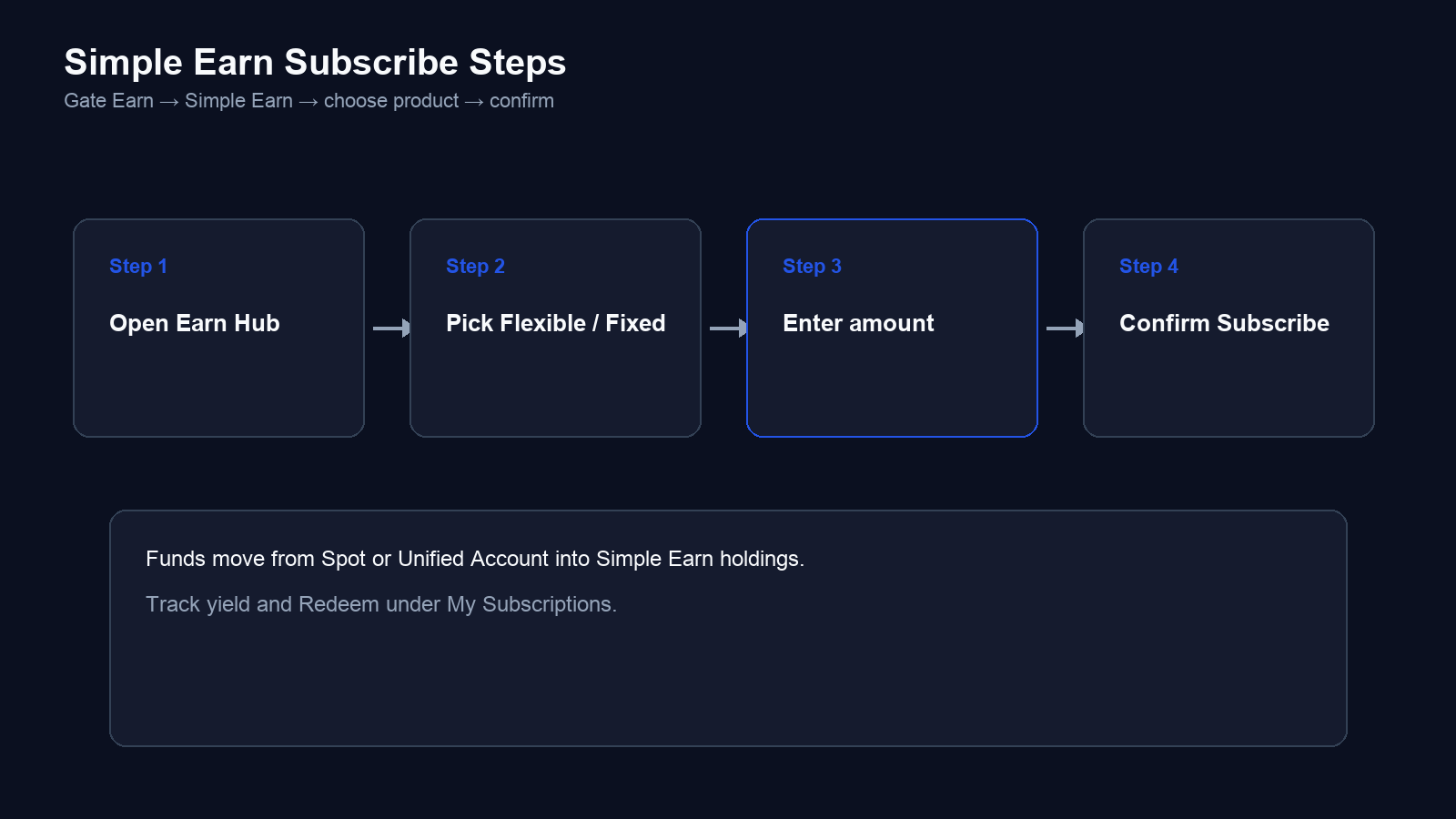
Fig. 1. Four-step Subscribe flow: open Earn hub, pick term type, enter amount, and confirm.
Auto-Earn and My Subscriptions
Auto-Earn can route eligible spot balances into Simple Earn and related earn paths without manual Subscribe each time. The toggle lives in Earn or Simple Earn settings; read supported tokens, trigger thresholds, and whether it overlaps manually Subscribed holdings before enabling. Auto-Earn runs scheduled scans (typically twice daily at 02:30 and 15:30 UTC+0) and auto-subscribes available balances into Simple Earn Flexible—same T+1 hourly rules as manual Flexible Subscribe. Auto-Earn does not mean all assets auto-enter Fixed Term locks—Fixed Term still requires manual selection and confirmation.
My Subscriptions lists active Simple Earn holdings: token, term type, Subscribe amount, accrued yield, Est. APR, and Redeem actions. Review holdings regularly—especially when Auto-Earn runs alongside manual Fixed Term positions. From My Subscriptions, users can Redeem Flexible holdings anytime or manage Fixed Term maturity and Auto Renew settings before term end.
Simple Earn differs from On-Chain Earn (Staking), Soft Staking, and Idle Earn—PoS staking on Gate, Simple Earn vs Soft Staking, and Idle Earn map the boundaries. PoS delegation belongs under Gate On-Chain Earn, not Simple Earn. Simple Earn is non-principal-protected; Est. APR does not guarantee absolute return at Redeem.
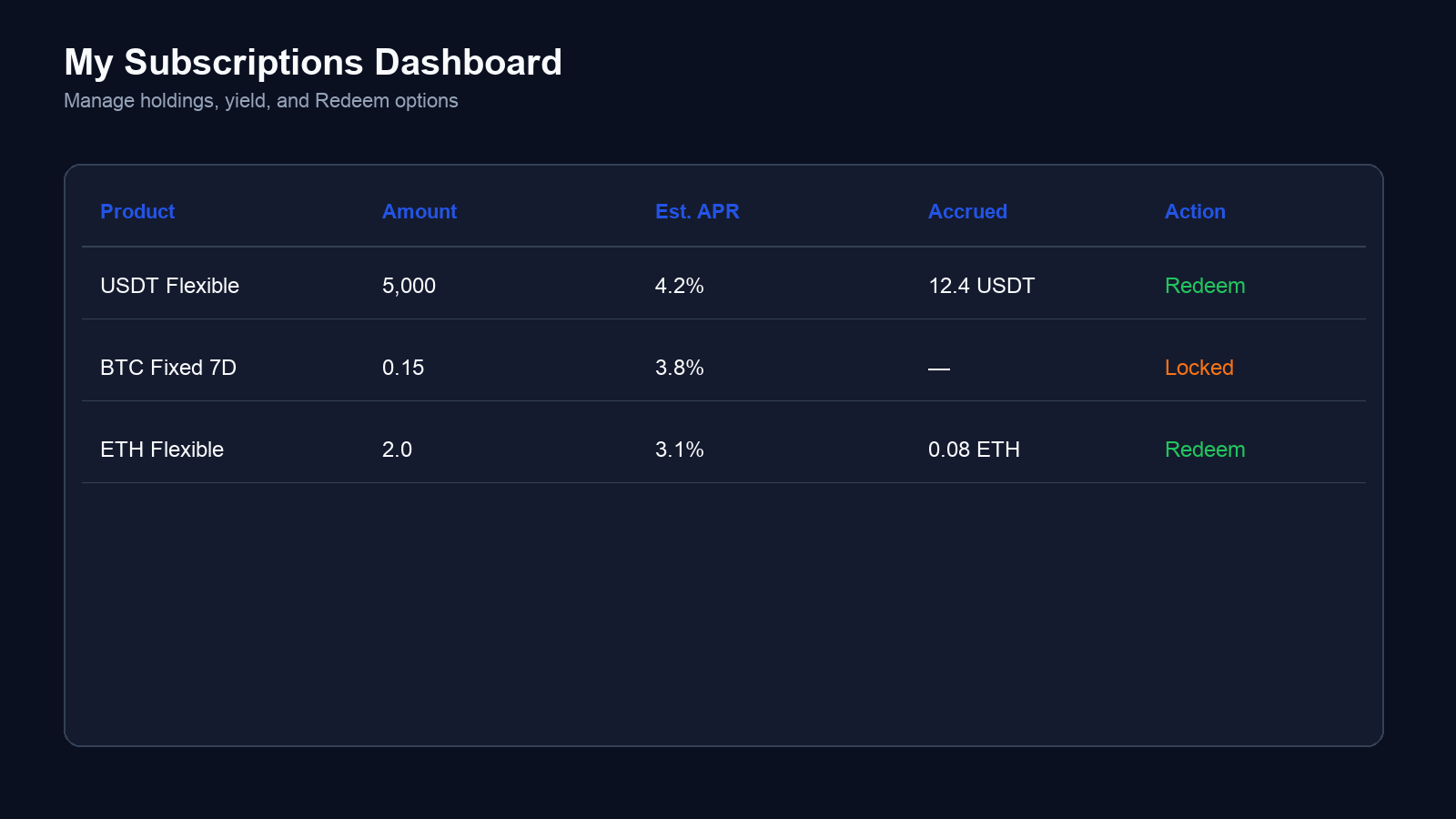
Fig. 2. My Subscriptions shows holdings, accrued yield, Est. APR, and Redeem actions per order.
How Do You Redeem From Simple Earn?
Flexible Term Redeem: In My Subscriptions, locate the holding, tap Redeem, enter the amount, and confirm. Principal and accrued yield typically return to spot; arrival time follows on-page prompts. Heavy Redeem volume may cause brief delays while interest continues accruing per product rules.
Fixed Term Redeem: Fixed Term products allow early Redeem, but early Redeem forfeits all accrued interest—only principal returns to spot or Unified Account. Interest settles at maturity if held to term; with Auto Renew enabled, principal can roll into the same Fixed Term at maturity. If no matching Fixed Term exists at renewal, principal may auto-subscribe to Flexible Term or redeem to the Trading Account. Confirm term length, early-exit penalty, and maturity handling before Subscribing.
Assets cannot trade or re-Subscribe while Redeem is processing; keep a spot buffer if liquidity matters. Gate Simple Earn is non-principal-protected; Est. APR does not guarantee absolute return at Redeem, and token price moves still affect final asset value. Users who need frequent spot access should prefer Flexible Term and avoid Fixed Term locks unless the idle window is clear.
Common Errors and How to Fix Them
| Error |
Cause |
Fix |
| Subscribe button disabled or insufficient balance |
Spot balance below minimum Subscribe size or fees not reserved |
Deposit or lower amount; check minimum Subscribe size |
| Chose Fixed Term but need funds during lock |
Fixed Term early Redeem penalty not reviewed |
Early Redeem forfeits all accrued interest; use Flexible Term next time |
| Cannot find Subscribed holdings |
Checking spot wallet instead of My Subscriptions |
Open Earn → Simple Earn → My Subscriptions |
| Auto-Earn not working |
Auto-Earn off or token unsupported |
Enable in Earn settings and verify supported tokens |
| Treating Simple Earn as on-chain staking |
Mixing Simple Earn with On-Chain Earn |
Use On-Chain Earn for PoS delegation needs |
The table covers the most common beginner mistakes. If on-page prompts differ, follow live rules in the Simple Earn Product Guide.
Summary
The Simple Earn Subscribe path is: Earn → Simple Earn → pick Flexible or Fixed Term → enter amount → confirm Subscribe → manage holdings and Redeem under My Subscriptions. Enable Auto-Earn separately when needed and verify its rules alongside manual Fixed Term positions. Simple Earn is lending-based yield; for PoS on-chain staking, use On-Chain Earn instead.
How Simple Earn works: subscribed assets enter Gate’s borrowing pool; when borrowers match your lend order, interest accrues per product rules. Flexible Term compounds hourly with T+1 payout and allows Redeem anytime; Fixed Term locks for 3–360 days and settles interest at maturity. Est. APR on the product card is a reference rate—not a guaranteed return. USDT, BTC, ETH, and other listed tokens each have separate quota, minimum Subscribe size, and displayed rates. Users can hold multiple orders per token with independent accrual and Redeem rules.
Before acting, cross-check live fields in the Simple Earn Product Guide and Earn Hub Guide (Web). Simple Earn offers a flexible and rewarding way to put idle crypto to work—confirm product rules, term type, and Redeem options on each Subscribe page before committing funds.
FAQ
Where is Simple Earn in the Gate app or website?
After login, open Earn → Simple Earn, or go directly to gate.com/simple-earn.
Should I choose Flexible Term or Fixed Term?
Flexible Term fits idle funds that may need Redeem access; Fixed Term locks for 3–360 days and may show higher Est. APR on the card, but early Redeem forfeits all accrued interest. Match term to liquidity needs. Simple Earn works by lending idle crypto to the borrowing pool—Flexible offers hourly compounding; Fixed Term settles at maturity. Both are non-principal-protected; Est. APR is a reference display that moves with borrow demand.
When does interest start after Subscribe?
Accrual start time varies by token and product—Flexible Term typically credits interest hourly after borrow match (T+1 payout); Fixed Term interest starts at 00:00 (UTC+0) the day after Subscribe and settles at maturity. Follow live rules on the Subscribe page and in the Simple Earn Product Guide.
Do Auto-Earn and manual Subscribe conflict?
Auto-Earn is a separate toggle that may move balances into Simple Earn Flexible when thresholds hit; manual Fixed Term holdings follow their own lock rules. Read Auto-Earn scope before enabling to avoid duplicate or unintended allocations. Both paths can run simultaneously for different tokens or amounts when allocations are planned separately.
Can I hold Simple Earn and On-Chain Earn at the same time?
Yes, as separate products—but mechanisms differ: Simple Earn is lending-based; On-Chain Earn is PoS delegation. The same spot lot cannot be double-allocated; plan balances first, then Subscribe to each product independently.