Gate Convert sits beside spot trading and Gate P2P as a different execution path for exchanging supported assets already held on Gate. The product page describes real-time conversions across a large set of cryptocurrencies, including Bitcoin (BTC) and Ethereum (ETH), plus Block Trade support for higher size limits. Convert on web and app covers the preview-and-confirm steps; Convert vs spot vs Gate P2P maps when each path fits.
Key Takeaways
- Gate Convert executes a quoted swap and settles into the spot account after confirmation, without an order-book workflow.
- “Zero trading fee” on Convert does not mean zero cost: the quote can sit slightly above spot when buying and slightly below spot when selling.
- Asset coverage and per-pair limits are shown in real time on the Convert page; small balances may use a separate small-balance path where available.
- Block Trade extends Convert for larger sizes with an emphasis on execution quality and higher limits versus the standard quote flow.
What Is Gate Convert?
Gate Convert is a simplified conversion interface on Gate. Instead of choosing a trading pair, reading an order book, and submitting a market or limit order, the user specifies how much of one supported asset to spend and which supported asset to receive. The system returns a conversion quote. After confirmation, settlement is designed to complete automatically in the user’s spot account.
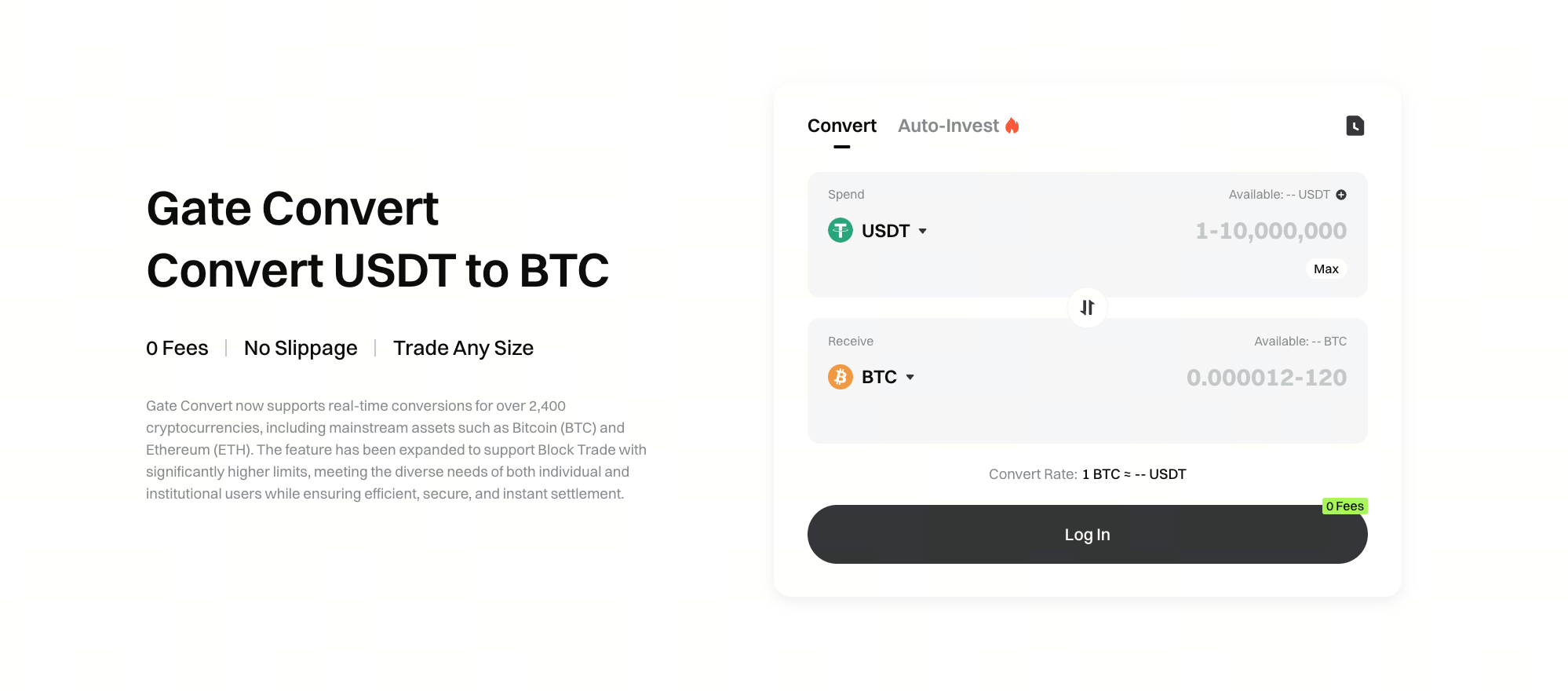
Help-center guidance frames Convert as a one-click swap: the quotation is generated by the trading system, and after confirmation settlement completes automatically in the user’s spot account. No fees are charged in the process. That product design prioritizes speed and interface simplicity over granular order control.
Convert only moves assets already available in the eligible Gate balance context for the product. Depositing or withdrawing still uses the usual spot deposit and withdrawal flows; Convert itself is an internal conversion step, not an on-chain transfer between external wallets.
Gate Convert is also distinct from a generic cryptocurrency converter calculator that only displays reference rates between Bitcoin (BTC), Ethereum (ETH), stablecoins, and fiat such as USD. A calculator may show illustrative rates for research; Gate Convert executes a funded swap inside the account and credits the receive asset to the spot account.
How Does Gate Convert Pricing Work With Zero Fees?
Gate help materials state that no fees are charged in the Convert process. At the same time, documentation notes a difference between the flash swap price and the spot price: when buying an asset, the Convert price may be slightly higher than spot; when selling, it may be slightly lower.
That distinction matters for cost comparison. A “zero fee” line item does not automatically make Convert cheaper than spot for every size and pair. The practical check is the receive amount shown in the quote preview versus what a spot market or limit order would deliver under the same market conditions, after applying any applicable maker or taker fees on spot.
Quoted rates are time-sensitive. If a preview expires, the interface refreshes with a new quote before confirmation. Users should treat the preview amount as the binding figure for that confirmation window, not a guarantee that the next refresh will match the previous quote.
Which Assets and Limits Does Gate Convert Support?
The Gate Convert product page describes real-time conversions for over 2,400 cryptocurrencies, including mainstream assets such as Bitcoin (BTC) and Ethereum (ETH); treat the live page as the source of truth for the current count. Availability can vary by region and account context.
Popular Convert paths often include major crypto-to-crypto and stablecoin routes—for example USDT to BTC, BTC to ETH, or ETH to USDC—rather than a fiat money-transfer workflow. Those paths still settle as account conversions; they are not international remittance products and do not replace bank-style send-money destinations.
Help guidance uses BTC as an example for size bounds: a minimum notionally around a small USDT-equivalent floor for some cases, with smaller amounts potentially routed through a “Convert Small Balance” style feature where offered. Maximum size varies by token or pair and is displayed in real time when an amount is entered. Limits, order types available elsewhere on Gate, and VIP fee schedules on spot do not automatically rewrite the Convert quote; Convert keeps its own preview amount as the decision figure.
For sizes that exceed comfortable standard Convert quotes, Gate Convert has been expanded with Block Trade: higher limits and large-order execution characteristics, a different operating mode from a small retail quote.
How Does Gate Convert Differ From Spot and Gate P2P?
Gate Convert, spot trading, and Gate P2P solve overlapping but not identical jobs.
| Path |
Execution model |
Price presentation |
Typical fit |
| Gate Convert |
Quoted swap, confirm, settle |
Quote may embed spread vs spot |
Fast crypto-to-crypto exchange without order book |
| Spot trading |
Order book, market or limit |
Maker/taker fees; user-controlled price for limits |
Price control, pair trading, charting workflows |
| Gate P2P |
User-to-user with escrow-style flow |
Ad price + payment method terms |
Fiat on/off and local payment rails |
Convert does not replace spot when the user needs a specific limit price, partial fills, or order-book depth inspection. Convert also does not replace Gate P2P when the goal is fiat payment methods between users. Pricing and fees differ in presentation: Convert may show no separate trading fee while embedding spread in the quote, whereas spot lists maker and taker rates. Use Convert for a fast funded flash swap; use spot when you want to work orders on the book. Convert vs spot vs Gate P2P breaks down fees, price control, and settlement side by side.
When Is Gate Convert a Good Fit—and When Is It Not?
Gate Convert fits users who already hold supported assets on Gate and want a short path from asset A to asset B: portfolio rebalancing, moving into a stablecoin, or swapping without learning order types. Instant settlement into the spot account keeps the workflow inside one balance surface.
Convert is a weaker fit when the user needs precise entry or exit prices, wants to work an order over time, or is comparing all-in cost on a large size where order-book liquidity or Block Trade quoting may matter more. It is also the wrong primary tool for fiat cash-in or cash-out via local payment methods; that job maps to Gate P2P or other fiat rails, not to Convert’s crypto-to-crypto quote.
Region, KYC status, and asset listing differences can change which pairs appear. The Convert page itself is the live checklist for supported assets and current limits.
What Risks and Limits Should Users Know Before Using Gate Convert?
Convert risk is mostly operational and pricing, not leverage. Quotes can move between preview and refresh. Available balance must cover the spend side, or the interface returns an Inadequate balance / insufficient-balance error. The flash swap price versus spot can widen in thin markets or volatile conditions even when no separate fee is charged in the Convert process.
Convert settlement stays inside Gate’s spot account context for the conversion itself, so there is no blockchain gas fee for the internal swap step. Deposit and withdrawal network fees still apply when assets enter or leave the platform. Users should also confirm they selected the intended spend and receive tickers, because ticker collisions and similarly named assets are a common operational mistake across exchanges.
Availability of Block Trade, small-balance conversion, and specific pairs can differ by product surface and jurisdiction. Treat marketing claims about asset count and “zero fees” as prompts to verify the live quote and the receive amount, not as a guarantee of best execution for every trade size.
How Do You Use Gate Convert on Gate?
On web, a typical path is: open Convert, choose spend and receive assets (for example USDT to BTC), enter an amount, preview the conversion details, confirm, and verify settlement in the spot account. On the app, Convert is reached from trade or more-menu entry points depending on the client version, then follows the same preview-and-confirm logic.
After completion, conversion history is available through order or Convert history routes described in Gate help materials. Convert on web and app also covers error fixes and the pre-confirm checklist.
Summary
Gate Convert is Gate’s quoted instant swap for supported cryptocurrencies, designed for one-click conversion into the spot account without an order-book workflow. Zero separate trading fees coexist with a possible spread versus spot, so the receive amount in the preview is the figure that matters. Limits, asset coverage, and Block Trade options are pair- and size-dependent. Convert complements spot and Gate P2P rather than replacing them: choose Convert for speed and simplicity, spot for price control, and Gate P2P when fiat payment methods between users are the goal.
FAQ
What is Gate Convert?
Gate Convert is Gate’s instant crypto-to-crypto conversion product. Users review a quoted rate for a chosen spend and receive pair, confirm the swap, and settle into the spot account without placing a spot order-book order. It is an executed account swap, not a standalone BTC to USD chart or portfolio-tracker calculator.
Does Gate Convert really charge zero fees?
Gate help materials state that no fees are charged in the Convert process. The flash swap price can still differ from the corresponding spot price—slightly higher when buying and slightly lower when selling—so users should compare the receive amount, not only the fee line. “Zero fee” language never replaces reading the preview size carefully.
Where do Convert funds settle?
Convert transactions settle into the user’s spot account. Deposits and withdrawals for those assets still use the normal spot deposit and withdrawal flows outside the Convert confirmation itself.
How is Gate Convert different from spot trading?
Gate Convert uses a quoted swap interface. Spot trading uses an order book with market and limit orders, maker/taker fee schedules, and greater control over execution price. Convert prioritizes simplicity; spot prioritizes control.
What is Gate Convert Block Trade?
Block Trade is the larger-size extension of Gate Convert described on the product page. It targets higher limits and large-order execution needs relative to the standard Convert quote flow, including use cases for institutional and high-net-worth size profiles where available.