This guide follows the App and Web entry points in the Gate Guard Activation Guide: prerequisites, both-client paths, post-activation status checks, and common errors. Coverage boundaries, applicable vs not-applicable cases, and VIP ceiling tables are covered under Gate Guard; day-to-day controls follow the account security settings checklist.
Key Takeaways
- Gate Guard activation is free for eligible users; requirements include a security score of 80 or above, KYC 2, required security verifications, normal account status, and other risk-control or eligibility conditions.
- The App and Web each offer three entry points to the Gate Guard page; if the score is low, use Boost Security Score to open Security Center.
- Successful activation enters the Security Hardening Period, not Protection Active; Protection Active requires 30 consecutive days at a score of 80 or above (and related conditions).
- A main account in Protection Active does not automatically activate a sub-account; activation eligibility and plan status are assessed per account.
- Gate Guard is the Account Protection Plan—not an insurance product, not an insurance contract or arrangement, and not a promise of reimbursement; the right to apply is not a guarantee of payment.
What You Need Before You Activate
Before activating Gate Guard, confirm eligibility against the announcement and rules pages, then open the Gate Guard page. If the security score is below 80, improve settings in Security Center first and apply once the threshold is met.
| Requirement |
Detail |
| Security score |
80 or above |
| Identity |
Completed KYC 2 identity verification |
| Verifications and account |
Required security verifications completed; normal account status |
| Other |
Platform risk-control, regional, and eligibility conditions |
| Fee |
Free activation for eligible users—no paid purchase |
The table is the activation checklist, not the full reimbursement-eligibility text. Applicable scenarios and VIP ceilings are covered above; platform-level buffers sit with Gate SAFU. The full rule text is the Gate Account Protection Plan Rules.
How to Activate on the App
On the App, open the Gate Guard page first, then complete activation. The three entry points below match the announcement; any one is enough.
Go to the Gate Guard page
- On the App homepage, tap Activate Now or the shield icon in the Assets section.
- Open the Assets page and, under Overview, tap the shield icon next to Est. Total Value.
- On the App homepage, tap the avatar in the upper-left corner, go to User Center → Security, then tap Gate Guard.
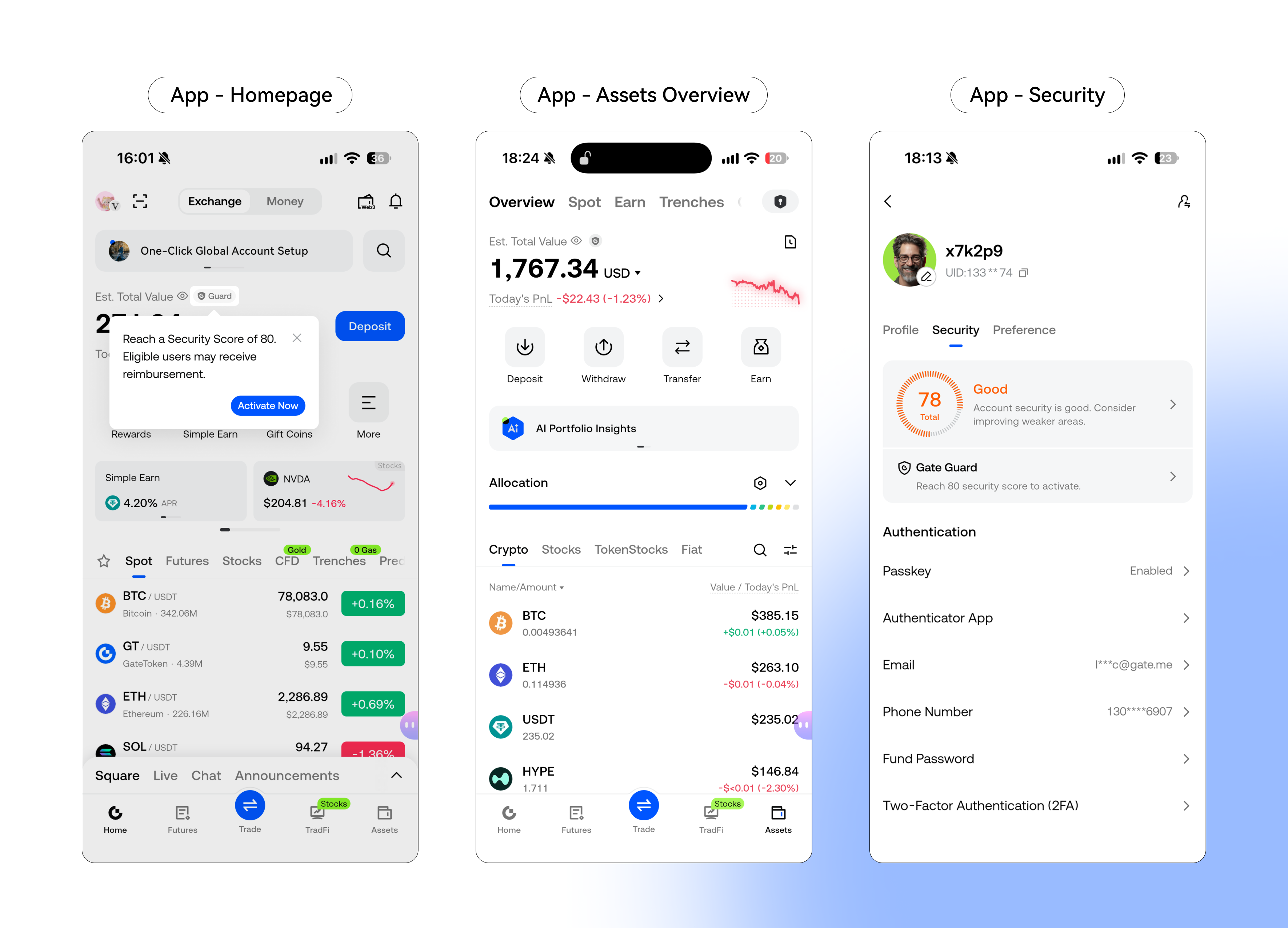
All three entries open the Gate Guard page. UI labels may shift slightly by version, but entry semantics should match the announcement.
Complete activation
- On the Gate Guard page, confirm the security score is 80 or above.
- If the score is below the threshold, tap Boost Security Score, finish key settings in Security Center, then activate once the score qualifies.
- After activation, view Gate Guard protection status and details.
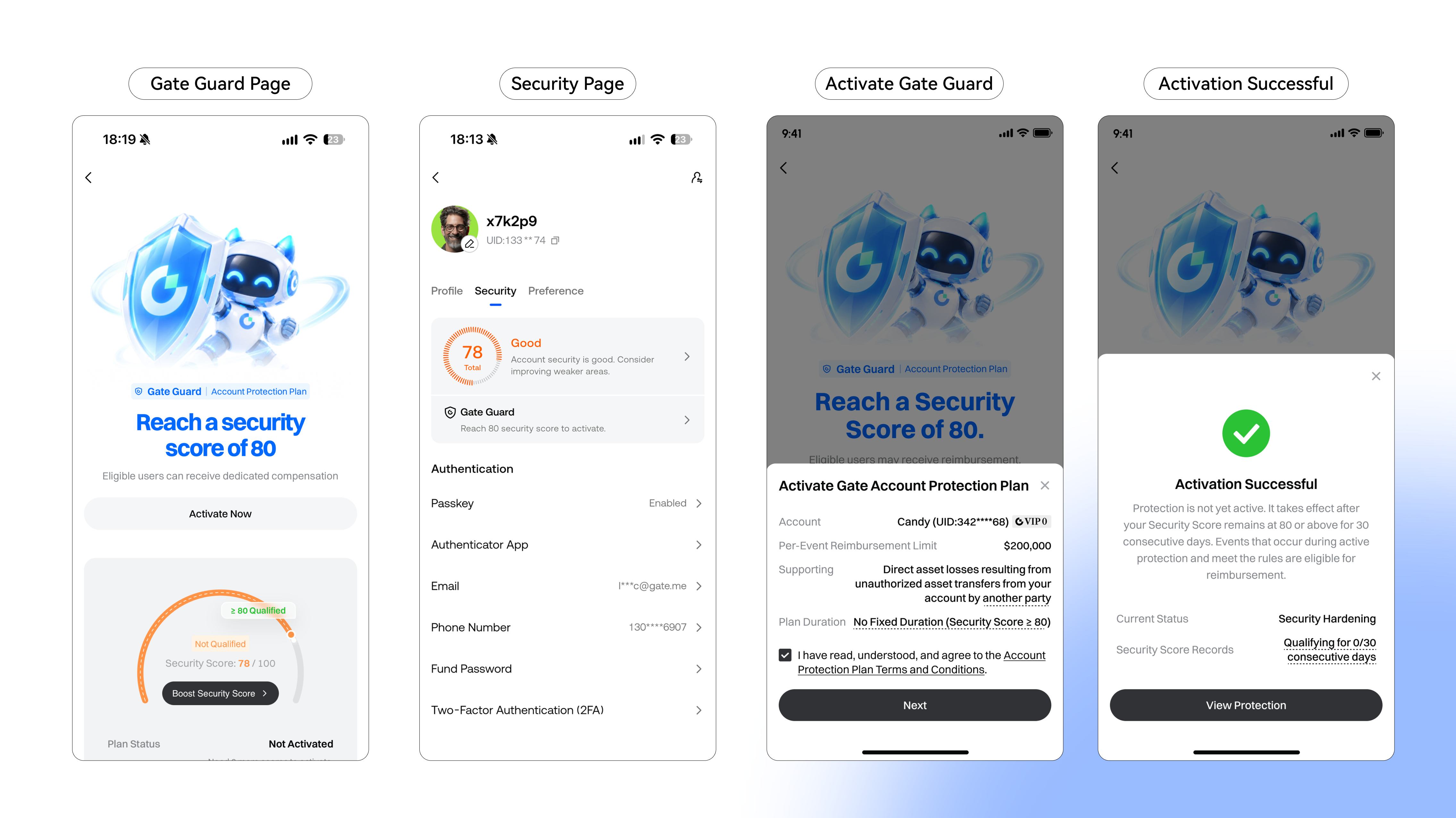
Finishing activation does not mean Protection Active. Next, confirm the status shows Security Hardening Period and start counting consecutive qualifying days.
How to Activate on the Web
On Web, open the Gate Guard page first, then activate once the score qualifies. The three entry points below match the announcement.
Go to the Gate Guard page
- On the Web User Center page, click the shield icon next to Total Asset Value.
- On the Web Funds Overview page, click the shield icon next to Total Asset Value.
- On the Web Security page, click to activate Gate Guard.
All three entries open the Gate Guard page. Users can also review plan copy on the Gate Guard product page before activating.
Complete activation
- On the Gate Guard page, check the current security score; activate once it reaches 80 or above.
- If the score is below the threshold, click Boost Security Score, complete settings in Security Center, then activate.
- After activation, view protection status and details.
App and Web share the same completion pattern: check score → boost if needed → activate → read status; the clients differ mainly in entry location.
What Status to Check After Activation
After successful activation, a 30-day Security Hardening Period applies. During that period the security score must remain at 80 or above for 30 consecutive days; protection takes effect only when related conditions are also met. Events during Security Hardening cannot be submitted; only events that occur while Protection Active and that meet the rules may enter the application path.
| Status |
Meaning (operations view) |
| Security Hardening Period |
Activated, but protection is not yet in force; consecutive qualifying days accumulate here |
| Protection Active |
Reached after 30 consecutive days at score ≥80 (and related conditions); only then may qualifying events be submitted |
| Plan Suspended |
Security score below 80; events in this window cannot be submitted |
| Plan Ended |
Still below 80 after 48 hours of suspension |
A score drop below 80 moves the plan to Plan Suspended; restoring 80 or above within 48 hours re-enters Security Hardening and resets consecutive days to zero; failure to restore ends the plan. Changes that weaken protections reset the consecutive-day counter. After activation, first recognize that hardening is not Protection Active; how the four statuses connect follows the Plan Rules and the product-page status copy.
Common Errors and How to Fix Them
Most activation friction comes from incomplete eligibility, misreading status, or applying a main-account status to a sub-account.
| Error / misconception |
Likely cause |
Fix |
| Cannot activate or submit |
Score below 80, or KYC 2 / account status not met |
Use Boost Security Score; complete KYC 2 and required verifications, then retry |
| Expecting cover right after activation |
Equating “activated” with Protection Active |
Confirm Security Hardening Period; keep score ≥80 for 30 consecutive days before expecting Protection Active |
| Main account active, assuming sub-accounts are covered |
Confusing shared reimbursement ceilings with separate activation/status |
Judge main and sub-accounts separately; the account that transferred assets must itself be Protection Active when the event occurs |
| Cannot find the entry |
Not using Assets shield, User Center, or Security Center paths |
Use the three App or three Web entries above to open the Gate Guard page |
| Trying to claim during Hardening or Suspended |
Ignoring “Protection Active only” |
Events in those windows cannot be submitted; restore and maintain the score, then follow the Plan Rules |
The Fix column addresses activation and status checks only; whether reimbursement is granted still follows the Plan Rules and Gate’s final review.
Is Activating Gate Guard Safe? Insurance Boundary
Activating Gate Guard is a free account-side enrollment step; it does not replace everyday controls. Passkeys, authenticators, and withdrawal limits remain the first layer; the plan only opens a review path for qualifying unauthorized transfers.
Gate Guard is Gate’s Account Protection Plan. It is not an insurance product and does not constitute an insurance contract, any form of insurance arrangement, or a promise of reimbursement. Qualifying events may be submitted for review; eligibility and amount are subject to Gate’s final review—the right to apply is not a guarantee of payment. Platform-level extreme-event buffers belong under SAFU and should not share Gate Guard’s account-level expectations.
Summary
On the App or Web, eligible users who meet a security score of 80 or above, KYC 2, required verifications, and normal account status can activate Gate Guard for free via Assets shields, Funds Overview shields, or Security Center. Activation starts the Security Hardening Period; Protection Active follows 30 consecutive qualifying days. Main and sub-account statuses are independent; shared ceilings do not mean automatic activation. Gate Guard is not insurance and not a promise of reimbursement—this guide covers how to enter and how to read status, not an automatic payout.
FAQ
How do I activate Gate Guard on the App or Web?
On the App, use Activate Now or the shield in the homepage Assets section, the shield next to Est. Total Value under Assets Overview, or Avatar → User Center → Security → Gate Guard. On Web, use the shield next to Total Asset Value in User Center or Funds Overview, or the Security page activation control. On the Gate Guard page, confirm score ≥80, boost the score if needed, then complete activation.
Can I activate if my security score is below 80?
Not on the qualifying path. Go to Security Center, complete the relevant security settings until the score reaches 80 or above, and meet KYC 2, required verifications, and normal account status before applying.
Does protection become active immediately after activation?
No. Successful activation starts a 30-day Security Hardening Period during which protection is not yet in force. Protection Active requires the security score to stay at 80 or above for 30 consecutive days and related conditions to be met. Events during Hardening, Plan Suspended, or Plan Ended cannot be submitted.
If the main account is Protection Active, does a sub-account activate automatically?
No. Activation eligibility and plan status for main and sub-accounts are assessed separately; each account must activate and qualify on its own. Main and sub-accounts under the same KYC share reimbursement ceilings, but that does not put a sub-account into Protection Active automatically.
Which entry points open Gate Guard?
App: Activate Now or the shield in the homepage Assets section; the shield next to Est. Total Value under Assets Overview; avatar → User Center → Security → Gate Guard. Web: the shield next to Total Asset Value in User Center or Funds Overview; the Security page activation entry. Plan copy is also available on the Gate Guard product page on gate.com.