Getting a crypto card usually takes one to three business days for verification, plus minutes to activate a virtual card once approved: confirm regional eligibility, complete identity verification with the card issuer, fund a linked crypto balance or payment account, then spend at card-network merchants while the issuer converts assets at checkout. Difficulty is beginner to intermediate; steps differ for debit-style, prepaid, or credit-linked products. The path below covers apply, fund, and spend mechanics without assuming every country or tier is open.
Best crypto cards overview compares issuers and fee models. The standard path: check prerequisites → pick card type and confirm supported region → finish KYC → top up spendable crypto → activate virtual details first, then physical shipment where offered. Crypto cards are payment products—debit, prepaid, or credit-linked—that let users spend crypto or stablecoin balances at everyday merchants through Visa or Mastercard rails, with conversion handled by the card program at authorization time.
What You Need Before You Apply
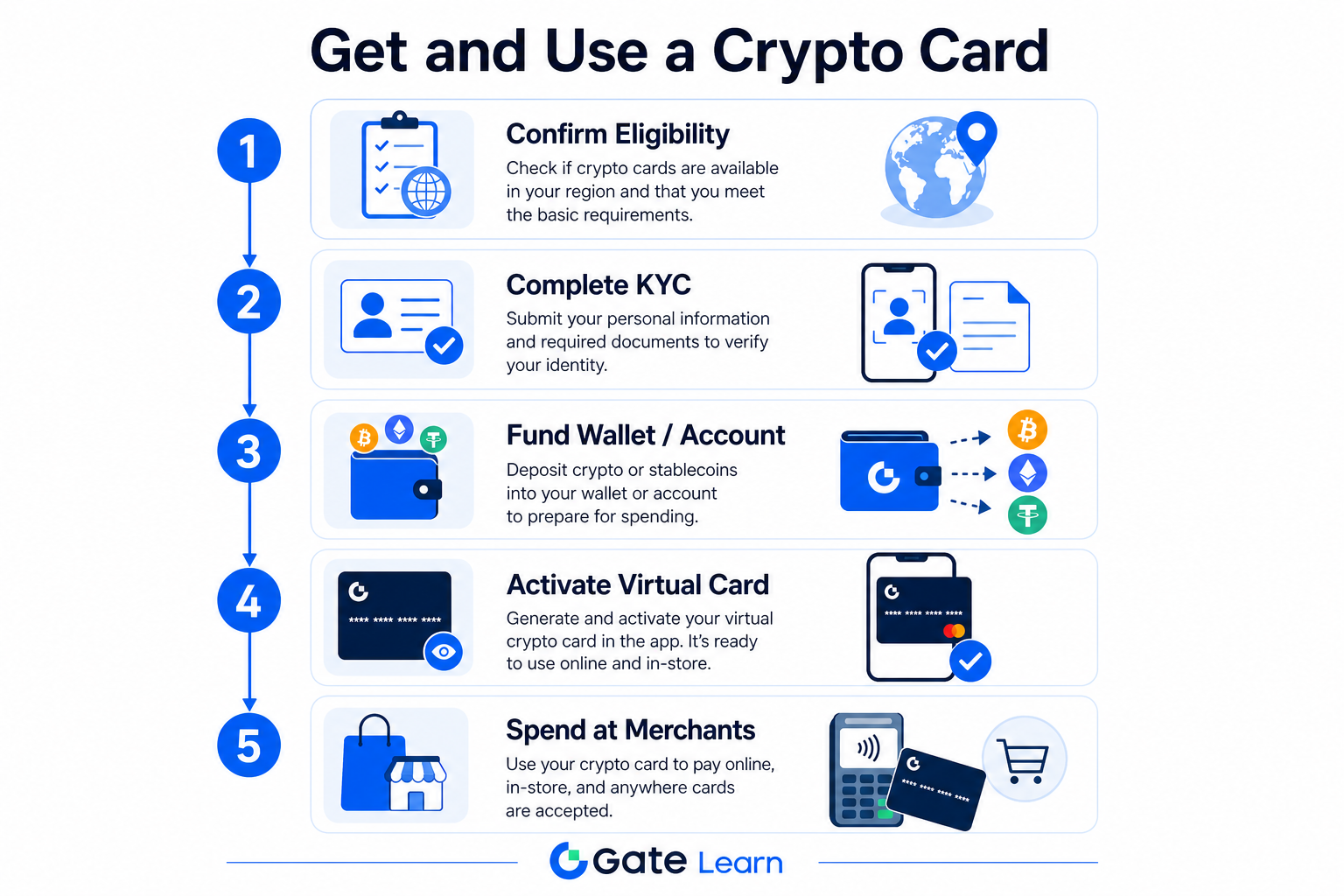
Figure 1. Five-step path: confirm eligibility → KYC → fund → activate virtual card → spend at merchants.
Gather account access, identity documents, and a spend plan before applying. Debit and prepaid cards draw from a prefunded balance; credit-linked products involve separate repayment terms. Crypto debit vs credit card explains funding and liability differences. Types of crypto cards generally fall into three buckets: debit-style cards that pull from a linked wallet or exchange balance, prepaid cards loaded in advance, and credit-style cards that bill fiat you repay later. Each type changes how you fund purchases, what fees apply, and how declined transactions are handled.
| Item |
Requirement |
Why it matters |
| Verified account |
Email and phone linked on the issuer platform |
Incomplete profiles are rejected |
| Government ID |
Same document for exchange and card KYC |
Mismatched IDs cause automatic rejection |
| Proof of address |
Where required for physical delivery |
Shipping and compliance checks |
| Spendable crypto |
Supported assets in a payment account |
Checkout conversion needs balance |
| Supported region |
Confirmed in-app, not assumed from marketing |
Eligibility varies by tier and licensing |
Decide whether you need virtual (instant online) or physical (in-store, ATM) access. Best crypto card by use case maps common spend patterns to card types. Before you apply, list the assets you plan to spend—USDT, BTC, ETH, and stablecoins are common defaults—and confirm those tokens appear in the issuer's supported-assets screen. Users who already hold crypto on an exchange can often link the same account; users starting from a self-custody wallet may need to transfer assets to the issuer's payment account first. Check whether your mobile wallet supports tokenized card details for tap-to-pay, since that affects how quickly you can activate a virtual card after approval.
Step 1: Choose Card Type and Confirm Eligibility
Select the product that matches how you will pay. Debit and prepaid crypto cards convert linked assets at tap or swipe; credit-linked cards bill fiat you repay on the issuer's schedule. Visa or Mastercard branding affects merchant acceptance but not your KYC path—that runs through the card program operator. At a high level: you hold supported assets in a custodial or linked account, the card network authorizes a purchase in local currency, and the issuer debits your balance or credit line while converting crypto at the quoted rate plus any spread or fees.
Read the in-app eligibility screen before uploading documents—availability varies by tier and licensing partner. Gate Card lives at gate.com/card, with separate Standard and Classic & Platinum flows; pick the tier your account displays. For context, other major programs users compare include the Coinbase Card (exchange-linked debit spending), MetaMask Card (self-custody wallet integration where available), Nexo Card (credit-line style spending with optional Apple Pay tokenization), Bitget Wallet Card, and Bybit Card—each with different asset support, fee schedules, and regional gates. None of these replace reading your own issuer's eligibility page; card type and licensing partner drive who can apply.
When comparing options, note debit vs credit, Mastercard or Visa tier, and whether ATM or cross-border purchase fits your plan. Credit-style products may offer higher spending limits; debit and prepaid paths decline the transaction when balance is insufficient.
Step 2: Complete KYC and Issuer Verification
Most issuers require exchange-level KYC plus card-program verification with facial match and address capture. Regulated card programs must verify identity before they can issue a Mastercard or Visa product, so expect document upload, liveness checks, and address confirmation for physical delivery.
- Finish global KYC on the hosting exchange (ID, selfie, proof of address where required).
- Start the card application from the official card hub—not third-party forms.
- Re-enter identity using the same ID approved on the exchange; mismatches trigger rejection.
- Submit facial verification and mailing address for physical delivery if applicable.
- Wait for approval; virtual credentials may appear immediately after success.
Gate Card Standard Card: Apply Now → confirm email, phone, and completed KYC → match Gate Global KYC documents → enter ID, facial data, and address per How to Apply for a Gate Card (Standard Card). Classic and Platinum tiers add a review step before submission, documented at How to Apply for a Gate Card (Classic & Platinum Card). Complete verification only inside official Web and App surfaces.
If verification stalls, use the issuer's in-app support channel—not third-party "expedite" services. Keep phone and email current for one-time codes during review.
Step 3: Fund, Convert, and Activate Spending
After approval, fund the payment account or linked wallet the card draws from. Many programs support USDT, BTC, ETH, and other listed assets; fiat settlement at merchants typically happens at payment time. Conversion spreads and network fees sit outside the card swipe itself but affect how much crypto each purchase consumes.
- Issue or reveal virtual card details in the secure card dashboard.
- Add the virtual card to mobile wallets if tokenization is supported.
- Select default payment asset and confirm balance for a small test purchase.
- Order physical card if offered; activate via in-app PIN when it arrives.
- Monitor history, FX spreads, and ATM fees in the tier fee schedule.
Gate Card issues virtual cards instantly on gate.com/card; physical cards ship where your tier includes them. Read tier "Fees & Limits" help before large purchases. See What is a crypto card and how does it work for conversion mechanics.
Every Mastercard or Visa purchase follows the same authorization path whether you pay online, in-store, or through a mobile wallet. Set a default asset, enable push alerts per purchase, and keep a buffer above expected totals to avoid declines. A typical flow: terminal authorization → network routing → balance or credit check → crypto conversion → fiat settlement. For online purchases, enter virtual card details or pay via tokenized wallet. In-store, tap or insert the physical card wherever contactless or chip pay is accepted.
Before a large purchase, confirm your default payment asset and whether the merchant category is allowed—some programs block gambling, adult, or certain high-risk MCC codes. ATM withdrawals, if supported, often carry separate fees and daily limits distinct from point-of-sale spending. Heavy international use may trigger extra FX markup on cross-border rails, so review the fee table before travel. Enable alerts and freeze tools in the app when the issuer offers them. If you pay online often, store the virtual card in a password manager and use wallet pay where merchant support exists.
Common Errors and Fixes
| Error |
Cause |
Fix |
| Application blocked |
Region or tier not open |
Check in-app eligibility only |
| KYC rejected |
ID differs from exchange KYC |
Reapply with the same global KYC document |
| No virtual card post-approval |
Pending review or skipped step |
Open card dashboard; complete facial or address items |
| Declined at merchant |
Low balance or blocked MCC |
Fund account; verify merchant category limits |
| Unexpected FX or fees |
Default asset or tier schedule |
Switch payment asset; read Fees & Limits |
| Physical card missing |
Address typo or courier delay |
Confirm shipping in-app; contact issuer support |
Use official support channels with your application timestamp—never share seed phrases or full card images publicly. Declined transactions are often balance or merchant-category issues; fund the payment account or switch default assets before contacting support. Review each receipt against the tier fee schedule if FX or conversion charges look unexpected.
Is Applying for a Crypto Card Safe?
Apply only through official card hubs and help-center flows. Risks include identity sharing with regulated partners and custodial payment accounts. Prefer gate.com/card typed directly; enable 2FA and test with a small purchase first. See What is a crypto card and how does it work for safety context.
Legitimate issuers never ask for seed phrases. Custodial programs hold assets for spending conversion—unlike pure self-custody wallet use. Enable app locks, transaction alerts, and card freeze controls.
FAQ
How do I get a crypto card?
Confirm supported region, choose debit/prepaid or credit-style product, finish exchange and card KYC, fund your payment account, then activate virtual or physical credentials. Gate Card applicants use gate.com/card and tier-specific help articles. Most users complete the flow inside one app: verify identity, pick a card tier, fund supported assets, and reveal virtual card details for first spending.
How long does crypto card approval take?
Many programs approve within minutes to a few business days. Virtual cards often activate immediately; physical cards add shipping time.
Do I need KYC to get a crypto card?
Yes for mainstream Visa and Mastercard retail programs. Issuers must meet anti-money-laundering rules. Expect government ID, selfie or liveness check, and sometimes proof of address for physical card delivery. Without KYC, regulated issuers cannot activate spending on network-branded cards.
Can I spend before the physical card arrives?
Usually yes with an instant virtual card. Add details to mobile wallets where supported; activate plastic separately on delivery. Virtual credentials enable immediate online spending and contactless pay where wallet tokenization is supported—most users activate the same day approval completes, then order physical plastic for in-store purchase where required.
Which assets can I spend?
Supported assets vary by issuer. Gate Card lists USDT, BTC, ETH, GT, and additional tokens on its payment account—confirm the live in-app list. Switching default assets before a purchase can reduce conversion fees when one token has tighter spreads than another.
Why was my application rejected?
Common reasons: unsupported region, ID mismatch with exchange KYC, incomplete phone or email linkage, or failed facial verification. Correct the flagged item and reapply through official channels only.
How do crypto card fees work at checkout?
Most programs charge conversion spread, and some add ATM, foreign-exchange, or inactive-card fees depending on tier. Debit and prepaid cards draw directly from funded assets; credit-style cards may add interest or repayment fees separate from crypto conversion. Read the tier schedule before heavy spending.
Can I use a crypto card with Apple Pay or Google Pay?
Many issuers support tokenization so users can add virtual or physical card details to mobile wallets for tap-to-pay. Availability depends on the card program and device region—confirm in the issuer app before relying on wallet pay for in-store transactions. Programs such as Nexo Card highlight Apple Pay; others support Google Pay or Samsung Pay. If wallet provisioning fails, contact issuer support with your device model and card tier.
How should I manage spending limits and daily caps?
Most card programs set daily spending caps and per-transaction ceilings by tier. Exceeding a cap declines the purchase even when crypto balance is sufficient—check limits in the dashboard or contact support to raise them after verification.
What is the difference between a crypto debit card and a crypto credit card?
Debit and prepaid cards spend prefunded crypto or stablecoin balances; credit-linked cards authorize fiat that you repay on a billing cycle. Debit paths keep liability tied to available assets; credit paths add repayment obligations and may offer higher limits for qualified users.