Enabling Gate Idle Earn is a one-time product setting, not a daily subscribe ritual. Product definitions and risks sit in What Is Gate Idle Earn; product choice versus Simple Earn and GUSD sits in Gate Idle Earn vs Simple Earn and GUSD. Soft Staking may appear as a separate neighbor product and is not an alias for Simple Earn. Web and App labels can differ slightly—use the live Idle Earn page as the source of truth for APR displays and eligibility notes.
Key Takeaways
- Path: Earn → Idle Earn → Enable once; afterward, daily average snapshots run under live product rules with no recurring subscribe for the base path.
- Available snapshot funds track eligible available balances in Spot and Futures trading accounts—not total equity including margin or freezes.
- Futures margin and open spot orders commonly explain “missing yield” more than display errors; lending-pool borrowed funds are also excluded.
- Individual KYC users can enable; Corporate/Institution accounts are not eligible.
What You Will Need Before You Start
Before enabling Gate Idle Earn, prepare:
- A Gate personal account with individual KYC completed, not blocked as Corporate/Institution for this product.
- Supported stablecoins such as USDT or USDC (confirm the live supported list) as available balances in Spot or Futures trading accounts.
- Access to Earn → Idle Earn on Web or the matching App earn entry.
- Willingness to read live APR, snapshot timing, and exclusion rules without freezing an educational rate.
Idle Earn does not require minting GUSD solely to start, and it does not require moving funds into a Simple Earn subscribe path or a Soft Staking listing. Simple Earn uses active subscribe/hold mechanics for idle tokens; Soft Staking targets flexible staking-style rewards on selected holdings. This how-to stays on Idle Earn enablement and snapshot checks. Borrowed funds, order freezes, margin occupancy, and lending-pool borrowed (non-owned) funds are excluded from effective snapshot balance.
Step 1: Go to Earn → Idle Earn
On Web, open Idle Earn from the Earn menu, or go directly to the Idle Earn URL. On App, open Earn and select Idle Earn or the matching App entry. Confirm the official Gate domain before changing any toggle.
Read the on-page summary for the displayed comprehensive APR, available snapshot funds, and the enable control. Treat APR digits as live UI values that can change; do not freeze a promotional rate from any announcement.
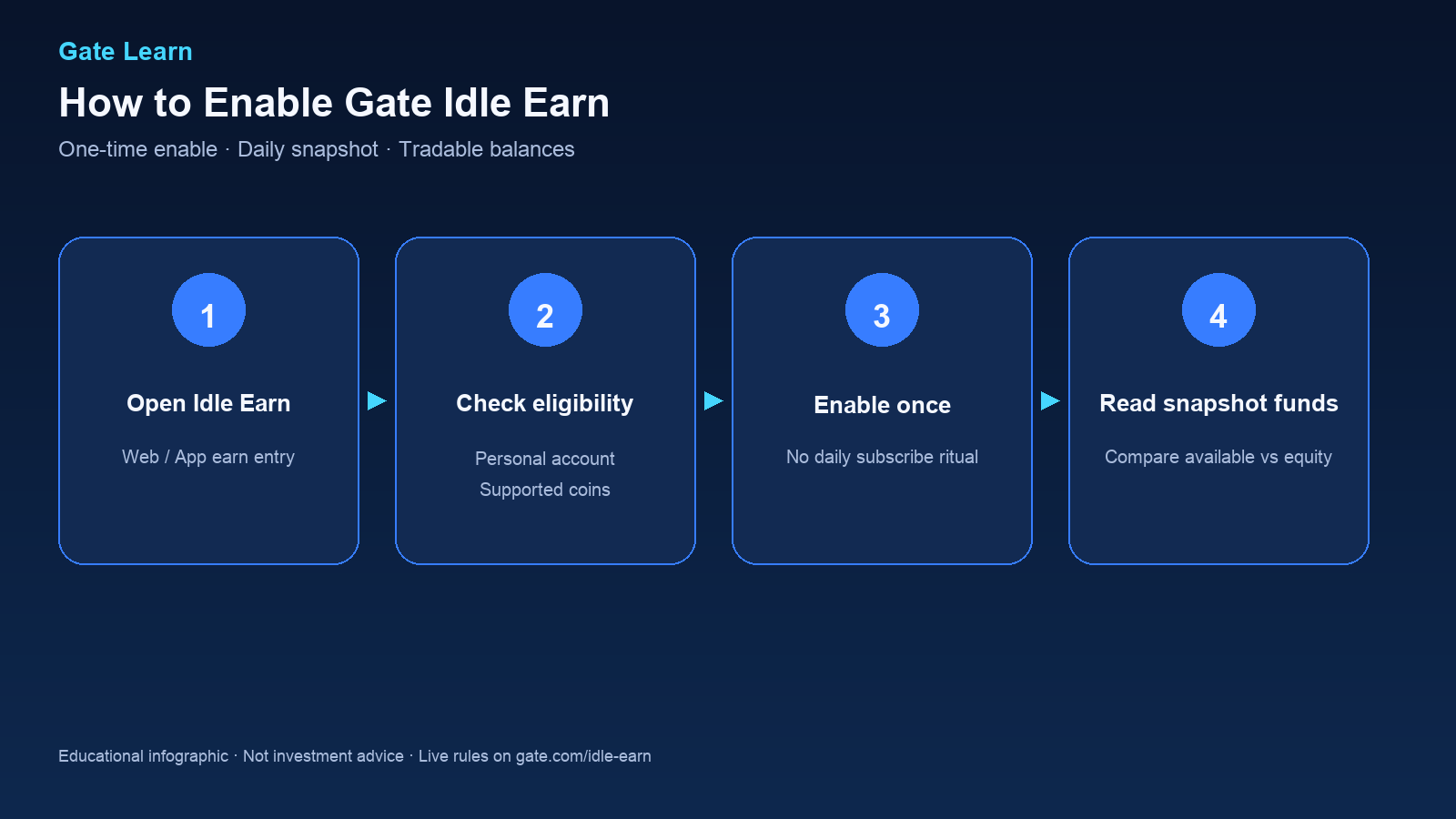
Figure 1. Enable path: Earn → Idle Earn → confirm eligibility → turn on once → read available snapshot funds.
Step 2: Enable Idle Earn Once
Check whether the account type is allowed. Users who completed individual KYC can enable; Corporate/Institution verified users are not eligible. Confirm which stablecoins are supported for snapshots on the live page.
Use the Enable control on the Idle Earn page. After enablement, Gate applies daily average snapshot rules to eligible balances. There is no need to place a classic earn subscription order each day for the base Idle Earn path.
If available snapshot funds show near zero while Spot still shows large USDT, continue to the effective-balance checklist rather than toggling enable repeatedly. Keep a note of enable time if reconciling the first T+1 credit later. Exact cutoff times follow the live product FAQ.
Step 3: Let Auto Earn Run (No Recurring Subscribe)
Once enabled, no recurring subscriptions or conversions to other assets are required. The system automatically takes scheduled daily snapshots of eligible available USDT, USDC, and other supported stablecoins in Spot and Futures trading accounts, with returns generated from the valid snapshot balance and any trading-volume bonuses shown on the live page.
U.S. Treasury and related RWA-style yield framing on Idle Earn is about how accrual is funded at the product level; it does not override exclusion filters (Idle Earn product page). Soft Staking and Simple Earn answer different jobs—flexible staking-style holdings versus subscribed idle-token earn—so switching products mid-check usually creates more confusion than clarity.
Step 4: Read Available Snapshot Funds and Expect T+1 Credit to Spot Account
Locate available snapshot funds (or the equivalent metric) on the Idle Earn page. Compare it with:
- Spot or trading account available USDT/USDC
- Futures available balance versus margin occupied
- Open order freezes on spot books
- Any borrowed amounts from lending pools
Effective snapshot should track available eligible inventory, not total account equity including locked margin.
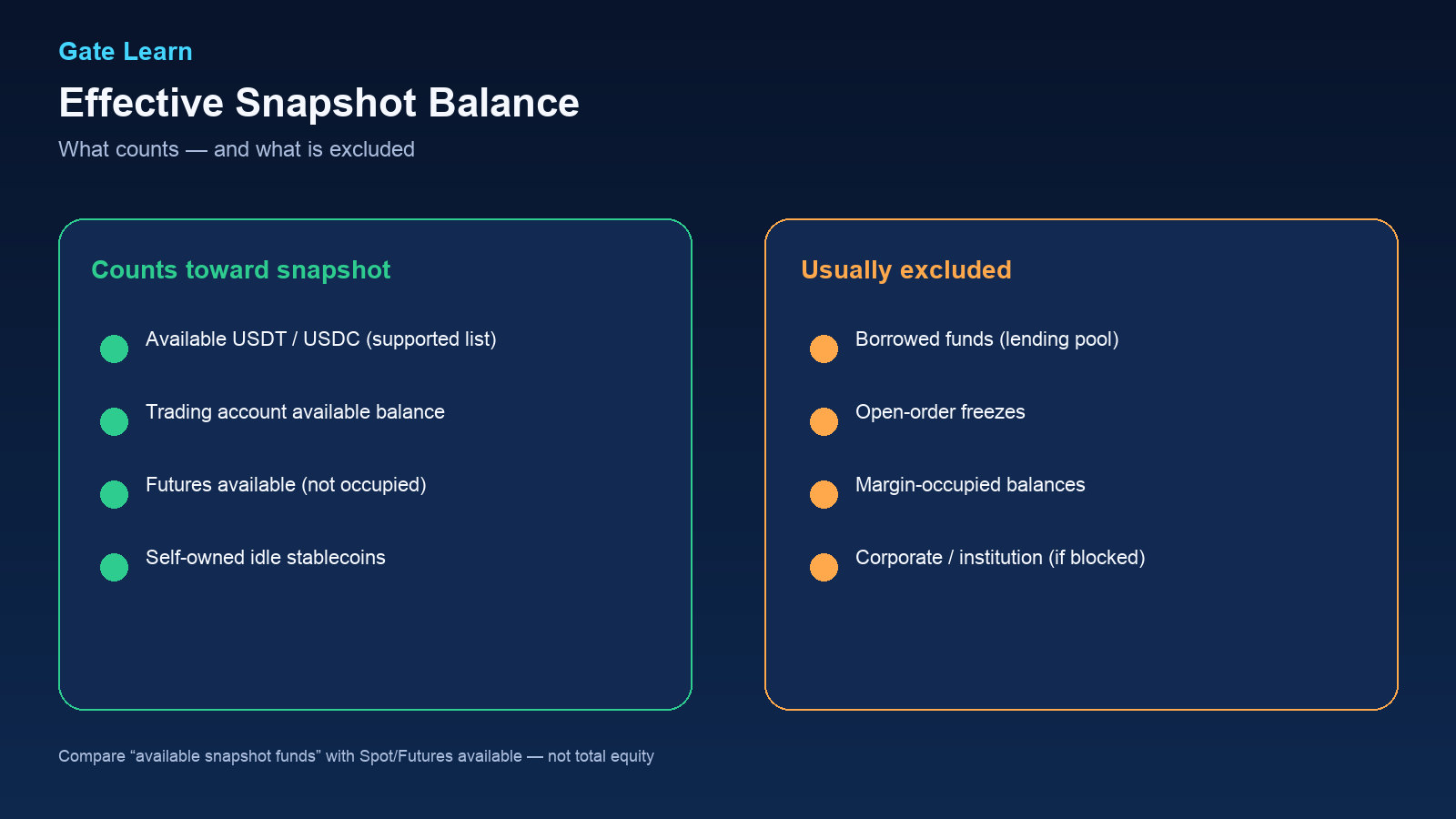
Figure 2. Effective snapshot excludes borrowed funds, order freezes, and margin occupancy.
Interest follows a T-day average snapshot and T+1 calculation, and is typically credited to the Spot Account automatically—no manual claim required. Confirm the exact destination on the live product FAQ.
Step 5: Keep Trading While Understanding Snapshot Shrinkage
After enablement, balances can still be used for spot trades or futures activity. Each use that freezes or occupies capital can reduce the next snapshot. Users who want steadier accrual keep a deliberate available stablecoin buffer; users who fully deploy margin should expect yield to fall even though Idle Earn remains enabled.
Reconciling available snapshot funds after active trading sessions is the practical way to understand the product—more reliable than assuming a fixed daily credit size.
If the account also holds GUSD from a separate subscribe path, treat that inventory under GUSD product rules rather than assuming it automatically increases Idle Earn’s stablecoin snapshot. Backend certificate mapping for Idle Earn is an accounting layer; it is not the same as seeing a mandatory GUSD balance appear in the Spot wallet after enablement.
Common Errors and How to Fix Them
| Error / Symptom |
Likely Cause |
Fix |
| Enabled but almost no yield |
Snapshot near zero after exclusions |
Free margin, cancel unneeded orders, repay borrowed stablecoins |
| App shows equity, Idle Earn shows low snapshot |
Margin or freezes not counted |
Reconcile futures margin and order freezes |
| Cannot enable |
Institution/corporate account or incomplete individual KYC |
Check account verification type and live eligibility |
| Expected GUSD in wallet |
Idle Earn uses backend certificates |
Do not expect a mandatory GUSD mint for Idle Earn enable |
| Confused with Simple Earn or Soft Staking |
Different product entries |
Open Simple Earn, Soft Staking, and Idle Earn pages side by side |
After each fix, wait for the next snapshot window before judging accrual. English and localized Apps may place the snapshot metric in slightly different areas of the earn screen—match the concept (available snapshot funds) rather than a single translated label.
Is Enabling Idle Earn Safe?
Enabling Idle Earn is a product-setting action on a centralized exchange earn feature. Safety questions should cover platform and counterparty risk, stablecoin peg and issuer risk, rule changes for exclusions and payout timing, and the fact that principal-protection style wording is governed by live product terms—not a bank deposit guarantee, and not a guarantee of principal. Review the product FAQ, any transparency materials Gate publishes for underlying assets, and account security basics (2FA, withdrawal allowlists) before leaving large stablecoin balances on any exchange.
This guide does not recommend enabling or allocating size; it only explains operational steps and verification checks. For mechanism context, read the Pillar; for product-choice framing versus Simple Earn and GUSD, read the comparison cluster.
Summary
Enable Gate Idle Earn from Earn → Idle Earn, confirm individual KYC and personal-account eligibility, turn the feature on once, then reconcile available snapshot funds against borrowed, frozen, margin-occupied, and lending-pool exclusions. Trading remains possible from the same balances; utilization changes the snapshot. Expect T+1 auto credit to Spot Account per the product FAQ. Use the Pillar for definitions and the comparison cluster when choosing among Idle Earn, Simple Earn, and GUSD paths.
FAQ
How do I enable Gate Idle Earn?
Open Earn → Idle Earn on Web or App, confirm individual KYC eligibility, and use the Enable control once; afterward, daily snapshots follow live product rules with no recurring subscribe for the base path.
Do I need to subscribe every day?
No. After a one-time enable, daily average snapshots and T+1 style credit run automatically—unlike products that require repeated subscribe actions.
Why is available snapshot lower than my USDT balance?
Borrowed funds, open-order freezes, margin occupancy, and lending-pool borrowed (non-owned) funds are commonly excluded from effective snapshot balance even when total equity looks large.
Can institution accounts use Idle Earn?
Corporate or institution verified accounts are not eligible; individual KYC users can enable. Check the live eligibility note on Idle Earn.
When will the first interest arrive after enabling?
Expect accrual based on a T-day snapshot and T+1 credit to the Spot Account under product rules. The first credit depends on when enablement falls relative to the daily cutoff.