Bridging ETH or ERC-20 tokens to Linea typically takes about 5–15 minutes at beginner-to-intermediate difficulty: you need an EVM-compatible wallet, enough gas and transfer amount on the source chain, and the official Linea bridge interface. Linea, a Consensys-incubated zkEVM Layer 2, uses ETH as its only gas token; Linea zkEVM Layer 2 covers proof model, LINEA token role, and Association governance. The steps below cover wallet prep, official bridge flows, and Lineascan verification.
The full path in five steps: verify the official URL → prepare wallet and source-chain funds → add and switch to Linea Mainnet → select a route at bridge.linea.build and confirm → verify balance and contract on Lineascan.
What Do You Need Before Bridging to Linea?
Before starting, confirm four basics: wallet, funds, network parameters, and URL. Linea Mainnet Chain ID is 59144, block explorer is lineascan.build, and gas is paid in ETH. Like other rollups compared in Linea vs Arbitrum vs Optimism, bridging depends on bridge contracts and source-chain gas—not Linea fees alone.
| Item |
Requirement |
Notes |
| EVM wallet |
MetaMask or other Web3 wallet |
MetaMask ships with Linea Mainnet preconfigured |
| Source funds |
Transfer amount + source gas |
Bridging from Ethereum requires ETH for L1 gas |
| Target network |
Chain ID 59144 |
RPC: https://rpc.linea.build; explorer: lineascan.build |
| Official entry |
bridge.linea.build |
Type the URL or navigate from linea.build—avoid unverified search results |
Beyond Ethereum, the All Bridges aggregator supports multiple EVM chains and Solana as sources; gas token and confirmation time vary by origin chain. If you plan LINEA-related ecosystem activity later, LINEA dual-burn tokenomics explains how gas (ETH) differs from incentive token (LINEA)—bridging only moves ETH or ERC-20, it does not mint LINEA.
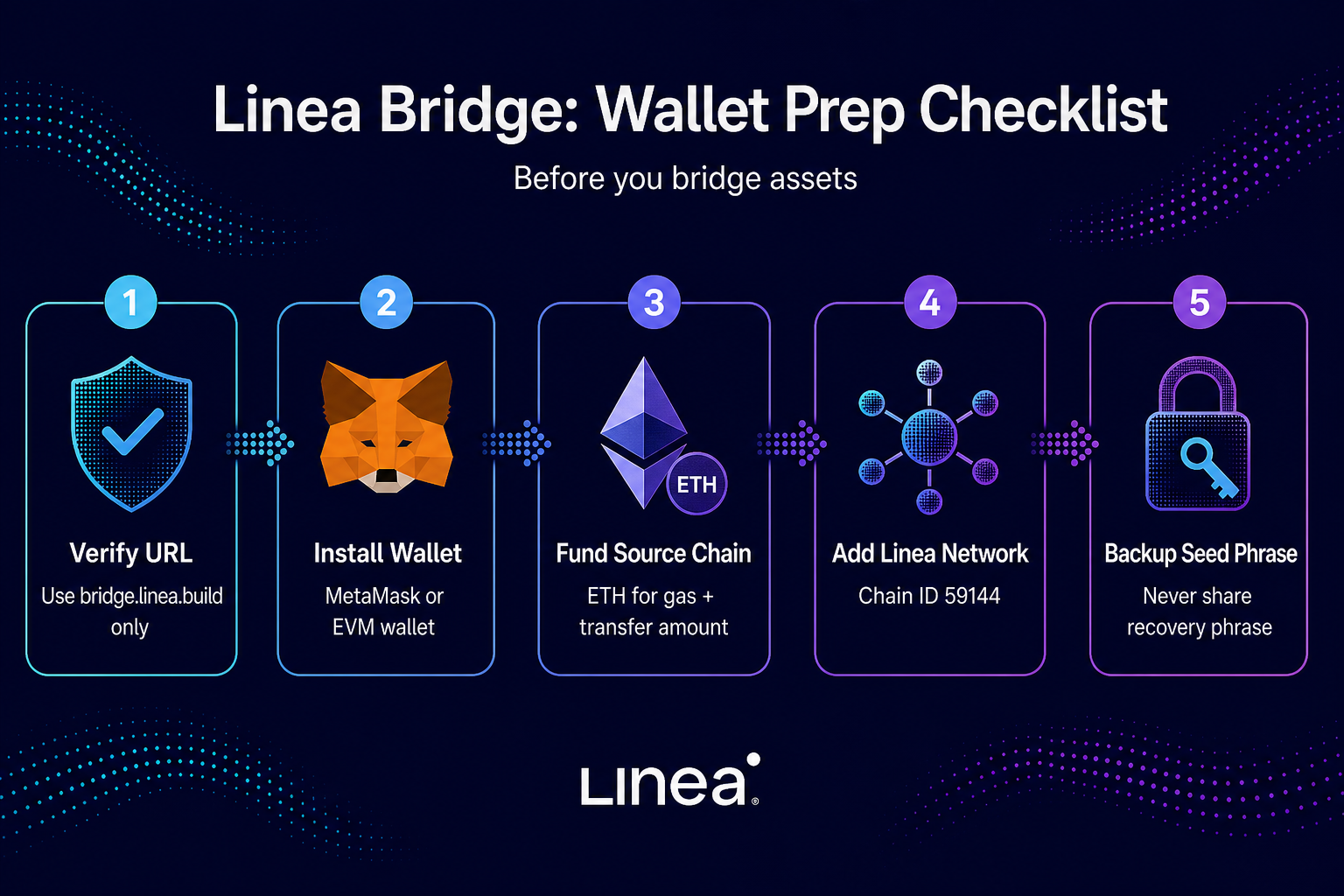
Figure 1. Five prep steps: verify URL, install wallet, fund source chain, add Linea network, secure recovery phrase.
Treat the table as a checklist against bridge.linea.build and docs.linea.build. First-time users should test with a small amount before moving larger balances.
Step 1: Add and Switch to the Linea Network in Your Wallet
Linea Mainnet is usually preconfigured in MetaMask and similar wallets—select "Linea" or "Linea Mainnet" from the network dropdown. If missing, add manually: Network Name Linea Mainnet, RPC URL https://rpc.linea.build (Infura and other Consensys RPC endpoints also work), Chain ID 59144 (hex 0xe708), Currency Symbol ETH, Block Explorer URL https://lineascan.build.
Wrong Chain ID or RPC can sign transactions to the wrong network. After switching, the wallet should show Linea Mainnet; ETH balance may read zero until bridging completes.
Linea Sepolia testnet uses Chain ID 59141, RPC https://rpc.sepolia.linea.build, explorer sepolia.lineascan.build. Do not mix mainnet and testnet parameters.
Step 2: Open the Official Linea Bridge and Connect Your Wallet
The official bridge lives at https://bridge.linea.build (also reachable via linea.build/bridge). Before connecting, confirm the browser address bar shows a linea.build subdomain—avoid unverified links from search or DMs.
The bridge app has three main areas:
| Tab |
Function |
Best for |
| All Bridges |
Li.Fi-powered aggregator |
Most users; multi-chain sources and cross-chain swaps |
| Native Bridge |
Linea team's canonical bridge |
Technical users or large liquidity; Ethereum ↔ Linea canonical path |
| Buy |
Onramper fiat on-ramp |
Buy on Linea with fiat; KYC required |
After connecting, confirm the source address matches the account holding funds. Multi-account wallets should double-check the selected account before signing.
Step 3: Choose a Route, Confirm Amount, and Complete the Transfer
All Bridges aggregator (recommended for most users)
Under All Bridges, pick source network (e.g., Ethereum, Arbitrum, Optimism), destination Linea, token, and amount. The aggregator routes via DEXs and third-party bridges based on speed or cost settings; some paths swap into a different token on arrival. Review estimated receive amount, time, and gas, then approve and sign on the source chain.
Native Bridge
The Native Bridge tab handles canonical Ethereum ↔ Linea transfers. ETH and most ERC-20 tokens use the standard native bridge; USDC uses Circle CCTP because Linea supports native USDC—read the USDC section on docs.linea.build before bridging USDC.
Native Bridge offers Automatic Claiming and Manual Claiming: automatic claiming credits Linea once the bridge completes; manual claiming requires returning to claim and ETH on Linea for claim gas. Some Ethereum → Linea flows default to automatic; reverse or specific tokens may need manual claim—follow in-app prompts.
| Dimension |
All Bridges aggregator |
Native Bridge |
| Source networks |
20+ EVM chains plus Solana |
Primarily Ethereum ↔ Linea |
| Speed |
Usually faster |
Depends on L1 batching and claim |
| Complexity |
Single UI flow |
Includes claim steps; more technical |
| Fee structure |
Route fees + source gas |
Official bridge notes no extra bridge fee on Ethereum path |
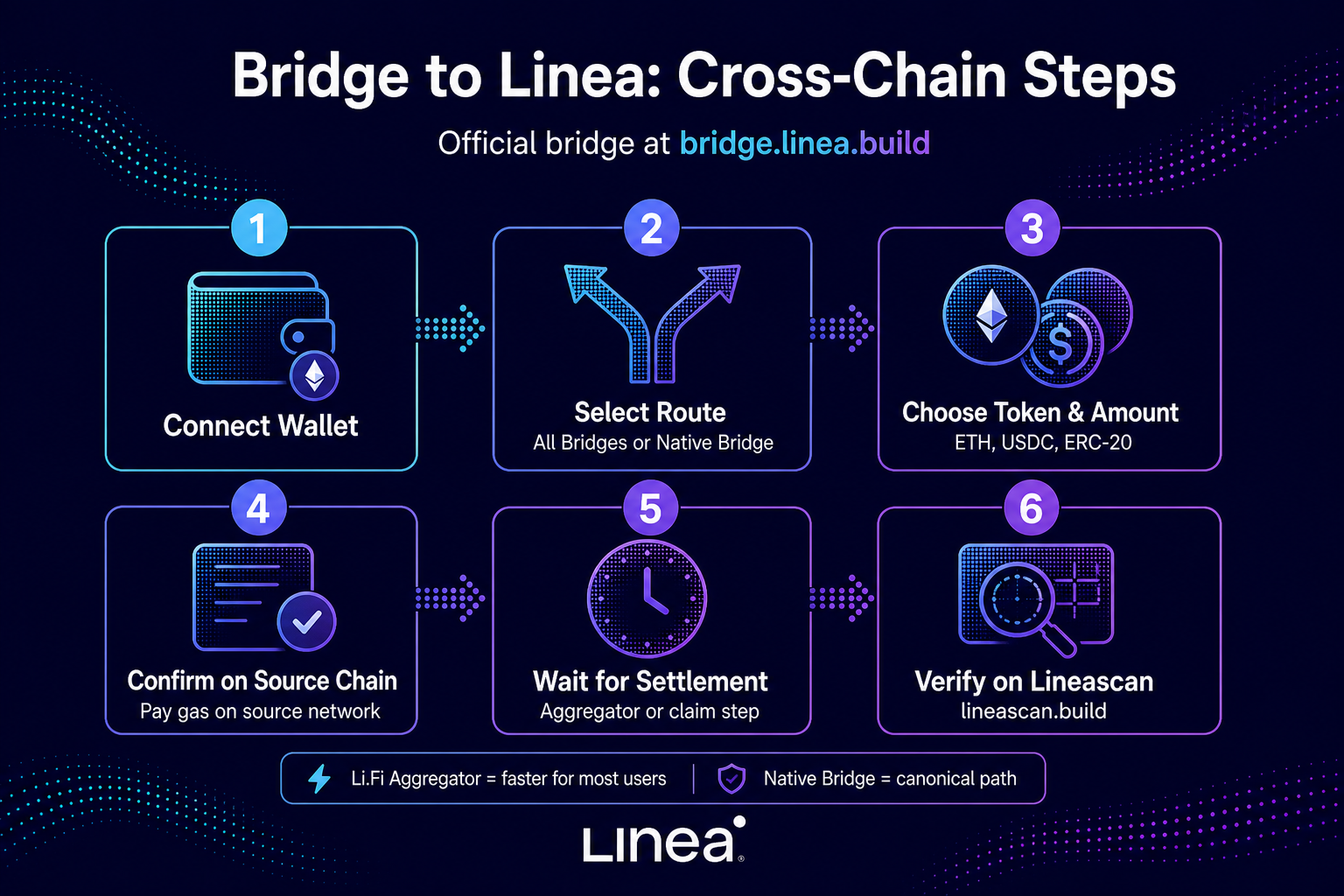
Figure 2. Six bridge steps: connect wallet, select route, set token and amount, confirm on source chain, wait for settlement, verify on Lineascan.
Keep the source-chain transaction hash (Tx Hash) for tracking. Aggregator completion may take minutes to 30+ minutes depending on route; Native Bridge can extend during L1 congestion. Proceed to verification once explorers show completion.
Step 4: Verify Receipt on Lineascan
Open https://lineascan.build, search your wallet address on Linea Mainnet, and confirm ETH or target ERC-20 balance increased. Click the token and compare the contract address to linea.build docs or the issuer's published Linea deployment—fake tickers are a common cross-chain risk.
Verify four items: address is yours; network is Linea Mainnet (59144); token contract matches official lists; received amount aligns with estimates after fees. If balance stays zero, trace the source Tx Hash on lineascan.build or the source explorer, and check bridge.linea.build for pending claim steps.
Linea Hub (linea.build/hub) and the ecosystem portal at linea.build/apps (Bridge filter) list third-party bridges and dApp entry points, but on-chain balances and contract verification should always be checked on Lineascan. Wallets may require manual token import by contract address for non-default tokens—verify the contract on linea.build docs before importing.
Third-party bridges listed in the ecosystem portal are not interchangeable with the official bridge UI; each route uses different contracts and fee models. When comparing Linea with other rollups, withdrawal assumptions differ by proof model—Linea vs Arbitrum vs Optimism outlines how zk validity proofs compare to optimistic challenge windows for cross-chain timing expectations.
Common Errors and How to Fix Them
Most bridge failures trace to wrong URLs, network params, insufficient gas, or missed claims.
| Symptom |
Likely cause |
Fix |
| Cannot switch to Linea |
Network not added or wrong Chain ID |
Add Chain ID 59144 with correct RPC per docs |
| Tx fails or stays pending |
Insufficient source gas or congestion |
Raise gas limit or retry when network clears |
| Bridge done but no Linea balance |
Manual Native Bridge claim not executed |
Return to bridge.linea.build and complete claim |
| Token name matches but unusable |
Fake contract or unofficial wrapper |
Cross-check Linea contract on linea.build docs |
| Connected to fake bridge |
Phishing link from search or DM |
Use only bridge.linea.build; reject unknown approvals |
| Success but amount differs |
Route slippage, swap, or middle fees |
Review fee breakdown in transaction details |
If the source tx confirms but Linea shows nothing for an extended period, contact support.linea.build or community.linea.build with Tx Hash and route name. Never share seed phrases publicly.
Is Bridging to Linea Safe?
The official bridge at bridge.linea.build offers Native Bridge (Linea-maintained canonical contracts) and All Bridges (Li.Fi aggregator routes)—verify current UI and docs before each transfer. Linea inherits Ethereum settlement security as a zkEVM rollup, but users still face L2 bridge, sequencer, third-party route, and phishing risks.
Safer habits: enter bridge.linea.build manually or via linea.build navigation; test small amounts first; avoid unlimited approvals to unknown contracts; treat LINEA incentive tokens separately from bridged assets—Linea gas is ETH-only, and fake LINEA claim sites plus fake bridges are common traps. Returning to Ethereum uses Native Bridge reverse paths or supported aggregator routes; finality still depends on proof submission and L1 verification—not "instant zero risk."
Bridge safety hinges on URL, contract addresses, and user discipline; treat mechanism learning separately from fund decisions.
Summary
Standard Linea bridging: prepare EVM wallet and source gas → add Linea Mainnet (59144) → connect at bridge.linea.build and pick All Bridges or Native Bridge → verify address, contract, and balance on lineascan.build. Most users prefer All Bridges; Native Bridge suits canonical paths or large liquidity, with USDC CCTP and manual claim caveats.
Always verify official URLs and token contracts; test with small amounts first. Linea gas is ETH-only—bridging does not distribute LINEA. Understanding Linea zkEVM Layer 2 settlement and LINEA dual-burn tokenomics helps separate cross-chain ops from incentive programs.
FAQ
How do I bridge ETH to Linea?
Add Linea Mainnet (Chain ID 59144) in MetaMask or another wallet, visit bridge.linea.build, connect, and under All Bridges select Ethereum as source and Linea as destination. Enter ETH amount, confirm on Ethereum, then check balance on lineascan.build. Native Bridge offers the canonical Ethereum ↔ Linea path; some flows require a claim step.
What is the official Linea bridge URL?
The official bridge app is at bridge.linea.build, also reachable via linea.build/bridge. Confirm the linea.build subdomain in the address bar before connecting. Parameters and docs live on docs.linea.build.
How long does bridging to Linea take?
All Bridges routes often finish in minutes to about 30 minutes, depending on source congestion and path. Native Bridge timing depends on Ethereum L1 batching and whether manual claim is required. Track progress with Tx Hash on source and Linea explorers.
Is bridging to Linea safe?
Using bridge.linea.build with Native Bridge or Li.Fi aggregator routes matches public documentation, but bridge contracts, third-party routes, phishing, and user error remain real risks. Verify URLs and contracts, test small amounts, avoid unlimited approvals, and evaluate cross-chain risk separately from protocol learning.
What is Linea's Chain ID?
Linea Mainnet Chain ID is 59144 (hex 0xe708), RPC https://rpc.linea.build, explorer https://lineascan.build. Linea Sepolia testnet is 59141—do not mix mainnet and testnet settings.
How do I add Linea to MetaMask?
MetaMask usually lists Linea Mainnet preconfigured—select it from the network menu. If missing, add manually: name Linea Mainnet, RPC https://rpc.linea.build, Chain ID 59144, symbol ETH, explorer https://lineascan.build. Tools like Chainlist can import networks, but always verify Chain ID and RPC against linea.build docs.