For readers comparing a bitcoin mining app or mobile mining apps stack, classify the product first, then check store policy and payout proofs. Later sections rank by use case, cover Android versus iOS limits, list scam red flags, and connect to crypto mining mechanics and Bitcoin basics.
Key Takeaways
-
Smartphones cannot profitably mine Bitcoin; compliant store apps are usually remote dashboards, not pocket ASICs.
-
Rank by category first: rig managers, hashpower markets, cloud-contract UIs, and reward/simulation apps serve different jobs and risks.
-
Apple and Google Play restrict on-device mining while allowing remote management; guaranteed daily BTC and pay-to-withdraw fees are classic scam signals.
-
When the goal is holding BTC, a verifiable spot path is usually clearer than an in-app “mining balance” with no on-chain proof.
What Is a Bitcoin Mining App—and Does the Phone Actually Mine?
A bitcoin mining app is a mobile product on Android or iOS that relates to Bitcoin mining workflows, and most mining apps are tied to cloud mining services or remote servers rather than the phone itself doing real Bitcoin mining. In most legitimate cases, the phone only handles login, dashboards, orders, and alerts; real SHA-256 hashrate comes from ASICs in data centers or from hardware the user already operates—the same proof-of-work logic described in crypto mining explainers.
Treating “bitcoin mining app” as “mine BTC with phone CPU” is misleading. On mobile devices, limited processing power means phones cannot handle the mining process competitively versus the Bitcoin network, and sustained load adds heat, battery wear, and power draw. Many free “Bitcoin Miner” listings only animate progress bars, ads, or subscriptions; the BTC number on screen may never map to withdrawable on-chain coins. The vast majority are not genuine, so users looking for legit crypto mining apps should stick to reputable platforms.
How We Ranked These Apps: Criteria for Android and iOS
This listicle ranks by job-to-be-done and key criteria, not by promised ROI copy. Apps featured as category examples should explain where hashrate or contracts run, how fees work, whether withdrawals can reach an address the user controls, and whether they make it easy to track earnings and understand mining profits after fees.
| Criterion |
Stronger signal |
Warning signal |
| Source |
Official Google Play / App Store page matching the company site |
Sideloaded APKs, clone store pages |
| Model clarity |
States remote rigs, hashpower market, or cloud contracts |
Implies the phone CPU mines Bitcoin |
| Verifiability |
Pool endpoints, contract terms, checkable payout history |
Balance only inside the app |
| Economics |
Outcomes vary with network difficulty, electricity costs, fees, and bitcoin price |
Fixed daily returns that ignore those variables, “risk-free” claims |
| Withdrawals |
Small test payouts to an external wallet |
Unlock fees before withdrawal, heavy referral pressure |
Summary table (by type—not an investment ranking):
| Rank |
Name / Category |
Best For |
Key Stat |
| 1 |
NiceHash |
Remote rig control + buying/selling hashpower |
Marketplace + Rig Manager in one app |
| 2 |
Minerstat |
Multi-rig operations monitoring |
Ops-focused dashboards |
| 3 |
Kryptex Mobile |
Pool stats and device management |
Monitoring first; on-device non-BTC mining is a separate case |
| 4 |
Cloud panels (e.g. ECOS-style apps) |
Watching remote mining contracts |
Contract terms and fees need independent checks |
| 5 |
Free “BTC Miner” store apps |
Cautionary examples / ultra-light experiments |
Often simulation or ads; withdrawals frequently constrained |
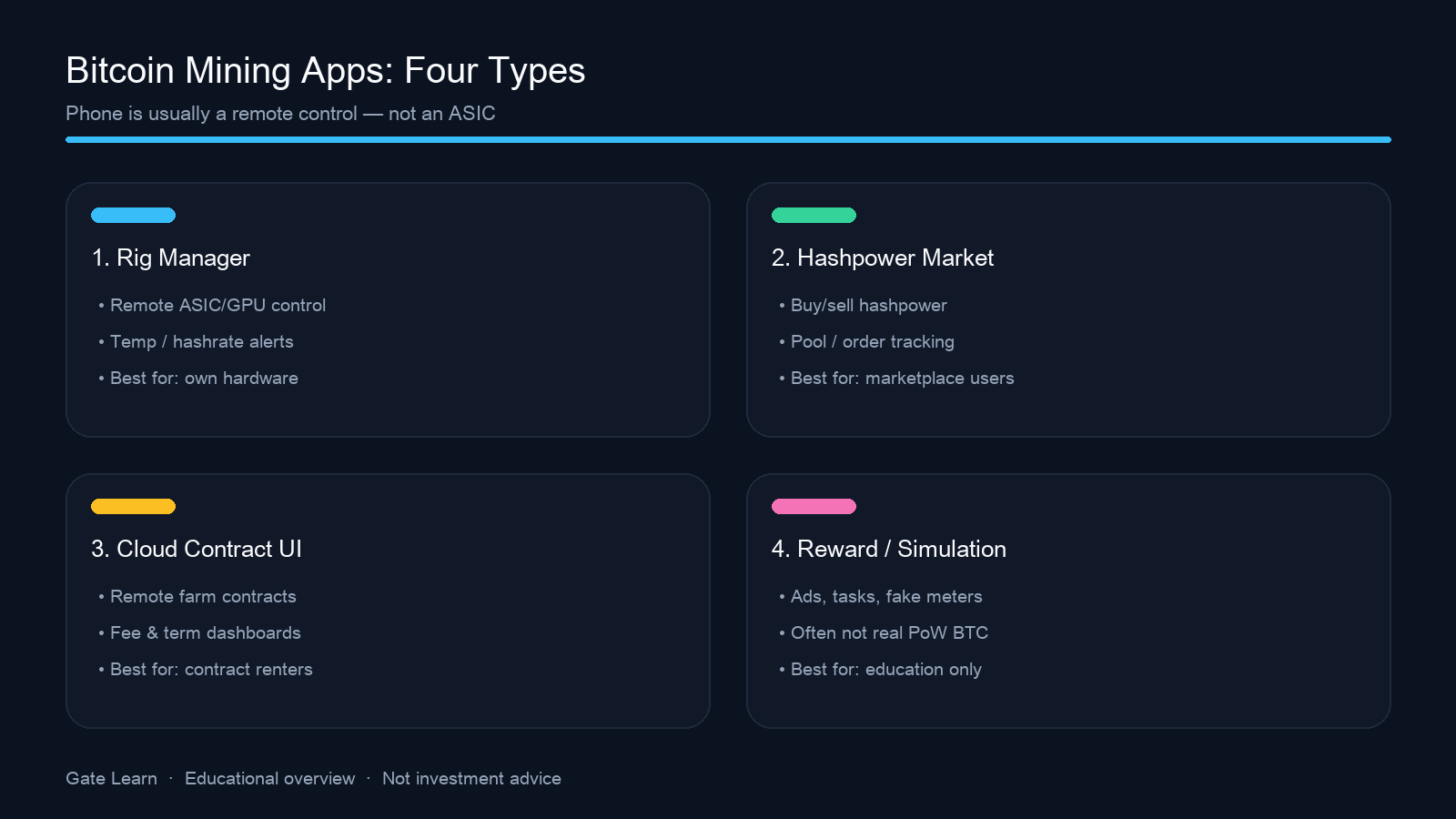
Figure 1. Four common mobile bitcoin mining app types: rig manager, hashpower market, cloud-contract UI, and reward/simulation.
Which Rig Manager and Hashpower Marketplace Apps Matter?
NiceHash fits users who already run miners or need on-demand hashpower. The official mobile app highlights the Hashpower Marketplace, Rig Manager, wallet views, and alerts—so users can buy or allocate mining power instead of relying only on own hardware, while the phone starts or stops machines and tracks temperature/hashrate as mining stays off-device. Confirm the publisher matches nicehash.com and enable account security controls.
Minerstat leans toward farm and multi-device operations: remote hashrate, status, and profit panels. It is better suited to mining operations with multiple rigs and more technical knowledge, especially for experienced miners who already host or operate hardware and need a mobile ops view—not a “zero-hardware mine BTC” story.
Kryptex Mobile is commonly used for pool statistics, balances, and device status. Kryptex also discusses Android on-device mining for CPU-friendly coins such as Monero (RandomX), where different mining algorithms matter for non-BTC use cases, while Bitcoin still relies on specialized ASIC miners. That is not the same product job as Bitcoin ASIC mining—keep “monitoring app” and “on-device PoW” separate so XMR guides are not mistaken for BTC phone mining.
Shared takeaway: these apps are best for users with a real hashrate source; the phone is mainly for remote monitoring across mining rigs and a ledger view.
How Should Readers Treat Cloud Mining and “Earn While You Use” Apps?
Cloud mining platforms and cloud mining apps (including ECOS-style apps) usually let users browse contracts, allocated hashrate, and estimated output on a phone. Some package access through cloud mining contracts or a mining contract rather than physical ownership of mining equipment. Credible copy admits mining runs in remote facilities and shows transparent operations, with clear fees and realistic disclosures that fit how legitimate providers behave across the broader cloud mining space. Panels that only sell “passive income” without disclosure should be down-ranked. Even when the app experience looks smooth, bear markets can make these offers less attractive.
“Earn while you browse / free bitcoin mining app” listings are plentiful. Security research—including Trend Micro’s analysis of fake cloud-mining apps—has shown apps that never mine: they simulate meters locally, then monetize ads or subscriptions. Others wrap click tasks or referral commissions in BTC branding without contributing verifiable hashrate to Bitcoin.
Pi Network often appears in “mobile mining” searches, but its model is participation and an alternate consensus narrative—not Bitcoin SHA-256 mining. See Pi Network.
How Do Android and iOS Differ for Mining Apps?
Google Play’s blockchain content policy disallows mining cryptocurrency on the device but allows apps that remotely manage mining. Apple’s App Review Guidelines similarly restrict unrelated background cryptocurrency mining; cloud or remote interfaces are the compliant pattern. Store-compliant mobile apps are mainly remote dashboards, not tools that use a phone’s computational power for real mining. Store titles that say “Bitcoin Mining” should therefore be read as remote service UIs, not pocket hash factories.
On Android, sideloading tools that claim on-device mining adds malware and permission risk; even CPU-friendly algorithms leave phones far behind dedicated hardware, and even personal computers are more viable than phones for experimental mining, so electricity and wear often dominate any nominal output. iOS restricts sustained background CPU load more tightly, so ordinary users cannot keep RandomX-style on-device mining running without jailbreaks.
Cross-platform note: when a brand ships both Android and iOS apps, contracts and accounts should sync in the cloud; differences are mostly UI and notifications—not which phone “mines BTC better.” In practice, these apps work best as companion tools while the actual mining runs elsewhere.
What Risks Do Bitcoin Mining Apps Carry—and How Do You Spot Scams?
| Red flag |
Why it matters |
Response |
| Guaranteed daily BTC |
Real mining varies with difficulty and price |
Disqualify |
| Withdrawal requires an unlock/tax fee first |
Classic advance-fee pattern |
Stop; keep evidence |
| Earnings mainly from recruiting |
Pyramid economics |
Demand hashrate proofs |
| Balance only inside the app |
No on-chain audit trail |
Test a small withdrawal first |
| Installers outside official stores |
High malware / clipboard-hijack risk |
Use official stores and domains only |
Legitimate apps should be clear about whether you are joining a mining pool, renting power, or buying contracts.
Device risks include heat, abnormal battery drain, and abused notification permissions. Account risks include phishing login pages and fake support asking for codes. Contract risks include cloud operators shutting down, unilateral term changes, and exposure tied to paid plans or any initial investment, especially when hashrate cannot be proven independently. No mining app changes the core fact: competitive Bitcoin PoW is dominated by ASICs and pools, and traditional mining still depends on mining hardware and pool economics outside the app itself.
If the Goal Is Holding BTC, What Paths Are Clearer Than Mining Apps?
If the goal is understanding or holding Bitcoin, start with the asset and network—not an app promise or an unverified progress bar. Buying or transferring BTC through a path you can audit is usually shorter than “deposit then mine,” with a clearer ledger; any claimed mined coins or other digital assets should only be trusted when that ledger path is clear—subject to market risk and venue rules, and not investment advice.
For education, learn Bitcoin and mining basics before choosing a rig manager or cloud-contract tool. Treating mining apps as ops or contract dashboards—not passive-income promises—cuts scam exposure sharply, especially for passive income seekers who mistake dashboards for guaranteed returns.
Summary
Rank Android and iOS bitcoin mining apps by type and verifiability: the top mining apps still need a caution-first read. The best mining app depends on whether you need monitoring, contracts, or real operational control: NiceHash and Minerstat fit real hashrate workflows; cloud panels need term and withdrawal checks; free Miner apps rarely deliver “mine BTC on phone.” Store policies already push real hashing off-device, so best crypto mining apps claims matter less than realism checks.
FAQ
Can you mine Bitcoin on your phone?
You cannot start mining Bitcoin meaningfully on a phone because mobile devices lack the computing power used in mining farms and data center setups. Real mining relies on specialized mining farms rather than app-only phone workflows. Compliant bitcoin mining apps are usually remote managers or cloud UIs, not ASIC replacements.
What is the best Bitcoin mining app for Android?
There is no single best Bitcoin mining app or mobile mining app for every user. NiceHash-style marketplace/monitoring fits users with hardware or hashpower orders; cloud panels fit contract watchers who read fees carefully, and the right choice depends on whether you want remote control, cloud access, or more advanced features; free “guaranteed” miners are usually unreliable. Match the job, not the ad.
Are Bitcoin mining apps safe?
Safety depends on source, model, and whether the app comes from reputable platforms with transparent operations. Official-store remote managers are more controllable but still face phishing risk; guaranteed returns, pay-to-withdraw fees, and sideloaded packages are far riskier. Test a small withdrawal to a wallet you control before scaling, and treat free crypto mining apps with extra skepticism.
Do free Bitcoin mining apps really work?
Most free apps do not maximize profitability and usually lack the mining power needed for meaningful Bitcoin output; many monetize ads, subscriptions, or simulated balances instead of contributing verifiable hashrate to Bitcoin, and apps promising bitcoin cash or other extra coins still need the same verification standard. If withdrawals cannot be checked on-chain, treat them as entertainment or high-risk experiments—not mining income.
Can you use a mining app on iPhone?
Yes for remote-management or cloud-panel apps that pass App Store rules—but not for operating mining equipment directly or as a way to sustainably mine Bitcoin on-device. Apple restricts on-device mining-style background work; still verify the publisher and withdrawal path, and some apps simply expose remote dashboards for mining operations running elsewhere, not on the device.