The process itself is straightforward, but accuracy matters. Before submitting a withdrawal, make sure the asset, network, receiving address, and any required Memo or Tag are all correct. This is especially important for multi-chain assets, because the sending network must match the network supported by the receiving platform. A mismatch or incorrect address can lead to failed transfers, delays, or permanent loss of funds.
Whether you are new to Gate or already move assets regularly between platforms, this guide walks through the full withdrawal flow, including fees and minimum amounts, verification steps, timing, status tracking, common mistakes, and troubleshooting. If you are still new to onchain transfers, you may also want to review Your First Deposit on Gate: A Step-by-Step Walkthrough to understand how deposit addresses, networks, and Memo/Tag requirements work from the receiving side.
Key Takeaways
-
A Gate onchain withdrawal requires you to choose the asset, network, receiving address, and withdrawal amount.
-
The withdrawal network must match the deposit network supported by the recipient.
-
Some assets require a Memo, Tag, or similar identifier in addition to the address.
-
Before submitting, check the withdrawal fee, minimum withdrawal amount, and estimated amount received.
-
After submission, you can track the withdrawal through the withdrawal history and transaction ID.
-
For a new address, a small test withdrawal above the minimum requirement can help reduce operational risk.
What Do You Need Before Withdrawing to a Bank Account From Gate?
Before starting, open the deposit page on the receiving wallet or exchange and confirm the asset, network, receiving address, and whether a Memo or Tag is required.
For example, if you are withdrawing USDT from Gate, do not simply choose the cheapest network first. Check which USDT networks the receiving platform supports, then return to Gate and select the same network.
If you are sending a larger amount to a new address for the first time, you may want to complete a smaller test withdrawal first, as long as it meets the minimum withdrawal requirement.
How to Withdraw Crypto From Gate
The exact layout may differ between Gate Web and App, but the core withdrawal process is the same.
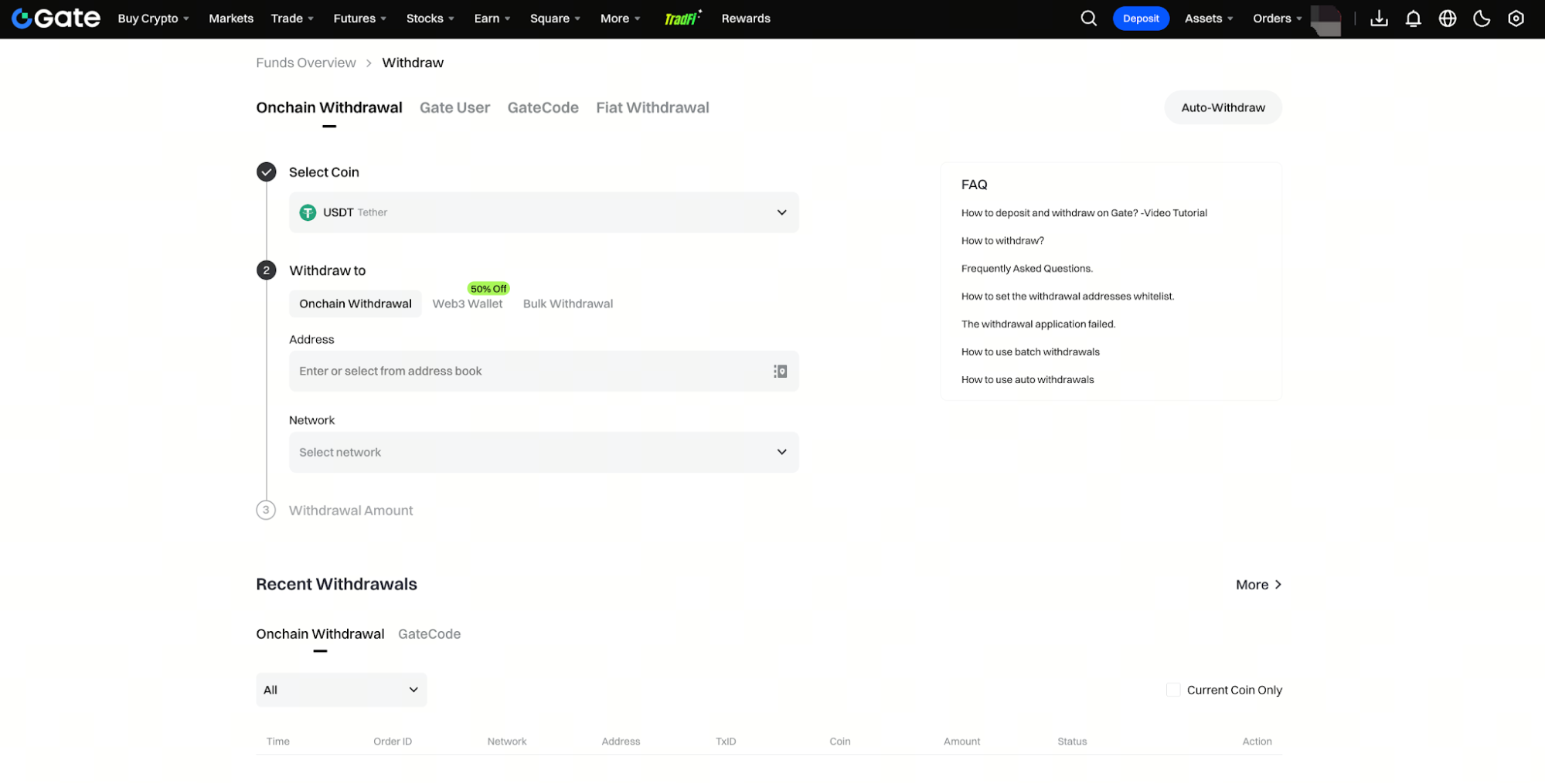
Step 1: Open the Withdrawal Page
Log in to Gate and open the asset section, then choose Withdraw and select the onchain withdrawal option.
On the Gate App, you can also access the withdrawal function from the asset section.
Step 2: Select the Asset or Fiat Currency
Choose the crypto asset you want to withdraw, such as BTC, ETH, or USDT.
Make sure you select the correct asset rather than relying only on a similar ticker symbol or token icon.
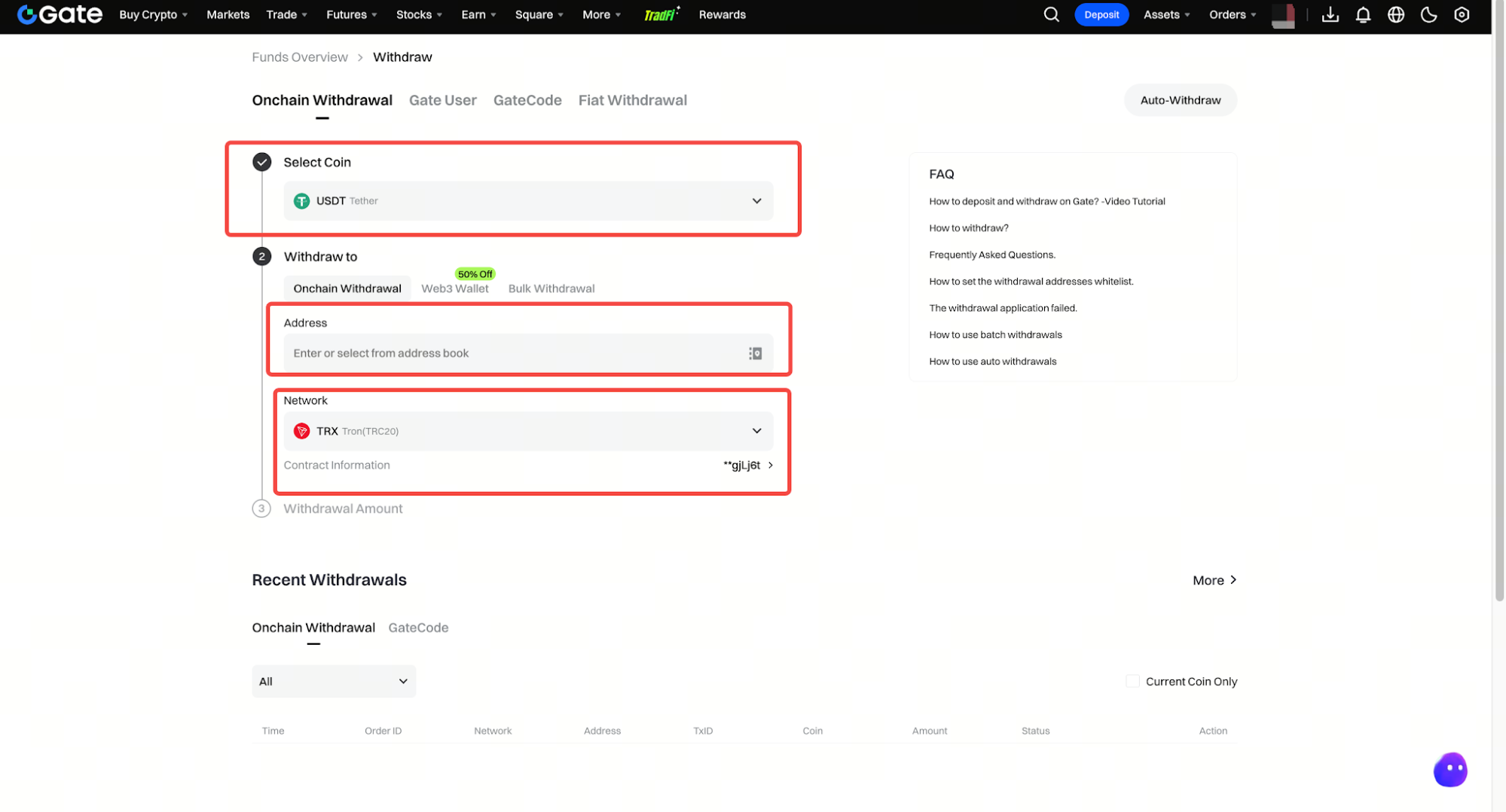
Step 3: Choose the Correct Network
After selecting the asset, Gate will display the supported withdrawal networks.
The network you choose must match the deposit network shown by the recipient. For example, if the receiving platform gives you a USDT address for a specific network, select that same network on Gate.
Do not switch to another network only because the fee is lower. Compatibility with the receiving address comes first.
Step 4: Enter the Receiving Address
Copy the receiving address from the destination wallet or exchange and paste it into the Gate withdrawal page as the recipient address.
After pasting, double check the address and any Memo, Tag, or other identifier for accuracy before confirming, rather than relying only on an old saved address. Incorrect address or Memo/Tag details can cause funds to be lost.
Step 5: Enter the Withdrawal Amount
Enter the amount of crypto you want to withdraw.
At this stage, the page will typically show the minimum withdrawal requirement, withdrawal fee, and estimated amount the recipient will receive.
Step 6: Check the Fee and Estimated Amount Received
Withdrawal fees vary by asset and network, so use the fee shown on the current withdrawal page.
If you want a more detailed explanation of how fees differ across networks, see Gate Withdrawal Fees by Coin and Network: How They Work.
When reviewing the fee, also check the minimum withdrawal amount and the estimated amount received. The minimum withdrawal requirement is not the same thing as the withdrawal fee.
Step 7: Review the Withdrawal and Complete Security Verification
Before submitting, pay close attention to the transaction details and check:
If everything is correct, complete the multi-factor security verification required by your account, such as a fund password, authenticator code, email code, or another enabled verification method.
Step 8: Track the Withdrawal Status and Transaction Details
After the request is submitted, open your withdrawal history to check the current status as it is processed, and be prepared to wait for updates.
Once the transaction has been sent to the blockchain, a transaction ID may become available. You can use that transaction ID in the relevant blockchain explorer to check whether the transaction has been broadcast and confirmed, and keep the ID plus related withdrawal documentation in case support is needed.
How Do Gate Withdrawal Fees Work?
Gate withdrawal fees mainly depend on the asset and network. If the same asset supports several networks, the fee may differ between them.
The withdrawal page shows the current fee and estimated amount received, so there is usually no need to calculate the blockchain cost manually. When choosing a network, always confirm compatibility with the receiving platform before comparing fees.
For a more detailed breakdown, refer to the Gate withdrawal fee guide linked above rather than treating one fee as applicable to every coin and network.
Why Has My Withdrawal Not Arrived Yet?
An onchain withdrawal usually goes through several stages: processing by Gate, blockchain confirmation, and final crediting by the receiving platform.
If Gate has already generated a transaction ID, check the transaction in the relevant blockchain explorer. If the transaction is still waiting for confirmations, it may simply need more time.
If the blockchain explorer shows the transfer as successful but the receiving platform has not credited the funds yet, contact the receiving platform with the transaction ID so it can check the deposit status.
What Are the Most Common Withdrawal Mistakes?
The most common mistake is selecting the wrong network. Even if the asset name is the same, the sending and receiving networks still need to match.
Another common issue is entering the wrong address or forgetting a required Memo or Tag. When withdrawing to another exchange, copy the current deposit details directly from that platform rather than using an old screenshot or saved message, and ensure the details are accurate before confirming.
You should also check the receiving platform’s minimum deposit requirement and follow its deposit instructions carefully. A successful withdrawal from Gate does not necessarily mean the receiving platform will automatically credit an amount below its own minimum deposit threshold.
Summary
Withdrawing crypto from Gate can be broken down into a few core steps: choose the asset and network, enter the receiving address and amount, check the fee, complete security verification, and then track the withdrawal.
The most important part is making sure the network, address, and any required Memo or Tag match exactly. If you are using a new address for the first time, starting with a smaller test withdrawal above the minimum requirement can make the process easier to verify.
FAQ
How long does a Gate withdrawal take?
The timing depends on Gate processing, blockchain confirmation speed, and the number of confirmations required by the receiving platform.
How much does Gate charge for withdrawals?
Withdrawal fees vary by asset and network, so check the current fee shown on the Gate withdrawal page.
What happens if I choose the wrong withdrawal network?
If the transaction has not yet been sent, stop the process if possible. If it has already been sent onchain, recovery may be difficult and you may need to contact Gate and the receiving platform.
Why does Gate require security verification for withdrawals?
Security verification helps confirm that the withdrawal is being initiated by the account owner. The exact verification method depends on the security settings enabled on the account. Newly changed security settings can trigger a mandatory 24-hour withdrawal suspension before you can proceed.
How can I check whether my withdrawal is already onchain?
Open the withdrawal history and check whether a transaction ID has been generated. You can use that transaction ID in the relevant blockchain explorer to view the transaction status.