This guide focuses on the most common method: an onchain deposit. That means transferring crypto you already hold, such as BTC, ETH, or USDT, from another exchange or personal wallet into Gate. Fiat payment methods such as card purchases or P2P are separate processes and are not covered here.
For a first deposit, the safest approach is to slow down before sending funds. Confirm the asset, network, address, minimum deposit amount, and any additional identifier shown on the Gate deposit page before completing the transfer from the sending platform.
Key Takeaways
-
A Gate onchain deposit involves selecting a coin, choosing a network, copying the deposit address, and sending the asset from another wallet or platform.
-
The network selected on the sending side must match the network selected on Gate.
-
Some assets require a Memo, Tag, or similar identifier in addition to the deposit address.
-
Check the minimum deposit amount shown on the Gate deposit page before sending.
-
For a first transfer, a small test deposit above the minimum amount can help reduce operational risk.
-
After sending the transaction, you can check its status in your Gate deposit history.
What Do You Need Before Making Your First Deposit?
Before starting, make sure you already hold the crypto you want to transfer in another wallet or exchange. For example, if you want to deposit USDT into Gate, the sending account must already hold enough USDT to cover both the transfer amount and any withdrawal or network fee charged on the sending side.
You should also decide which blockchain network to use. Assets such as USDT may be supported on multiple networks, but the network selected on Gate must match the withdrawal network selected on the sending platform.
If you are new to onchain transfers, do not choose a network based only on the lowest fee. First confirm that both Gate and the sending platform support the same network, then compare fees and expected confirmation speed.
How to Make Your First Onchain Deposit on Gate
The entry points on Gate Web and App may look slightly different, but the core process is the same.
Step 1: Open the Gate Deposit Page
Log in to Gate and go to the asset section, then choose Deposit and select the onchain deposit option.
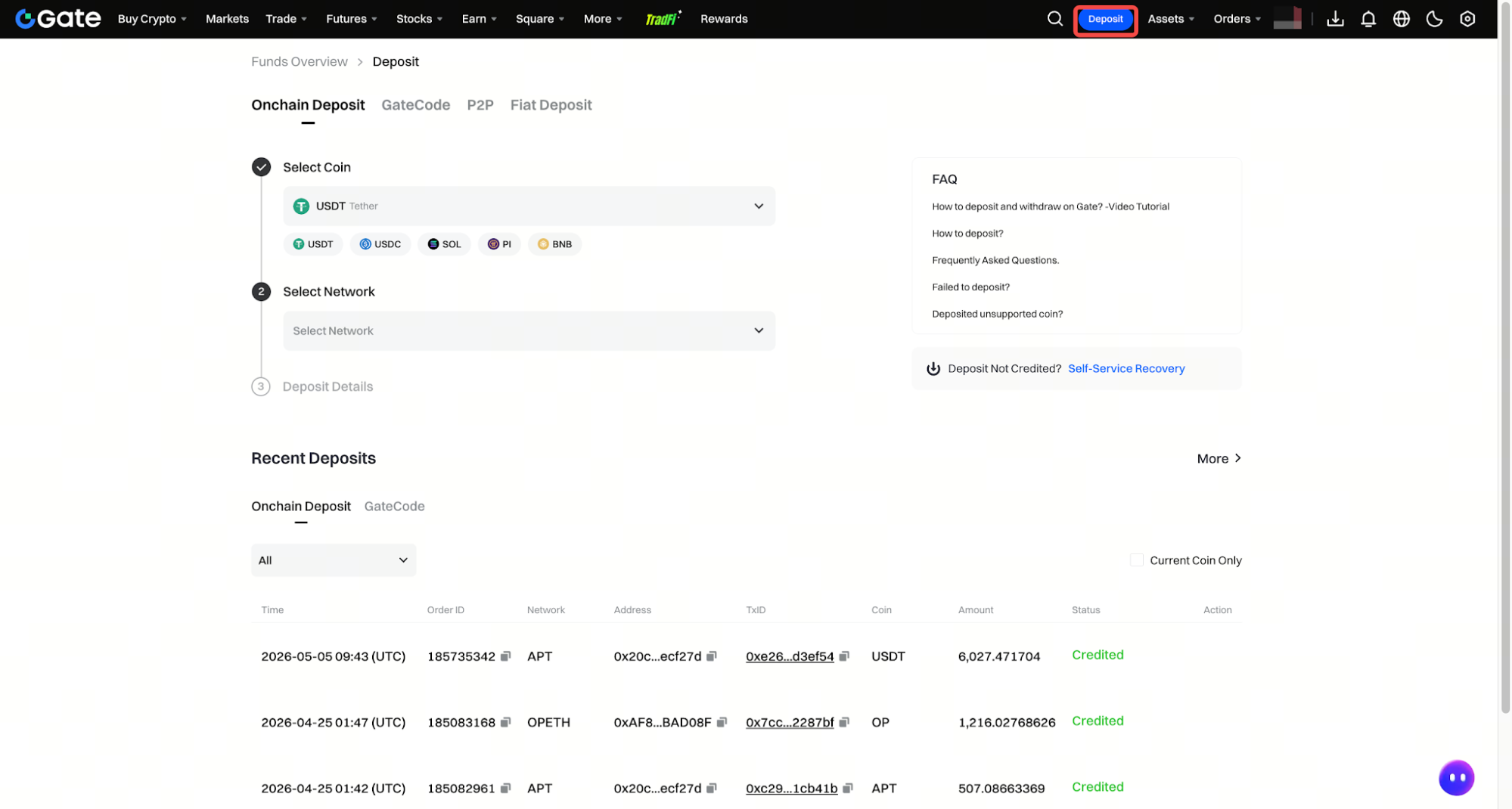
Before copying any address, confirm the exact asset you plan to transfer.
Step 2: Select the Coin You Want to Deposit
Search for and select the crypto asset you want to transfer, such as BTC, ETH, or USDT.
Be careful with assets that may exist in different versions or on multiple smart-contract networks. Similar names do not always mean the tokens are interchangeable.
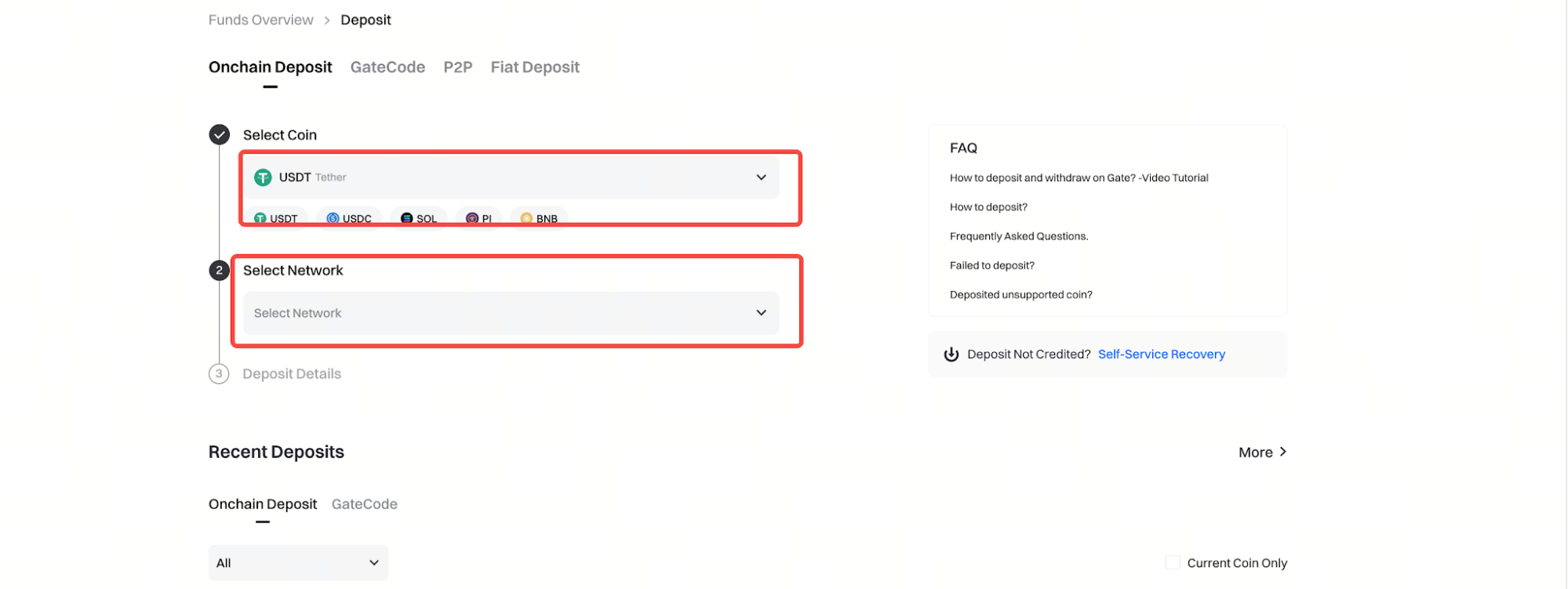
Step 3: Choose the Correct Deposit Network
After selecting the asset, Gate will display the supported deposit networks. This is one of the most important steps in the entire process.
The network selected on Gate must match the withdrawal network on the sending platform. For example, if you choose one specific network for a USDT deposit on Gate, you must select that same network when withdrawing USDT from the sending platform.
Do not assume that any USDT network will work simply because the asset name is the same.
Step 4: Copy the Deposit Address and Check for a Memo or Tag
Once the network is selected, Gate will display the corresponding deposit address. You can copy the address directly or use the QR code shown on the page.
Some assets also require a Memo, Tag, or similar identifier. If Gate displays one, it must be entered on the sending side together with the deposit address. Assets such as XRP or XLM are common examples where an additional identifier may be required.
If no Memo or Tag is shown, do not add one yourself.
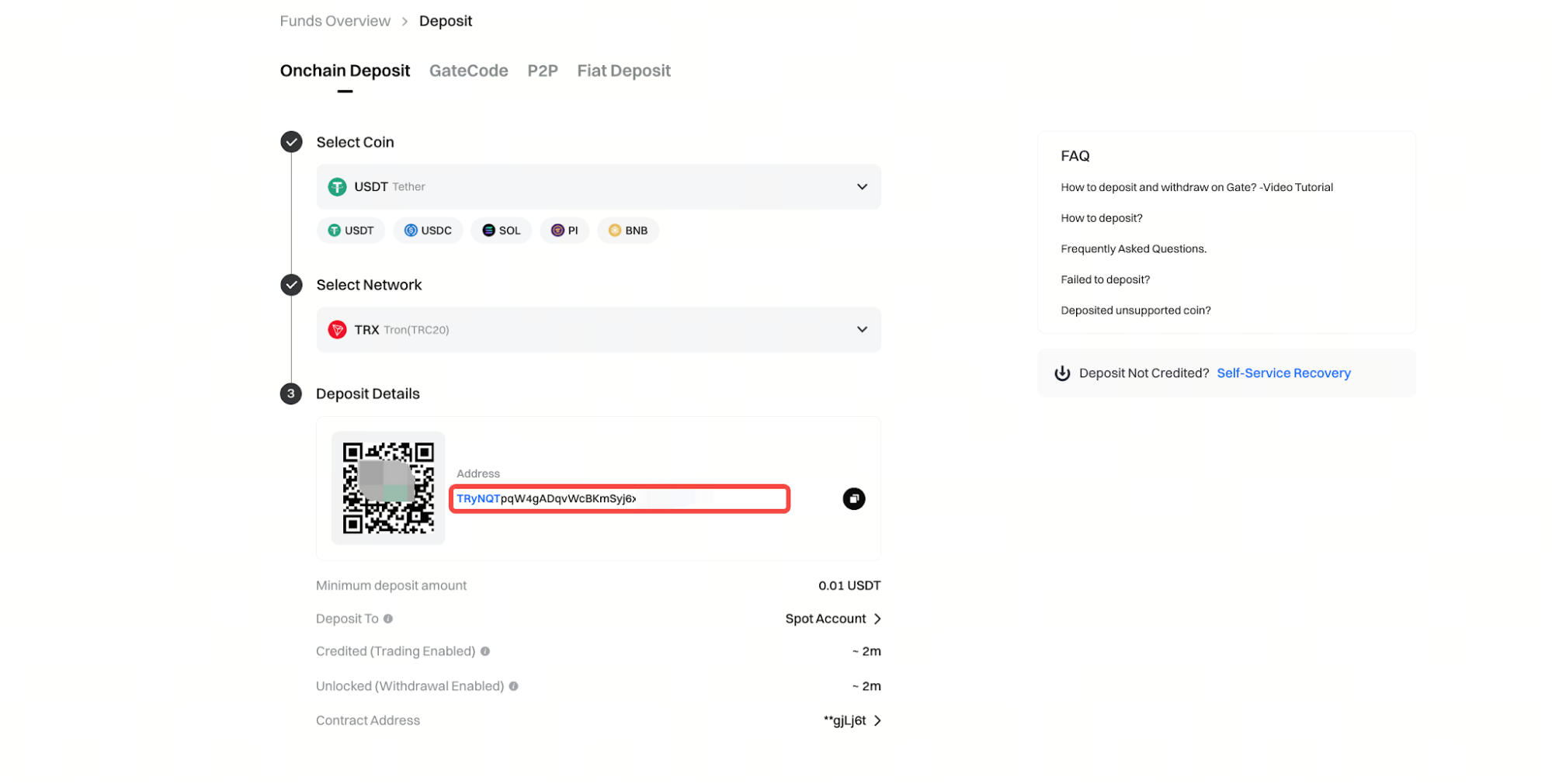
Step 5: Check the Minimum Deposit Amount
Before sending the transaction, check the minimum deposit amount displayed for the selected asset and network.
Minimum deposit requirements can vary by coin and network, so there is no single amount that applies to every asset. Deposits below the displayed minimum may not be credited normally.
For a first deposit, it can be useful to send a smaller test transaction first, as long as the amount is above the minimum deposit requirement.
Step 6: Send the Funds From the Other Platform or Wallet
Return to the wallet or exchange you are sending from and open the withdrawal or send page. Paste the Gate deposit address into the destination field.
Before confirming, check the three most important items again: the asset, the network, and the address. If Gate requires a Memo or Tag, confirm that it has also been entered correctly.
The sending platform may require a password, verification code, or additional security confirmation before processing the withdrawal.
(Screenshot placeholder: Sending platform withdrawal page)
Step 7: Wait for Network Confirmations and Check the Deposit Status
After the transaction is submitted, the funds may not appear in your Gate account immediately. Onchain deposits usually require blockchain confirmations, and the required time depends on the network and the asset.
You can check the transaction status in your Gate deposit history. If the sending platform has already generated a transaction ID but the funds have not yet arrived, check whether the transaction has received enough blockchain confirmations before taking further action.
Why Must the Deposit Network Match Exactly?
An onchain deposit is a blockchain transaction. The deposit address shown by Gate is associated with a specific asset and network, while the withdrawal network on the sending platform determines where the asset is actually sent.
This means that even when transferring the same asset, different networks should not be treated as interchangeable. A token may be supported on several blockchains, but each network represents a different transfer route.
If you are unsure which network to choose, compare the network names shown on the Gate deposit page and the sending platform’s withdrawal page. Only proceed when they match.
What Happens If You Enter the Wrong Memo or Tag?
Some assets use a shared deposit address and rely on a Memo or Tag to identify the individual recipient. For those assets, an address alone may not be enough.
If the Memo or Tag is missing or incorrect, the deposit may not be credited automatically and may require additional recovery steps. That is why any Memo or Tag shown on the Gate deposit page should be treated as part of the complete receiving information.
If Gate does not display a Memo or Tag for the selected asset and network, there is no need to add one manually.
Does Gate Charge a Deposit Fee?
Gate does not charge a fee for standard onchain crypto deposits. However, the wallet or exchange sending the funds may charge a withdrawal fee or blockchain network fee.
This is why the amount sent and the amount ultimately credited can sometimes differ. The cost may be deducted on the sending side rather than by Gate during the deposit process.
It is useful to distinguish between deposit fees, withdrawal fees, and blockchain network fees, because they occur at different stages of the transaction.
What Are the Most Common First-Deposit Mistakes?
The most common problems usually come from incorrect transfer details rather than from the deposit button itself. Typical mistakes include choosing the wrong network, copying the wrong address, forgetting a required Memo or Tag, or sending less than the minimum deposit amount.
Before confirming the transaction, review the details from the beginning rather than checking only the last few characters of the address. For a larger transfer, a small test deposit above the minimum amount can reduce the risk of sending the entire amount with incorrect settings.
If you realize something was entered incorrectly, do not keep repeating the same transfer. Save the transaction ID, asset name, amount, and sending records first, then follow the current Gate recovery or support process.
Summary
Your first crypto deposit on Gate can be broken down into a few simple steps: select the asset, choose the correct network, copy the Gate deposit address, check whether a Memo or Tag is required, verify the minimum deposit amount, and send the funds from the other wallet or platform.
The most important part is not speed but accuracy. The network, address, and any additional identifier must match exactly.
If this is your first onchain transfer, sending a smaller test amount above the minimum requirement before transferring a larger balance can make the process easier to verify.
FAQ
What is the easiest way to make a first deposit on Gate?
If you already hold crypto in another wallet or exchange, an onchain deposit lets you transfer it directly to Gate through a supported blockchain network.
Can I reuse a Gate deposit address?
It is better to reopen the deposit page and confirm the current address and network requirements before each transfer rather than relying only on an address saved earlier.
Why do I need to choose a network if I already selected the coin?
The same crypto asset may exist on multiple blockchain networks, so the sending and receiving networks must match for the deposit to be processed correctly.
Which assets require a Memo or Tag?
Whether a Memo or Tag is required depends on the asset and network. If the Gate deposit page displays one, it must be entered on the sending side.
How long does a Gate deposit take to arrive?
Arrival time depends on the blockchain network, current network conditions, and the number of confirmations required before the deposit is credited.