Trading INFI on Gate is straightforward once the spot pair, quote asset, order type, and slippage settings are selected. The token became tradable through Gate’s spot market after its November 17, 2026 TGE on Ethereum Mainnet and Base. The full protocol mechanics are covered in infiniFi explained.
Key Takeaways
- INFI is available in Gate’s spot trading area; the exact eligible pairs and regional access are shown in the official listing and account interface.
- Fund a quote asset such as USDT before opening the trade ticket, and confirm network, deposit address, and any minimum deposit requirements.
- Search for INFI, review the pair, price chart, recent trades, order book depth, and spread before placing an order.
- Use a market order for immediate execution and a limit order for price control; set a slippage or price limit that matches liquidity conditions.
- Newly listed tokens can have changing depth and wider spreads, so split large orders and confirm the fill, fees, and balances after execution.
What You Need Before You Start
Before placing an INFI order, prepare a Gate account that has passed the platform’s required identity and regional eligibility checks. Availability, fees, and trading rules can vary by region, so verify the asset page and trade interface rather than relying on screenshots from third parties.
Fund the spot account with the quote asset used by the selected pair, commonly USDT. If depositing crypto from a self-custody wallet, select the supported network and verify the deposit address before sending. If using a bank transfer or supported fiat method, allow enough time for funds to arrive and become available for trading.
Confirm that the funds are in the spot account rather than a funding, earn, or margin account. Gate shows available balances by account type, and a spot order can draw only on the balance assigned to spot trading. If the balance is held in another asset, review the platform’s transfer and conversion paths before creating the order. Keep a small reserve for fees rather than allocating the entire quote balance to the order.
Prepare a simple execution checklist before opening the trade page: pair name, quote asset, order size, maximum acceptable price, order type, fee tier, and post-trade review method. This is useful on a newly listed asset because prices and spreads can change while you are entering an order. The checklist also makes it easier to compare what was intended with what actually filled.
Know your objective before opening the ticket: immediate execution, price control, or gradual accumulation. That determines whether a market or limit order is appropriate and how much slippage tolerance is acceptable.
How to Find the INFI Spot Pair on Gate
Sign in and open Gate’s Spot market. Search for “INFI” in the market list or use the token’s official listing announcement to identify the exact trading pair. Confirm the asset name is INFI and that the pair uses the quote asset you intend to trade, such as INFI/USDT.
Review the asset page before trading. Gate's listing announcement identifies INFI as a spot listing, while infiniFi's official documentation identifies the protocol, token utilities, and supported networks. This helps distinguish INFI, the protocol token, from iUSD, siUSD, and liUSD. For a comparison with direct lending protocols, see infiniFi vs Aave and Morpho.
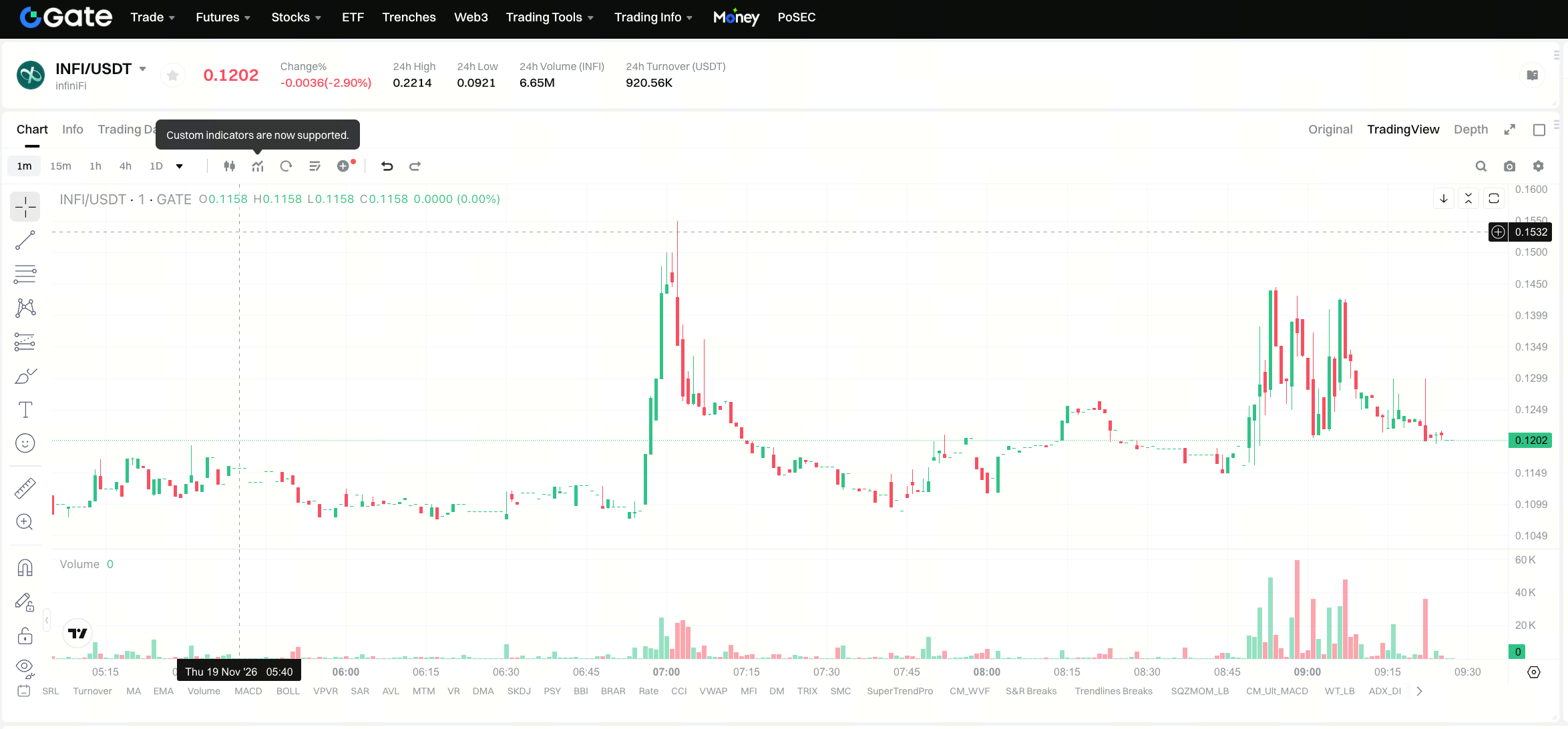
Check the current trading status, supported order types, and any platform notices on the asset page. If INFI is newly listed, the platform may apply temporary trading rules or display changing depth, so confirm the interface details at the time of execution.
Gate’s INFI spot announcement also identifies a 150,000 INFI reward campaign for eligible users. Treat the reward campaign as a separate event from the trading workflow. Before participating, read the announcement’s activity period, eligibility conditions, allocation method, and distribution date. Campaign participation does not change how the INFI spot order is placed or filled, and it is separate from infiniFi protocol deposits.
How to Review INFI’s Liquidity Before Trading
Look at the order book first. A liquid pair has enough bids and asks near the top of the book to absorb your intended size without moving the price materially. Compare the best bid and ask to estimate the spread; a wide spread increases execution cost.
Review recent trades and 24-hour volume to understand activity. Volume alone does not guarantee depth, but it provides context for execution conditions. Then check candlestick intervals and recent volatility to decide whether a market or limit order is safer for your objective.
For large orders, split the trade into multiple tickets or use a limit order at your maximum acceptable price. Avoid sending an amount that would consume several order-book levels when the top-of-book size is thin.
How to Place a Market or Limit Order
Open the INFI spot trade page and select the pair. In the order panel, choose Market to execute at the current available price or Limit to set your own price. Enter the amount of INFI you want to buy or the quote asset you want to sell.
For a market buy, Gate matches your order against available asks until the order fills. For a market sell, it matches against available bids. For a limit order, the order rests on the book until your price is reached, is canceled, or expires according to the selected time-in-force setting.
Before confirming, verify the order quantity, estimated price, fee tier, and available balance. If the platform provides a slippage tolerance control, set it according to the spread and your risk tolerance. After submission, check the order status, average fill price, fees, and resulting balance.
After the order fills, export or copy the spot trade history from Gate if you need a transaction record. The trade history shows the filled quantity, execution price, fee, and timestamp. This is useful for reconciling the order with your portfolio tracker, tax records, or internal trading journal. Gate also provides an account book view for balances, deposits, withdrawals, and transfers; use the appropriate record type rather than mixing fills with balance movements.
If an order remains open, check whether it has fully filled, partially filled, or remains unfilled. A limit order may sit above the best ask or below the best bid. Adjust the price or cancel the order only after checking its current status and the live order book. Partial fills are normal in thin markets; the remaining size may fill at a different price from the first tranche.
How to Manage Risk After Execution
Store INFI in your Gate spot account if you intend to keep trading, or review supported withdrawal networks before transferring to self-custody. INFI launched on Ethereum Mainnet and Base, so selecting the wrong network can result in loss; follow Gate’s asset-page instructions only.
Record your entry price, fees, and order size if you are monitoring exposure. Newly listed assets can move sharply in both directions, especially around early liquidity formation, emissions, unlocks, and governance news. Avoid increasing size impulsively when spreads widen or liquidity thins.
Reconcile every completed order against the spot trade history and your own checklist. The pair, side, size, average price, fee, and timestamp should match the intended execution. If there is a discrepancy, review the order details and platform notices before adding more exposure. Keeping this record with withdrawal history and reward distributions gives a complete view of the INFI position.
Review withdrawals with the same discipline as deposits. Before moving INFI to self-custody, confirm the supported chain, address format, minimum withdrawal, and network fee. Ethereum Mainnet and Base use different address handling and confirmation behavior, so the receiving wallet must support the selected network. Test withdrawals with a small amount when the receiving address is new.
Set alerts or review the market at defined intervals rather than reacting to every tick. If you use stop or conditional order features, test the parameters with small sizes first and confirm how Gate executes each order type.
Common Errors When Trading INFI
| Error |
Cause |
Fix |
| Trading the wrong asset |
Similar names such as INFI and yield tokens like iUSD |
Confirm the official INFI asset page, contract details, and spot pair |
| Insufficient quote balance |
Funds are in a funding account or another asset |
Transfer funds to the spot account and convert to the pair’s quote asset |
| Excessive slippage |
Large market order meets thin order-book depth |
Use smaller tickets, a limit order, or adjust slippage tolerance |
| Wrong deposit network |
Self-custody deposit sent through an unsupported chain |
Verify the asset page’s supported networks before withdrawing |
| Ignoring fees |
Fee tier and estimated cost are skipped |
Confirm the fee tier and account for fees in the planned entry and exit |
| Chasing a thin move |
Buying after a rapid spread expansion |
Wait for depth to normalize or use a bounded limit order |
Summary
To trade INFI on Gate, fund the spot account, find the correct INFI spot pair, review liquidity and spread, then place a market order for immediate execution or a limit order for price control. INFI’s spot listing gives users access to the protocol token, while infiniFi’s deposit and yield mechanics are handled separately through iUSD, siUSD, and liUSD.
FAQ
Is INFI available on Gate?
Yes. Gate announced INFI spot availability. Open Gate’s spot market and confirm the eligible pair, trading status, and regional rules in your account interface.
What quote asset should be used for INFI?
USDT is the common quote asset for newly listed crypto pairs, but the exact supported pair is shown on Gate’s INFI asset page. Fund the quote asset required by the selected pair.
Should INFI be bought with a market or limit order?
Use a market order when immediate execution is more important than price control. Use a limit order when you want to cap the price you pay or receive, especially during thin liquidity or fast price movement.
Is trading INFI the same as using infiniFi’s yield protocol?
No. Trading INFI gives exposure to the protocol token. Depositing USDC into infiniFi creates iUSD and yield exposure through siUSD or locked liUSD positions.
What should beginners check before buying INFI?
Check account eligibility, the exact pair, quote balance, order book depth, spread, fee tier, order amount, and any withdrawal network instructions before executing.
Educational content only. Spot trading involves market, liquidity, execution, and loss risk.