On-chain crypto payments rely on blockchain nodes to validate and confirm transfers without traditional banks acting as a clearing middleman. Making a Bitcoin payment is a beginner skill many users need for global commerce, remittances, and online checkout. For beginners, the hard part is rarely clicking Send—it is verifying the address, network, fee, and confirmation requirements. The sections below cover prerequisites, how crypto payments work, on-chain steps, the Gate Pay path, common errors, and safety checks.
Key Takeaways
- Before you pay with Bitcoin, you need spendable BTC, a secure wallet or exchange account, and a correct receiving address or QR code.
- An on-chain Bitcoin payment follows four checks: get the address → verify network and amount → send the transaction → wait for enough confirmations.
- Bitcoin transfers are generally irreversible; wrong addresses, wrong networks, and phishing QR codes are the most common permanent-loss causes.
- Gate Pay supports scan and checkout payment paths that reduce manual long-address entry, but users still must verify amount, merchant, and regional availability.
What You'll Need Before You Pay with Bitcoin
Confirm four prerequisites before starting a Bitcoin payment. Choose your Bitcoin wallet or exchange carefully: you need a tool you can use to send funds, receive a payout confirmation, and keep reporting records for your own bookkeeping.
| Item |
What it means |
Check before sending |
| BTC balance |
Enough BTC in a wallet or trading account (including network fees) |
Amount + fee ≤ available balance |
| Wallet / account |
Hardware wallet, software wallet, or exchange account that can send |
Withdrawal/transfer enabled; backup and 2FA in place |
| Recipient details |
BTC address, QR code, or in-app payment identifier |
Full address from a trusted channel |
| Network & timing |
Bitcoin network fees and confirmation expectations |
Merchant confirmation rules and acceptable wait time |
If any item is missing, do not rush Confirm. When an address arrives via chat, unknown links, or pop-ups, go back to the merchant page or verify the QR code in person. Making payments from an unverified deep link is a common loss pattern.
For background on Bitcoin as an asset and network, build the basics first; payment flows emphasize address accuracy and confirmation rules rather than price narratives. Some users convert fiat to BTC before making a purchase; others already hold BTC and only need to send.
How Cryptocurrency Payments Work
What are crypto payments in practice? Cryptocurrency payments use a public blockchain ledger: the payer broadcasts a transaction, nodes independently check balances and signatures, and confirmed transfers are recorded in blocks linked into a chain. The same blockchain settlement rail can move Bitcoin or, in other tools, stablecoins—without asking banks to intermediate every global transfer.
Compared with the limitations of traditional payment systems run by banks, on-chain payment is closer to moving digital value directly from one address to another. There is no clearing bank rewriting ledgers in the middle—and usually no default “customer service reverse” path. Payment providers and marketplaces may still show fiat equivalents on screen, but the underlying payout settles on the blockchain. Verifying the receiving address and network therefore matters more than interface polish.
A typical Bitcoin payment status path looks like this:
- Create: The wallet builds the transaction (inputs, outputs, fee).
- Broadcast: The transaction enters the mempool and waits to be included in a block.
- On-chain: Inclusion in a block provides the first confirmation.
- Merchant acceptance: The recipient waits for their required confirmation count before releasing goods or services.
Confirmation requirements vary: small everyday purchases may accept fewer confirmations; larger settlements usually require more. Follow the recipient’s published rules. Settlement time is not fixed like an instant card authorization—network load can raise fees and extend the time to finality. Public guides such as Bitcoin.org Getting Started also stress learning wallet and transfer safety before everyday use.
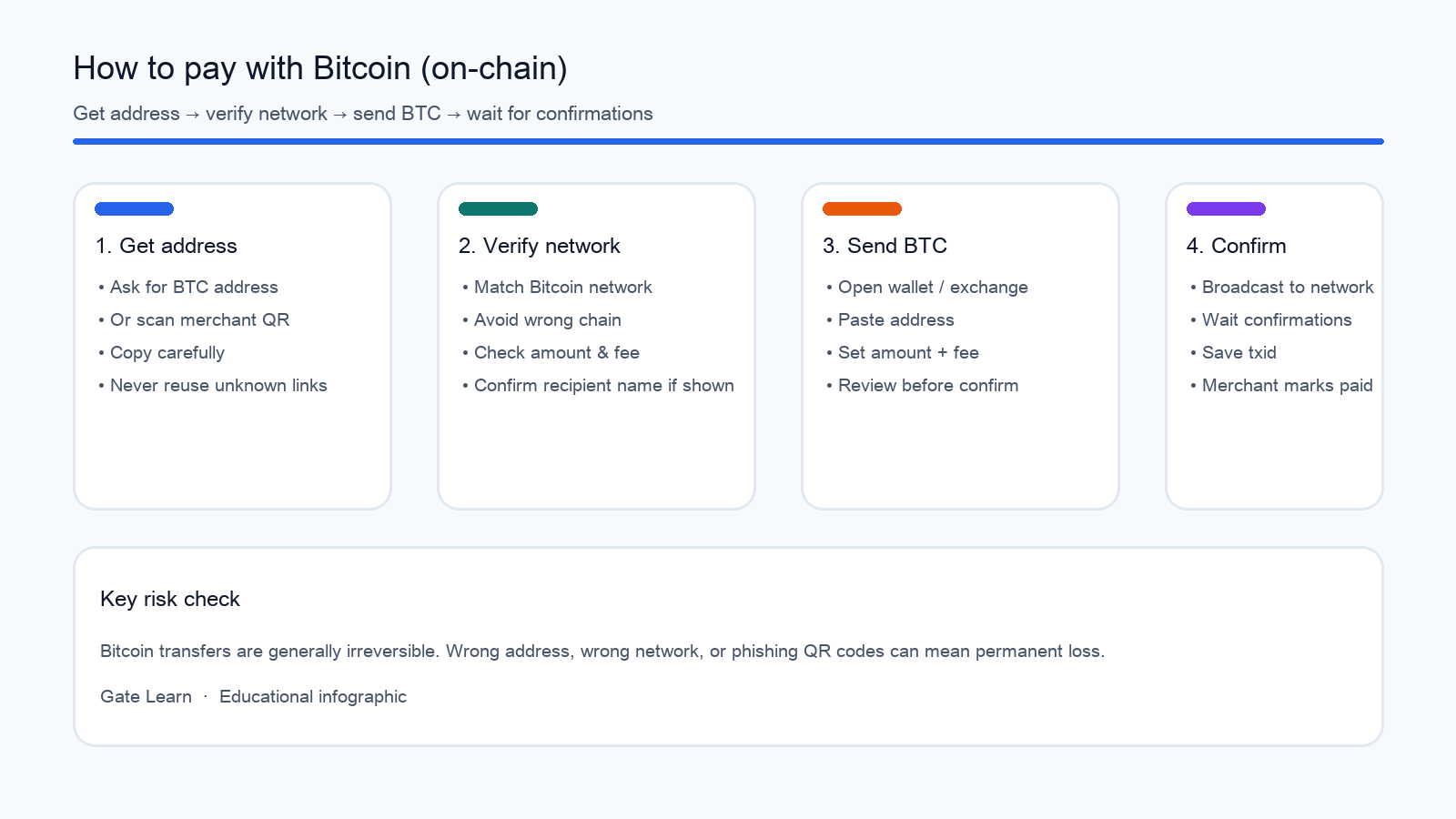
Figure 1. Four-step on-chain Bitcoin payment flow: get address, verify network, send BTC, wait for confirmations.
Step 1: How Do You Get the Recipient’s Bitcoin Address?
Start with recipient details the payee clearly provides so you can receive accurate payout instructions. Common formats include:
- A Bitcoin address string to copy and paste.
- A QR code on a checkout page or at a counter.
- An in-app payment identifier that routes into a payment module instead of a raw address.
Practical checks when making a transfer:
- Prefer official merchant checkout pages, counter displays, or in-person QR codes.
- After pasting, verify the first and last characters; scan a QR when possible instead of typing.
- Do not trust “temporary new address” messages from unknown chats.
- Use a Bitcoin address lookup / block explorer only after you initiate a send, not as a substitute for verifying the merchant’s own QR.
If the recipient lists addresses on multiple networks, confirm they want Bitcoin-network BTC, not a lookalike asset on another chain. Global merchants and payment providers may display fiat invoices while still expecting a crypto payout on-chain.
Step 2: How Do You Send Bitcoin and Set the Network Fee?
Open the wallet or exchange withdrawal/transfer screen that holds BTC, then use the following checklist:
- Paste or scan the receiving address.
- Enter the payment amount (confirm whether the UI shows BTC or a fiat display conversion).
- Select or confirm the Bitcoin-related network (use the options shown in that wallet).
- Review the estimated network fee; fees that are too low can delay confirmation time.
- On the final review screen, re-check address, amount, network, and fee before making the send.
Exchange accounts may add a withdrawal step from a spot balance to an on-chain address; minimums, reviews, and fees follow that platform’s page. Some users convert fiat balances to BTC inside an exchange first, then send; others use BTC they already hold. In Gate scenarios where the merchant supports scan or checkout, evaluate Gate Pay before defaulting to an on-chain withdrawal. You still need enough balance to cover both the invoice and the network fee.
Step 3: How Do You Confirm the Payment Is Complete?
After sending, wallets usually return a transaction ID (txid). Look up the txid on a block explorer and watch confirmation count increase over time. Keep that txid for personal reporting if you need to reconcile a payout with a merchant invoice. For how nodes validate and record transfers, see Bitcoin.org’s how-it-works overview on broadcast and confirmation basics.
Recipients typically mark a payment complete when:
- The correct amount arrives and they can receive the payout on their side;
- The network matches their requirement;
- Confirmations reach their threshold.
Before that threshold, a merchant may show “pending” and withhold delivery. Waiting for more confirmations on larger or higher-risk payments is a common risk control—not necessarily a product bug. Unlike card rails operated by banks, blockchain settlement finality depends on confirmations rather than overnight clearing cycles.
How to Pay with Gate Pay Scan or Checkout
Besides sending BTC on-chain, users can complete crypto payments through payment apps and other providers. Gate Pay is Gate’s crypto payment and spending tool for partner merchants, peer transfers, and some local QR payment scenarios. Gate Help Center documents Home, deposit, Scan, and checkout steps. Making payments this way can reduce the need to type long addresses while still letting merchants receive a clear payout record.
A common Gate Pay path:
- Open Gate Pay in the Gate App.
- If the payment account balance is low, deposit or transfer funds from the spot account—convert or move assets only as the app balance screen requires.
- At a partner merchant checkout, choose Gate Payment, or tap Scan and scan the merchant QR code.
- Confirm amount and order details, then complete payment.
- Review the record under Recent Activity on Home for reporting and dispute checks.
Gate Pay Scan to Pay explains integration with selected national QR networks so users can spend digital assets such as stablecoins in everyday settings without always converting to local fiat first. Supported assets, countries/regions, and merchants follow the latest product and Help Center details. Global coverage still depends on region rules—not every market can use every QR rail.
On checkout pages, merchants may offer Gate QR payment and on-chain address payment side by side. On-chain address payment still requires verifying coin, network, and address, and paying network/gas fees on the blockchain. Gate’s checkout payment guide lists both paths so users can choose by scenario. Payment providers that accept crypto often show a fiat invoice amount while settling the payout in crypto.
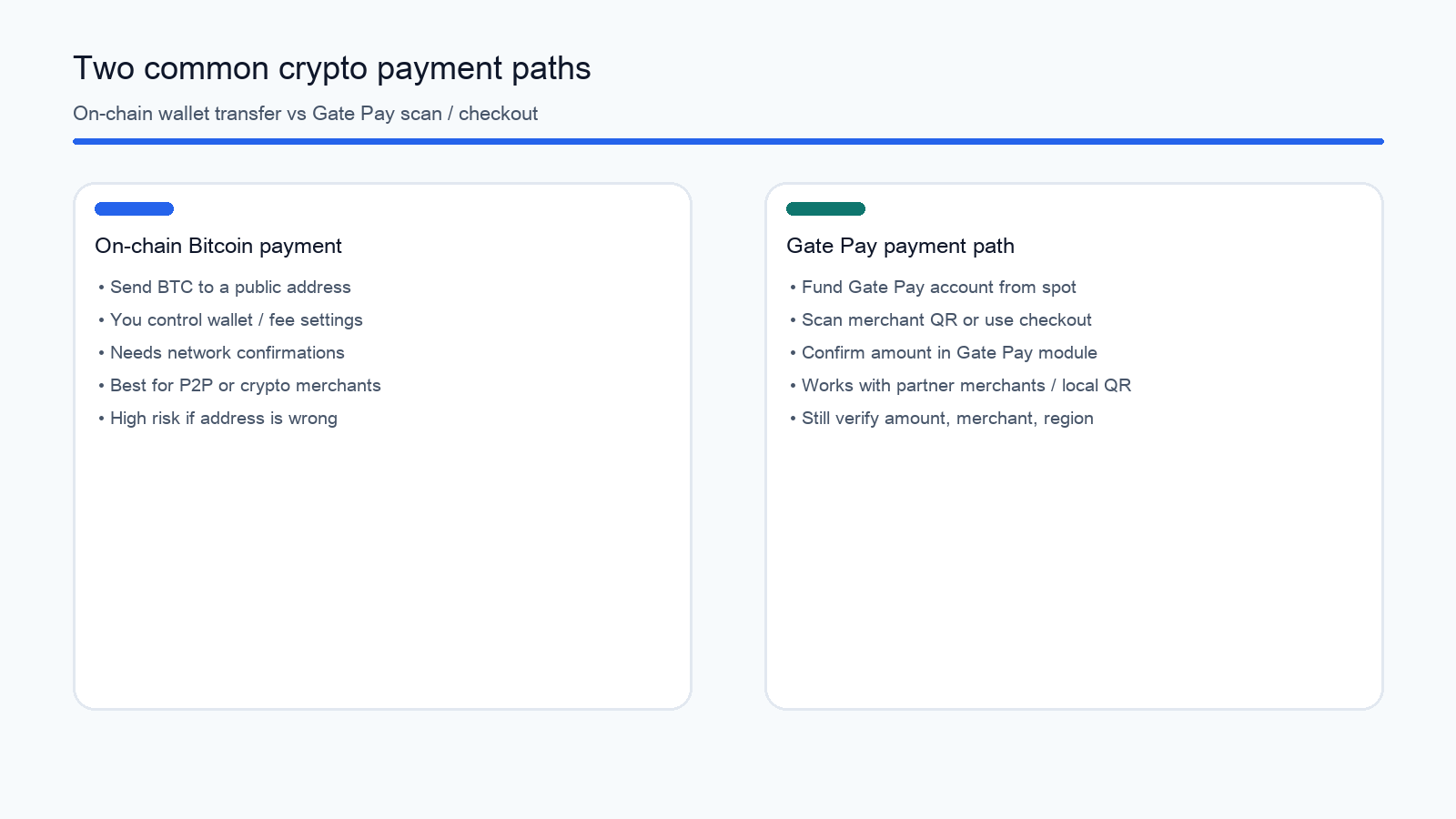
Figure 2. On-chain Bitcoin payment versus Gate Pay scan/checkout paths: different use cases and verification focus.
| Path |
Better when |
Main checks |
| On-chain BTC transfer |
P2P, address-only crypto merchants, self-custody users making a direct payout |
Address, network, fee, confirmations, blockchain explorer reporting |
| Gate Pay scan / checkout |
Gate partner merchants, in-app spending, some local QR rails where providers support fiat display |
Payment-account balance, amount, merchant, regional availability |
Common Errors and How to Fix Them
| Error |
Common cause |
Fix / prevention |
| Sent to the wrong address |
Truncated copy, phishing QR, chat-based address change |
Verify first/last characters; use official checkout or in-person QR only |
| Wrong network |
Sending BTC-like assets to another chain’s address format |
Send only on networks the recipient explicitly supports; stop if unsure |
| Fee too low / stuck unconfirmed |
Underpriced fee or network congestion |
Use wallet-suggested fees; track txid status over time |
| Asking for delivery before confirmations |
Treating “broadcast” as “settled” |
Follow the merchant’s confirmation threshold before they receive goods |
| Insufficient Gate Pay balance |
Spot funds not moved to the payment account |
Check available balance on Gate Pay Home before making payment |
| Fiat amount mismatch |
UI shows fiat while payout settles in crypto |
Convert carefully; confirm crypto size equals the invoice |
Most severe Bitcoin payment losses happen in the last seconds before confirm—rushing, chatting while paying, or following unknown deep links. Slow verification beats after-the-fact recovery attempts.
Is Paying with Bitcoin Safe?
Bitcoin payments can support global peer-to-peer settlement, but the safety model differs from card rails operated by banks.
Key risks include:
- Irreversibility: Most on-chain transfers cannot be reversed like a typical card chargeback from banks.
- Address and QR fraud: Fake merchant pages, address poisoning, and social-engineering address swaps.
- Fee and timing uncertainty: Congestion can slow confirmation time or raise fees when making a send.
- Merchant and regional limits: Not every merchant accepts BTC; payment providers and app features vary by region and compliance rules.
- Account and device security: Seed-phrase leaks, missing 2FA, and malicious apps amplify loss.
- Reporting gaps: Users still need their own records (txid, invoice ID) because blockchain explorers do not replace merchant reporting.
Pre-payment safety checklist:
- Is the address or QR from a trusted source?
- Do network and asset match the recipient’s requirement?
- Are amount and fees acceptable in both crypto and any displayed fiat terms?
- Is the device and account under your control (no remote assistance, no unknown approvals)?
- Have you saved the txid or payment order ID for reconciliation and reporting?
These points describe mechanism and operational risk only—they are not investment, savings, or purchase advice. Whether a business should accept cryptocurrency is a separate decision from making a personal payout; the focus here is the payer workflow. An educational summary of advantages of paying with Bitcoin is also available from Investopedia; still verify addresses and confirmation rules yourself.
Summary
How to pay with Bitcoin comes down to two clear paths: send an on-chain BTC transfer to a receiving address and wait for enough confirmations, or—where supported—use Gate Pay for scan or checkout. Either path hinges on verifying recipient details, network, amount, and confirmation rules. Prepare balance and wallet access, follow the send steps, use the error table when something looks wrong, and finish the safety checklist before an irreversible transfer. Making crypto payments carefully—without confusing fiat display amounts for the actual blockchain payout—turns Bitcoin payment from a stressful guess into a repeatable process that works across global merchants and payment providers.
FAQ
How do I pay with Bitcoin?
Obtain the recipient’s BTC address or QR code, paste it into a wallet or exchange transfer screen, enter the amount, confirm network and fee, then send and wait for the merchant’s required confirmation count. Where supported, Gate Pay scan or checkout can complete payment without typing a long address. Some checkout pages convert an invoice from fiat to crypto automatically; still verify the final payout amount before making the send.
Do I need a wallet to pay with Bitcoin?
You need a tool that can control BTC and initiate a transfer: a self-custody wallet or an exchange account with withdrawal/payment features. Without a transferable wallet or account, on-chain Bitcoin payment is not possible; payment-app paths require the corresponding app account and available balance. Choose providers you can use safely, and keep reporting records of every payout you receive confirmations for.
How long does a Bitcoin payment take?
Broadcasting can appear on the network quickly, but “usable settlement” depends on confirmations and network time. Small merchants may accept fewer confirmations; larger settlements often require more. Congestion can extend wait times—follow blockchain progress and the recipient’s rules rather than assuming banks-style instant finality.
Can I recover Bitcoin sent to the wrong address?
Usually no. Once sufficiently confirmed, on-chain transfers do not offer a default bank-style reversal from banks. If the transaction is still unconfirmed, stop further actions and ask wallet/platform support whether fee replacement or product-specific options exist—success is not guaranteed. Making a second “corrective” payout to an unverified address often worsens losses.
Is paying with Bitcoin safe, and what fees apply?
Peer-to-peer settlement is possible on a global scale, but irreversibility, phishing addresses, and variable network fees remain real risks. Costs mainly include network fees on-chain plus any convert / service fees shown when payment providers display fiat. Verify the UI before confirming, and always re-check address and amount before you receive a final confirmation screen.