


POV Algorithmic Orders (Percentage of Volume Orders) are intelligent order-splitting tools provided by Gate for users making large trades. These orders automatically break down large orders into multiple smaller ones and execute them in batches based on real-time market trading volume, helping users complete transactions with minimal impact on market prices.
Feature Overview
What is a POV Algorithmic Order?
The core logic of POV algorithmic orders is to “follow the market”: the system continuously monitors real-time market trading volume and, based on your set participation rate (i.e., the proportion of your trading volume relative to the market volume), automatically places batch orders.
- When the market is active, the system places more orders;
- When the market is quiet, the system places fewer orders or may even pause;
- Orders are not guaranteed to be fully filled; actual execution speed depends on market activity, order book depth, and your parameter settings.
When Should You Use It?
POV algorithmic orders are suitable for the following scenarios:
- Large trades: When executing a large order at once might push the price up or down, and you want to reduce market impact by splitting the order;
- Not seeking immediate full execution: If you care more about execution quality and are willing to wait for better prices;
- Adapting to market liquidity: If you want to trade more when the market is active and less when it’s quiet;
- Mainstream trading pairs: Best for pairs like BTC, ETH, and other high-volume assets; for less popular tokens with low trading volume, orders may execute more slowly;
- Price range requirements: You can set a limit price to ensure trades are executed within an acceptable price range.
Order Parameter Guide
| Parameter | Required? | Description |
|---|---|---|
| Total Order Size | Required | The total amount you wish to buy or sell in this order |
| Target Participation Rate | Required | The proportion of your trades to market volume; options: 5% / 10% / 20% / 40% |
| Order Validity | Required | Maximum execution time for the order; any unfilled portion is canceled after expiry |
| Trigger Price | Optional | If set, the order will only execute when the market price reaches the trigger price |
| Limit Price | Optional | Buy orders won’t execute above this price; sell orders won’t execute below it; if outside this range, the system pauses order placement |
How to Place an Order
- Log in to the Gate website and go to the Spot Trading page;
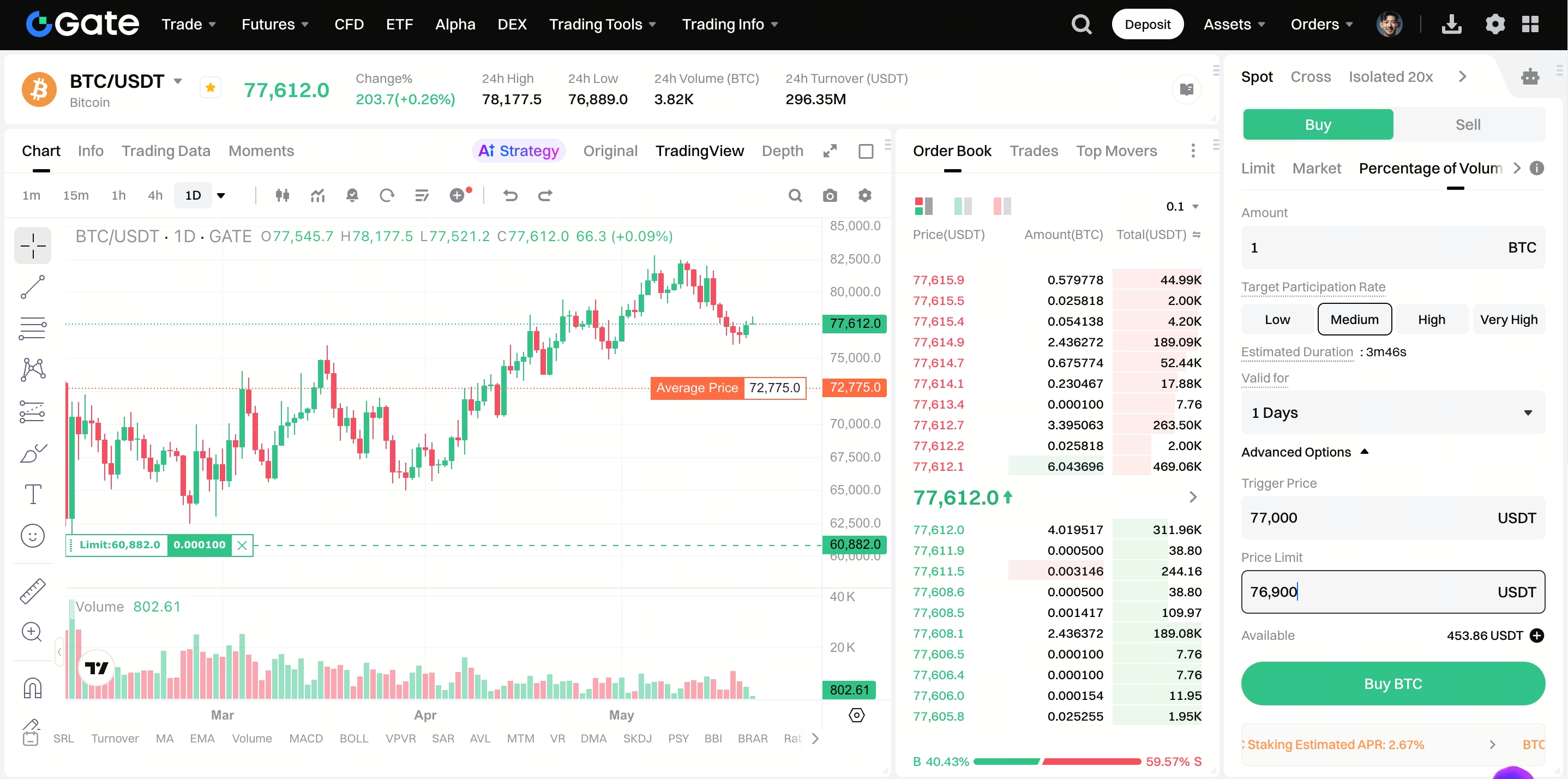
- In the order area, select the Percentage of Volume strategy;
- Enter the required parameters: Total Order Size, Target Participation Rate, and Order Validity;
- If needed, enter Trigger Price and Limit Price (optional);
- After confirming all parameters, click Buy or Sell to submit the order;
- You can view order execution progress in Current Orders or Order History.
Execution Logic Explained
The system checks the market at fixed intervals and places orders according to the following steps:
- Read the actual market trading volume in the previous time slice;
- Calculate the theoretical order size for this round: Theoretical Order Size = Previous market volume × Target Participation Rate;
- Check order book depth to avoid excessive market impact;
- Place the smallest value among the three: Final Order Size = min(theoretical order size, safe tradable volume in the order book, remaining unfilled amount);
- Submit as an IOC limit sub-order (Immediate or Cancel; any unfilled portion is canceled immediately). Filled trades are executed; unfilled portions are not retained.
Auto-Correction Mechanism
The system continuously compares the “actual participation rate” with the “target participation rate” and automatically adjusts the pace:
- Actual fills are too low (e.g., target 10%, actual only 5%): The system will speed up order placement to “catch up,” but won’t chase indefinitely to avoid aggressive buying or selling that could impact prices;
- Actual fills are too high (e.g., target 10%, actual 18%): The system enters a “cooldown period,” reducing or pausing order placement until market volume catches up.
Important Notes
- POV algorithmic orders are only supported on the web; not available in the app for now;
- Orders are not guaranteed to be fully filled. If the validity period ends, market volume is extremely low, or price limits are too strict, only part of the order may be executed;
- It’s recommended to use this feature with major trading pairs like BTC and ETH. For less popular tokens with low liquidity, order execution efficiency may be poor;
- If the limit price is set too strictly (too close to the market price), the system may frequently pause order placement, affecting overall execution efficiency.
Frequently Asked Questions
Q: Why is my order executing slowly or not being filled for a long time?
A: Possible reasons include low market trading volume (especially for less popular tokens), a trigger price set too far from the market price, or a low target participation rate. Try increasing the participation rate or check if your price settings are reasonable.
Q: What happens if my order isn’t fully filled by the time it expires?
A: When the validity period ends, the system automatically cancels any unfilled portion, and any frozen funds are released back to your account. If you still want to trade, you can submit a new order.
Q: What’s the difference between a POV order and a regular limit order?
A: A regular limit order places the entire order in the order book at once and waits for it to be filled. A POV algorithmic order continuously tracks market trading volume and automatically splits the order into smaller batches, making it more suitable for large trades aiming to minimize market impact.
Q: What’s the difference between a trigger price and a limit price?
A: The trigger price determines “when the order starts”—the order will only activate when the market price reaches the trigger price. The limit price determines “the price range for execution”—if the market price moves outside the limit, the system pauses order placement and won’t force trades at unfavorable prices.
Disclaimer
The content provided herein is for reference and educational purposes only and does not constitute any financial, investment, trading, or legal advice, nor does it constitute an offer or solicitation to buy or sell any digital assets. Gate makes no express or implied representations or warranties regarding the accuracy, completeness, or timeliness of the information contained herein. Product features, interfaces, rules, and fee structures may be updated or adjusted at any time. Please refer to the latest announcements and the actual information displayed on the Gate platform for the most accurate details.
Digital asset investments involve significant risk, and prices may fluctuate substantially. You may lose the entire amount of your investment. Please make decisions cautiously based on your own financial situation and risk tolerance after fully understanding the associated risks. If necessary, you are advised to consult an independent professional financial or legal advisor.
For more information about potential risks, please refer to Gate's Risk Disclosure and User Agreement.
