Suitable for beginners who want automation basics without every advanced toggle first. Strategy hubs live on the Gate Trading Bot product page.
Key Takeaways
- Gate Trading Bot executes buys, sells, or rebalances from rules; the edge versus manual trading is discipline and 24/7 coverage, not risk removal.
- Common strategies include Spot Grid, Futures Grid, Futures DCA (Futures Martingale), Spot DCA / Spot Martingale, Rebalance Bot (Smart Rebalance), and Stock Portfolio; Ultra AI assists grid setup and is not Chat-to-Strategy.
- Spot Grid buys low and sells high inside a range; Futures Grid adds long/short/neutral modes plus leverage; Futures DCA averages cost with batch entries and needs stop-loss and liquidation control.
- The usual path is Select type → Configure → Launch → Monitor; bots can still break out of range, run unrealized losses, or lose edge to fees.
What Is Gate Trading Bot, and How Does It Differ from Manual Trading?
Gate Trading Bot hands range orders, staged entries, and ratio rebalancing to system execution: pick a strategy and parameters, then let the bot post, fill, and rebalance. Help Center covers Spot Grid, Futures Grid, Spot/Futures Martingale, Smart Rebalance, and Stock Portfolio; the product page shows the same family as Spot Grid, Futures Grid, Futures DCA, Rebalance Bot, and Stock Portfolio.
Versus manual trading, the gap is execution: bots keep working on grid lines or add-on triggers and reduce emotional chase orders; discretionary trading keeps instant judgment. Bots do not guarantee fills inside a range; wrong parameters, one-way markets, or excess leverage still leave losses and liquidation risk with the account.
What Strategy Types Does Gate Trading Bot Offer?
Gate Trading Bot splits strategies by market and goal: range arbitrage, directional grids, staged cost management, weight maintenance, and stock-portfolio rebalancing. Confirm leverage or short needs, and whether the goal is volatility harvest or allocation rebalance.
| Strategy |
Product-page positioning (summary) |
Typical fit |
Key parameter focus |
| Spot Grid |
Buy low and sell high. Auto arbitrage in swing markets |
Spot ranges, buy-low / sell-high loops |
Bounds, grid count, investment |
| Futures Grid |
Use futures to amplify returns and expand arbitrage space |
Long / short / neutral + leverage |
Side, leverage, range, grid count |
| Futures DCA (Futures Martingale) |
Enter in batches, boost win rate, and per-trade returns |
Averaging long/short cost in chop |
Side, leverage, base order and add-ons |
| Spot DCA (Spot Martingale) |
Buy in batches, lower cost, capture rebounds |
Spot drawdowns with staged buys |
Deviation, rounds, take-profit |
| Rebalance Bot (Smart Rebalance) |
Auto-maintain position ratios for easy asset allocation |
Multi-asset target weights drifting |
Target weights, trigger threshold |
| Stock Portfolio |
Long-term investing, automated portfolio rebalancing |
Same-market multi-stock allocation |
Names, weights, interval / threshold |
The table aligns product-page labels with Help Center names: Futures DCA maps to Futures Martingale; Spot DCA / Spot Martingale maps to Spot Martingale; Rebalance Bot maps to Smart Rebalance. Trailing Grid can shift the full range after breakouts; do not confuse Arbitrage Bot or Chat-to-Strategy with Ultra AI.
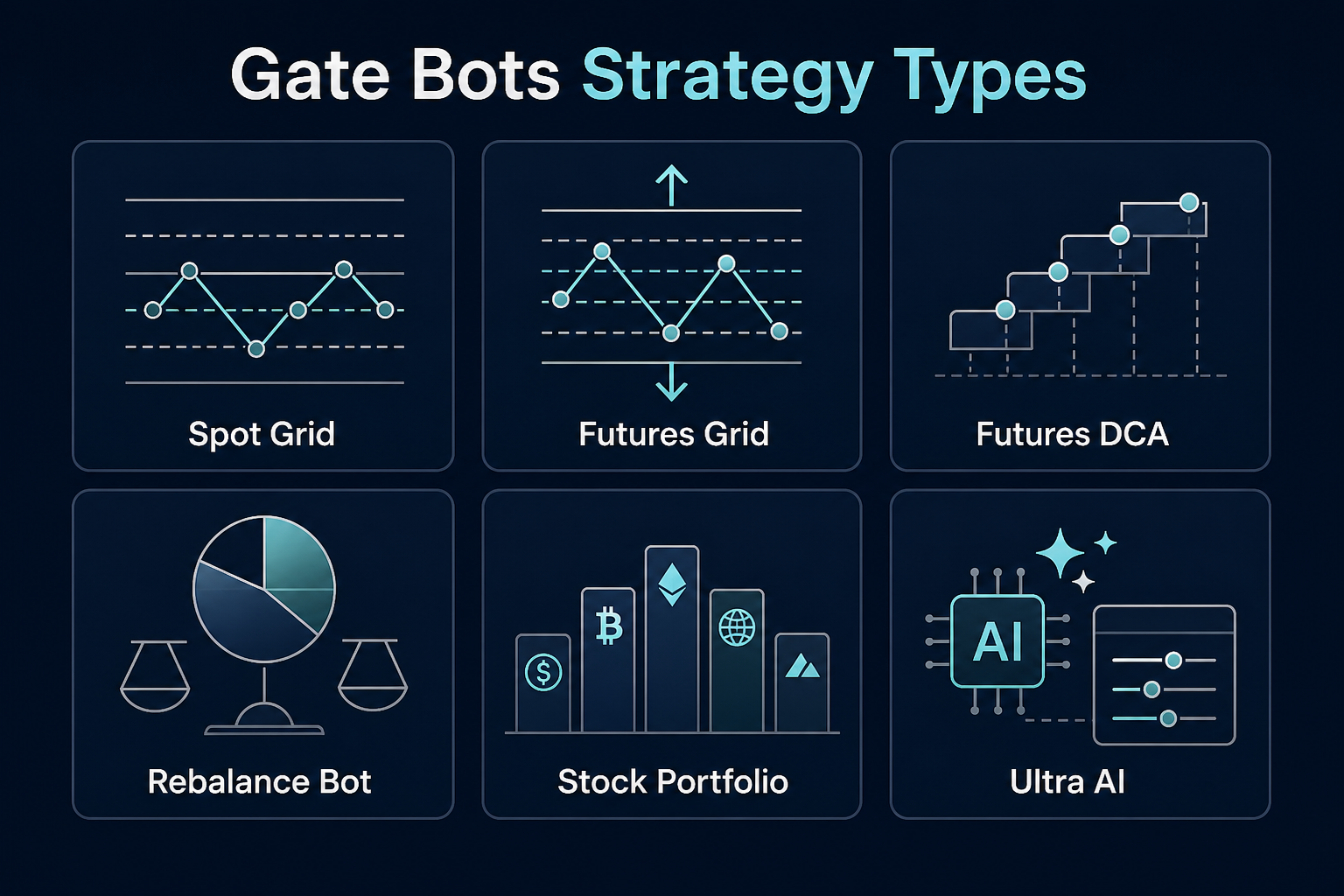
Figure 1. Gate Bots strategy types at a glance: Spot Grid, Futures Grid, Futures DCA, Rebalance Bot (Smart Rebalance), Stock Portfolio, and Ultra AI.
How Do Spot Grid, Futures Grid, and Futures DCA Work?
Spot Grid slices a price band into levels, buying as price falls and selling as price rises. Per the Spot Grid Trading Guide, users set upper/lower limits and grid count; Spot Grid is typically long-only and can sit underwater in prolonged downtrends. Trailing Grid can shift the range via moving-average or breakout rules. Spot Grid vs Futures Grid compares leverage and direction in more detail.
Futures Grid runs on perpetual futures, can raise capital efficiency with leverage, and offers long, short, and neutral grid modes. Neutral grids keep both-side logic when direction is unclear—yet one-way moves can still build unrealized losses, with added margin, funding, and liquidation constraints.
Futures DCA (Futures Martingale on Help Center) picks a long or short bias, then adds size on adverse moves to lower average cost and closes when a rebound hits take-profit. It supports leverage and shorts, which also raises liquidation risk; stop-loss, add-on ratio, and max add-on count belong in the same checklist.
What Is Ultra AI, and How Does It Help Create Bots?
Ultra AI is the smart-parameter path inside creation flows, commonly split as “Ultra AI / Manual” for Spot Grid and Futures Grid. Related tooling includes AI Smart Grid: backtests recent history to suggest upper limit, lower limit, and grid count so users mainly confirm investment size (and leverage on futures). Backtested recommendations and full manual entry remain available.
Ultra AI answers “where do parameters come from,” not “which strategy type to pick,” and it is not Chat-to-Strategy. Historical backtests only reflect past volatility; after accepting suggestions, still verify range coverage and whether take-profit, stop-loss, coin-accumulation, or Trailing Grid toggles are needed.
What Problems Do Rebalance Bot and Stock Portfolio Solve?
Rebalance Bot (Help Center: Smart Rebalance) keeps multi-asset target weights: when one coin drifts above its share, the bot sells overweight and buys underweight. It solves allocation drift, not single-cycle grid scalps. Trigger thresholds follow product-page fields.
Stock Portfolio Bot extends rebalancing to equities: add at least two and up to about ten same-market stocks, set target weights plus interval or threshold rules. Cross-market mixes are unsupported, and closed sessions can block changing weights or terminating; the intent is medium- to long-term allocation.
What Are the Advantages and Risks of Using Gate Trading Bot?
Advantages sit in execution: 24/7 rule-based orders and rebalances; grids that harvest ranges; Futures Grid for direction and leverage; Futures DCA for staged cost management; Rebalance Bot (Smart Rebalance) and Stock Portfolio for target weights. Creation paths include smart/backtest recommendations, copy flows, and custom parameters.
Risks are equally concrete: Spot Grid can get stuck in one-way selloffs; futures and Martingale bots add leverage, funding, and liquidation; add-ons raise wipeout pressure; grids without Trailing Grid can idle after breakouts; Stock Portfolio is bound by trading hours and same-market rules. Automation does not erase fees or slippage, and it is not a return promise.
How Do You Use Trading Bots on Gate?
The path matches the product page in four steps:
- Select Robot Type: pick Spot Grid, Futures Grid, Futures DCA, Rebalance Bot (Smart Rebalance), Stock Portfolio, or another listed type based on asset and view.
- Configure Parameters: set investment, price range, grid count, leverage, add-on rules, or target weights; use Ultra AI / backtest recommendations or enter values manually.
- Create and Launch: confirm settings and start the bot so it runs under the rules.
- Monitor and Adjust: review status under My Bots, then pause, edit parameters, set take-profit / stop-loss, or terminate when needed.
Web and App entry points sit under Bots / Trading Bots; Spot Grid docs illustrate “Bots → Spot Grid → select pair → Ultra AI / Manual → Create.” Before launch, check liquidity and minimum investment; if the strategy no longer matches the market, stop it promptly.
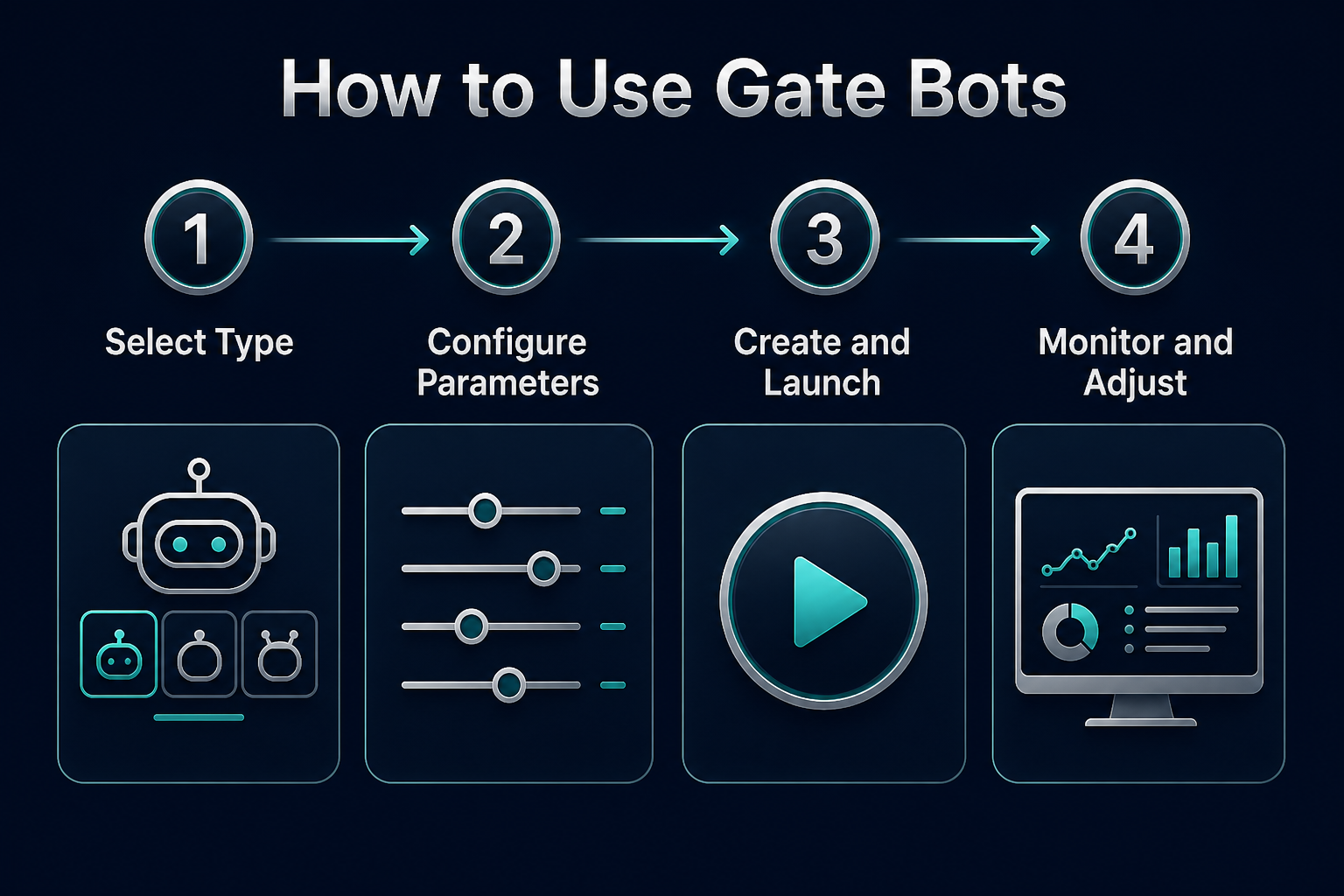
Figure 2. Four-step Gate Bots flow: Select type → Configure parameters → Create and Launch → Monitor and Adjust.
Summary
Gate Trading Bot productizes order, add-on, and rebalance actions: Spot Grid for range arbitrage, Futures Grid for direction and leverage, Futures DCA (Futures Martingale) for adverse-move averaging, Rebalance Bot (Smart Rebalance) and Stock Portfolio for target weights, and Ultra AI for lower grid-setup friction. Choose by market hypothesis and risk budget first, then set range, leverage, and stops.
FAQ
What is a Gate trading bot?
Gate Trading Bot (Gate Bots / Trading Bots) is Gate’s automation toolkit: after setting a strategy and parameters, the system places, fills, or rebalances under those rules. Types include Spot Grid, Futures Grid, Futures DCA, Rebalance Bot (Smart Rebalance), and Stock Portfolio. The goal is less repetitive chart-watching, not zero market risk.
How does Spot Grid work?
Spot Grid divides a price band into levels, buying on dips and selling on rallies. Core inputs are upper limit, lower limit, grid count, and investment; Trailing Grid or take-profit / stop-loss can be enabled. Spot Grid is typically long-only and can get stuck in prolonged downtrends.
What is Futures DCA / Futures Martingale?
Futures Martingale on Help Center is labeled Futures DCA on the product page. After choosing long or short, the bot adds size on adverse moves to lower average cost and closes when take-profit hits. Leverage is available, which also raises liquidation risk, so stop-loss and add-on caps should be set together.
What is Ultra AI?
Ultra AI is the smart-parameter path when creating grid bots, related to AI Smart Grid suggestions for range and grid count from historical backtests. Users still confirm investment and risk toggles. Ultra AI is not Chat-to-Strategy and does not guarantee that backtested settings will repeat live.
Are Gate trading bots safe?
Bots can reduce emotional mistakes, but they do not remove price swings, breakouts, fees, or futures liquidation risk. Spot strategies can still get stuck; futures and Martingale strategies also layer leverage and funding. Safety depends on parameter fit, margin buffer, and timely termination when conditions change.