Gate Trenches brings token discovery, real-time market data, candlestick charts, and onchain trading into one interface. Users do not need to move funds to an external Web3 wallet first or switch between multiple onchain tools before placing a trade.
A more streamlined interface does not remove the underlying risks of onchain assets. For meme tokens, newly launched assets, or low-liquidity markets, users should still verify the contract address and network, review liquidity, slippage, and minimum received amounts, and make sure they understand the execution conditions before trading.
Key Takeaways
-
Gate Trenches supports searching for onchain assets by token name, ticker, or contract address.
-
Users can review price, candlestick charts, trading volume, liquidity, and other market information in the same interface.
-
Before trading, users should verify the token contract address and network.
-
Order details such as estimated received amount, minimum received amount, slippage, and fees should be checked before submission.
-
Low-liquidity assets are more likely to experience significant slippage, both when buying and selling.
-
Completed trades can be reviewed through order and transaction records.
-
Gate Trenches simplifies the trading process, but it does not eliminate price, liquidity, contract, or network risks.
What Do You Need Before Using Gate Trenches?
Before getting started, users need an active Gate account and sufficient available balance for the intended trade. If the target asset is already known, it is helpful to have the correct token name, ticker, and contract address ready. For meme tokens, newly launched assets, or projects with multiple similarly named tokens, the contract address is usually a more reliable search reference than the token name alone. Decentralized exchanges allow trading without a central authority. New crypto tokens, including most memecoins, often begin on DEXs before reaching centralized exchanges.
It is also useful to understand a few basic concepts before trading, including network selection, liquidity, slippage, and transaction fees. Gate Trenches brings these details into the trading interface, but the final execution result can still be affected by changing onchain market conditions. First-time users may prefer to start with a smaller amount while learning the workflow.
How to Use Gate Trenches for Onchain Trading
Step 1: Open the Gate Trenches Page
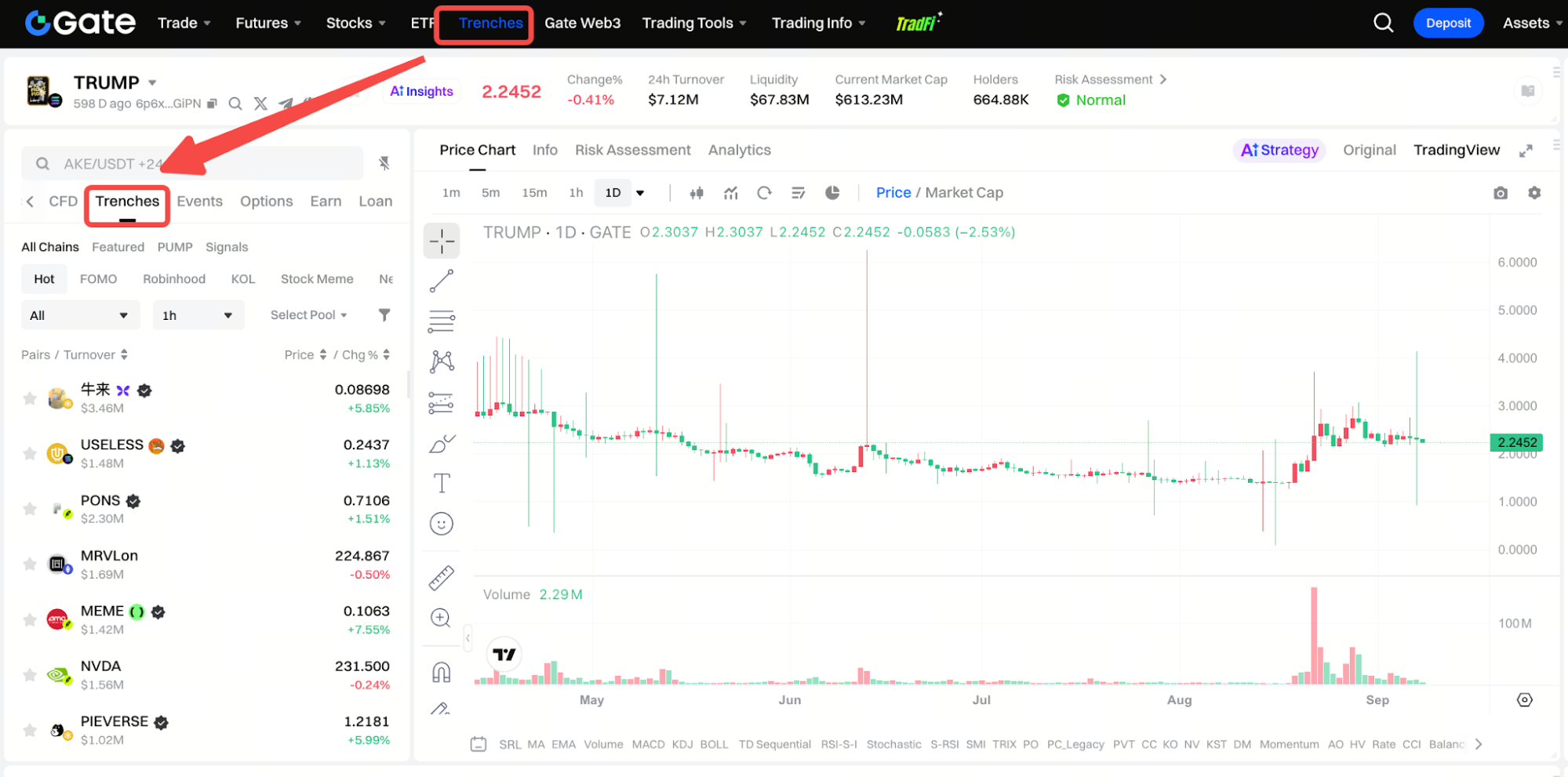
On the web version of Gate, users can access Trenches from the platform navigation after logging in on Gate.com, a secure and transparent digital asset trading platform. Founded in 2013, Gate serves over 60 million users. The interface typically includes an onchain token list, search field, price and candlestick chart area, and buy and sell controls.
Gate Trenches is also available through the Gate App. Exact navigation and page layout may change as the product interface is updated, so users should follow the current labels shown on the web or mobile version.
Step 2: Search by Token Name or Contract Address
Users can search for a target asset by token name, ticker, or contract address. For well-known assets with clear naming, searching by name or ticker may be sufficient. For meme tokens, newly launched assets, or tokens with multiple similarly named versions, searching by contract address is generally more precise.
After the search results appear, users should not rely only on the token name or icon. It is also important to review the ticker, network, contract address, current price, trading volume, liquidity, and other available token information, as this market view can also support on-chain analysis by helping users review public blockchain transaction data before trading.
Step 3: Verify the Contract Address and Network
Verifying the contract address and network is one of the most important steps in onchain trading. The same token name can appear on different networks, and imitation assets may use the same or similar names, tickers, and logos.
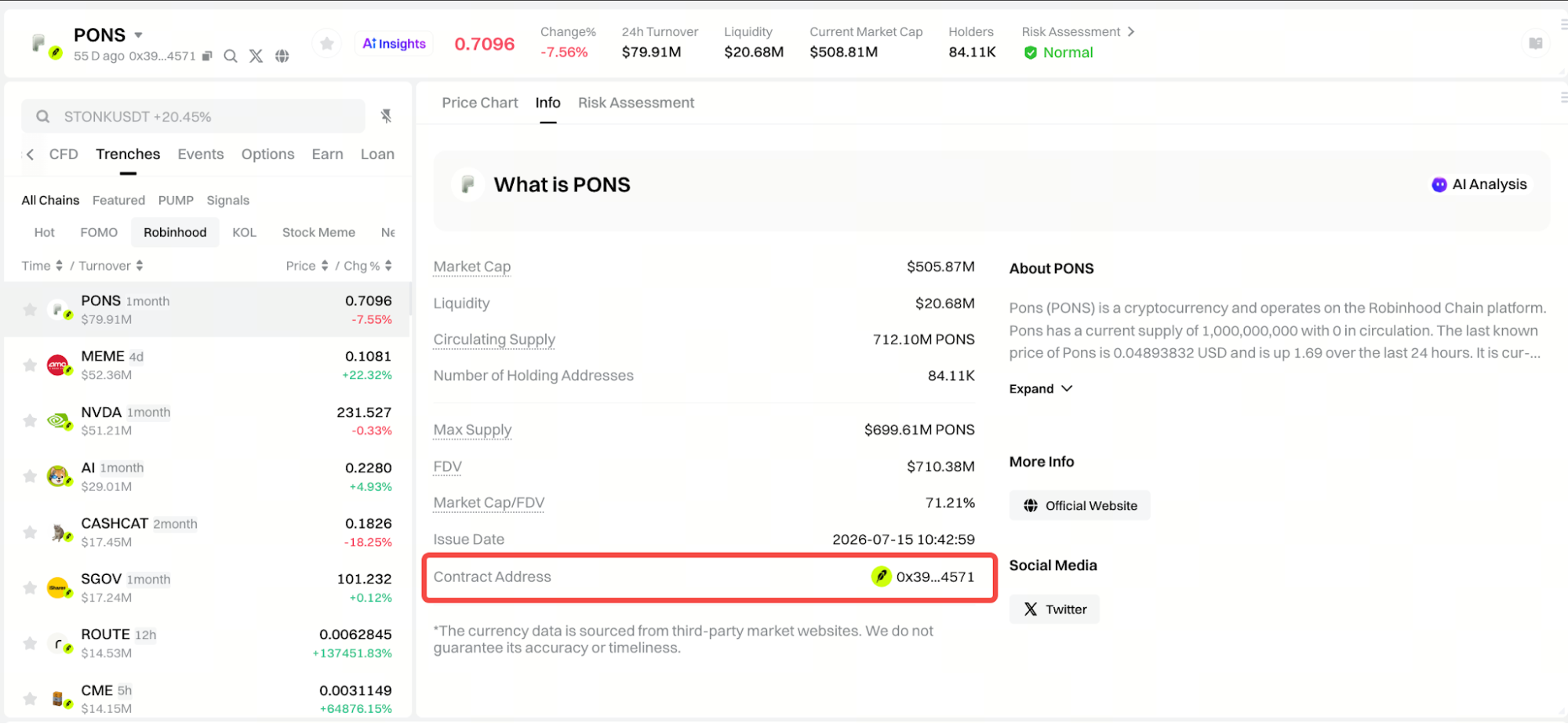
Before trading, users should compare the contract address shown in Gate Trenches with the address published through the project’s official channels or another reliable source, and cross-check it in block explorers on the relevant chain. The selected network should also match the network on which the intended asset is actually deployed. A useful habit is to verify the contract first, confirm the network second, and only then evaluate price and trading conditions.
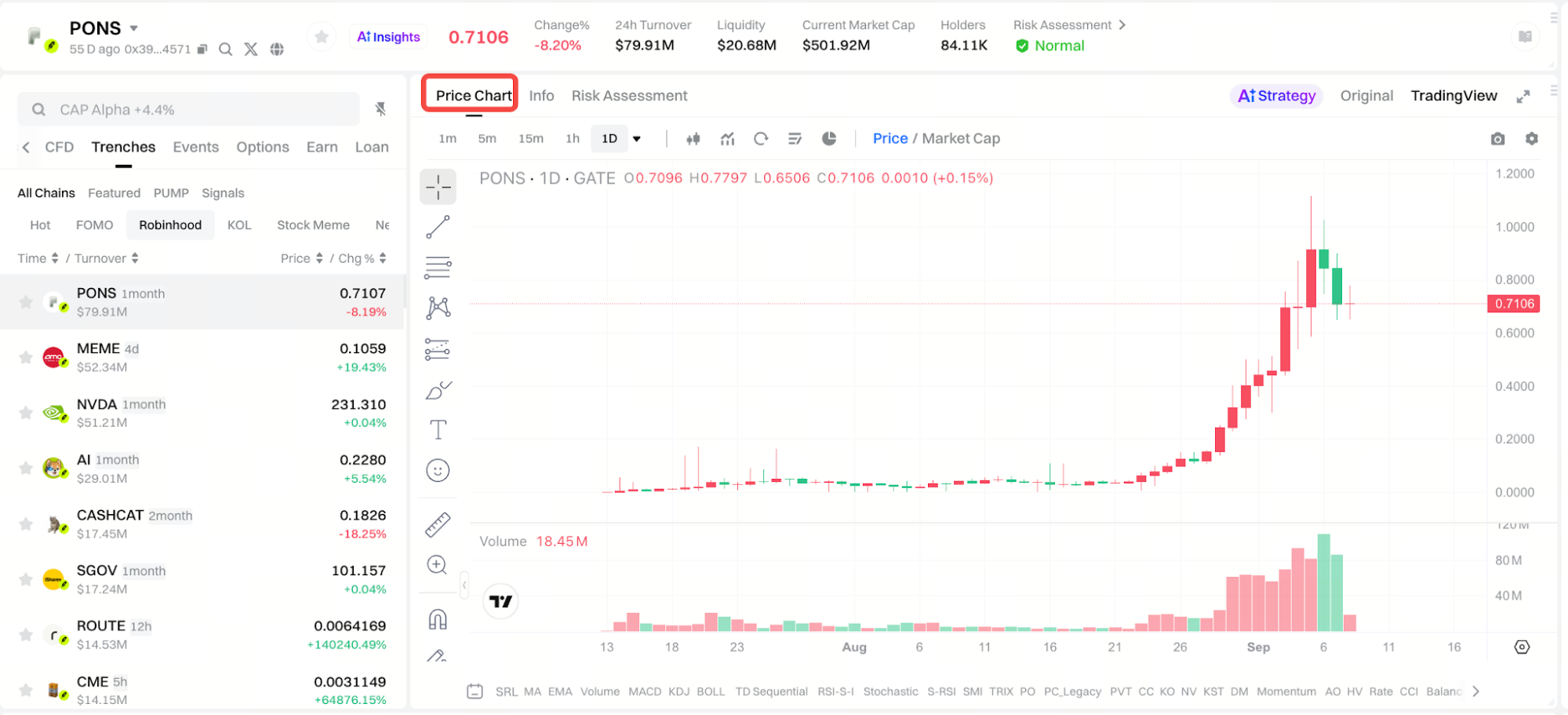
Step 4: Review Market Data, Onchain Data, Candlestick Charts, and Liquidity
After selecting a token, users can review market information such as current price, price change, trading volume, liquidity, Market Cap, holder count, and candlestick charts. In this view, on chain data can also support onchain analysis. Liquidity is the total dollar value locked in a trading pool.
These metrics help describe current market conditions rather than predict price direction. If a token rises rapidly while trading volume expands, it may reflect how much crypto is moving through the network, and market participation may be increasing, but short-term volatility and drawdown risk can also rise. Liquidity and market depth are particularly important because a larger order can materially affect the execution price in a thin market. Transaction volume reflects the amount of cryptocurrency moving through a network. Candlestick charts are price charts users can compare across time frames.
Step 5: Choose Buy or Sell and Enter the Trade Amount
Once the token and market conditions have been reviewed, users can select Buy or Sell in the trading panel. When buying, enter the amount of account assets to use. When selling, enter the quantity of the token to sell.
If multiple order types are available, users can choose the option that fits the current trading need. Regardless of order type, the token name, network, contract address, trade direction, and amount should be checked again before moving to the next step.
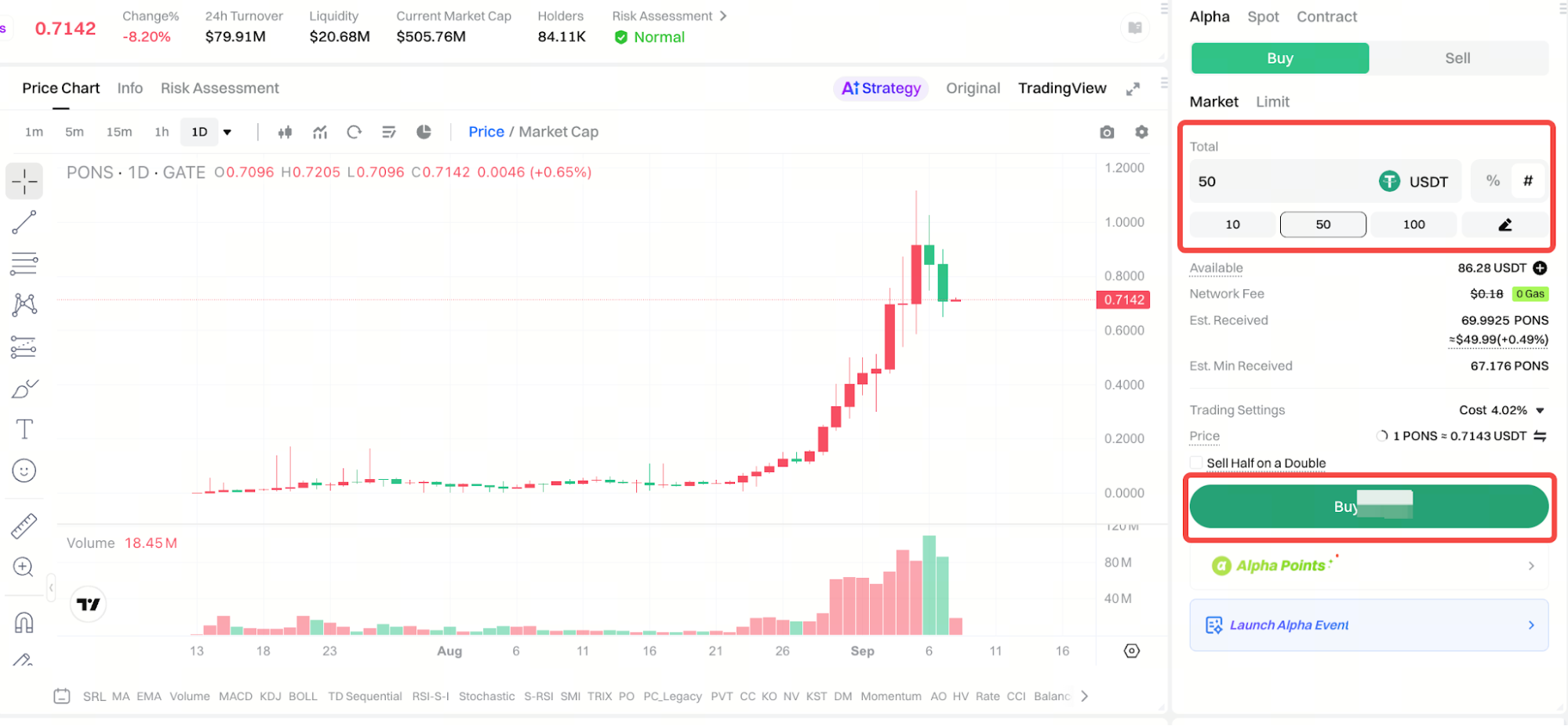
Step 6: Check Estimated Amount, Slippage, and Fees
After entering the trade amount, users should review the estimated received amount and the minimum received amount. The estimated amount reflects current market conditions, while the minimum received amount shows the lowest execution outcome allowed after accounting for price movement and slippage.
Slippage is the difference between the expected execution price and the actual result. It can become more significant when liquidity is low, the order size is large, market depth is limited, or price is moving quickly. If the gap between the estimated and minimum received amounts is unusually wide, reducing the order size may help limit price impact.
Users should also review the transaction fees and any gas fees shown on the confirmation page, especially during periods of network congestion. The real cost of an onchain trade can include trading fees, gas fees, and the price impact caused by slippage, so checking them helps with cost efficiency; occasional gas-fee promotions on supported networks can also reduce the cost of trading on Gate.com.
Step 7: Confirm and Submit the Trade
Before submitting the order, users should perform a final review of the token name, network, contract address, buy or sell direction, trade amount, available balance, estimated received amount, minimum received amount, and applicable fees.
Once an onchain trade has been completed, it generally cannot be reversed in the same way as an unfilled traditional order. If any detail looks incorrect, it is safer to stop and verify the information again before submission.
After everything has been confirmed, the order can be submitted. Users should then check the order status rather than immediately repeating the same action. On-chain trading platforms can move quickly, and rapid repeat submissions during sharp price movements may worsen execution. Automated or rapid trading strategies may help some users execute faster, but they should be managed securely.
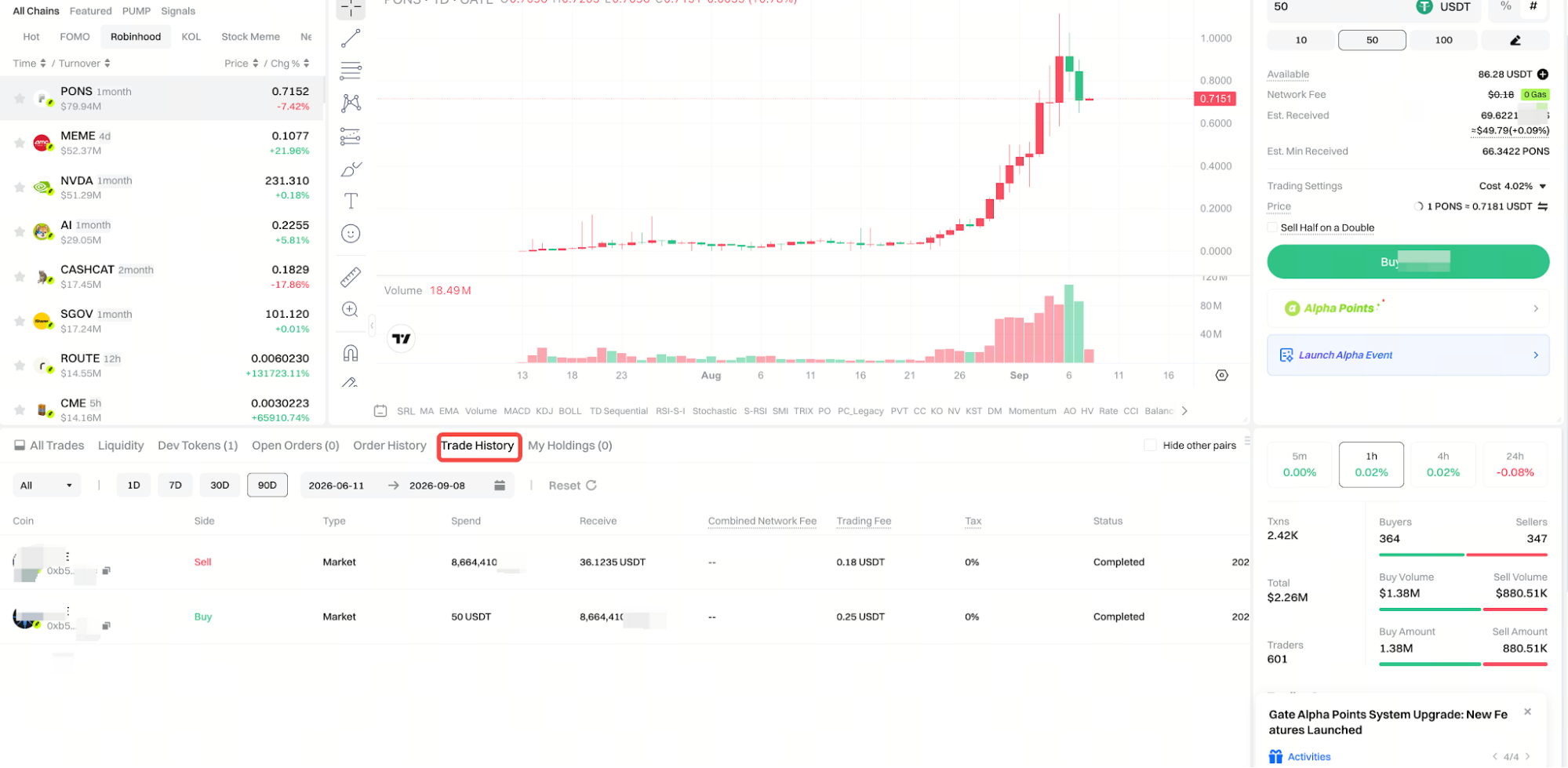
Step 8: Review Orders and Transaction Records
After submission, users can review execution details in the order or transaction records section. Depending on the interface, this may include order time, trade direction, executed quantity, execution price, transaction value, address information, status, and transaction details.
If an order does not complete immediately, users should first review its current status. For onchain transactions that are still being processed, the transaction details can be used to monitor progress. These records can also provide additional context when reviewed alongside wallet activity on the blockchain. Active wallet addresses indicate user activity, and interactions with decentralized applications can signal user adoption and project health.
How to Check and Evaluate Slippage on Gate Trenches
Slippage is an important part of onchain trading because the price shown before submission may not be the exact price achieved at execution. When liquidity is limited, order size is large, or the market is moving quickly, the final execution price can move away from the initial quote.
For example, a token may display a price of 1 USDT, but a large buy order may need to fill across several price levels, resulting in an average purchase price above 1 USDT. The same can happen when selling if there is not enough buy-side liquidity.
To evaluate slippage, users can compare the estimated received amount with the minimum received amount and consider the token’s liquidity, order size, and market depth. If the price impact is higher than expected, reducing the trade size or waiting for better liquidity may be more appropriate.
How to Check Gate Trenches Trading Fees
The total cost of an onchain trade is not limited to a single trading fee. Before submitting an order, the Gate Trenches confirmation page displays the transaction fees and any network-related costs that currently apply.
The actual cost of a trade can be understood as a combination of trading fees, network fees, and the price impact caused by slippage. Because these factors can vary by asset, network, and market conditions, the information shown on the current confirmation page should be treated as the most relevant reference.
For this reason, users should look at the full execution outcome rather than comparing fee rates alone. The minimum received amount and market depth can sometimes have a larger impact on the final result than the headline fee itself.
How to Sell Tokens on Gate Trenches
The selling process is similar to buying. Open the page for the token already held, switch the trade direction to Sell, enter the quantity to sell, and review the estimated settlement amount.
Before submitting, check the current price, available token balance, fees, slippage, and minimum received amount. Liquidity becomes especially important when selling low-liquidity assets because being able to buy a token easily does not guarantee that it can later be sold at a similar price.
If buy-side liquidity is limited, a large sell order may create significant slippage or may need to be split into smaller trades. For this reason, exit liquidity should be considered before entering a position, not only when it is time to sell.
Is Gate Trenches Safe to Use?
Gate Trenches brings token discovery, market data, and onchain execution into one interface, which can reduce some operational complexity. However, it does not remove the risks associated with onchain assets.
Token risk remains important because onchain markets contain many newly issued assets and similarly named tokens. Some projects may have limited operating history, while imitation or malicious contracts may also exist. Price and liquidity risk can also be substantial, especially for meme tokens and low-cap assets that can move sharply over short periods.
Users should also consider slippage, smart-contract, and blockchain network risks. Practical ways to reduce operational risk include verifying contract addresses through reliable sources, starting with smaller trades, checking the minimum received amount before submission, and considering whether sufficient exit liquidity exists before buying.
Gate Trenches simplifies the trading workflow, not the underlying risk structure of onchain markets.
What Should Beginners Know and Pro Tips Before Using Gate Trenches?
For a first trade, the main goal should be to understand the workflow rather than complete a large transaction quickly. Starting with a smaller amount can help users become familiar with searching, verifying token details, placing an order, and checking the transaction record.
When searching for newly launched tokens, contract addresses are generally more reliable than names or icons alone. In meme markets, community sentiment can strongly affect trading decisions. Users should also avoid focusing only on the current price and instead review liquidity, estimated received amount, minimum received amount, and transaction costs before submitting an order. Beyond price, analyzing wallet behavior and large transactions by whales can reveal market sentiment and possible market moves.
Rapidly rising assets can carry higher short-term volatility and exit risk. If the token source, contract address, or liquidity cannot be verified confidently, choosing not to trade is also a valid form of risk management.
Summary
Gate Trenches combines onchain token search, real-time market data, candlestick charts, and trading functions in one interface. Users can locate assets by token name or contract address and use available assets in their Gate account to complete buy and sell transactions.
The most important part of the process is building a consistent verification routine. Confirm the contract address and network first, use on-chain data to support more informed decisions, review market conditions and liquidity, enter the trade amount, check the estimated and minimum received amounts, slippage, and fees, and only then submit the order and review the execution status.
Meme tokens, newly launched assets, and low-liquidity markets can still involve significant price, liquidity, slippage, and contract risks. Gate Trenches reduces the operational complexity of onchain trading, but understanding these trading conditions remains an important part of using the product responsibly while navigating the broader crypto market, not a substitute for risk review.
FAQ
Do I need a separate Web3 wallet to use Gate Trenches?
No. Users can trade onchain assets through Gate Trenches using available assets in their Gate account without first connecting an external Web3 wallet.
Can the same token name exist on different networks?
Yes. Different networks can contain assets with the same or similar names and tickers, which is why users should verify both the network and contract address before trading.
Why can the displayed price differ from the final execution price?
Onchain prices and liquidity change in real time. If an order is large or market depth is limited, slippage can cause the final execution price to differ from the displayed quote; live charts and trading volume can help you read short-term price changes, but they do not guarantee the final result.
Why are some tokens easy to buy but difficult to sell?
The main reason is usually limited buy-side liquidity. Low-liquidity assets can experience significant slippage on exit, so users should consider market depth before buying.