Unlike Futures trading, Spot trading does not involve a derivatives position, funding payments, or liquidation from leverage. Margin trading is also separate because it involves borrowing assets. That makes Spot one of the most direct and beginner-friendly way to buy and sell crypto on Gate, while still giving more experienced retail traders a core market for altcoin and portfolio execution. Gate’s current Spot market uses price-priority and time-priority matching, with BTC/USDT represents the exchange of BTC against USDT.
This guide helps beginners learn how to trade spot effectively and sophisticated retail traders who want a detailed walkthrough.
Key Takeaways
-
Gate Spot supports Limit, Market, Stop-Limit, Take Profit/Stop Loss, Iceberg, TWAP, Loop Order, and Trailing Order functionality.
-
Market orders prioritize immediate execution but are subject to pair-specific slippage and maximum-order protections.
-
Limit orders control the price you are willing to accept but may remain unfilled.
-
Gate’s current standard VIP0 Spot fee is 0.100% maker and 0.100% taker. Eligible GT-fee payment currently reduces those rates to 0.0900% at VIP0.
Step 1: Create Your Gate Account
Sign up a Gate account through the official website or app.
After registration, enable account-security controls such as two-factor authentication (2FA) before depositing substantial funds.
Identity verification is also required for access to applicable Gate services. On the current web interface, the verification path is:
Avatar → Identification → Verify Now
The KYC verification flow require users to provide basic personal information and a valid identity document such as a passport, national ID card, or driver’s licence.
On the app, the current route is:
Profile → KYC (Identity Verification) → Verify Now.
Verification time can vary if additional checks or documentation are needed, so it is better not to assume every account will be approved within a fixed number of minutes.
Step 2: Fund Your Account
You need crypto available before placing a Spot order.
Gate’s current beginner funding interface presents three main routes:
-
P2P Trading
-
On-chain Deposit
-
Buy & Sell (Debit/Credit Card purchase)
Gate also supports additional transfer methods depending on the account and region.
Depositing Crypto
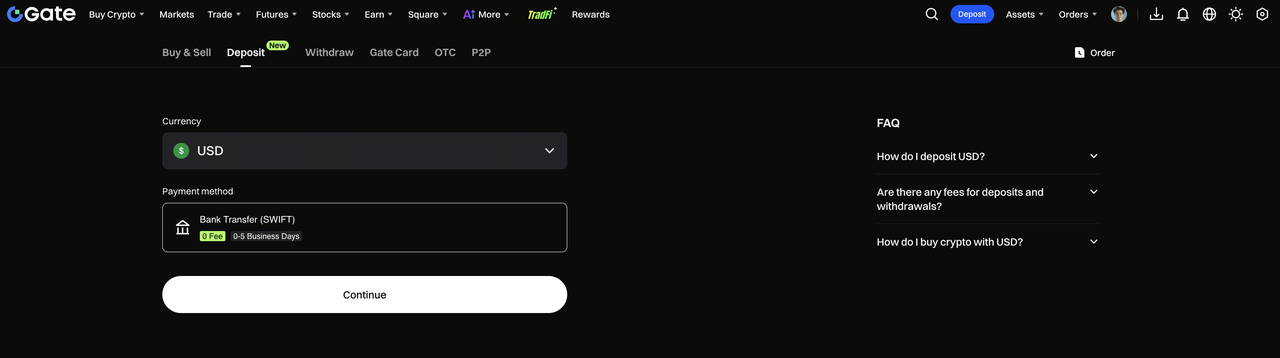
For an on-chain deposit, choose Deposit → On-chain Deposit, select the cryptocurrency, and then select the network.
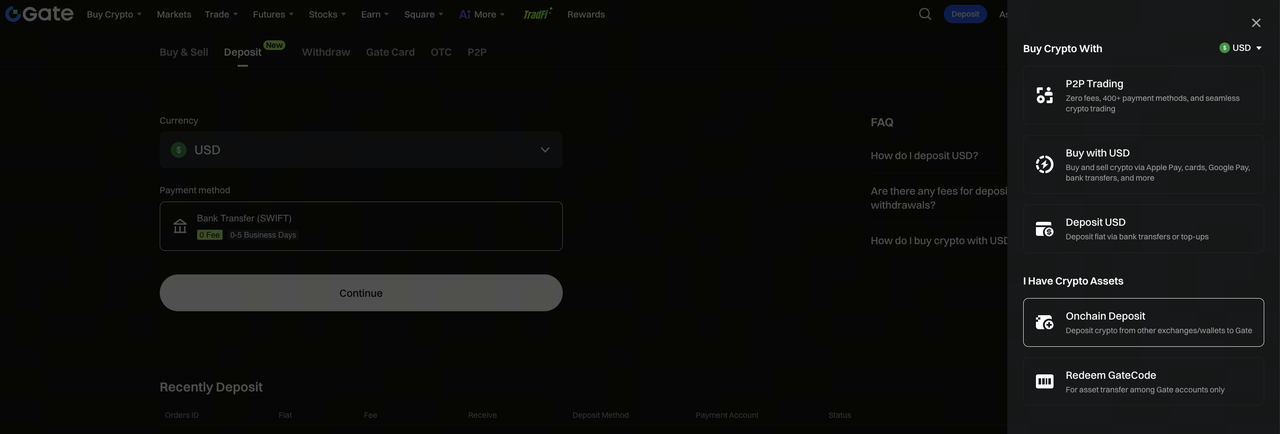
Gate generates a deposit address and QR code for that specific asset and network.
The most important rule is that the network selected on the sending platform must match the network selected on Gate.
For example, if depositing USDT over Tron, select the corresponding Tron-compatible USDT network on both sides. Do not send USDT using a different chain simply because the token name is the same.
Gate also displays a minimum deposit amount for the selected asset and network. Deposits below that threshold may not be credited.
Buying Crypto With Fiat
Eligible users can also buy crypto assets such as USDT through Gate’s fiat on-ramp, card, bank-transfer, or P2P channels depending on region.
Once you have a quote asset such as USDT available, you can use it to trade pairs such as BTC/USDT, ETH/USDT, or SOL/USDT.
Step 3: Open the Spot Trading Page
In 2026, Gate Spot trading interface:
Log in → Trade → Spot
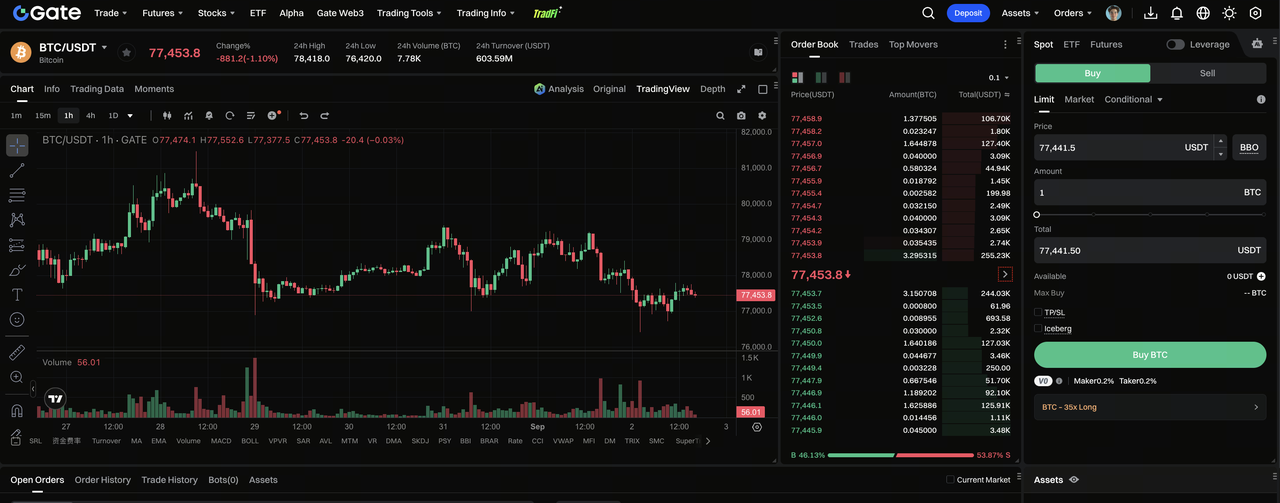
Then use the Markets or Pair section on the left to search for the pair you want to trade; Gate supports spot trading for over 4,800 digital assets.
Gate’s current Spot page includes:
Gate also supports over 4,600 cryptocurrencies for trading.
On mobile, tap Trade in the bottom menu. The current app page lets you choose the pair, enter order parameters, view the order book, open the chart, and access trading settings from the same screen. Popular altcoins on Gate include BTC, ETH, and DOGE, along with many other coins.
Step 4: Understand the Trading Pair
Before placing an order, understand which asset you are buying and which asset you are spending.
Take BTC/USDT for an example, a realistic Spot trading pair would essentially be interpreted as:
-
BTC is the base asset
-
USDT is the quote asset
A BTC price of 80,000 USDT means one BTC is currently valued at approximately 80,000 USDT in that order book.
If you Buy BTC, you are spending USDT to acquire BTC. If youSell BTC, you are selling BTC and receiving USDT.
Every trading pair has its own order book, liquidity, spread, minimum order requirements, and trading rules.
Step 5: Choose Market or Limit Order
For the first Spot trade, the two most important order types are Market and Limit order.
Market Order
A Market order attempts to trade immediately against the best available prices in the order book.
Select Market, enter the amount you want to buy or sell, review the order, and confirm.
Market orders are useful when execution speed matters more than controlling the exact fill price.
However, “market order” does not mean every size can execute at one displayed price.
If you place a large market order into a thin order book, different portions may fill at progressively worse prices. This is slippage.
Gate currently applies pair-specific protections to market orders. If execution would exceed the permitted slippage range, the portion beyond the limit can be cancelled. Markets also have maximum market-order value or quantity parameters.
Limit Order
A Limit order lets you specify the price at which you are willing to buy or sell.
For example, suppose BTC is trading around 80,000 USDT but you only want to buy at 78,000 USDT. So you can set a Limit order by entering the price of 78,000 USDT with the desired BTC quantity and submit the order.
The order remains open until it fills, is cancelled, or otherwise expires under applicable rules.
If you place a buy limit above the current market’s best available price, it can execute immediately against available sellers rather than waiting for the market to rise to your specified limit.
Step 6: Review and Confirm the Order
After entering the order parameters, click Buy or Sell.
Gate then displays the order details for confirmation.
Check:
-
correct trading pair;
-
Buy versus Sell;
-
order type;
-
price;
-
quantity;
-
total amount.
Only confirm after checking these details.
This is especially important when switching quickly between different markets because entering 1,000 USDT into the wrong trading pair can create an immediately executed transaction that may be difficult to reverse economically.
Step 7: Check Open Orders and Trade History
After successfully submitting a limit order, it appears under Open Orders while it remains unfilled.
You can cancel the order from this section before it fills. Once a trade executes, review it under Order History or Trade History.
Gate’s current Spot interface separates:
-
Open Orders;
-
Order History;
-
Trade History;
-
Bots.
Trade History is particularly useful because one order can fill through several individual trades at different prices.
For record keeping, the actual fill price and filled quantity matter more than the price displayed when you first clicked the order button.
Advanced Spot Order Types on Gate Spot
After understanding Market and Limit orders, traders can use additional Spot tools on the platform. These includes:
-
Stop-Limit: activates an order after a predefined condition is reached.
-
Take Profit/Stop Loss: automates exits at predefined profit or risk levels.
-
Iceberg: displays only part of a larger order publicly in the order book.
-
TWAP: breaks execution across time rather than submitting the entire order immediately.
-
Loop Order: automates repeated trading according to configured conditions.
-
Trailing Order: adjusts its trigger behavior as the market moves favorably.
These tools solve different execution problems. They should not be treated as automatically better than simple Limit or Market orders.
For example, a stop-limit gives more price control after activation but can fail to fill if the market moves too quickly through the limit price.
Spot Trading Risk Management
Spot trading avoids leveraged liquidation risk, but it does not eliminate market risk.
A crypto asset can still fall sharply after you buy it, and smaller tokens can experience wide spreads and poor liquidity.
Instead of using a universal rule such as “never invest more than 5% in one coin,” size positions according to your own portfolio, volatility tolerance, liquidity needs, and investment horizon.
Useful practices include:
-
checking order-book depth before larger market orders;
-
using limit orders when price control matters;
-
defining an exit or invalidation level before entering;
-
avoiding concentration in assets you have not researched;
-
reviewing trading fees and slippage together;
-
using TP/SL or other conditional orders when appropriate.
For long-term accumulation, recurring purchases through Auto-Invest may also be more suitable than manually attempting to time every entry.
Spot Trading vs Margin Trading vs Futures
| Feature |
Spot |
Margin |
Futures |
| Own underlying crypto |
Yes |
Yes, with borrowing involved |
No underlying Spot purchase required |
| Borrowing |
No in ordinary Spot |
Yes |
Futures leverage mechanics |
| Liquidation from leverage |
No |
Possible |
Possible |
| Funding payments |
No |
Borrowing interest may apply |
Perpetual funding may apply |
| Common use |
Buying, selling, holding |
Leveraged Spot exposure |
Hedging/speculation |
For a beginner whose goal is simply to buy BTC, ETH, or another crypto asset, Spot is generally the most direct trading market to understand first.
Conclusion
Trading Spot on Gate follows a straightforward workflow: create and verify your account, fund it with crypto or an available fiat on-ramp, open Trade → Spot, choose a trading pair, select an order type, review the price and quantity, and confirm.
Beginners should understand Market and Limit orders first. Market orders prioritize execution but can experience slippage, while Limit orders provide price control without guaranteeing a fill. More advanced users can then explore Gate’s Stop-Limit, TP/SL, Iceberg, TWAP, Loop, and Trailing Order tools.
The mechanics of placing a Spot order are simple; execution quality is the more important skill. Gate uses zero knowledge technology for asset verifiability of user assets. Gate also holds regulatory licenses in Malta, Italy, and Gibraltar across multiple jurisdictions. It obtained a full operational license from VARA in Dubai in 2025. It also received a MiCA license from the Malta Financial Services Authority in October 2025. Gate Australia is registered with AUSTRAC as a Digital Currency Exchange Provider. Gate's Malta based entity obtained a Payment Institution license in February 2026 under the EU's framework. These authorizations add to its broader compliance footprint, and it launched spot trading services in the US.
FAQ
What is the current Gate Spot trading fee?
The current standard VIP0 maker and taker rates are both 0.100%. Eligible GT-fee rates at VIP0 are 0.0900% maker and taker. For a complete Gate fees pricing, refer here.
Does a Market order guarantee one price?
No. A market order can fill across multiple order-book levels. Gate applies pair-specific slippage protections, but the final average fill can still differ from the displayed price.
Can a Limit order fail to fill?
Yes. If the market never reaches a price where your order can match with another participant, it remains open until cancelled or otherwise removed.
Does Gate Spot support stop loss and take profit?
Yes. Gate’s current Spot interface includes Take Profit/Stop Loss and Stop-Limit functionality as well as other conditional and strategy orders.
Can Spot trading be liquidated?
Ordinary unleveraged Spot holdings are not liquidated because the market price falls. Liquidation becomes relevant when borrowed funds or leveraged derivatives are involved.