The current campaign (18 October 2026 announcement) pays a 4% base APY, with daily pools of 1,200 USDD on Ethereum and 1,500 USDD on BNB Chain, boosted by 200 USDD per chain per day for 40 days, for a 154,000 USDD full-campaign total pool. It runs from 28 September 2026 18:00 to 27 November 2026 18:00 (UTC+8). The APY shown in the app includes Boost and changes with participation; the live APY is final.
Failures often start in preparation, not in the staking screen. Common causes include a wallet with no ETH or BNB, a wallet chain that differs from the app, or a stake made outside the Bonus flow that never appears in the reward view. Gate Web3 Bonus breaks down the two reward layers.
Readers who have not created a wallet should complete Gate Web3 wallet setup first, because every Bonus action is signed from the wallet, not the exchange account.
Key Takeaways
- The entry path is Gate App → Web3 → Earn → Bonus, not the exchange Earn menu.
- The current campaign pays a 4% base APY, with daily pools of 1,200 USDD on Ethereum and 1,500 USDD on BNB Chain, for a 154,000 USDD total pool.
- A stake can be made in USDD or USDT; both mint the same sUSDD, and USDT is converted 1:1 through the Peg Stability Module.
- Ethereum and BNB Chain positions are separate, each requiring its own native token for gas.
- Rewards are claimed manually and sUSDD is redeemed manually; neither action is automatic.
What You'll Need Before You Start
This walkthrough suits crypto users who already use wallets, stablecoins, and multi-chain apps. It covers wallet setup, the stake, the position check, claiming, redemption, common errors, and the safety points that decide whether the position behaves as expected.
| Requirement |
Why it matters |
| Gate App with Web3 mode enabled |
The Bonus section exists inside the wallet, not the exchange interface |
| USDD or USDT in the wallet |
USDT is converted to USDD at a 1:1 rate during staking |
| ETH or BNB for gas |
The chain used for staking determines which native token is required |
| A selected network that matches the asset |
A mismatch makes the transaction fail or books the stake in another chain’s pool |
| Awareness of the current campaign terms |
Pool size, eligible chains, and dates change between phases |
USDD is a crypto stablecoin pegged to the US dollar and deployed on TRON, Ethereum, and BNB Chain, with overcollateralized reserves that include WBTC, ETH, TRX, sTRX, and USDT. Before staking, buy USDD on the spot market or convert USDT through the Peg Stability Module at a 1:1 lossless rate; Gate Web3 charges no fee for USDD/USDT conversion. Prepare slightly more native token than the estimated fee; if Ethereum gas is high, price it into the cost of a small test stake before starting.
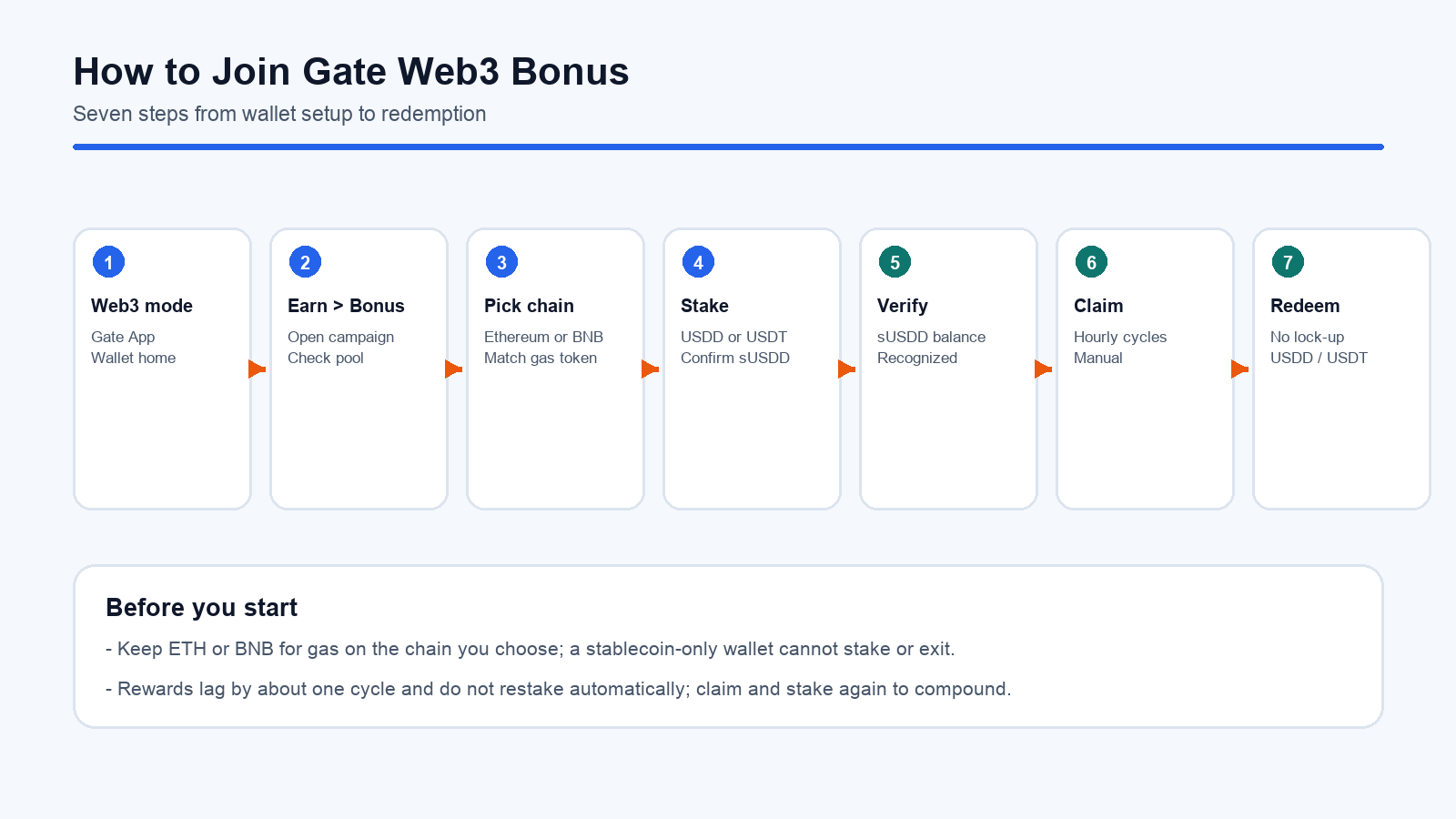
Figure 1. The seven steps to join Gate Web3 Bonus, from switching to Web3 mode through redeeming sUSDD.
Step 1: Switch the App to Web3 Mode
Open the Gate App and switch from the exchange view to Web3. The wallet home shows the wallet address, token balances, and the entry points for Earn and Activity. Confirm the address before continuing, because the stake is tied to this wallet rather than to the exchange account balance.
If Web3 mode is unavailable, first check whether the wallet has been created and the app is up to date; if it still does not open, check any network or region notice in the app.
Step 2: Open Earn and Select Bonus
From the wallet home, open Earn and select the Bonus section. The page lists the active campaigns, the participating chains, and the claimable reward entry for positions already staked. The same section is reachable from the wallet Activity page, which routes to the same campaign list.
Two areas matter on this screen. The campaign page shows the pool and the eligible assets, while the product detail page shows the sUSDD position and the claimable reward balance. A claimable reward still at zero after a stake may mean the stake did not originate from this flow, or that the reward data has not synced yet.
Step 3: Choose the Network and the Asset
Select Ethereum or BNB Chain, then choose USDD or USDT as the deposit asset. The choice of chain fixes the gas token and the pool the position counts against; the choice of asset only affects the conversion step, since both routes end in sUSDD.
Pick one chain per position rather than splitting a small amount across both. Two positions mean two gas budgets, and the share must be checked on each chain; a position on one chain does not enlarge the share on the other. Under the announcement’s rule that on-chain transfers do not count, sUSDD moved across chains is also excluded from the reward share.
Step 4: Stake and Confirm the sUSDD Mint
Enter the amount, approve the contract if this is the first stake, and confirm the transaction in the wallet. Wait for on-chain confirmation, then check that the sUSDD balance appeared—sUSDD is minted under the ERC-4626 vault standard. For a USDT stake, the contract converts USDT to USDD through the Peg Stability Module at a 1:1 lossless rate before depositing it into the protocol; Gate Web3 charges no fee for USDD/USDT conversion.
Keep the transaction hash. It is the only reliable way to trace a stake that does not show up on the product detail page.
Step 5: Verify That the Position Is Counted
Open the USDD or USDT product detail page and check the sUSDD balance against the claimable reward. The individual investment share counts only sUSDD staked through the Gate Web3 flow; a balance above the share may mean part of the sUSDD arrived by transfer and earns protocol yield without counting toward rewards.
Ethereum and BNB Chain positions appear separately. Check the chain selector before concluding that a position is missing; under the announcement’s rule that on-chain transfers do not count, sUSDD moved across chains is also excluded from the share.
Step 6: Claim the Rewards
Rewards accrue per hourly cycle and are settled one cycle later. Open the product detail page, review the claimable balance, and claim it. Claiming is a wallet transaction, so it consumes gas on the chain where the position sits.
The claimed amount is paid in USDD and is never added to sUSDD pricing, so the campaign layer does not compound on its own; protocol yield keeps accruing inside sUSDD, and the two are separate decisions.
Step 7: Redeem sUSDD When Needed
To exit, open the position and choose redeem. Enter the amount, choose whether to receive USDD or USDT, and confirm. The contract burns sUSDD and returns the corresponding value, converting through the Peg Stability Module at a 1:1 lossless rate when USDT is selected.
There is no lock-up, but redemption is an on-chain transaction that settles only after network confirmation. Settled rewards stay in the claimable balance and can be claimed cumulatively, unaffected by the campaign end time; once sUSDD is redeemed for USDD, the position no longer generates new protocol yield.
Common Errors and How to Fix Them
The table is an experience-based troubleshooting order; the wallet message and on-chain receipt are the source of truth for the actual cause.
| Error |
Common cause |
Fix |
| Stake button disabled |
Wallet lacks the native token for gas |
Add ETH or BNB on the selected chain and confirm the network matches |
| Transaction reverts on approval |
Insufficient allowance, network mismatch, or the transaction itself failed |
Check the allowance and wallet network first; if it still fails, inspect the on-chain receipt |
| sUSDD balance shows but rewards do not |
Position came from a transfer or protocol-site stake |
Start a new stake through the Bonus flow; transferred sUSDD is not counted |
| Claimable reward stays at zero |
Snapshot and settlement lag by one cycle |
Wait for the next cycle and refresh the page |
| Reward amount lower than expected |
Total participating sUSDD grew, diluting the share |
Compare the share, not the APY shown in the app |
Each fix addresses a different layer. A disabled button usually points to gas first, a missing reward to eligibility, and a smaller-than-expected payout to dilution. Treating them as one issue leads to repeated failed retries, and buying more of the asset will not repair a network mismatch.
Is Gate Web3 Bonus Safe?
Gate Web3 Bonus is not risk-free, and the risks do not disappear because the interface is inside a major app. Staking, minting, claiming, and redemption all run through smart contracts, so a contract defect or an upgrade issue can delay or block withdrawals, making the position dependent on the health of the contract. USDD itself depends on overcollateralized vaults and liquidation mechanics, so a peg or collateral shock can still change the value of the position.
Campaign terms add a separate layer. The bonus pool exists only while a campaign runs, and APY, eligible chains, and pool sizes can change between phases. A position can keep earning protocol yield after a campaign ends while the bonus layer stops entirely.
A dedicated entry point keeps the position and the reward share in one place, leaves an operational record of each step, and separates protocol yield from campaign subsidies.
Users should also account for operational risk: a wrong network selection, a wallet restored from an incorrect seed phrase, or a phishing site that mimics the Bonus page. Use the app rather than a search result to reach the entry, and keep the seed phrase offline. The staking rewards framework covers the broader checks.
Summary
Joining Gate Web3 Bonus is a seven-step process that starts with wallet preparation and ends with a manual claim or redemption. The mechanics are simple, but the preparation decides the outcome: the right chain, enough gas, and a stake made inside the Bonus flow. Users who check the claimable reward after the first cycle and claim rather than assume will avoid the common failures covered above.
FAQ
How do I join Gate Web3 Bonus?
Open the Gate App, switch to Web3 mode, reach Earn from the wallet home or the Activity page, and select Bonus; choose Ethereum or BNB Chain, stake USDD or USDT, and confirm the sUSDD mint. The settlement cycle containing the first stake becomes the first reward cycle, and rewards are claimed on the USDD or USDT product detail page.
Can I join with USDT instead of USDD?
Yes. A USDT stake is converted to USDD at a 1:1 rate through the Peg Stability Module before sUSDD is minted; Gate Web3 charges no fee for USDD/USDT conversion. Redemption can likewise return USDT, so the entry and exit asset do not need to match.
Why is my staked sUSDD not counted in the individual investment share?
The campaign only counts sUSDD minted by staking through the Gate Web3 Bonus flow. sUSDD received by transfer or minted on the protocol website earns protocol yield but stays outside the individual investment share; joining therefore requires a new stake made through the Bonus section.
How long does it take to receive rewards?
Each hourly cycle snapshots the position, and rewards from one cycle are settled in the next. The claimable balance therefore lags by roughly one cycle, and any settled amount stays claimable until it is withdrawn.
Do I need ETH or BNB to claim and redeem?
Yes. Claiming and redemption are on-chain transactions, so they require the native token of the chain where the position sits. A wallet holding only the stablecoin cannot stake, claim, or exit.