Completing Gate CandyDrop tasks requires understanding Task-Driven Participation first, then following platform paths: open CandyDrop, click Join Now on a project page, and finish listed tasks inside the campaign window.
Platform definitions and reward rules sit in Gate CandyDrop; how CandyDrop differs from Launchpool and HODLer Airdrop is covered in CandyDrop vs Launchpool and HODLer Airdrop. Live campaign pages control the final rules.
Key Takeaways
- Prepare a main Gate account with identity verification; sub-accounts cannot participate.
- Enter CandyDrop via Web Earn → Launch, App More Services → Launch, announcement Join Now, or search / Gate AI.
- Click Join Now on the project page before trading, depositing, or inviting—otherwise progress will not count.
- Expect Candy/volume sync in about 1–3 hours and Spot airdrop distribution within about 14 working days after the event ends.
What Should You Prepare Before Joining?
Before starting, register and log in to Gate and complete identity verification (KYC). Only main accounts are eligible; sub-accounts cannot participate, and sub-account volume is not counted. New users must wait one hour after sign-up before participating in first futures or first spot trading tasks.
Read the project’s start and end times carefully. The system counts only actions inside each project’s official campaign period. If several First Trade tasks are live, remember you can join only one First Trade task at a time—compare rewards and rules before clicking Join Now. Some campaigns label spot trading pools for new users only or existing users only; those labels are campaign filters, not separate products. Select the pool that matches your account status, then confirm the task card still shows after Join Now.
How Do You Open CandyDrop on Web and App?
Web: top navigation Earn → Launch → CandyDrop. App: tap the Profile Icon in the top-left corner, scroll to More Services → Launch → CandyDrop. You can also join from an announcement Join Now button, or search CandyDrop in the search bar or Gate AI. Browse live campaigns on the CandyDrop product page.
After opening CandyDrop, browse Ongoing projects and open the event detail page you want. Entry alone does not enroll you; the next step is mandatory opt-in.
How Do You Click Join Now and Activate Tracking?
On the specific project’s CandyDrop page, click Join Now to claim that project’s tasks. CandyDrop uses an opt-in mechanism: you choose whether to join by project preference. Only users who manually join and complete tasks are eligible for rewards. If you finish trades first and never click Join Now, the system will not begin recording valid data.
Some campaign announcements use different button labels; follow the live Join Now control, then confirm the page shows you as joined before executing tasks.
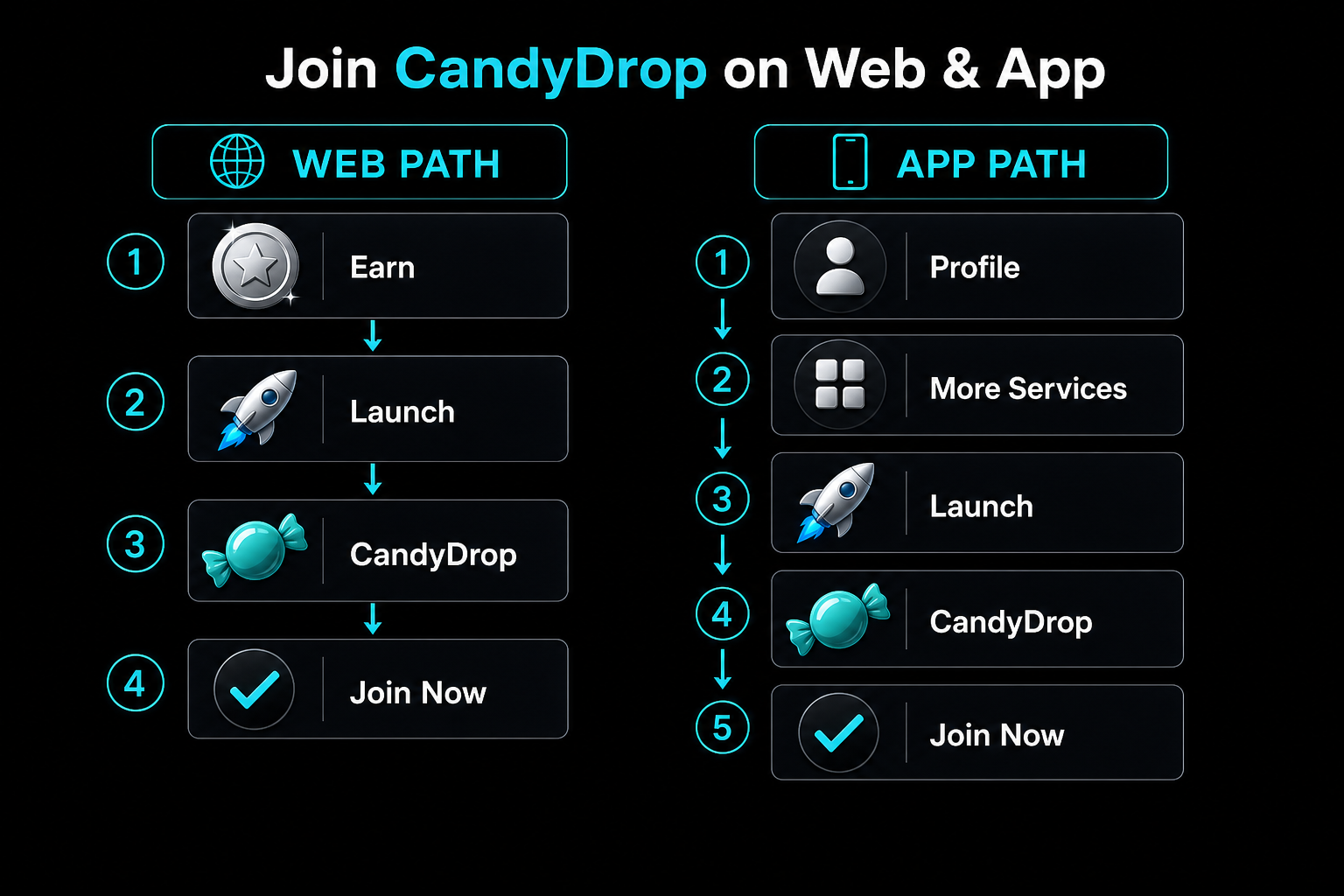
Figure 1. Opening CandyDrop on Web and App, then clicking Join Now.
How Do You Complete Trading, Deposit, and Referral Tasks?
Follow the task list on the project page. Spot trading counts cumulative volume for designated pairs; volume = buys + sells. Futures trading counts cumulative open and close value; volume = open value + close value. Deposit tasks use net deposits from external wallets: on-chain deposits minus on-chain withdrawals, internal transfer-out, and P2P sells. Referral tasks require your exclusive link; Candy is granted only after the invitee completes KYC verification and the required trading tasks.
Within one project, completing multiple task types—trading, deposits, and referrals—can increase total Candy where the campaign allows. Candy does not transfer to the next campaign. After completion, Candy and volume typically appear within one to three hours. If you are bridging from another Launch product, remember Launchpool staking does not automatically create CandyDrop Candy—each mechanic is tracked separately.
How Do You Check Progress and Receive Rewards?
If progress looks stuck, reconfirm Join Now activation and wait for the usual 1–3 hour sync window. Final reward math follows Candy-pool share, volume-based pool share, or fixed rewards, always subject to the per-user cap. After the event ends, airdrops are typically distributed to your Spot Account within 14 working days; check Assets → Transaction History.
Web and App share the same rules; only navigation differs. Within the Launch area, CandyDrop vs Launchpool and HODLer Airdrop maps tasks, staking, and GT holding as separate paths. Payout wording follows the CandyDrop FAQ and the App task guide.
Common Errors and How to Fix Them
| Error |
Cause |
Fix |
| Progress stays at zero after trading |
Join Now was not clicked |
Join first, then complete tasks inside the campaign window |
| Cannot start a First Trade task right after signup |
Less than one hour since registration |
Wait one hour, then reopen the campaign page |
| First Trade task unavailable |
Another First Trade task is already active |
Compare campaigns and keep only one First Trade join |
| Candy/volume slow to update |
Sync still running |
Wait the usual 1–3 hours, then re-check Join Now status |
| Sub-account trades do not count |
Only main accounts are eligible |
Switch to the main account to join and complete tasks |
Summary
Complete Gate CandyDrop tasks by preparing KYC on a main account, opening CandyDrop on Web or App, clicking Join Now, executing listed tasks inside the campaign window, then verifying Candy sync and Spot payout timing. Always re-check the live campaign page before acting.
FAQ
How do I join Gate CandyDrop?
Open CandyDrop from Earn → Launch (Web), More Services → Launch (App), an announcement Join Now button, or search / Gate AI, then click Join Now on the project page.
How do I earn Candy on CandyDrop?
Complete the tasks shown for that project—commonly designated trading volume, net deposits, or qualified referrals—after Join Now is active.
Why didn’t my CandyDrop task progress update?
You may not have clicked Join Now, or the 1–3 hour sync window has not finished. Only post-join actions inside the campaign period count.
When are CandyDrop rewards paid?
Typically within 14 working days after the event ends, credited to your Spot Account.
Can sub-accounts complete CandyDrop tasks?
No. Only main accounts are eligible to participate and earn Candy.