Deploying a custom rollup on Caldera produces a dedicated execution environment hosted by Caldera’s Rollup Engine—configurable framework, identifiers, and native Gas Token included. Testnet is usually self-serve in the Dashboard; Mainnet typically follows a short engagement before Caldera launches production. Difficulty is intermediate: teams need stack trade-offs and unique Chain IDs, not a from-scratch node fleet. For product context, see Caldera (ERA) and Metalayer; to compare RaaS options, use Caldera vs AltLayer and Conduit.
The path is checkable end to end: prepare account and identifiers; open Manage Rollups → Get Started; choose Testnet or Mainnet; pick Nitro, Bedrock, or ZK Stack; set Gas Token, Name, Subdomain, and Chain ID; Deploy (or complete Mainnet launch); wire app RPC; optionally connect Metalayer for cross-chain liquidity.
What Do You Need Before You Deploy?
Gather four inputs: access, network intent, token/identifiers, and an app cutover plan.
| Item |
Requirement |
Why it matters |
| Dashboard account |
Authorized login |
Entry for Testnet and ongoing management |
| Network intent |
Testnet self-serve vs Mainnet engagement |
Different approval and security cadence |
| Framework preference |
Nitro / Bedrock / ZK Stack |
Sets proof model and tooling |
| Gas Token |
ETH or eligible ERC-20 |
Custom Gas needs contract + decimals |
| Identifiers |
Name, Subdomain, Chain ID |
Hard to change after write; must be unique |
| App checklist |
Contracts, RPC, oracles, bridges |
Post-deploy integration and regression |
Elastic-supply tokens are usually unfit as native Gas. Conflict-check Chain ID before Deploy. Public materials often call Ethereum app ports relatively fast; dependency and oracle work still dominate the timeline.
Step 1: Open the Console and Choose Testnet or Mainnet
Sign in, open Manage Rollups, then Get Started to reach Deploy New Rollup. Network type decides the rest of the flow.
|
Testnet |
Mainnet |
| Entry |
Dashboard self-serve |
Engagement / Book demo, then launch |
| Goal |
Validate stack, Gas, RPC, ports |
Production settlement and ops |
| Who deploys |
Your team clicks Deploy |
Caldera brings the chain up per agreement |
| Risk focus |
Misconfig, ID collisions |
Bridges, upgrade keys, finality |
A live Testnet does not prove Mainnet readiness. Wrong network type creates rework—it does not rewrite the security model.
Step 2: Choose a Framework (Nitro, Bedrock, or ZK Stack)
Pick the framework on the Deploy page before filling identifiers. Caldera Rollup Engine supports:
- Arbitrum Nitro and Optimism Bedrock (OP Stack) — Optimistic paths; disputes can use fraud proofs.
- zkSync ZK Stack — validity proofs on state updates.
Reuse existing Arbitrum or OP tooling → Nitro or Bedrock usually lowers port friction. Prefer validity-proof structure → evaluate ZK Stack. Once bound, RPC, native bridges, and runbooks harden around that choice—finish Testnet regression before switching.
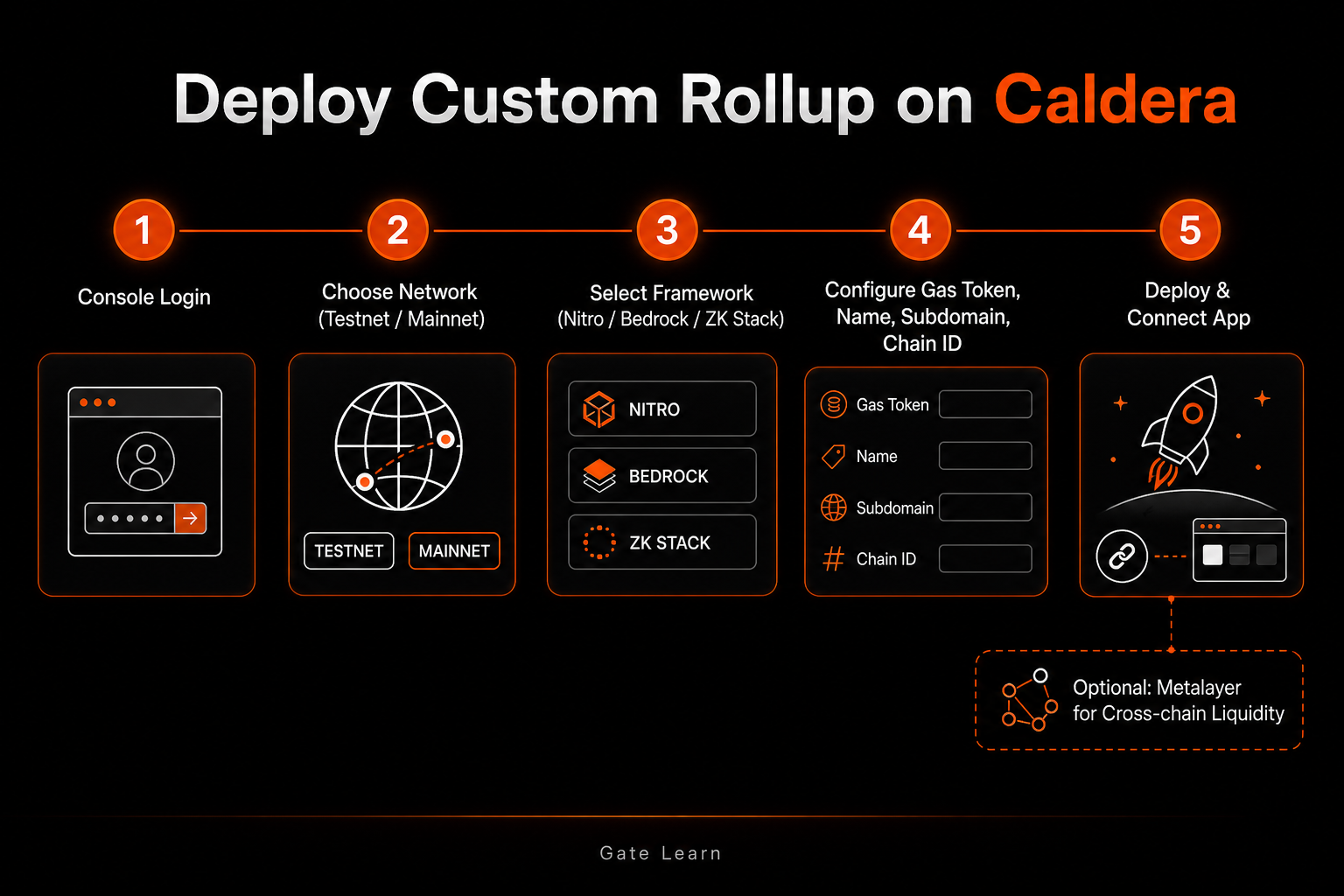 Figure 1. Deploy flow: login → network → framework → Gas Token and identifiers → Deploy and app integration (optional Metalayer).
Step 3: Configure Gas Token, Name, Subdomain, and Chain ID
On Deploy New Rollup, set native Gas Token plus three identifiers:
- Lock Gas Token (native asset or eligible ERC-20) with correct decimals.
- Confirm Chain ID is globally unused across wallets and bridges.
- Verify Name and Subdomain for console and RPC namespaces.
Bad fields cause wrong wallet networks, broken bridge maps, or Explorer mismatches. Deploy only after the config is stable.
Step 4: Deploy and Integrate Your App
Testnet: Deploy New Rollup → wait for ready status → copy RPC, Chain ID, and Explorer into wallets and CI. Retarget contracts, front ends, gas asset, and oracles to the new chain. Run core txs and failure paths end to end.
Mainnet: After engagement, Caldera launches the production rollup on agreed framework and settlement params. Separately harden permissions, upgrade keys, monitoring, and bridge or Metalayer limit tests. “Chain is up” ≠ “open to traffic.”
When assets must move across Caldera chains or other supported paths, connect Metalayer after the single-chain app works:
- Bridge aggregation quotes providers in parallel and routes.
- Metatoken keeps hub-and-spoke same-address, unified-supply assets.
- Public stack: Execution → Bridge providers → Settlement (Hyperlane-backed messaging).
Use SDK, widget, or API—no need to build a full bridge stack. Open limits carefully and choose fast vs full finality deliberately. A deployed rollup does not make every bridge path equally safe.
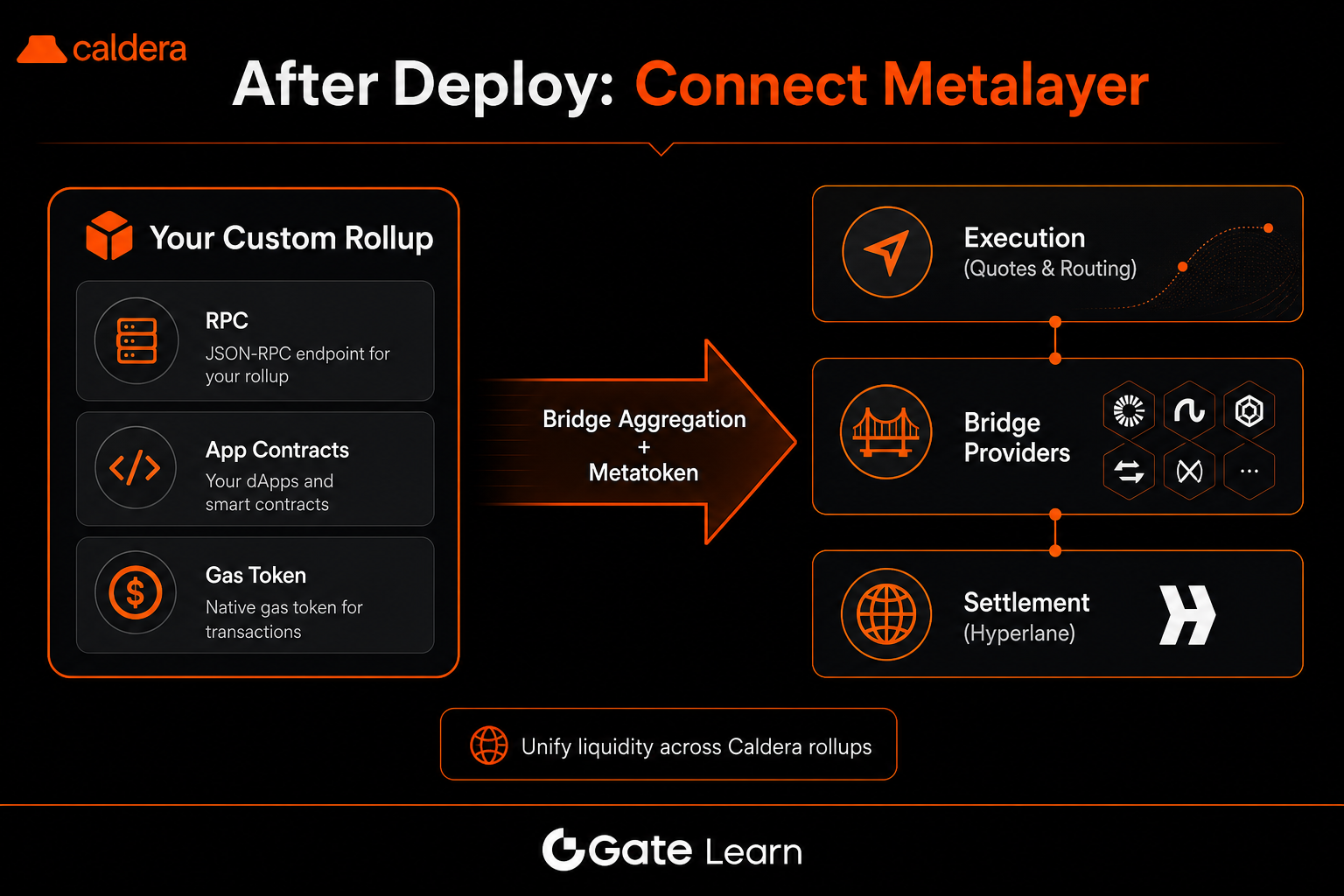 Figure 2. Post-deploy Metalayer connect across Execution, bridge providers, and Settlement.
Common Errors and Fixes
| Error |
Cause |
Fix |
| Wallet cannot reach RPC |
Wrong Subdomain/RPC or network |
Copy official RPC from Dashboard |
| Wrong gas asset in txs |
Gas Token ≠ wallet default |
Add Chain ID; confirm native Gas contract |
| Chain ID conflict |
Duplicate or swapped ID |
Pick a free Chain ID; update app and bridges |
| Mainnet Deploy unavailable |
Mainnet is not fully self-serve |
Engage / Book demo; align framework and settlement |
| Cross-chain delay or failure |
Metalayer/path limits unmet |
Check route, limits, finality; trial small amounts |
| Oracle errors after port |
Feeds still on old chain |
Retarget oracles to the new Chain ID |
Separate “chain not ready” from “client misconfigured” before changing Gas Token or bridge settings.
Security Checklist After Deploy
Deploy follows public flows; security boundaries remain:
- Rollup: sequencer and DA assumptions, upgrade keys, custom Gas Token oracle or supply risk.
- Metalayer: per-provider trust and liquidity models; fast vs full finality trade-offs.
- External: fake dashboards, spoofed RPC, counterfeit $ERA—verify domains and contracts.
Document Mainnet framework, settlement chain, monitoring, and incident ownership so hosting is not mistaken for zero-responsibility outsourcing. Use limits, allowlists, and small regressions before open cross-chain traffic. Mechanism notes only—not launch advice.
Summary
To deploy a rollup on Caldera, separate Testnet’s self-serve path (login → network → framework → Gas Token and IDs → Deploy → integrate) from Mainnet engagement, then add Metalayer only when cross-chain liquidity is required. Framework and identifiers, once written, shape wallets, tooling, and bridges. Security review should cover upgrade keys, bridge trust, and phishing surfaces—not only a green “deployed” badge.
FAQ
How do you deploy a rollup on Caldera?
Testnet: Dashboard → Manage Rollups → Get Started → framework + Testnet → Gas Token, Name, Subdomain, Chain ID → Deploy. Mainnet: engage or Book demo; Caldera launches the production rollup, then you integrate the app.
What is the difference between Testnet and Mainnet?
Testnet is self-serve for stack and port validation. Mainnet starts after engagement and covers production settlement plus ops boundaries. Testnet success does not equal Mainnet readiness.
Can you customize Gas Token on Caldera?
Yes—under supported frameworks, a standard ERC-20 can be native Gas; elastic-supply tokens are usually excluded. Verify address, decimals, and wallet display first.
After the single-chain app works, use Metalayer SDK, widget, or API. Aggregation handles routing; Metatoken handles unified multi-chain supply. Check limits, finality, and provider paths at connect time.
What are the main deploy risks?
Upgrade keys, sequencer/DA assumptions, custom Gas Token surfaces, divergent bridge trust models, and spoofed consoles or RPC. Verify domains, contracts, and paths before open traffic.
Which frameworks does Caldera support?
Public flows commonly offer Arbitrum Nitro, Optimism Bedrock, and zkSync ZK Stack. Validate Optimistic vs ZK trade-offs on Testnet before locking Mainnet.