Confirm published ceilings and the Apply Now entry on the Gate Broker Program page, and use how to apply for Gate Broker on Gate Web for form steps. The largest prep risk is incomplete or inaccurate business information, which slows review, plus treating published rebate ceilings as a pre-approved rate. Filling the form takes about five minutes; review usually completes within 1–3 business days with contact from a dedicated broker manager, and onboarding can be as fast as one week when materials and review progress cleanly. Rules and rates may change—the latest live pages prevail.
Program scope and VIP boundaries are in the Gate Broker Program overview; choosing between Portal and API is a Portal vs API Broker decision. Concurrent limited-time Global Broker Program campaigns are optional after registration—not application prerequisites.
Key Takeaways
- Gate Broker applications on web use More → Broker Program → Apply Now after login.
- Applicable operators include trading bot, copy trading, quantitative strategy, asset management, market website, and aggregated trading platforms; Spot, Futures, and CrossEX share one Apply Now path handled by BD.
- Commission rates are subject to approval; published ceilings are Portal up to 70% and API up to 60% for Spot and Futures.
- After approval, partners receive broker backend access and a dedicated account manager; review usually takes about 1–3 business days, and onboarding can be as fast as one week.
What Do You Need Before Applying for Gate Broker?
Before submitting, confirm the business fits the applicable scope and gather accurate entity and traffic details for the form. A Gate web login is required for Apply Now. Do not treat Gate Life merchant onboarding, P2P merchant recruitment, or generic “how to get into day trading” threads as Gate Broker application steps—those are different products and communities.
If search results ask whether you are interested in becoming a Gate.com merchant, invite you to join Gate Life as a merchant, or explain what the Gate.com Influencers Program is about, treat those as adjacent partner funnels. How to apply for Gate Broker still means Broker Program → Apply Now reviewed by the broker/BD team—not Gate Life merchant recruitment and not Influencers earn-per-user checklists.
| Item |
Detail |
| Business type |
Trading bot, copy trading, quantitative strategy, asset management, market website, or aggregated trading platform |
| Audience fit |
Designed for professional entities operating trading platforms, communities, or related services |
| Application path |
Web: More → Broker Program → Apply Now |
| Rate expectation |
Published ceilings (Portal up to 70% Spot/Futures; API up to 60% Spot/Futures); final rates subject to approval |
| After approval |
Broker backend access and dedicated account manager support |
The checklist is preparation only. Portal FAQ language about influencers, group leaders, freelancers, top traders, or investment advisors with at least 500 followers points readers to the Referral Program for that path and does not replace Broker review for platform-style applicants.
Step 1: Apply via Gate Website
Start from a logged-in Gate web session and use the Broker Program entry under More.
- Log in to the Gate account on the web.
- Click More in the navigation menu, then select Broker Program.
- On the Broker Program page, click Apply Now.
- Fill out the application form with the required information.
- Click Submit to complete the application.
The Broker Program page also lists Portal and API rebate ceilings and states that Spot, Futures, and CrossEX rebate applications share Apply Now. Choosing Portal versus API after or during review is a model question, not a second web login flow. Accurate and complete fields matter most: Spot, Futures, and CrossEX rebate requests are handled through the same Broker application surface.
Step 2: Wait for Review and Contact
After submission, the Gate Broker team reviews the application and contacts the applicant with results. Review usually completes within 1–3 business days, with contact from a dedicated broker manager; when materials and review progress cleanly, onboarding can be as fast as one week. Features, rules, and rates may change—the latest announcements and live pages prevail.
Once approved, the partner receives access to the broker backend system and dedicated account manager support. Commission rates and terms remain subject to that approval outcome and may vary by business model and traffic quality. Separately, applicants can check whether a concurrent New Broker Leaderboard or first-month GT reward campaign is live (countdown, event-period volume rules, and a 21-day top-tier bonus window after broker registration). Activity rewards are not prerequisites for submitting the Broker application.
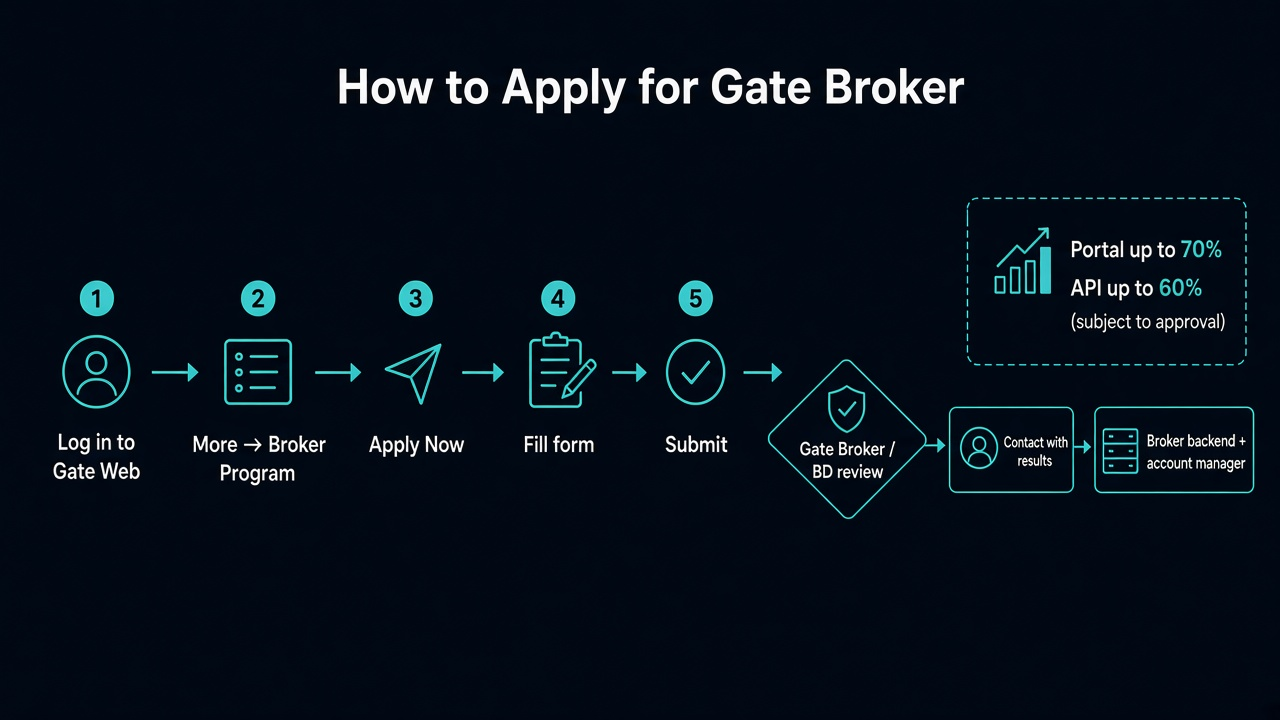 Figure 1. Gate Broker web Apply Now path, then review and broker-manager contact.
What Common Errors Happen When Applying for Gate Broker?
Most application friction comes from wrong product expectations, incomplete forms, or mixing evergreen rebate ceilings with limited-time activity copy.
| Error / misconception |
Likely cause |
Fix |
| Form rejected or review delayed |
Incomplete or inaccurate business fields |
Re-check entity, traffic, and contact details; resubmit or reply to the broker manager with corrections |
| Expecting a fixed rebate before approval |
Treating published ceilings as granted rates |
Treat Portal up to 70% and API up to 60% as published ceilings; final terms follow approval |
| Looking for a separate CrossEX application |
Assuming Spot/Futures/CrossEX use different portals |
Use the same Apply Now path; BD handles all three rebate types |
| Skipping applicable-scope fit |
Applying as a casual personal invite path |
Confirm applicable business types; Portal FAQ ≥500-follower cases point to Referral, not Broker shortcuts |
| Counting activity GT rewards as onboarding requirements |
Mixing Global Broker Program campaign rules into the application checklist |
Apply first; verify any live leaderboard or 21-day bonus window afterward |
| Following Influencers or Affiliate blog checklists instead of official Broker steps |
SERP overlap with Gate.com Influencers / Affiliate Program guides |
Use More → Broker Program → Apply Now; treat other partner programs as separate |
| Confusing Gate Life / P2P merchant forms with Broker Apply Now |
Similar “become a merchant/partner” wording in search results |
Gate Broker review is handled by the broker/BD team; Life or P2P merchant paths have their own recruitment pages |
The Fix column covers process hygiene only. Approval, rate confirmation, and backend provisioning remain with the Gate Broker team.
Is Applying Safe? What to Verify
Submitting a Gate Broker application is an informational and commercial onboarding request, not a trading order and not a promise of a specific rebate percentage. The main operational risk is providing false or incomplete information, which slows review or blocks contact. The main commercial risk is assuming published ceilings equal approved terms.
Verify three points before and after submit: (1) business details match the operating entity; (2) rate language is read as ceilings subject to approval; (3) any Global Broker Program activity copy is checked on the live campaign and kept separate from evergreen Portal/API ceilings. The program is designed for professional entities; commission rates and terms may vary by business model and traffic quality.
Official materials emphasize approval-dependent commission terms, dedicated account-manager support, and technical API documentation; they do not publish a separate public price list for Broker onboarding fees. Confirm rebate ceilings, settlement cadence after approval, and any concurrent activity rewards with BD—do not import figures from unrelated Gate Life merchant, P2P merchant, or Influencers earn-per-user pages.
Once approved, partners receive access to the broker backend system and dedicated account-manager support. Portal referral links versus API channel identifiers (including any approved X-Gate-Channel ID) should be mapped before co-marketing or routing order flow.
How to apply for Gate Broker therefore stays process-bound: prepare professional business details, submit via Apply Now, wait for broker-manager contact, confirm ceilings subject to approval, then provision backend access.
Summary
How to apply for Gate Broker on web: log in, open More → Broker Program → Apply Now, then wait for team review and contact with results. Applicable operators include trading bot, copy trading, quantitative strategy, asset management, market website, and aggregated trading platforms. Spot, Futures, and CrossEX share one application surface. Published ceilings are Portal up to 70% and API up to 60% for Spot and Futures; actual rates follow approval. After approval, partners receive broker backend access and a dedicated account manager. Limited-time Global Broker Program campaigns may run in parallel and should be verified on the live campaign without treating them as application prerequisites.
FAQ
How do I apply for the Gate Broker Program on Gate web?
Log in on Gate web, open More → Broker Program → Apply Now, fill the form, and submit. The Gate Broker team reviews the submission and contacts the applicant with results.
What businesses can apply for Gate Broker?
Applicable businesses include trading bot platforms, copy trading platforms, quantitative strategy platforms, asset management platforms, market websites, and aggregated trading platforms. The program is designed for professional entities operating trading platforms, communities, or related services.
Do Spot, Futures, and CrossEX rebates need separate applications?
No. Broker rebate applications for Spot, Futures, and CrossEX are submitted via Apply Now. The BD team handles applications directly, so no separate CrossEX portal is required.
How long does Gate Broker review take?
Review usually completes within 1–3 business days, with contact from a dedicated broker manager; when materials and review progress cleanly, onboarding can be as fast as one week. Rules may change, so confirm against the latest live pages and BD communication.
What happens after a Gate Broker application is approved?
Approved partners receive access to the broker backend system and dedicated account manager support. Commission rates and terms remain subject to approval and may vary by business model and traffic quality. Published Spot and Futures ceilings are Portal up to 70% and API up to 60%.