For beginners, understanding these three order types is enough to cover most basic trading situations. Market orders focus on fast execution, limit orders give more control over price, while stop orders wait for a predefined condition before triggering the next order.
If you have not yet completed your first spot trade, you may want to start with How to Make Your First Trade on Gate: A Beginner’s Spot Trading Guide to become familiar with trading pairs, the Buy and Sell sides, and the order-entry panel.
Key Takeaways
-
A limit order lets you set the price at which you are willing to buy or sell.
-
A market order executes against the best available prices in the order book and prioritizes speed.
-
A stop order waits for a predefined trigger condition before submitting the next order.
-
Limit orders may remain unfilled, while market orders may experience slippage.
-
The trigger price of a stop order is not necessarily the same as the final execution price.
-
No order type is always better; the right choice depends on whether the priority is price control, speed, or conditional execution.
What Is a Gate Limit Order?
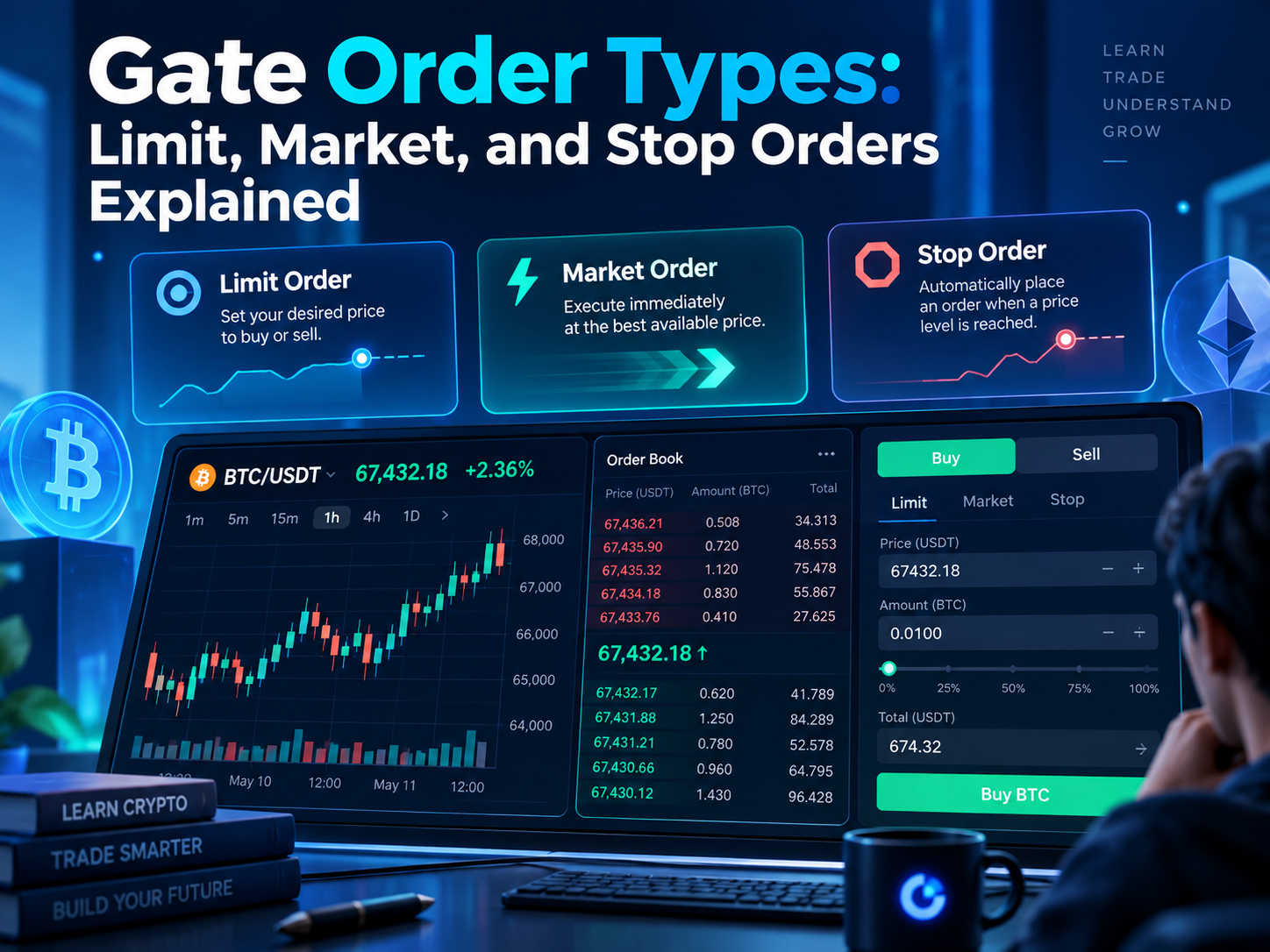
A limit order allows you to specify the price at which you are willing to buy or sell an asset, helping you target a desired price when you want more control over execution. The order only executes when the market can match your chosen price or better. If the market cannot meet that condition, the order remains in the order book.
For example, suppose BTC is trading around 100,000 USDT, but you only want to buy at 98,000 USDT or lower, which sets the maximum price you are willing to pay. You could place a buy limit order at 98,000 USDT. If the market never reaches an executable price, the order will remain open.
The main advantage of a limit order is greater price control. The trade-off is that execution is not guaranteed. If several traders place orders at the same price, earlier orders generally receive priority under price-time priority matching. On the sell side, a limit order can also set the minimum price you are willing to accept.
What Is a Gate Market Order?
A market order does not require you to set a fixed execution price. Instead, it is used when you want an order filled quickly in the current market rather than at a fixed price, matching against the best prices currently available in the order book.
For example, if you want to buy BTC immediately with 500 USDT, you can place a market buy order. The system will begin matching your order against available sell orders until the requested amount has been filled.
“Market price” does not mean the entire order is guaranteed to execute at the last price shown on the screen. It depends on the bid ask spread and whether your order is hitting the current bid or ask side of the order book. A larger order, or a market with lower liquidity, may fill across multiple price levels, so the amount you pay can differ from the most recent displayed price, especially in a fast market. This can result in an average execution price that differs from the most recent displayed price.
What Is a Gate Stop Order?
A stop order can be understood as an order that waits for a specific market condition before taking action.
Unlike a standard limit or market order, a stop order usually does not enter normal matching immediately. Instead, it waits until the market reaches a predefined trigger price. Once that condition is met, the system submits the corresponding order according to the settings selected by the user.
For example, a trader holding BTC may place a sell stop order to protect an existing position if the stock price drops to the stop price set as the trigger level. Until that trigger price is reached, the stop condition remains inactive. Traders use this setup to limit losses or protect unrealized gains.
The key distinction is between the trigger price and the execution price. The trigger price determines when the order becomes active, but it does not guarantee the exact price at which the final trade will execute. Once the stop price is reached, the order becomes a market order or submits the selected follow-up order, depending on the settings.
What Is the Difference Between Limit, Market, and Stop Orders?
The easiest way to compare these order types is by looking at when they execute and how the price is determined. These different order types help determine whether your priority is quick execution, price control, or conditional risk management.
| Comparison |
Limit Order |
Market Order |
Stop Order |
| Need to set a price |
Yes |
No |
Requires a trigger condition |
| Executes immediately |
Not necessarily |
Usually |
No, waits for trigger |
| Price control |
Higher |
Lower |
Depends on the triggered order |
| Guaranteed execution |
No |
More likely, depending on liquidity |
No |
| Common use |
Buying or selling at a chosen price |
Fast execution |
Stop-loss, take-profit, or conditional execution |
| Main consideration |
May remain unfilled |
Slippage |
Trigger price may differ from execution price |
If your priority is “I only want to trade at this price,” a limit order is more suitable. If the priority is “I want the trade completed quickly,” a market order is more direct. If the goal is “only act after the market reaches this condition,” a stop order is designed for that purpose.
Why Has My Limit Order Not Filled?
A limit order usually remains unfilled because the current market price has not reached your specified limit price.
For example, if BTC is trading at 100,000 USDT and you place a buy limit order at 95,000 USDT, the buy limit sets the specified limit price for entry rather than guaranteeing execution, and the market must reach a level where sellers are willing to trade with your order before it can execute.
Even if the market briefly touches your price, the entire order is not guaranteed to fill. Orders at the same price are generally matched according to time priority, so orders submitted earlier may execute first.
Any unfilled portion of the limit order can remain in open orders until it is filled or canceled.
Why Can Market Orders Experience Slippage?
A market order trades against the prices currently available in the order book rather than locking in one fixed price.
Suppose only a small amount of BTC is available at the current ask. If your order is larger than that amount, the system may need to continue buying from higher-priced sell orders, which can lead to partial fills across several price levels. The result is an average execution price across several price levels.
This difference is commonly called slippage. It becomes more important when the order is large, the market is moving quickly, or the trading pair has limited liquidity. That is why market orders in less-liquid markets typically execute at an average price rather than one exact price.
Does a Stop Order Always Execute After It Is Triggered?
Not necessarily.
A stop order first needs to reach its trigger condition. What happens next depends on the type of order that is submitted after the trigger.
If the trigger creates a limit order, the market still needs to meet that limit price before the trade can execute. If the trigger uses market-order logic, a buy stop order or a sell stop can convert once the stock reaches the stop level, so execution is prioritized, but the final price may differ because of market volatility and available liquidity. If there is a price gap, the trade may fill at a higher price or a lower price than expected.
For this reason, the trigger price should not be treated as a guaranteed execution price, since normal market fluctuations and sudden gaps can move the final fill away from the trigger level.
Which Order Type Is Better for a First Trade?
For a first spot trade, it is usually enough to start with market and limit orders, and beginners can choose between them based on their investment strategy and whether they want fast execution or tighter price control.
A market order is relatively straightforward and helps users understand the basic execution process. A limit order is useful for learning how order books, open orders, and price control work. Once those concepts are familiar, stop orders become easier to understand because they introduce another layer: the trigger condition.
There is no need to learn every advanced order type at once. Building a clear understanding of basic order logic first makes more complex strategies easier to use later.
What Other Order Types Does Gate Offer?
In addition to limit, market, and stop orders, Gate also provides more advanced strategy orders on supported trading interfaces, including tools such as iceberg orders, TWAP, trailing orders, and other conditional strategies.
These order types are designed for more specific execution needs. For example, an iceberg order can hide part of the total order size, while TWAP can spread a larger trade over time.
For most beginners, these advanced strategies are not necessary for basic spot trading. It is usually more useful to understand how limit, market, and stop orders work before moving on to more complex execution tools.
Summary
The three main Gate order types covered here are limit orders, market orders, and stop orders.
A limit order provides more control over price but may remain unfilled. A market order prioritizes execution speed but may experience slippage. A stop order waits for a predefined condition before triggering another order, which makes it useful for stop-loss, take-profit, and other conditional strategies.
The easiest way to understand them is to focus on three questions: When does the order enter the market? How is the price determined? And is execution guaranteed? Once these basics are clear, more advanced order types become much easier to understand.
FAQ
Can I cancel a Gate limit order?
Yes. As long as part of the limit order remains unfilled, it can generally be viewed and canceled from the open orders section.
Not necessarily. Market orders prioritize fast execution and are often filled during the trading day as long as liquidity is available, but not always immediately under all market conditions.
Is the trigger price of a stop order the same as the execution price?
No. The trigger price only determines when the order becomes active as a specific price condition. The final execution price depends on the order type and market conditions at that time, and with a stop limit order, which uses both a stop price and a limit price, execution can differ from a pure stop order.
Are limit orders or market orders better for beginners?
Both are basic order types. Market orders are easier for learning the execution flow, while limit orders are useful for understanding price control and order-book mechanics.
What advanced order types are available on Gate?
Gate supports additional strategy orders on certain interfaces, including iceberg orders, TWAP, trailing orders, and other conditional order types. You may also encounter duration settings such as a day order, which expires at the end of the trading day, and good til canceled, where a gtc order can remain active until filled or canceled, subject to platform rules and any time limit.