For example, in the BTC/USDT trading pair, BTC is the base asset and USDT is the quote asset. Buying BTC means using USDT to acquire BTC, while selling BTC means exchanging BTC back into USDT.
If you are new to crypto trading, trading pairs, or Gate.com itself, this walkthrough focuses on the basics you need to place a first spot trade with confidence. It covers setting up your available balance, understanding trading pairs, choosing between market and limit orders, using the Gate trading interface, placing and confirming an order, and checking your execution and updated balances. Those skills matter because spot trading is the simplest entry point into crypto, and learning how order types and pairs work makes it much easier to use Gate securely and effectively from your first trade onward.
Key Takeaways
-
Spot trading is generally easier to understand for a first trade than futures or margin trading.
-
BTC/USDT means BTC is traded against USDT.
-
A market order executes against available prices in the order book and may fill at slightly different prices.
-
A limit order lets you set your own price but may remain unfilled if the market does not reach that level.
-
Before submitting an order, check the trading pair, buy or sell direction, order type, price, and amount.
-
Unfilled limit orders can be viewed and canceled from the open orders section.
What Do You Need Before Using the Service to Make Your First Trade?
Before trading, make sure your account already has an asset that can be used in the selected market. For example, if you want to buy BTC in the BTC/USDT market, you need enough USDT in your spot balance. KYC verification is required before trading access is enabled.
If you have just completed your first deposit, confirm that the funds have arrived and been transferred to your spot wallet before opening the trading page. On Gate Web, spot trading can be accessed from the trading section, while the Gate App provides a trading entry from the main navigation.
For a first transaction, there is no need to use your entire balance. Starting with a smaller amount can make it easier to learn how trading pairs, order entry, and trade history work.
How to Make Your First Spot Trade on Gate
The example below uses USDT to buy BTC. The same basic process applies to other spot trading pairs.
Step 1: Open the Gate Spot Trading Page
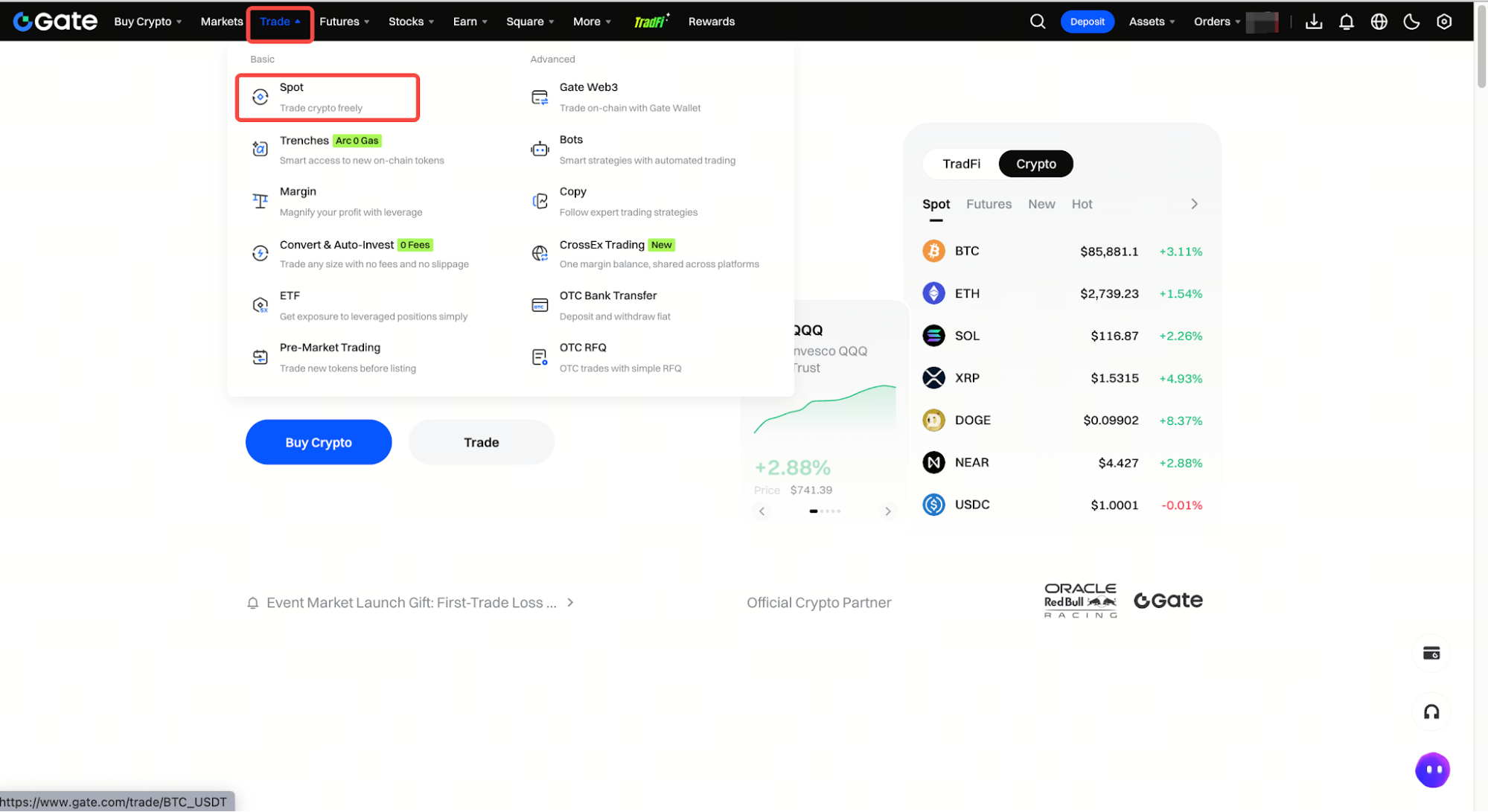
Log in to Gate and open the spot trading interface. On Web, select Trade and then Spot Trading to start. In the Gate App, open the trading area and navigate to the spot market on the platform.
The page typically shows the current trading pair, price chart, order book, order-entry panel, open orders, and trade history. For your first trade, you do not need to understand every module immediately. Focus on the trading pair and order-entry area first.
Step 2: Choose the Trading Pair
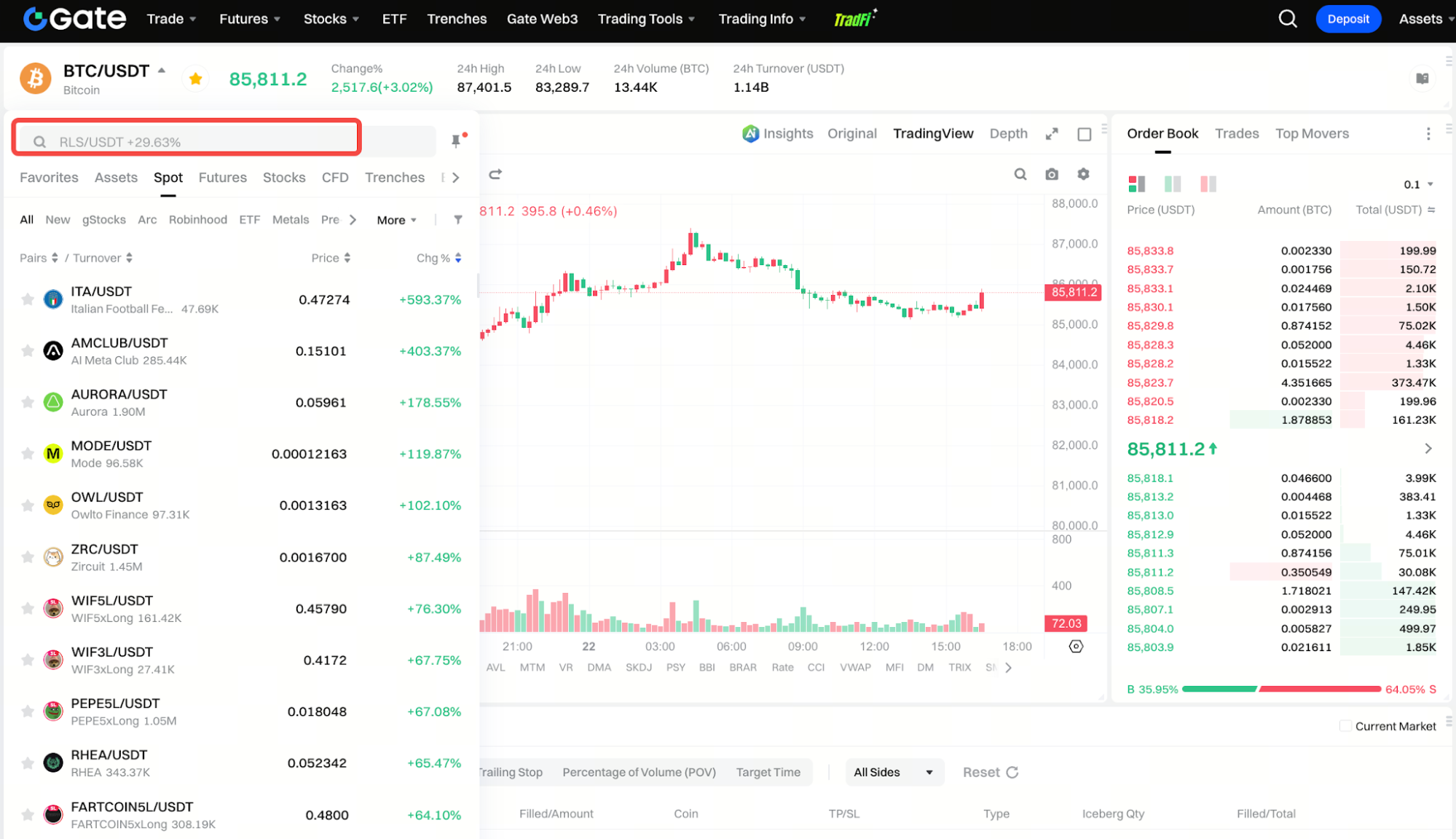
Search for the asset you want to trade and select the appropriate pair, such as BTC/USDT; in the app, tap “Markets” to find your trade pair. Gate.com also provides extensive altcoin listings, so checking the exact pair is important.
The order of the pair matters. In BTC/USDT, BTC is the base asset and USDT is the quote asset. Buying BTC means paying with USDT, while selling BTC means receiving USDT.
Before submitting the order, confirm that you have opened the correct pair, especially when several assets have similar ticker symbols.
Step 3: Choose Buy or Sell
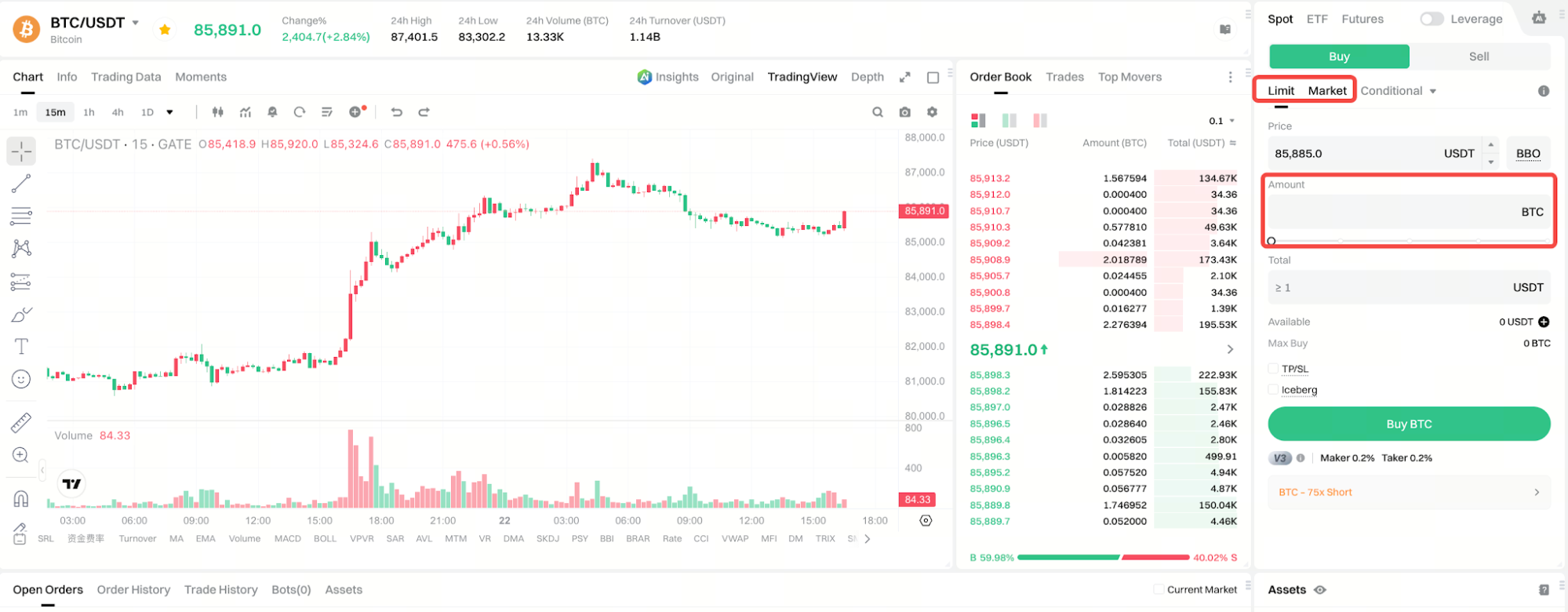
If your goal is to use USDT to acquire BTC, select the Buy side of the order panel. If you already hold BTC and want to exchange it for USDT, select Sell.
In spot trading, you can only sell assets that are already available in your account. For example, you need to hold BTC before placing a BTC sell order in the BTC/USDT market.
Step 4: Choose a Market Order or Limit Order
The two most common order types for a first trade are Market Order and Limit Order.
A market order is designed to execute as quickly as possible using the prices currently available in the order book. You usually enter the amount you want to buy or sell rather than setting an exact execution price. If the market is moving quickly or liquidity is limited, the final average execution price may differ from the last price shown on the screen.
A limit order lets you specify the price you are willing to accept. For example, if BTC is trading around 100,000 USDT but you only want to buy at 98,000 USDT or lower, you can place a buy limit order at 98,000 USDT. If the market never reaches an executable price, the order may remain open.
Gate also offers a one-click order feature for simple execution, but beginners should still review the order details carefully before confirming.
Step 5: Enter the Trade Amount and Review the Order
After choosing the order type, enter the amount you want to trade.
With a market buy order, you may enter the amount of USDT you want to spend. With a limit order, you generally need to specify both the price and the amount of the asset you want to buy or sell.
Before submitting, review the trading pair, Buy or Sell direction, order type, price, amount, and other order information carefully. For a first trade, pay particular attention to decimal placement so that a small intended order does not become much larger than expected.
Step 6: Confirm and Submit the Order
Once the details are correct, click Buy or Sell and follow the on-screen confirmation process.
A market order will usually execute quickly if sufficient liquidity is available. A limit order may instead appear in your open orders if the market has not yet reached the specified price.
Once the order is submitted, your first Gate spot order has been placed.
Step 7: Check the Order and Updated Balance
After the trade, review the order status, trade history, or order history section in the spot trading interface to view the result.
If a BTC/USDT buy order is fully filled, your BTC balance should increase while the corresponding USDT balance decreases. If a limit order is only partially filled, the remaining portion may stay in open orders.
Should You Use a Market Order or Limit Order for Your First Trade?
Neither order type is always better. The difference comes down to whether you care more about execution speed or price control.
| Comparison |
Market Order |
Limit Order |
| Need to set a price |
No |
Yes |
| Execution speed |
Usually faster |
Depends on market price |
| Price control |
Lower |
Higher |
| Can remain unfilled |
Usually not |
Yes |
| Useful for learning |
Basic execution flow |
Order book and price control |
If your goal is simply to become familiar with the trading process using a small amount, a market order is relatively straightforward. If you care more about entering at a specific price, a limit order may be more suitable.
In either case, check the amount and trade direction before submitting the order.
Why Can a Market Order Fill at a Different Price?
The latest price displayed on the trading page usually reflects the most recent transaction, but a market order executes against the actual prices available in the order book.
If the order is relatively large or the market has limited liquidity, it may fill across several price levels. The result is an average execution price rather than one guaranteed fixed price.
This difference is commonly associated with market depth and slippage. A market order prioritizes execution rather than an exact price, so it is worth checking both the order size and current liquidity before submitting one.
Why Has My Limit Order Not Filled?
A limit order only executes when the market can meet the price you specified.
For example, if you place a buy order below the current market price, the order may remain open until sellers are willing to trade at that level. If the market never reaches the price, the order may stay unfilled.
An unfilled limit order does not necessarily mean something is wrong. As long as it is still visible in open orders, you can keep waiting or cancel it and enter a different price.
What Are the Most Common First-Trade Mistakes?
One of the most common mistakes is selecting the wrong trading pair. If you intended to trade BTC/USDT but opened another market with a similar ticker, the transaction could involve a different asset or quote currency.
Another common misunderstanding is treating market orders as “instant buy” and limit orders as “delayed buy.” The real difference is how price is determined: market orders prioritize immediate execution at available prices, while limit orders restrict the price you are willing to accept.
It is also important not to focus only on the trade amount. Trading fees and actual execution price affect the final result as well. For a first trade, learning the complete order process is more useful than trying to use advanced strategies immediately.
Summary
Making your first trade on Gate can start with a basic spot transaction. Choose the correct trading pair, select Buy or Sell, decide between a market order and a limit order, enter the amount, and confirm the order.
Market orders focus on faster execution, while limit orders provide more control over price. Understanding these two order types is enough to handle most basic spot transactions.
Your first trade does not need to be complicated. Using a manageable amount to learn how to select a pair, place an order, confirm execution, and review trade history is a practical way to become familiar with the Gate trading interface.
FAQ
Should my first Gate trade be spot or futures?
Spot trading is generally more straightforward for beginners because it does not involve futures leverage, funding rates, or liquidation mechanics. Unlike basic spot buying and selling, futures trading lets users go long or short on assets, but it adds more complexity to the trading service. Gate also offers beginner-friendly guides for users who want to learn futures before trying it.
What do BTC and USDT mean in BTC/USDT?
BTC is the base asset and USDT is the quote asset. Buying BTC means exchanging USDT for BTC.
Will a market order always fill at the displayed price?
Not necessarily. A market order executes against available order-book prices, so the final average price may differ depending on market movement, order size, and liquidity.
Can I cancel a limit order after placing it?
Yes. As long as part of the limit order remains unfilled, it can generally be viewed and canceled from the open orders section.
Where can I see my first trade after it is completed?
You can review the order status and execution history in the spot trading interface and check the updated asset balance in your account. For added security, Gate.com combines cold and hot wallet storage and conducts regular security audits to safeguard funds. As of January 2025, Gate.com reported total reserves of $10.328 billion, a reserve ratio of 128.58%, and excess reserves of $2.296 billion.