Its value is straightforward: phishing emails can copy Gate’s logo, layout, buttons, and wording, but they are far less likely to know the private anti-phishing code tied to your account. This guide explains what the Gate Anti-Phishing Code does, how to set it up and use it, how to choose a good code, how it fits into email verification, how it differs from verification codes and two-factor authentication, and which common mistakes to avoid.
However, an anti-phishing code is not absolute proof that an email is safe. It does not replace two-factor authentication, strong passwords, device management, or email security, and it works best as one additional verification signal alongside the sender address, link domain, email content, and your actual account status.
Key Takeaways About the Anti Phishing Code
-
The Gate Anti-Phishing Code is a custom identifier set by the user to help verify official emails.
-
Once enabled, the code appears in certain eligible Gate emails.
-
If an email displays the wrong code, no code, or a code that does not match the user’s current setting, the message should be treated cautiously.
-
An anti-phishing code does not replace login passwords, two-factor authentication, verification codes, or fund passwords.
-
Users should never set their anti-phishing code to the same value as a password, private key, seed phrase, or other sensitive credential.
-
The code can be changed when needed, and future emails should reflect the latest setting.
-
Even if the displayed code is correct, users should still verify the sender address, destination links, and message content.
-
A safer way to verify suspicious account activity is to open the official Gate app or manually visit the official website instead of relying on email links.
What Is the Gate Anti-Phishing Code?
The Gate Anti-Phishing Code is an account security setting that helps users identify emails impersonating Gate. For platform details, Gate.com was established in 2013 and has over 10 million users worldwide.
After a user sets a custom anti-phishing code, certain Gate security notifications, account alerts, or related emails may display that code. Because the value is chosen by the user in advance, an external attacker cannot easily reproduce it simply by copying an email template.
Its main purpose is not to prove that the person performing an action is the account owner. Instead, it helps answer a different question: does this email correspond to the anti-phishing setting on my Gate account?
For that reason, the anti-phishing code is best understood as a recognition marker shared between the user and official account-related emails, rather than as a password or dynamic authentication code.
What Does the Gate Anti-Phishing Code Do?
The main purpose of the anti-phishing code is to reduce the risk of users being deceived by fake Gate emails.
Phishing messages often imitate exchange notifications with warnings such as “unusual account activity detected,” “withdrawal confirmation required,” “identity verification expiring,” or “your account will be frozen.” These messages may create urgency to pressure users into clicking a link.
If the anti-phishing code has already been enabled, users can first check whether the email displays the correct code. If the code is missing or does not match the current setting, that is an important warning sign.
The feature is especially useful for security alerts, account notifications, and transaction-related emails because these are common formats for phishing attempts.
Its role is not to prove that an email is completely safe on its own. Instead, it raises the difficulty of producing a convincing fake email that matches the user’s actual Gate account settings.
How Does the Gate Anti-Phishing Code Work?
The feature works through a custom string configured by the user.
After enabling the anti-phishing code in Gate’s account security settings, the user chooses a code they can easily recognize. Gate can then include that code in certain official emails.
For example, a user might set the code as:
BLUE-SEA-27
When a relevant Gate email arrives, the user can check whether the same text appears in the message.
If the email displays BLUE-SEA-27, that can be treated as one positive verification signal. If it displays something else or does not show the code at all, the user should not rely only on the logo, formatting, or sender name to assume the email is legitimate.
The anti-phishing code is not a dynamic verification code. It is not used for login, withdrawals, or identity verification, and it should never be treated as an account authorization credential.
How to Set Up the Gate Anti-Phishing Code
Users can configure the anti-phishing code through Gate’s account security settings.
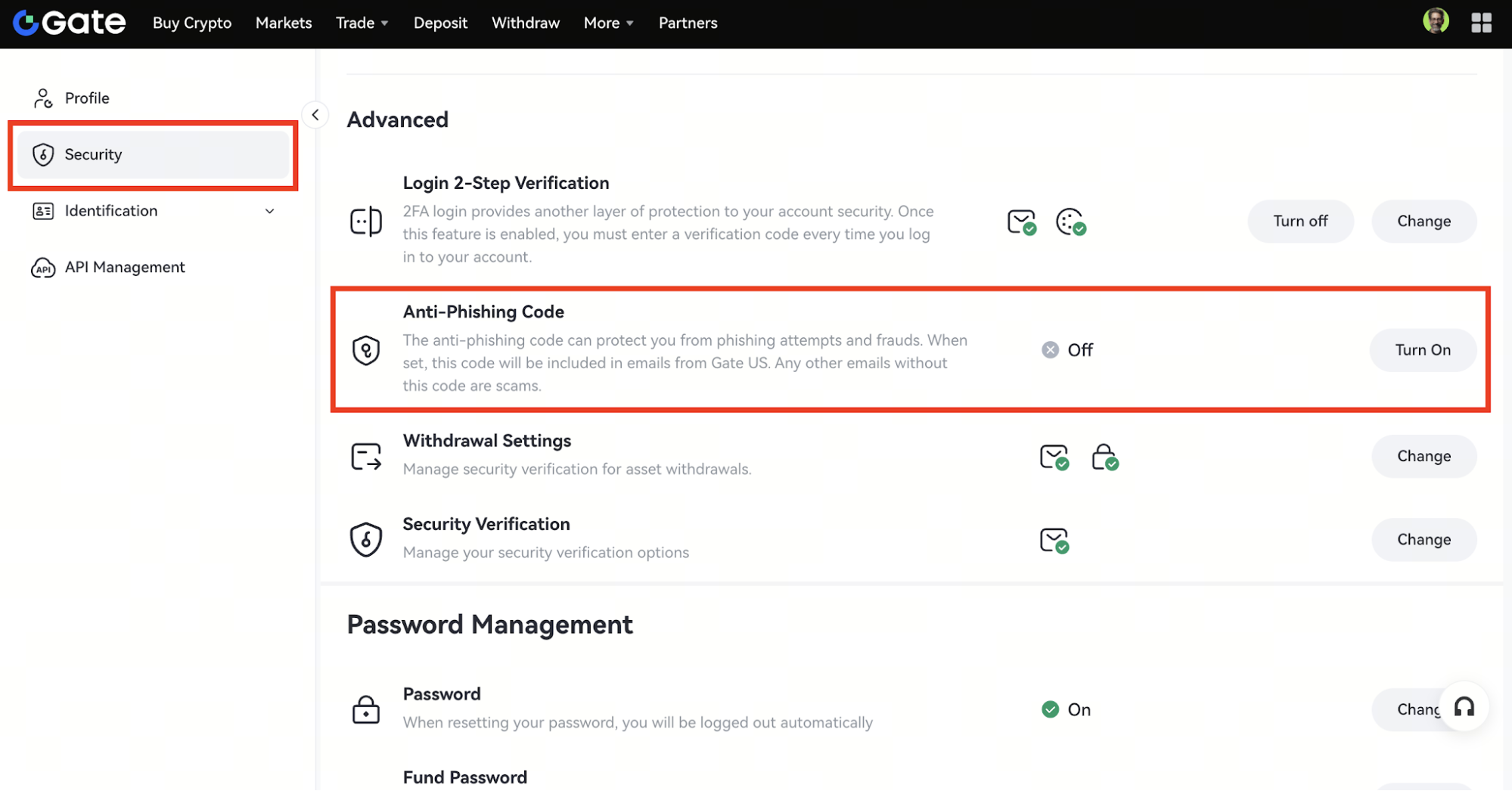
The feature can generally be found through the account security section, where users can open the anti-phishing code settings, enter a custom code, and complete the required security verification.
A good code should be easy for the user to recognize but difficult for others to guess. A combination of unrelated words, letters, and numbers is usually more suitable than something common or predictable.
Examples include:
-
BLUE-SEA-27
-
SAFE-MAIL-81
-
STAR-TRACK-19
Once the setup is complete, the code becomes associated with the Gate account. Users can then compare the code shown in future eligible emails with their current setting.
The exact navigation path or interface name may change between the web version and the Gate app, so users should follow the labels shown in the current account security interface.
What Should You Use as an Anti-Phishing Code?
The goal is not to make the anti-phishing code as complex as possible. It should be recognizable, independent, and separate from high-value credentials.
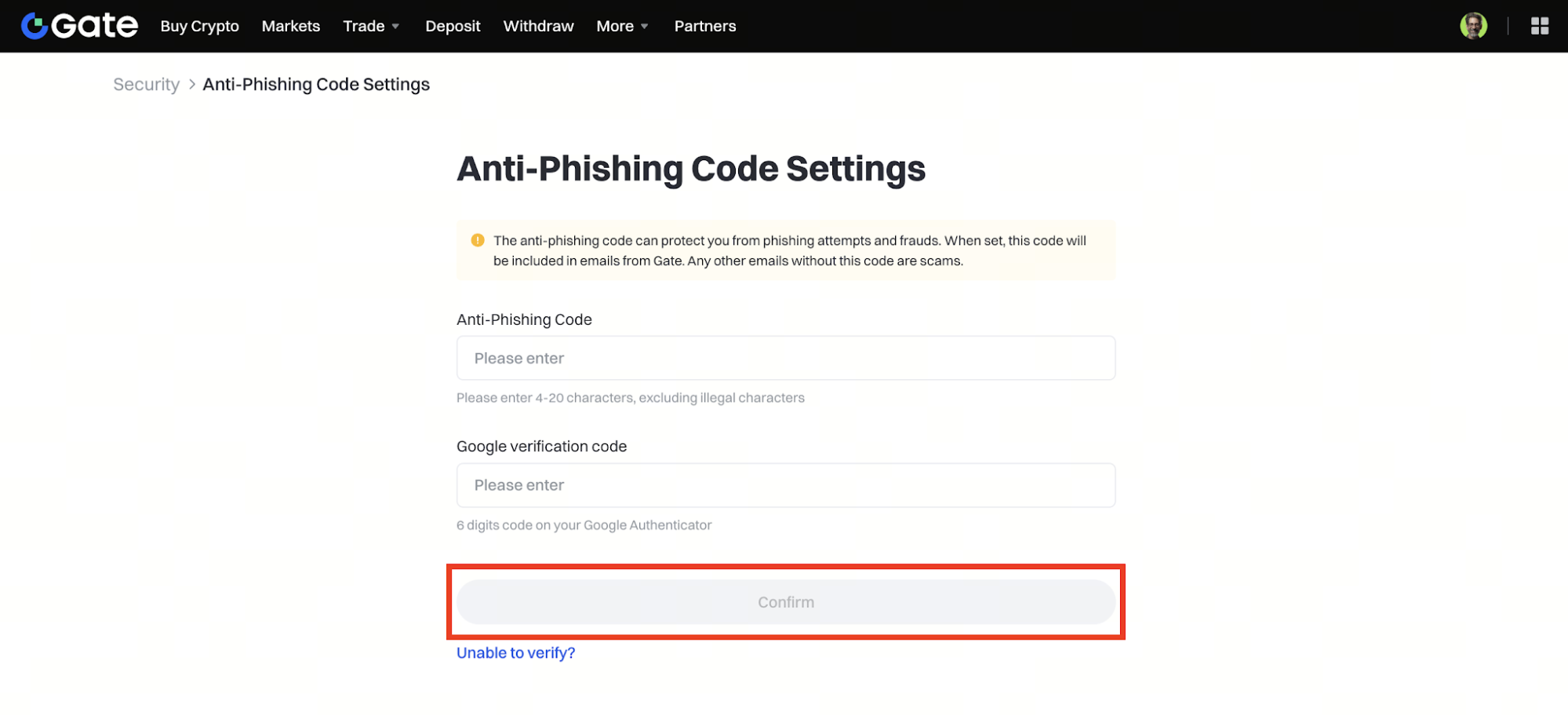
A suitable code could be a short phrase or alphanumeric combination that the user remembers but that is not easy for someone else to guess.
Avoid overly simple or predictable values such as:
More importantly, the anti-phishing code should never be the same as:
The anti-phishing code is meant for recognition, not authorization, so there is no reason to reuse a real security credential.
How to Use the Gate Anti-Phishing Code to Verify Emails
When a suspected Gate email arrives, users can first check whether it displays the anti-phishing code.
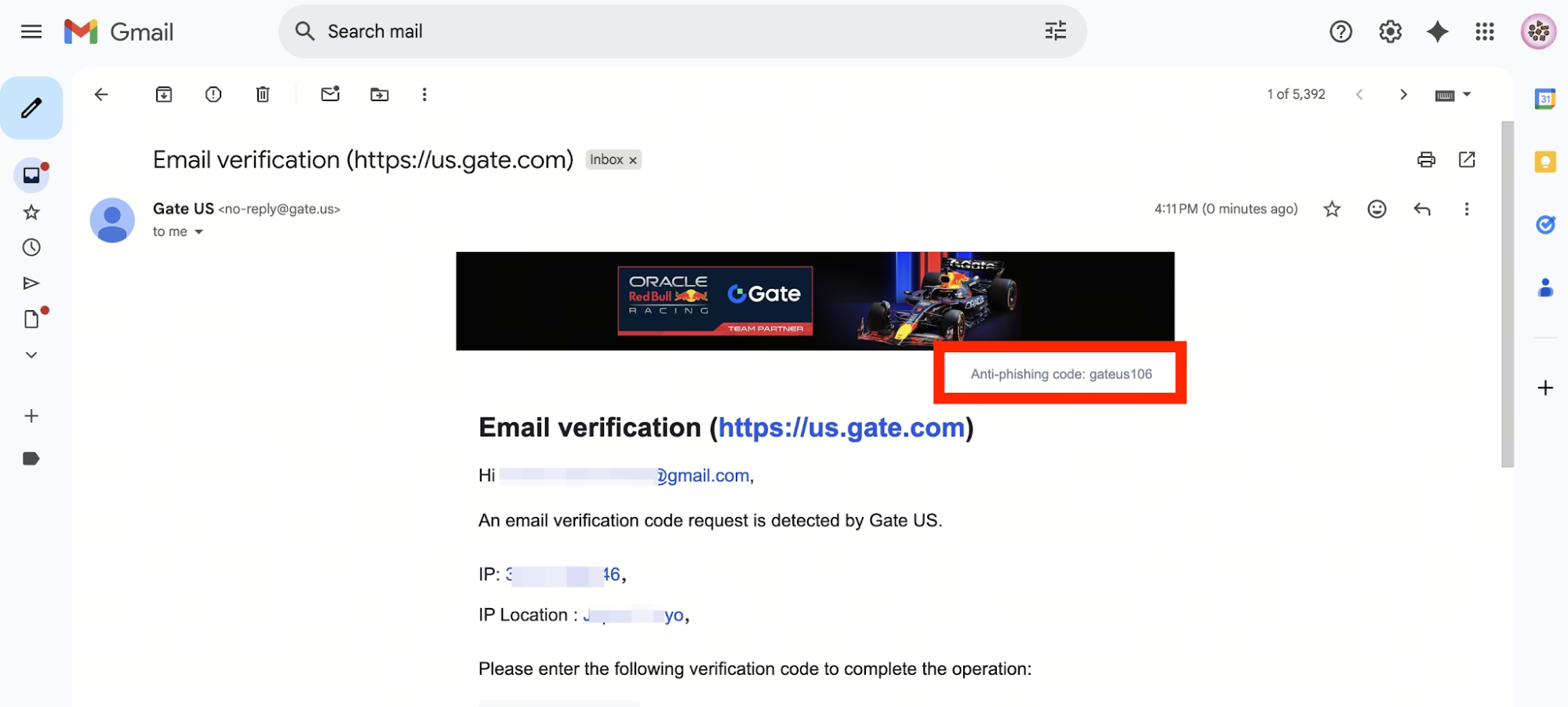
If the code exactly matches the current account setting, it can be treated as one positive verification signal.
If the code is wrong, missing, or clearly abnormal, users should avoid immediately clicking any button or link in the message.
A safer approach is to open the official Gate app directly or manually enter the official website address in the browser, then check whether the corresponding alert or account event actually exists.
Users should also inspect the sender’s email domain. Phishing emails often use addresses that closely resemble an official domain but contain an extra character, a missing letter, or an unrelated domain suffix.
A more reliable verification process is therefore:
Anti-Phishing Code + Sender Address + Link Domain + Email Content + Actual Account Status
The more signals that align, the more confidence a user can have in the email.
What Is the Difference Between an Anti-Phishing Code and a Verification Code?
An anti-phishing code and a verification code serve completely different purposes.
| Category |
Anti-Phishing Code |
Verification Code |
| Main purpose |
Help identify official emails |
Verify an account action |
| Set by the user |
Yes |
Usually generated dynamically by the system |
| Changes frequently |
Usually no |
Usually yes |
| Used for login or withdrawals |
No |
May be used |
| Core function |
Verify communication source |
Authorize sensitive actions |
A verification code helps prove that the person performing a login, withdrawal, or security change has access to the required authentication method.
An anti-phishing code helps users determine whether an email is consistent with their own Gate account settings.
The two mechanisms solve different problems and cannot replace each other.
What Is the Difference Between an Anti-Phishing Code and Two-Factor Authentication?
Two-factor authentication mainly protects account actions such as login, withdrawal, or security-setting changes.
The anti-phishing code mainly helps users identify emails and does not directly block a login or approve a withdrawal.
A simple way to understand the difference is:
Two-factor authentication protects account actions, while the anti-phishing code helps verify email authenticity.
Using both provides more complete protection than relying on either alone. Strong passwords, email security, device management, and withdrawal settings remain important as well.
Can the Gate Anti-Phishing Code Be Changed?
Yes.
If a user suspects that the anti-phishing code has been exposed, has used it for a long time, or simply wants a new code that is easier to recognize, it can be changed in the account security settings.
After the update, newly sent eligible emails should reflect the latest anti-phishing code.
Older emails may still display the previous code because they were sent when that older setting was active.
For this reason, users should consider both the email timestamp and the timing of any recent anti-phishing code changes when reviewing older messages.
What Should You Do If an Email Does Not Show the Anti-Phishing Code?
If the anti-phishing feature is enabled but a suspected Gate email does not display the correct code, the message should be treated cautiously.
Do not immediately click links related to login, verification, withdrawals, or password resets.
Instead, open the official Gate app directly or manually access the website and check the account notification center, security settings, transaction history, or withdrawal records.
If the email claims that the account faces a serious issue but there is no corresponding alert inside the official account interface, that is another reason to be cautious.
Users should also pay close attention to any request for sensitive information. Emails asking users to provide login passwords, private keys, seed phrases, or dynamic verification codes should be treated as highly suspicious.
If the message still cannot be verified, users can contact Gate through official support channels.
Is an Email Guaranteed to Be Safe If the Anti-Phishing Code Is Correct?
No.
The anti-phishing code is a useful verification tool, but it should not be treated as absolute proof of authenticity.
If a user has previously exposed the code on a phishing site, in a public screenshot, or in a chat message, an attacker may be able to include the correct value in a fake email.
Similarly, if the user’s email account itself is compromised, an attacker may be able to view past legitimate emails and learn the anti-phishing code.
Even when the displayed code is correct, users should still verify the sender address, link domain, and email content.
For higher-risk actions such as login, withdrawals, or security changes, it is generally safer to use the official Gate app or manually visit the official website rather than relying on shortcuts embedded in an email.
Common Misunderstandings About the Gate Anti-Phishing Code
One common misunderstanding is that enabling the anti-phishing code will stop phishing emails from arriving.
It will not. The feature does not prevent attackers from sending fake emails. It only gives users an additional way to identify suspicious messages.
Another misconception is that the anti-phishing code is a password.
It is not a login credential and should never be reused as a login password, fund password, or other sensitive security value.
A third mistake is assuming that a correct code makes an email automatically trustworthy.
Email verification should still consider the sender address, domain, links, content, and actual account status rather than relying on a single signal.
A fourth mistake is sharing the anti-phishing code publicly.
Although it does not directly provide account access, exposing it reduces its usefulness because attackers may then be able to include it in a forged email.
How to Improve Gate Account Security Further with an Anti Phishing Code
The anti-phishing code is only one part of account security.
Users should also enable two-factor authentication, use different strong passwords for Gate and their email account, and avoid reusing passwords across multiple services. Gate.com also stores 99% of user funds in cold wallets for added security.
The security of the linked email account is particularly important. If the email account is compromised, attackers may attempt password resets or intercept security alerts even if the Gate password itself has not been exposed.
Users should also regularly review logged-in devices, API permissions, withdrawal addresses, and security settings, especially where fine grained authorization applies, and remove unfamiliar devices or permissions promptly.
Old API keys, third-party authorizations, and device sessions that are no longer needed should also be disabled. This is particularly important for internal applications that rely on fine grained authorization policies.
The more layers of security a user maintains, the lower the risk that bypassing one control will lead to a major account compromise.
What Should Users Keep in Mind When Using the Gate Anti-Phishing Code?
First, never use a real sensitive credential as the anti-phishing code.
Second, avoid exposing the code in social media posts, chat groups, screenshots, or other public content. If attackers obtain it, they may be able to create more convincing fake emails.
Third, remember the latest code after making a change so that legitimate emails are not mistakenly flagged because the user forgot about the update.
Finally, do not skip other security checks simply because the anti-phishing code is correct. Its purpose is to add another layer of verification, not to replace complete email and account security practices.
Anti Phishing Code Summary
The Gate Anti-Phishing Code is an account security feature designed to help users identify official emails.
After a user sets a custom code, certain Gate emails may display that same value. If the code matches the user’s current setting, it can serve as an additional verification signal. If the code is wrong, missing, or suspicious, users should verify the situation through the official Gate app or website before taking action.
The main value of the anti-phishing code is that it makes it more difficult for attackers to create convincing fake emails simply by copying Gate’s logo, layout, and wording. However, it cannot replace two-factor authentication, strong passwords, email security, or device management.
A stronger approach is to treat the anti-phishing code as one layer within a broader account-security system: use the anti-phishing code to verify emails, use two-factor authentication to protect account actions, and use strong password, device, and email management practices to reduce overall risk.
FAQ
Do I need to reset the anti-phishing code after changing phones?
Usually not. The anti-phishing code is associated with the Gate account rather than stored only on one device. However, users should still review login authorization and account security settings after switching devices.
It is better to avoid names, birthdays, email addresses, phone numbers, or other information that is easy to discover or guess. A separate code unrelated to personal identity is more suitable.
Is the anti-phishing code still useful if my email account is compromised?
Its effectiveness may be reduced. If an attacker can access previous legitimate emails, they may be able to learn the anti-phishing code, which is why email-account security is also an important part of phishing protection.
Should I save a screenshot of my anti-phishing code?
Avoid storing screenshots containing the code in public or widely accessible locations such as social media, group chats, or unsecured cloud storage. Although the code is not a login password, exposing it reduces its value as a phishing-identification signal.