Etherscan fits Ethereum and many EVM analytics workflows, BscScan fits BNB Smart Chain with a similar UI pattern, and Blockchain.com Explorer is a common starting point for Bitcoin and multi-asset lookups—choose by network first, then by features such as token pages, labels, and multi-chain coverage.
This comparison sits under the broader explainer What is a blockchain explorer. The goal is selection clarity, not a ranking of “best overall,” because the wrong network explorer fails even when the UI looks familiar. In one sentence each: Etherscan is the default Ethereum view; BscScan is the default BNB Smart Chain view; Blockchain.com Explorer is a common free Bitcoin-oriented entry point.
| Dimension |
Etherscan |
BscScan |
Blockchain.com Explorer |
| Primary network |
Ethereum (plus related Etherscan family sites) |
BNB Smart Chain |
Strong Bitcoin focus; broader multi-asset views |
| Contract / token tools |
Deep ERC token and contract pages |
Deep BEP token and contract pages |
Lighter than EVM specialist explorers |
| UI familiarity for EVM users |
High |
High (same family pattern) |
Different; Bitcoin-oriented layout |
| Typical first use |
ETH tx, ERC-20, contracts |
BSC tx, BEP-20, contracts |
BTC tx and address checks |
Network mismatch is the top selection error. An Ethereum TXID will not resolve on a BSC-only view; a Bitcoin TXID will not appear on Etherscan’s Ethereum main search. Solana and other non-EVM networks need their own explorers—do not expect Solana signatures inside Etherscan’s Ethereum index.
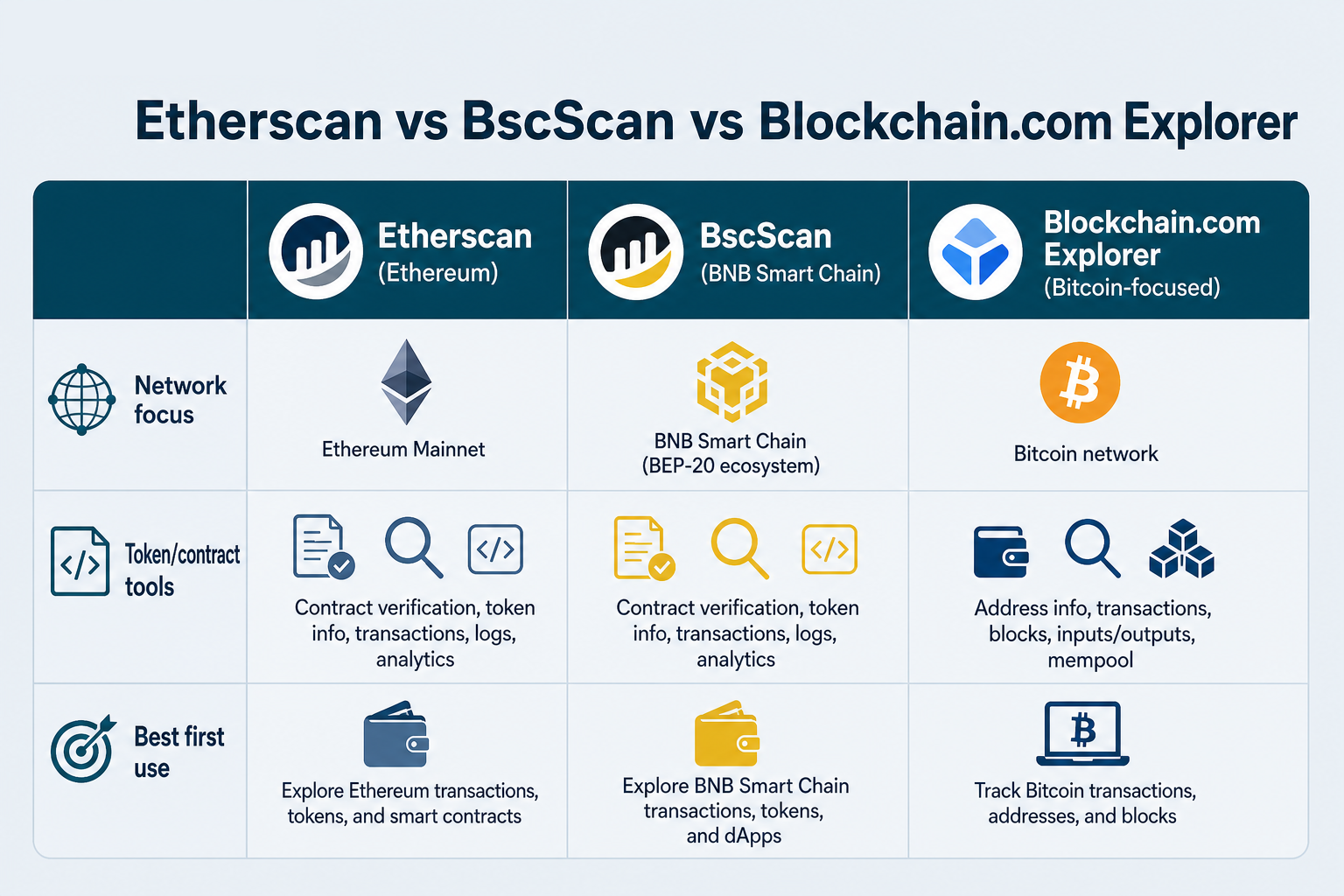 Figure 1. Match the explorer to the withdrawal network before comparing features.
What Is Etherscan?
Etherscan, BscScan, and Blockchain.com Explorer are not interchangeable: Etherscan is built for Ethereum, BscScan for BNB Smart Chain, and Blockchain.com Explorer for Bitcoin. The right choice is usually decided by which network the transaction actually uses. For most readers comparing these three, Etherscan and BscScan are the closer pair because both offer deeper EVM token, contract, and address analysis, while Blockchain.com Explorer is stronger for straightforward Bitcoin readability.
This comparison is for traders, investors, operations teams, and businesses that need to verify deposits, withdrawals, wallet activity, and payment status across Ethereum, BNB Smart Chain, and Bitcoin. It focuses on differences that change the decision: network coverage, UI similarity, verification workflow, token and contract visibility, security checks, API access, and which explorer fits each use case. Picking the wrong explorer wastes time and can lead to false troubleshooting—a valid result on one chain says nothing about a transaction sent on another.
Etherscan is a widely used explorer for Ethereum. It surfaces transaction status, address activity, ERC-20 and NFT-related views, gas-related context, and contract verification pages used by developers and power users. For many EVM learners, Etherscan defines the mental model of “what a modern explorer shows.” Teams that check deposits daily often bookmark it because the layout is consistent across transaction, address, and token pages.
Etherscan-family products also exist for other chains with similar layouts. Similarity helps muscle memory, but each site still indexes its own network—confirm the domain and network badge before trusting results. A successful status means the transaction was included in a block under that network’s rules; it does not by itself mean an exchange has credited a deposit. When you open a transaction view, check whether token transfers are listed separately from the native value line.
What Is BscScan?
BscScan is a block explorer for BNB Chain / BNB Smart Chain, following the same basic pattern many users know from Etherscan. Users typically rely on its search bar for transaction data, wallet balances, smart contracts, history, and token tracking when checking activity on BSC. The information layout is very similar to Etherscan, so transaction, address, and token pages feel familiar and reduce the learning curve between Ethereum and BSC. The free public UI is enough for most users who only need to check whether funds were received.
Because UI similarity is high, phishing and wrong-network mistakes are also high. Bookmark official URLs and match the chain ID or network label to the asset you withdrew. If a support team asks for proof, provide the BscScan transaction URL after you confirm the hash is included on BSC—not an Ethereum mirror that happens to look the same.
Blockchain.com Explorer is frequently used to inspect Bitcoin transactions and addresses, with product surfaces that may also cover additional assets depending on the path. Compared with Etherscan/BscScan, its strengths skew toward UTXO-style Bitcoin readability and broader consumer recognition rather than Ethereum-style contract tooling. As a searchable ledger view, it makes block and transaction details easy to review, with inputs, outputs, and confirmation counts that Bitcoin users expect. Token pages and contract reads can still help for lighter checks, but an EVM explorer is usually stronger for token and contract depth.
For Bitcoin payment verification—confirmations, inputs/outputs, and fee context—Blockchain.com Explorer or other BTC-capable explorers are the natural fit. For ERC-20 contract debugging, an EVM explorer remains the better tool. Open the address view carefully when many small outputs are listed; check that the received amount matches the payment you expected before marking the transfer complete.
Block Explorer Chain Coverage
Chain coverage is the decisive filter. Etherscan aligns with Ethereum lookups; BscScan aligns with BNB Smart Chain; Blockchain.com Explorer is built mainly for Bitcoin-oriented lookups. These are specialized explorers for different blockchains, so the right choice depends first on the network named in the transfer. Across supported chains, the trade-off stays the same: Etherscan and BscScan are better for smart-contract and token analysis, while Blockchain.com Explorer is easier for Bitcoin readability. Some tools offer cross-chain visibility, but that does not replace network-specific pages when you need precise transaction context. Solana explorers, for example, provide account and signature views that do not map one-to-one onto Etherscan’s Ethereum pages.
If a withdrawal ticket says “BSC” or “BEP-20,” open BscScan (or an equivalent BSC explorer), not Ethereum mainnet Etherscan. If the ticket says Bitcoin, use a BTC explorer. This rule prevents hours of false troubleshooting. Popular explorer lists are useful for discovery, yet the practical test is simple: can you paste the TXID and clearly see key fields and block information on the chain named in the ticket?
For comparison work, document which site you checked, which network badge was active, and whether token-transfer rows appear beneath the summary. Address poisoning and fake transfers are easier to catch when you check the full recipient string instead of trusting a truncated display.
Which Explorer for Common Tasks—and What About APIs?
| Task |
Prefer |
| Ethereum payment or ERC-20 |
Etherscan |
| BNB Smart Chain payment or BEP-20 |
BscScan |
| Bitcoin payment check |
Blockchain.com Explorer (or other BTC explorer) |
| Contract source / ABI inspection |
Etherscan or BscScan (matching chain) |
Choose Etherscan when verifying Ethereum transfers, reading ERC token movements, or inspecting verified contracts. Choose BscScan for the same tasks on BNB Smart Chain. Choose Blockchain.com Explorer when the asset and TXID are Bitcoin-oriented or when a simple BTC address history view is enough. Operations teams often standardize on one primary explorer per chain so every member checks the same fields.
For a repeatable verification workflow after you pick the site, follow Verify a crypto transfer step by step. For interpreting token and contract pages once inside an EVM explorer, use Address, token, and contract data pages. Those guides provide the reading order; this page provides the tool shortlist. The usual trade-off is simplicity versus depth.
Developer workflows often use each site’s API (for example, Etherscan-style JSON-RPC interfaces). Read transaction status—success, pending, failed—together with confirmations and finality expectations on that network. Good tracking means checking a particular transaction in real time before you rely on it as settlement evidence. Network fee and gas lines explain cost; on Ethereum they include gas prices, and they are not the token amount received. Smart-contract calls, swaps, and approvals may share the same hash as a token movement, so open nested tabs before you conclude the payment failed.
After you choose the right site, you typically find transaction status, sender and recipient addresses, token transfer versus native coin transfer rows, confirmations and finality cues, network fee and gas, plus optional labels. Asset pages may also show supply metrics and top holders. If you are reviewing contracts or assets, confirm the token address so spoofed tokens are easier to spot. The TXID (transaction hash) is the lookup key you paste once the explorer is open.
In a comparison context, explorers provide independent proof that a payment was included—not a ranking of brands. You use them to verify transactions, review activity tied to an address, and pull fields for payment ops or audits. At selection time, each product indexes one or more chains; your job is to open the index that matches the withdrawal ticket, then check whether funds were received on that ledger. Transparent records also let teams inspect transfers without relying on screenshots alone.
Key Takeaways
Network fit beats brand familiarity. Etherscan and BscScan share UI patterns but index different chains, while Blockchain.com Explorer is a frequent Bitcoin-oriented entry point with different tooling depth; all three help verify a particular transaction with a transaction ID or hash. Select the explorer that matches the withdrawal network, then apply a consistent TXID verification checklist. For most users, the best explorer is the one that matches the chain they need to inspect; Etherscan is often treated as the canonical Ethereum entry and gives deeper access to contract and token-level detail than a Bitcoin-first tool. Document which information you checked, which view was open, and whether the hash was included before a team marks funds received.
Once the transaction page loads, you usually see status, confirmation count, sending and receiving addresses, fee details, timestamps, and relevant smart-contract method data—plus address history and token-page metrics such as supply and holders where available. The goal is not just “did something happen,” but whether the hash maps to the correct network, destination, amount, and asset.
If the transfer is pending, keep tracking against live chain data, including gas prices on Ethereum-style networks. If it is confirmed, compare the final amount, receiving address, and time with your exchange or wallet records. The trade-off is simple: Etherscan and BscScan go deeper on EVM tokens and security checks, while Blockchain.com Explorer is simpler for Bitcoin-focused verification.
FAQ
Which blockchain explorer should I use for Ethereum?
Etherscan is the common default for Ethereum transaction, address, and token lookups. Confirm you are on the Ethereum network view before concluding a transfer is missing. Block height on block and transaction pages helps confirm where the transaction landed. Check that the transaction is included and that any ERC-20 movement appears in the token information section.
Which blockchain explorer should I use for Bitcoin transactions?
A Bitcoin-capable explorer such as Blockchain.com Explorer is appropriate for BTC TXIDs and addresses. EVM explorers will not show native Bitcoin transactions. Open a free public page, paste the TXID, and verify the outputs that received value.
Are Etherscan and BscScan the same product?
No. They share a similar interface family and field layout, but they index different networks. Treating them as interchangeable search boxes causes wrong-chain misses. Same UI means faster learning—not shared data. If you want detailed Bitcoin mempool visualization, Mempool.space is another Bitcoin-focused option; these EVM explorers still do not show native Bitcoin transactions. For developers, bigger differences show up in API access and rate limits: free tiers cover basics, while paid tiers typically add higher quotas.
Can one explorer show every blockchain?
Some products offer multi-chain search, but each query still requires the correct network context. Universal coverage is not a substitute for selecting the chain that produced the TXID. Solana, Bitcoin, and Ethereum each need the matching index before a team can provide reliable proof of payment. Explorers read data broadcast by nodes, but they do not hold funds, swap tokens, or ever require private keys. Multi-chain tools (such as OKLink or Blockscout) can widen coverage, yet settlement checks should still follow the chain that produced the hash.