This guide is for beginners who follow project announcements, airdrop notices, or platform support replies on Telegram. Full scam paths and red flags are covered under fake support and recovery tactics; if a suspicious link was already opened or a login code shared, prioritize after a recovery scam to cut sessions and rotate credentials.
Key Takeaways
- Trusted channel entries come from a known website or app-store disclosure page—not search ads, pinned comments, or forwarded DMs.
- The @username and t.me link must match character by character; one extra underscore or lookalike letter means unverified.
- Telegram support is reached in-app via Settings → Ask a question; the Telegram FAQ states Telegram does not run support accounts on other social platforms.
- Unsolicited DMs, rushed ticket clicks, or asks for login codes or seed phrases should be treated as fake support and reported through verifiable paths.
What Do You Need Before You Start Verification?
Before verifying, prepare independently reachable entry points and one repeatable matching rule—do not rely on screenshots sent by the other party.
Gather three items: a brand website or app-store page you can reopen yourself; the claimed @username; and a blank checklist (entry source / username / unsolicited DM? / asks for codes?). Do not replace the website with a stranger’s short link, and do not open DM attachments before the username check.
The Telegram FAQ (telegram.org/faq) states users contact support in-app via Settings → Ask a question, and that Telegram does not maintain support accounts on other social platforms. The same rule applies in crypto: exchange, wallet, and project support entries must trace back to that brand’s public disclosure page.
Step 1: How Do You Find the Official Channel from the Website or App Store?
The correct starting point is a Telegram / Community link on a known website or app-store listing—not the first search result or a comment-section “official group.” A Telegram group or channel can have many subscribers and still be fake, so popularity does not confirm legitimacy.
Follow this numbered path:
- Type the known domain in the browser address bar, or open Help / Community inside the genuine installed app; do not tap DM short links.
- Locate the Telegram channel or group link in the footer, Support, Community, or Help Center sections.
- Record the full
t.me/... path and visible @username; do not forward it or join unknown private groups yet.
- If the website discloses no Telegram entry, mark the channel “not publicly confirmed” and stop treating DMs as support.
App-store pages count as a cross-check only when the listing or developer site shows the same Telegram link. Search ads, lookalike landing pages, and “pinned support” avatars are not verifiable starting points.
Step 2: How Do You Match the @username and Public Link?
Verification hinges on exact string matching: the publicly disclosed @username must match the open channel’s username and link path character by character.
Check four items:
| Check |
Pass signal |
Fail / pause signal |
| @username spelling |
Exact match to the website disclosure |
Extra/missing letters, digit swaps, underscore variants |
| t.me path |
Path maps to the username and is reproducible |
Short-link hops or intermediate jump domains |
| Display name / avatar |
Supporting clues only; never sufficient alone |
Trusting “looks official” without a string match |
| Verification badge |
Bonus only when the brand explains what it means |
Treating any checkmark or logo as absolute proof |
Official organizations or a company may display a visual marker, but the username still has to match exactly. Common impersonation swaps lookalike characters (such as 0/O or l/I), appends _support / help, or builds trust with a similar display name before asking for a login code. Log the result; on failure, close the chat and do not tap any “ticket” or “verify” button.
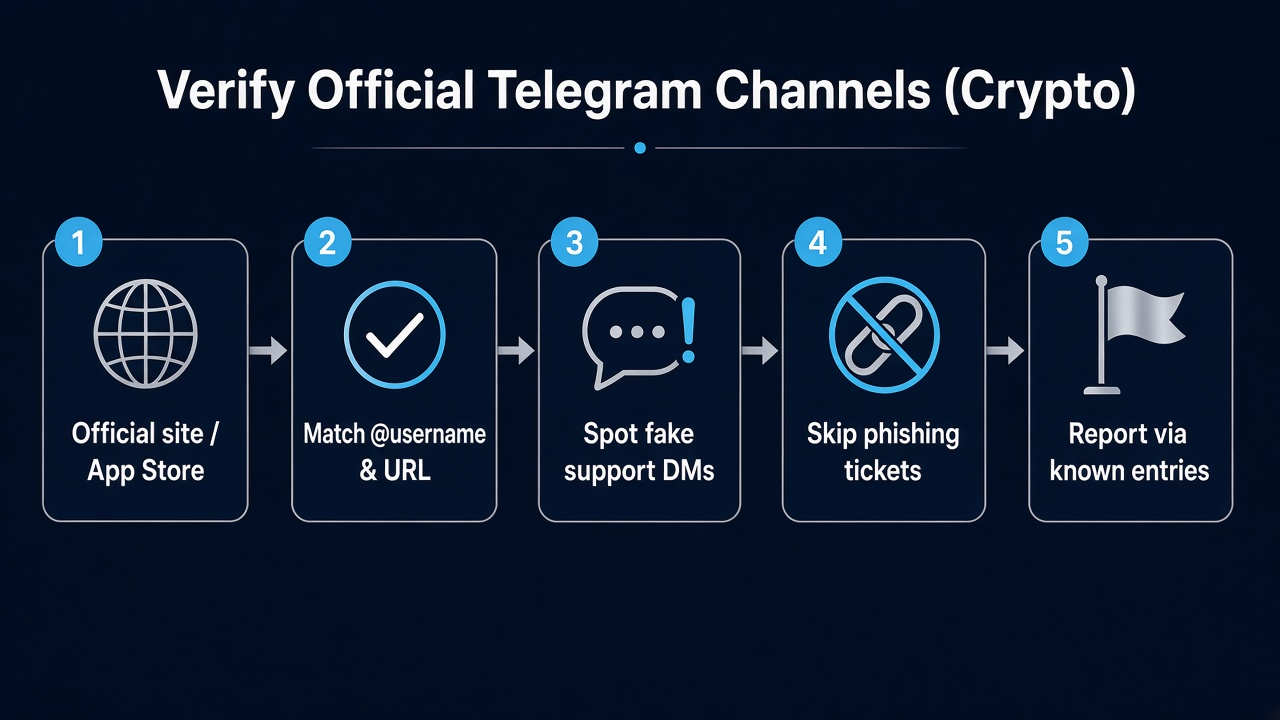
Figure 1. Crypto-user flow to verify official Telegram channels: website/app-store entry → match @username → spot fake support DMs → skip phishing tickets → report via known entries.
Step 3: How Do You Spot Fake Support Private Chats?
Fake support usually opens the DM first, creates urgency, and confines “the only fix” to a conversation the impostor controls. On Telegram, scammers often pose as real crypto company staff so the private chat feels legitimate—confirm identity through official channels and avoid impersonators.
Use this table to separate fake support DMs from verifiable official entries:
| Dimension |
Fake support DM |
Verifiable official entry |
| Who starts |
Sudden DM or comment-section bait |
User enters from website / in-app help |
| Identity basis |
Avatar, claimed badge number, screenshot ID |
Disclosed @username / help-center path |
| Handling |
“Only in this chat; expires in 30 minutes” |
Ticket created on a known site or in-app |
| Asks |
Login codes, SMS codes, seed phrases, remote control |
Legitimate support does not demand login codes or seed phrases |
| Telegram support |
Self-branded “Telegram official support” friend requests |
Settings → Ask a question; no support accounts on other platforms |
The Telegram FAQ states login codes appear in the verified service notifications chat and must never be shared with anyone. Impostors often frame “send the code to prove ownership” as required for unfreezing or withdrawals; never click unsolicited links, and any code ask means stop.
Step 4: Why Should You Skip Phishing Ticket Links from Strangers?
Treat “ticket,” “verify,” or “compensation” links inside stranger DMs as phishing by default when the host domain is not a brand domain the user already knows.
Typical wrappers include shortened URLs, lookalike help-center subdomains, wallet-connect “sync balance” pages, or remote-assistance downloads. Clicks often lead to credential harvest, malicious approvals, or session hijacking—then wallet drain or exchange withdrawals. Close the DM link and return to the website / app help center; screenshots of the chat and username can preserve evidence without opening the URL.
If a link was already opened or a code shared, stop “confirming the ticket number” in the same chat and move to account-protection steps.
Step 5: How Do You Report Through Verifiable Paths?
Report suspicious accounts through independently openable public entries—not a “special report bot” supplied by the other party.
Practical paths include:
- Use Telegram’s built-in report / block controls and keep screenshots of the username and message timestamps.
- In-app support: Settings → Ask a question (the support entry cited in the Telegram FAQ); remember Telegram states it does not run support accounts on other social platforms.
- For cross-border cybercrime leads, file at IC3; consumer fraud tips can go to ReportFraud.ftc.gov.
- For exchange or wallet incidents, submit tickets only via that brand’s app or website help center—never via DM short links.
These paths support evidence retention and reduce secondary loss; “emergency recovery” tutorials that claim to bypass normal phone-number constraints are often used as bait and sit outside legitimate verification and help flows. Off-platform “recovery” pitches that ask for bulk personal data should also be refused.
Checklist: Official Entry vs Fake Support—How Do You Run It Quickly?
Compress verification into a repeatable checklist; any critical fail means stop interacting.
| # |
Question |
Yes → next |
No → action |
| 1 |
Did the entry come from a manually opened website or genuine app? |
Proceed to username match |
Stop; reopen from the known domain |
| 2 |
Do @username / t.me match the disclosure page character by character? |
Safe to follow public announcements |
Mark as impersonation; block and report |
| 3 |
Did the other party DM first and push a deadline? |
Treat as fake-support signal |
Contact only via the help center |
| 4 |
Are login codes, seed phrases, or remote control requested? |
Stop immediately and report |
Read public posts only; grant nothing |
| 5 |
Can the “ticket” open only through a DM link? |
Do not click; use the known help center |
Submit inside the known domain |
Public channels are for reading announcements; anything involving accounts, assets, or codes returns to a verifiable entry. The checklist turns “feels official” into pass/fail conditions that can be re-run. Claims of guaranteed profits or fixed daily returns in a “support” chat are also a red flag.
Summary
A reliable sequence is: enter from the website or app-store disclosure, match the @username character by character, use the comparison table to spot fake support DMs, refuse phishing tickets, and report only via in-app support, IC3, FTC ReportFraud, or the brand help center. The Telegram FAQ points support to Settings → Ask a question and states Telegram does not run support accounts on other social platforms. A verified channel only means the source is traceable—not an investment opportunity; if credentials leaked, move straight into account protection.
FAQ
Open the Telegram link from that brand’s website or genuine app / app-store listing, then match the channel @username and t.me path character by character. Avatars, display names, search rank, or a DM claiming “official” are not enough—even for a crypto exchange channel.
Where is Telegram’s real support entry?
The Telegram FAQ states users can contact support in-app via Settings → Ask a question, and that Telegram does not maintain support accounts on other social platforms. Accounts on Facebook or similar claiming to be Telegram support should not be treated as Telegram.
Someone DMs as support and asks for a verification code—what should happen next?
Stop the chat immediately and do not send login codes, SMS codes, or seed phrases. Telegram login codes appear in the verified service notifications chat and must never be shared; an unsolicited code ask—often from someone pretending to be staff at a real crypto company—is a high-risk fake-support signal. Confirm the contact on the brand’s public website, then block and report the account.
Why skip “ticket” or “verify” links inside private chats?
DM links sit on domains and redirects the user does not control and are often used to host phishing pages that harvest credentials or push malicious approvals. Close the link and return to the known website or in-app help center to find the formal entry.
After a failed verification or clicking a suspicious link, what else should be done?
Stop all interaction, keep username and chat screenshots, and report through Telegram’s built-in tools, the brand help center, or public portals such as IC3 / FTC ReportFraud; if a code leaked or a risky approval completed, follow account-protection steps to rotate credentials and review withdrawals and wallet permissions.