Built for sophisticated retail crypto traders, investors, and institutions that want advanced derivatives with clear settlement rules, Event Contracts offer a defined way to speculate on short-term price outcomes without trading the asset itself. After an order is filled, you can either sell the position before expiration or hold it until the event is automatically settled. This guide explains how to read Event Contract terms, place and manage trades, view open positions and orders, understand settlement, fix common trading issues, and assess the liquidity and timing risks involved.
What Do You Need Before Trading Event Contracts?
Before getting started, log in to your Gate account and make sure you have completed any required identity verification and product-access procedures. Event Contracts are typically traded and settled in USDT, so your account must also have sufficient available USDT.
You should understand the basic contract terms before placing an order. Event contracts are a financial instrument framed as Yes/No questions about future events. In the U.S., they are generally overseen by the commodity futures trading commission (CFTC). Each event has a defined outcome, expiration time, target price, and settlement rule. You are purchasing a contract tied to one possible outcome rather than buying BTC, ETH, or another underlying asset directly.
Before trading, check the following information:
-
What outcome the event is measuring;
-
When the event starts and expires;
-
What Up and Down represent;
-
The current contract price and available liquidity;
-
Which reference price and settlement conditions determine the result.
Contract specifications may vary between events. Always review the information displayed on the relevant trading page rather than relying only on the contract price or recent movement of the underlying asset.
How to Trade Event Contracts on Gate
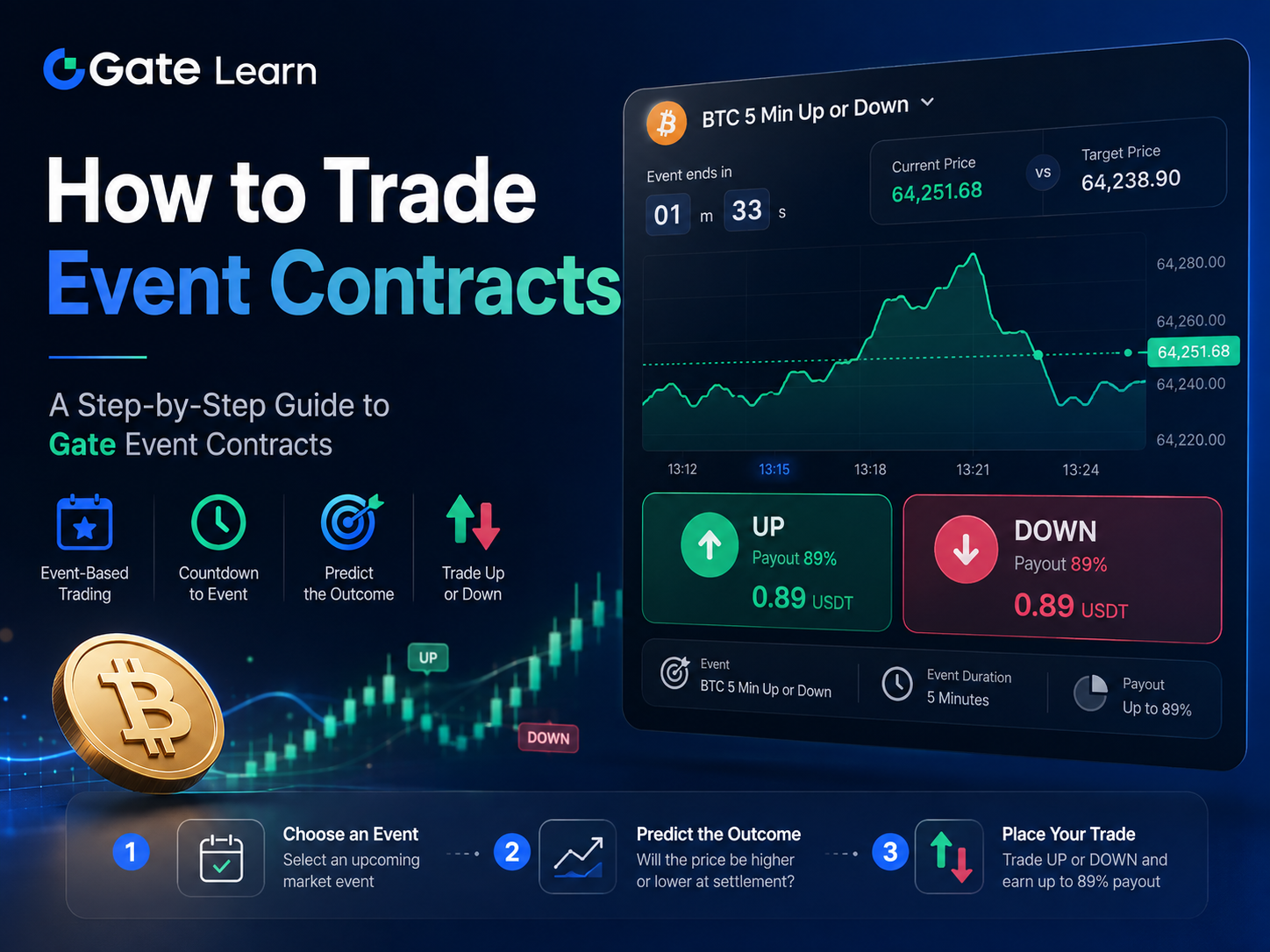
On the Gate Event Contracts trading page, users can select an event and expiration time, review market information, choose Up or Down, and place an order from the same interface.
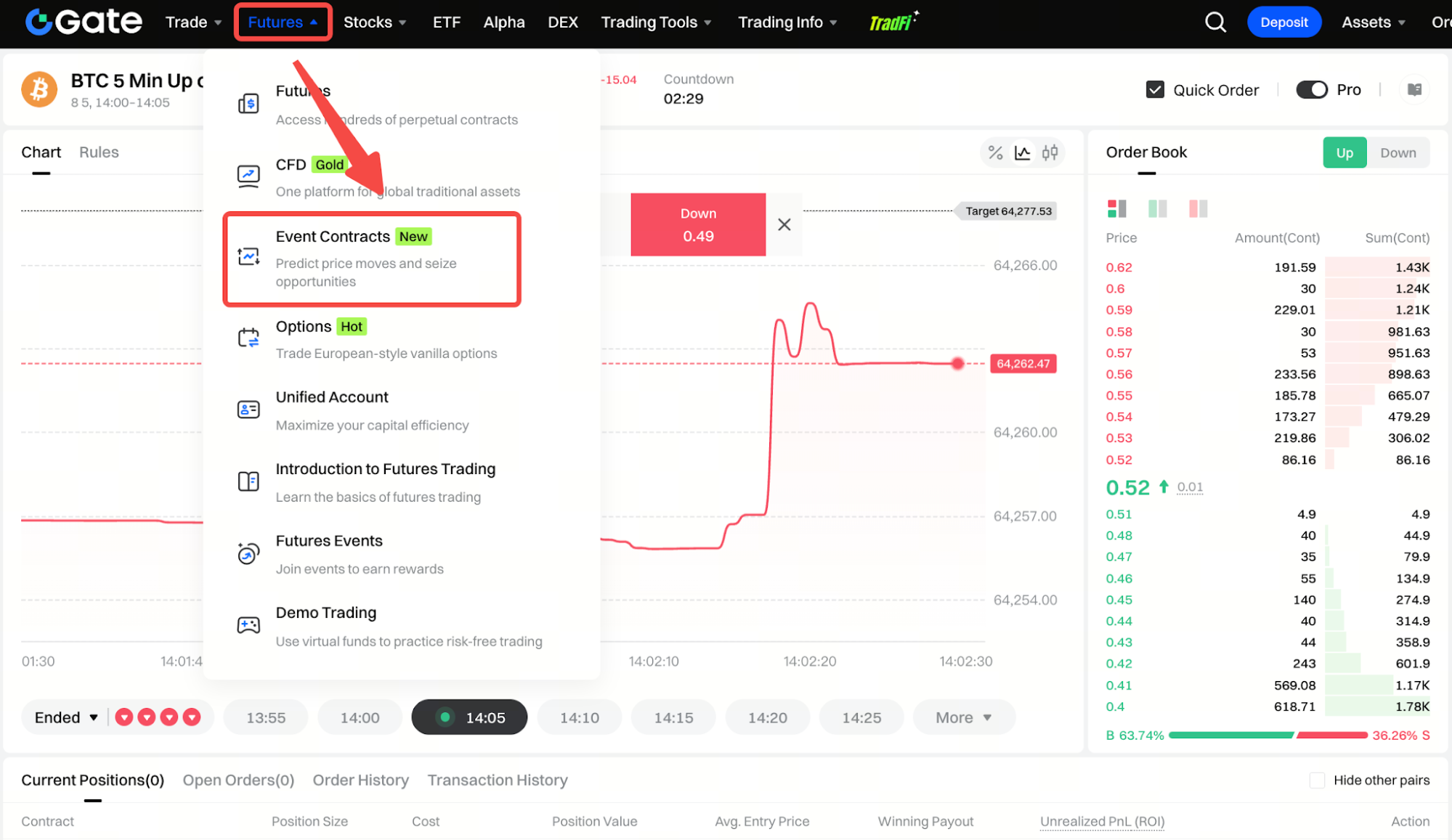
Step 1: Select an Event
Choose the event you want to trade from the event selector in the upper-left section of the page. The event name normally identifies the underlying asset, event duration, and possible outcomes.
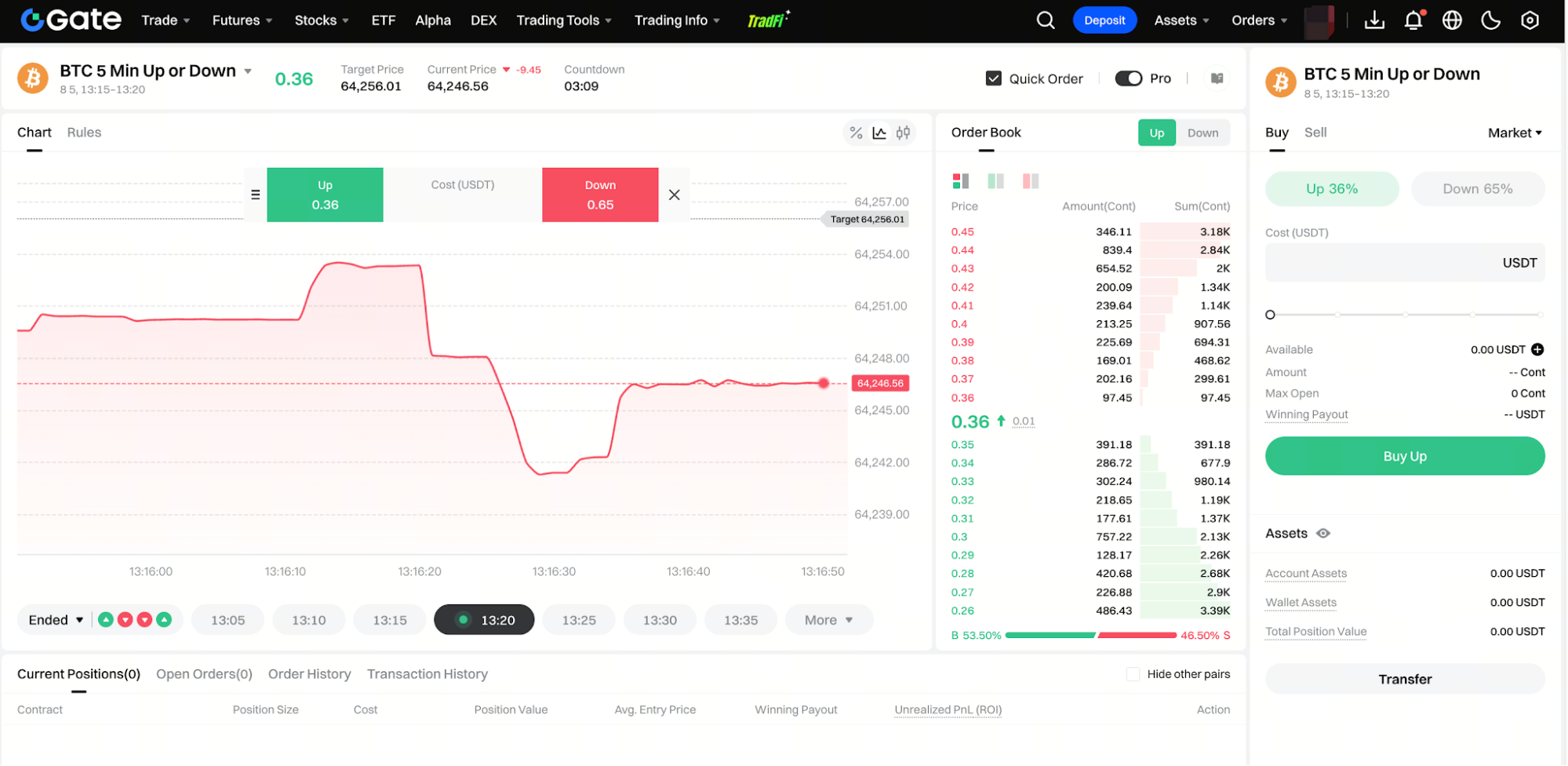
For example, BTC 5 Min Up or Down asks users to predict the direction of BTC over a five-minute event period.
When selecting an event, check the start time, expiration time, and target price. Events based on the same underlying asset but with different expiration times are separate contracts. A BTC event expiring at 13:15 is therefore different from one expiring at 13:20.
Step 2: Review the Target Price, Current Price, and Countdown
After choosing an event, review the target price, current price, and countdown displayed near the top of the page.
The target price is the benchmark used to determine the event outcome. In simple terms, event contracts work by tying the trade to an underlying market and a defined expiration. The current market price of the underlying asset shows its latest traded value, while the countdown shows how much time remains before the event expires.
The price chart can help you compare the live market price with the target price. Depending on the platform, event contracts are often priced between $0 and $1, which makes them useful as probability-like signals for price discovery across financial markets. In practice, you are weighing probabilities rather than making absolute predictions about whether the market will finish above or below a certain price at a specific time. However, a price trading above or below the target before expiration does not guarantee the final result. The market may move again before the settlement time.
Short-duration events can change quickly, especially during the final seconds. Users should consider both the price difference and the remaining time before deciding whether to trade.
Step 3: Choose Up or Down
Once you have reviewed the event details, select the outcome you expect.
Up generally means you expect the asset price at expiration to meet the contract’s upward settlement condition. Down generally means you expect the price to meet the downward settlement condition.
The exact comparison may depend on the event rules. In a typical price-direction event, Up may win if the final reference price is above the target price, while Down may win if it is below the target price.
The page displays a market price for both outcomes. This two-outcome structure can resemble binary options, but Event Contracts follow their own settlement rules on the platform. These prices move as participants place orders and update their expectations.
For example, an Up contract priced at 0.89 USDT costs approximately 0.89 USDT per contract. A higher price suggests that the market currently assigns greater confidence to that outcome, but it does not guarantee that the outcome will occur.
Up and Down positions should not be confused with leveraged long and short positions in perpetual futures. Event Contracts represent possible outcomes of a defined event and follow their own pricing and settlement rules.
Step 4: Select an Order Type and Enter the Trading Amount
After choosing Up or Down, use the order panel on the right side of the trading page to configure the order.
Select Buy when opening a new position. Users who already hold contracts and want to exit before expiration can switch to Sell, subject to available market liquidity, which can help limit losses and reduce potential losses if conditions change.
The page may support market orders or other order types. A market order is matched against available orders in the order book at the best currently available prices. A limit order allows the user to set a preferred price, but it may not be filled immediately, especially in thin order books where bid-ask spreads can widen.
Enter the amount you want to spend in the Cost (USDT) field. The order panel may also display information such as:
Minimum and maximum purchase amounts can vary by platform and event, and traders may be able to buy event contracts at prices from $1 to $25,000.
The estimated number of contracts can be understood using the following calculation:
Estimated Contract Amount = Trading Amount ÷ Contract Price
For example, if an Up contract is priced at 0.89 USDT and the user spends 8.90 USDT, the estimated purchase amount would be approximately 10 contracts before considering price changes, order-book depth, or applicable fees.
The final contract amount may differ because market prices can move while the order is being executed. Larger orders can also face slippage when order flow is thin. Larger market orders may also be filled across several price levels.
Step 5: Review and Submit the Order
Before submitting the order, review the event name, expiration time, target price, selected outcome, order type, and trading amount.
Pay particular attention to whether Up or Down is selected. Choosing the wrong outcome cannot normally be corrected by cancelling the trade after it has already been filled.
Once the information is correct, click Buy Up or Buy Down to submit the order.
A market order may be filled quickly, although the average execution price can differ slightly from the latest displayed price. Execution quality also depends on available exchange liquidity at the moment of submission. A limit order may be fully filled, partially filled, or remain open until a matching counterparty becomes available.
After execution, the contracts will appear under your current positions. In standard yes/no event structures, the payout is typically $1 if the selected outcome occurs and $0 if it does not, subject to the platform's rules. Any unfilled portion of the order will remain under open orders, where it can usually be reviewed or cancelled.
How to View Current Positions and Open Orders
After an order is filled, the position appears in the Current Positions section of the Event Contracts page. The information shown may include the contract name, position size, cost, position value, average entry price, winning payout, and unrealized profit or loss.
Orders that have not yet been filled, or have only been partially filled, appear under Open Orders. Users can review the order price, quantity, filled amount, and current status.
An open order is not the same as an active position. Only the filled portion creates a contract position. Users who no longer want an unfilled order can normally cancel the remaining quantity.
Filled positions may be sold before expiration while the event is still open for trading. The exit price is determined by the order book at that time and is not the same as the final settlement value.
A sell order may not execute immediately if there is insufficient liquidity. Users may need to adjust the order price or wait for another participant to take the opposite side.
How Are Event Contracts Settled at Expiration?
When an event expires, Gate determines the result according to the contract’s predefined reference price, data source, and settlement conditions.
Users do not need to submit a separate settlement request. Any position that remains open at expiration is automatically processed by the system.
If the selected outcome matches the final event result, the winning contracts receive the settlement value specified in the event rules. If the selected outcome is incorrect, the contracts may settle at zero.
In a typical binary event, a winning contract may settle at 1 USDT per contract, while the losing contract settles at 0 USDT. This differs from traditional futures and other futures contracts, which are usually tied to the price of an underlying asset or commodity rather than the outcome of a specific event. However, users should always check the specific terms of the event because settlement procedures may vary.
After settlement, users can review the result, settlement amount, and final profit or loss in their order history, transaction history, position records, or account balance records.
Positions that were fully sold before expiration do not participate in the final settlement because they have already been closed through the market.
Common Event Contract Trading Issues and How to Fix Them
| Issue |
Possible Cause |
Suggested Action |
| The order was submitted but not filled |
The order price does not match available market orders, or liquidity is limited |
Review the order book, adjust the price, or cancel and resubmit the order |
| The page shows insufficient balance |
Available USDT is too low, or funds are reserved by other open orders |
Check your balance and open orders, then add or release available funds |
| Only part of the order was filled |
There were not enough matching contracts at the selected price |
Wait for the remaining amount to fill or cancel the unfilled portion |
| An open order cannot be sold |
The order has not yet created a position |
Cancel the open order or wait until it is filled |
| A sell order was not filled immediately |
There is insufficient demand at the selected price |
Adjust the sell price or wait for liquidity to improve |
| Settlement funds are not visible immediately |
The system may still be confirming the result or processing settlement |
Check the event status and transaction history, then allow time for settlement |
| The final cost differs from the simple estimate |
The order may have been filled at several prices or may include applicable fees |
Refer to the confirmation page and final execution records |
Event Contracts use an order-book matching system. Execution speed, average price, and the ability to exit before expiration therefore depend on market depth and available counterparties.
The latest displayed contract price does not guarantee that an entire order can be filled at the same level, particularly when the order is large relative to available liquidity.
What Risks Should You Consider When Trading Event Contracts?
Event Contracts generally do not use the same margin and leverage structure as perpetual futures. In futures markets, traditional contracts are generally tied to commodities or other underlying asset prices rather than event outcomes. As a result, they do not involve liquidation in exactly the same way as leveraged derivatives.
However, users may still lose all the money committed to a position, including the entire amount paid, if the selected outcome does not match the final result.
Contract prices can also change significantly before expiration. Even when a user’s final market view is correct, selling the position early at a price below the entry price can still result in a loss.
Liquidity is another important risk. If there are not enough buyers or sellers in the order book, users may be unable to close a position immediately or at their preferred price.
Like other speculative products linked to futures trading, event-driven contracts can also raise behavioral and market-integrity concerns, including compulsive trading and misuse of nonpublic information.
Short-duration events are particularly sensitive to timing. A relatively small price movement near expiration may change the result, especially when the current price is close to the target price.
Contract prices reflect the market’s current expectations, but they should not be treated as guaranteed probabilities. A high-priced outcome can still lose, while a low-priced outcome is not automatically undervalued.
Users should control their position size according to their risk tolerance and avoid treating Event Contracts as fixed-income products. Funds required for everyday expenses should not be used for speculative trading.
Conclusion
To trade Event Contracts on Gate, select an event and expiration time, review the target and current prices, choose Up or Down, configure the order, and submit it from the trading panel.
After the order is filled, the position can be monitored under Current Positions. Users may sell before expiration if sufficient market liquidity is available, or continue holding until the contract is automatically settled.
Event Contracts provide clearly defined outcomes and expiration times, but they still involve market, timing, and liquidity risks. Users should review the event rules carefully, confirm all order details, and limit the amount committed to each trade. This guide is for educational purposes only and is not investment advice.
FAQ
What asset is used to trade Gate Event Contracts?
Gate Event Contracts are typically purchased and settled in USDT. The supported settlement asset should always be confirmed on the relevant event trading page.
What do Up and Down mean?
Up generally means the user expects the final reference price to satisfy the upward settlement condition. Down means the user expects it to satisfy the downward condition. The exact definition depends on the rules of the selected event.
Can an Event Contract order be cancelled after submission?
The unfilled portion of an order can usually be cancelled from the Open Orders section. Once an order has been filled, it cannot normally be reversed through cancellation. The user may instead attempt to sell the resulting position before expiration.
Can Event Contracts be sold before expiration?
Yes, users can generally submit a sell order while the event remains open for trading. Whether the order is filled depends on the available liquidity and counterparty orders in the market.
Do users need to claim settlement funds manually?
Normally, no. Once the event expires and the result is confirmed, the system automatically settles eligible positions. Users can review the result in their transaction or position records.
Can Event Contracts be liquidated?
Event Contracts generally do not use the same leveraged margin system as perpetual futures, so they do not have the same liquidation mechanism. Still, traders can limit losses by closing a position early rather than holding until settlement. However, a contract may still lose its entire value if the selected outcome is incorrect.