To start Gate Stock Copy Trading, update the Gate App to V8.29.0 or later, open Copy Trading > Stocks, evaluate a lead trader, set your copy amount and stop-loss, confirm the agreements, then manage the relationship under My Copies. Followers replicate lead traders' real stock and ETF positions across U.S., Hong Kong, and South Korean markets, more than 12,500 instruments, using proportional sizing and fractional shares from 0.01. Web access is coming soon, and the App is the supported path at launch.

Key takeaways
- App V8.29.0+ is required; the path is Copy Trading > Stocks, while Web access was announced as coming soon.
- Review returns, drawdown, and copier count before tapping Copy.
- Set copy amount and stop-loss, then confirm risk disclosures to start.
- Manage capital and exits in My Copies → Copy Trade Details → Manage.
What do you need before you start?
-
Update the Gate App to V8.29.0 or newer so the Stocks tab appears under Copy Trading.
-
Log in to an account that can access Gate stock-related services in your region. Gate may restrict services by jurisdiction, so check the User Agreement before you start.
-
Know the product type. Stock Copy uses real stocks and ETFs, distinct from futures copy at gate.com/copytrading. See Stock Copy vs futures and CFD.
-
Read Help Center stockcopy and in-app risk documents on proportional copy, fractional lots, and HWM before allocating capital.
Before you start, treat Gate Stock Copy Trading as an equity-and-ETF copy workflow rather than a substitute for reading disclosures. Confirm that your device build shows the Stocks category, that funding is available for the copy amount you plan to set, and that you understand proportional sizing can open fractional lots as small as 0.01 shares when the lead trader's book includes high-priced names. A short checklist helps: App version, regional access, funding currency for the copy relationship, and a clear stop-loss plan before tapping Copy.
Background: Gate Stock Copy Trading.
How to find and evaluate lead traders for copy trading
-
Open Copy Trading > Stocks on the App.
-
Browse lead traders. Gate highlights metrics such as returns, drawdown, and number of copiers, but you should also review detailed statistics and performance data to understand each trader's strategy, trading style, and overall risk level on the platform.
-
Open a profile and note markets covered, turnover, and concentration. Prefer traders with at least one year of performance history and several trades per week, since a longer record gives a clearer view of reliability than a short burst of gains. Very high ROI can imply elevated risk, so compare returns with drawdown and check whether the trader works across different markets with different approaches.
-
Remember past performance is not a guarantee of future results - copy trading still carries market and operational risk. Beginners can learn by observing experienced traders, but they should still monitor results regularly and make sure each profile fits their risk tolerance.
-
When ready, tap Copy. To reduce concentration risk, avoid relying on a single trader and consider following more than one approach only if you can monitor them clearly.
Evaluation is a comparison exercise. Ask whether the lead's U.S., Hong Kong, and South Korean stock mix - and any ETF sleeves - matches the exposure you want to follow. Check whether drawdown depth is acceptable relative to displayed returns, whether copier capacity is full, and whether the strategy description (if present) matches the trade history you view on the platform. Treat popularity as context, not proof. When two traders show similar returns, the lower drawdown profile is often the clearer fit for beginners who are still learning how copy trading behaves during volatility.
How to set copy amount and stop-loss for risk management
-
Enter the copy trading amount for that lead. Proportional copy sizes from the ratio of available assets so structure tracks the lead 1:1; fractional fills can start from 0.01 shares at the current market price, and most allocation pools commonly use USDT for funding flows.
-
Configure stop-loss parameters on the setup screen per in-app rules.
-
Read and agree to the agreements and risk disclosures.
-
Confirm to establish the relationship. Once the relationship is active, the platform can mirror new lead-trader activity under the product rules, while the copier manages amount, stop-loss, and ongoing review at the account level.
Sizing and stop-loss work together. A larger copy amount increases how closely absolute PnL tracks the lead's moves under proportional rules; a tighter stop-loss can exit the relationship earlier if cumulative losses hit your threshold. Neither control removes market risk. Review how the product applies stop-loss to open stock and ETF positions before confirming, and leave headroom so ordinary volatility does not force an exit you did not intend. For mechanism detail on High-Water Mark fees and proportional replication, see HWM and proportional copy.
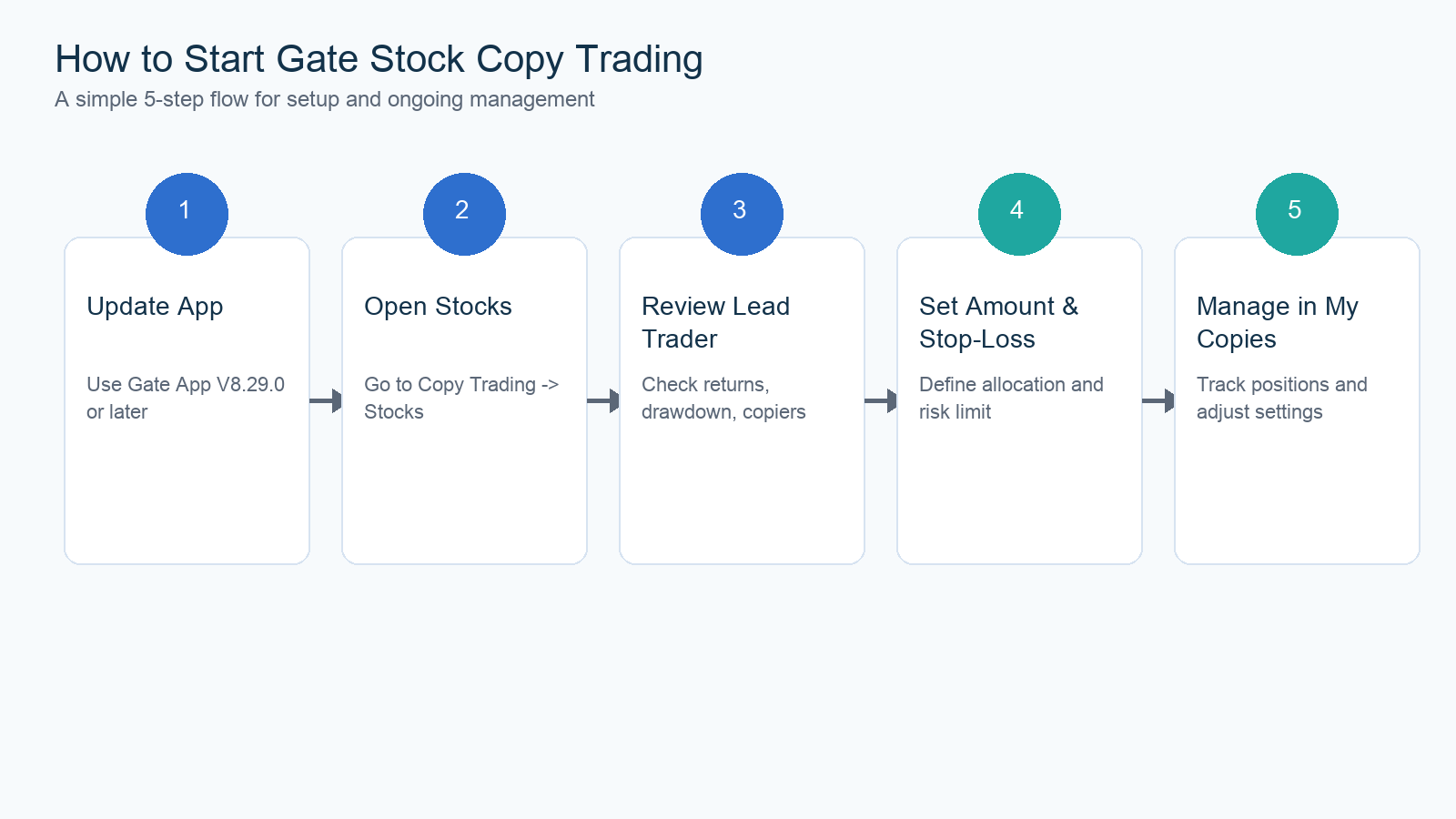
This flow summarizes the in-app path from opening Stock Copy to setting copy amount and managing the relationship in My Copies.
How to manage, adjust, or stop a copy trading strategy
-
Open My Copies for copied positions, position PnL, and trading history.
-
To change capital or parameters, go to Copy Trade Details > Manage.
-
Adjust amount or stop-loss only after checking open positions. Stop-loss settings can limit downside during market volatility, but sudden moves can still produce losses and affect later proportional sizing.
-
If you stop copying, confirm how open stock positions are handled per the Manage screen and Help Center stockcopy.
-
Revisit metrics periodically and actively manage your setup by reviewing copy-trading activity as drawdown profiles and market conditions change, since technical issues can also affect performance or execution.
Ongoing management is part of the how-to, not an optional extra. After the relationship starts, use My Copies to verify that new lead trades appear as expected, that fractional fills match the proportional model, and that stop-loss parameters remain where you set them. When you add capital, expect future sizing to recalculate against available assets. When you reduce capital or stop copying, confirm whether existing positions stay open, close proportionally, or follow another rule shown on the Manage screen. Keep Help Center stockcopy bookmarked for edge cases such as corporate actions or failed copies.
How do you apply as a stock lead trader?
-
On the Stock Copy Trading homepage, open the application entry (Join Now).
-
Provide your email and other required contact fields.
-
Submit and wait for approval. After approval, you can lead trades for followers and receive profit-sharing under HWM when copiers' cumulative net PnL exceeds prior high-water marks.
-
Follow Help Center stockcopy for lead-trader obligations.
Approval is compliance-gated and not automatic for every submission. Applicants should expect identity or contact checks, product-rule acknowledgements, and platform review before they can accept copiers. Once approved, lead traders still operate under the same HWM logic that protects followers: share eligibility depends on cumulative net PnL peaks, not every interim rebound. Keeping transparent metrics and disciplined risk controls helps copiers evaluate whether to follow.
Summary
Starting Gate Stock Copy Trading is a five-step App flow: update to V8.29.0+, open Copy Trading > Stocks, evaluate lead-trader metrics, set amount and stop-loss with disclosures, then manage under My Copies. The product covers U.S., Hong Kong, and South Korean stocks and ETFs, supports fractional shares from 0.01, and uses proportional replication with HWM profit sharing. Use evaluation, sizing, and My Copies management as a continuous loop rather than a one-tap set-and-forget process.
FAQ
What App version do I need?
Gate App V8.29.0 or later. Web Stock Copy Trading was announced as coming soon. Without a supported App build, the Stocks category under Copy Trading may not appear even if futures copy is visible elsewhere.
Where is Stock Copy in the App?
Navigate to Copy Trading > Stocks after logging in on a supported build.
Within the app, Stock Copy sits beside other copy-trading areas but is distinct from the futures copy hub. If you only see futures leads, confirm you selected the Stocks tab rather than the futures path at gate.com/copytrading.
Can I copy fractional shares?
Yes. Proportional copy supports fractional-share trading from as little as 0.01 shares. Fractional lots matter most when leads hold high-priced U.S. names alongside Hong Kong or South Korean stocks and ETFs in one book.
How do I change my copy amount later?
Open My Copies → Copy Trade Details → Manage, then adjust capital or parameters per on-screen rules. After any change, re-check open positions and confirm proportional sizing still matches your intended exposure.
How do I become a stock lead trader?
Apply from the Stock Copy Trading homepage with required contact information and start leading only after approval. HWM profit sharing for leads follows the same high-water rules documented for copiers.
What should I review before choosing a lead trader?
Review returns, drawdown, market coverage, and concentration together rather than relying on a single high-return figure. A longer track record and a drawdown profile you can accept usually matter more than popularity alone.