


Target Time algorithm is Gate’s intelligent order-splitting tool designed for users making large trades. The core logic is: users want to concentrate more executions around a specific time, but don’t want to send the entire large order at once and trigger market impact. Therefore, the system uses a normal distribution—essentially a bell curve—to smoothly break the order into multiple smaller trades.
Feature Overview
What is a Target Time algorithm order?
Target Time orders are best suited for situations where users want to concentrate executions around a particular time but wish to avoid significant price impact from executing everything at once. The closer it is to the target time set by the user, the more child orders the system generates; the further away, the fewer child orders. Orders are distributed for execution before and after the target time, aiming to create a peak of executions near the target while minimizing slippage caused by large, instantaneous trades.
What scenarios are suitable?
Typical scenarios include:
- Trading around important events: such as earnings releases, major announcements, macroeconomic data publications, project launches, etc.
- Wanting trades to cluster near a specific time: users care more about “execution time concentration” than uniform execution.
- Trading pairs with decent liquidity: best suited for BTC, ETH, and other mainstream coins with good liquidity.
- Users willing to accept partial fill risk: if the order book lacks liquidity, limit prices aren’t met, balances are insufficient, or the market is highly volatile, orders may not be fully filled.
Less suitable scenarios:
- Users require immediate full execution.
- Users only want uniform execution over fixed intervals—this is closer to TWAP.
- Users want to execute in proportion to market volume—this is closer to POV.
- Illiquid coins or thin order books may result in slow fills, partial fills, or unfilled orders by expiration.
Order Parameter Description
| Parameter | Required | Description |
|---|---|---|
| Total Order Size | Required | Total quantity you wish to buy or sell |
| Target Time | Required | The time when you want trades to concentrate |
| Execution Duration | Required | Total time the order will be active |
| Trigger Price | Optional | Order starts only when market price reaches this trigger |
| Limit Price | Optional | Buy orders will not execute above this price; sell orders will not execute below this price. If exceeded, the system pauses order placement |
Operation Steps
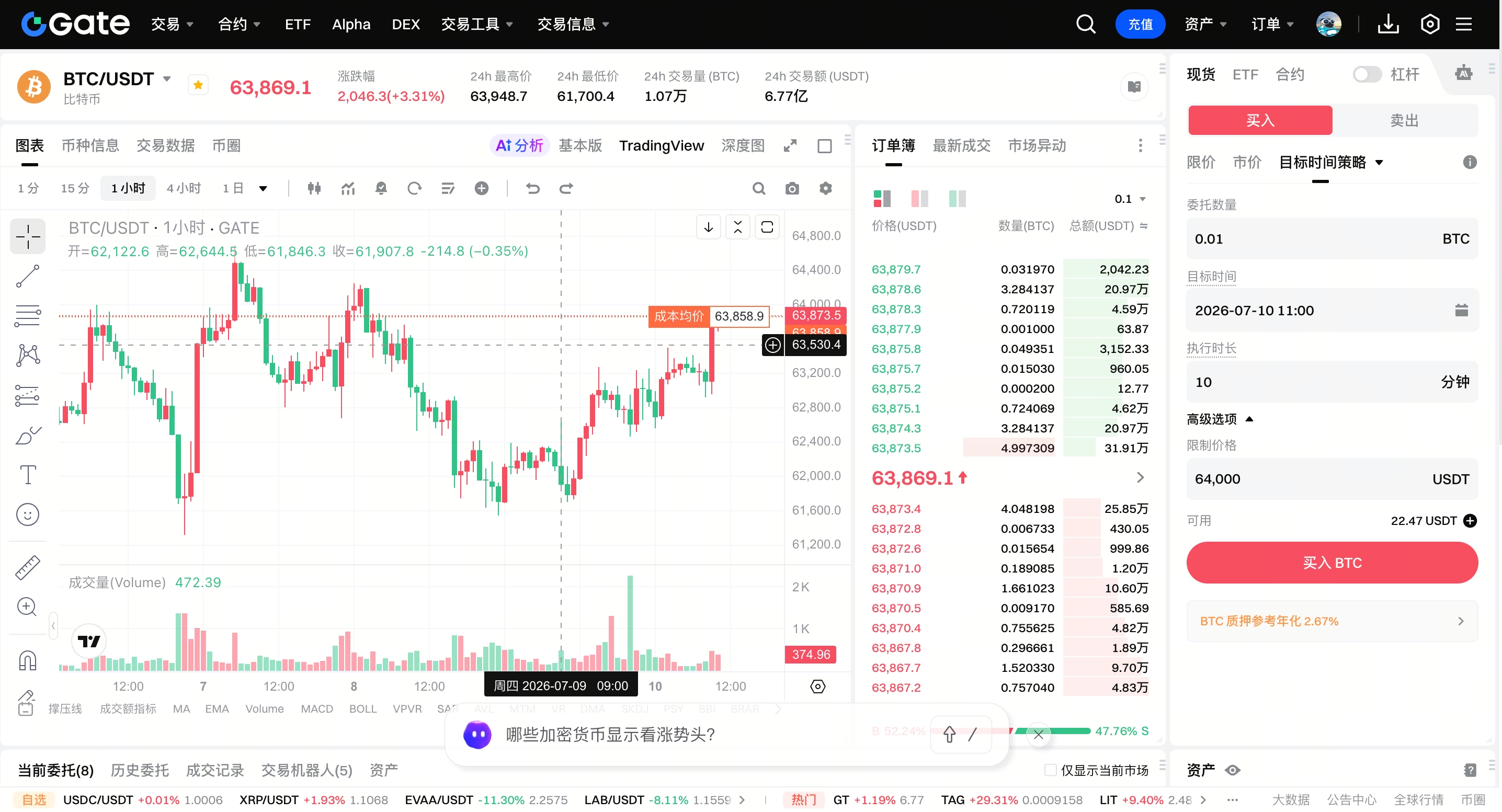
- Log in to the Gate official website and go to the Spot Trading page;
- In the order placement area, select the Target Time strategy;
- Fill in the required parameters: Total Order Size, Target Time, Execution Duration;
- If needed, enter Trigger Price and Limit Price (optional);
- After confirming all parameters are correct, click Buy / Sell to submit your order;
- You can check order progress in Current Orders or Order History.
Execution Logic Explanation
Although Target Time is time-driven, the system doesn’t force execution regardless of market conditions. Before each round of order placement, the system checks order book depth and limit prices to avoid consuming too much liquidity at once and causing noticeable slippage.
Final order size = min(theoretical order size, safely executable order book size, remaining unfilled quantity)
If the order book is thin, limit prices aren’t met, or the safely executable size is too small, the system may place fewer orders or pause, resulting in the order not being fully filled.
Frequently Asked Questions
Q: Is the target time the order completion time?
A: No. The target time is when the order’s trading volume is most concentrated—it’s essentially the peak execution time.
Q: Why wasn’t my order fully filled?
A: Possible reasons include:
- Insufficient order book depth.
- User-set limit price not met by the market.
- High market volatility.
- Trading pair lacks liquidity.
- Insufficient balance or abnormal account status.
- There’s still unfilled quantity when the order expires.
Q: Why were there no executions during some time periods?
A: If the order book is too thin, prices don’t meet the limit price, or the child order size after splitting is less than the minimum order size, there may be no executions during certain time intervals.
Q: Can I modify a Target Time order?
A: The current version does not support order modification—only order cancellation is available.
Disclaimer
The content provided herein is for reference and educational purposes only and does not constitute any financial, investment, trading, or legal advice, nor does it constitute an offer or solicitation to buy or sell any digital assets. Gate makes no express or implied representations or warranties regarding the accuracy, completeness, or timeliness of the information contained herein. Product features, interfaces, rules, and fee structures may be updated or adjusted at any time. Please refer to the latest announcements and the actual information displayed on the Gate platform for the most accurate details.
Digital asset investments involve significant risk, and prices may fluctuate substantially. You may lose the entire amount of your investment. Please make decisions cautiously based on your own financial situation and risk tolerance after fully understanding the associated risks. If necessary, you are advised to consult an independent professional financial or legal advisor.
For more information about potential risks, please refer to Gate's Risk Disclosure and User Agreement.
