


“Keeping your software up to date is one of the most important things you can do to maintain the security of your Apple products.”
—Apple’s official reminder:Quoted from Apple’s official website*Apple Security Releases*
For Web3 users, iPhones, iPads, and Macs are more than just communication and productivity tools. They also play key roles in logging in to exchanges, receiving verification codes, using authenticators, confirming withdrawals, and managing email and wallets. If the system remains on an outdated version for an extended period, unpatched vulnerabilities may expose it to phishing websites, malicious links, files, or advanced attack tools, potentially putting exchange accounts and digital assets at risk.Promptly upgrading your device’s OS version is not optional—it is an essential part of digital asset security protection.
Note: In this article, OS systems specifically refer to iOS, iPadOS, and macOS.
I. What Are the Risks of Using an Outdated Apple Device?
Each OS update does more than add new features. More importantly, it often fixes security vulnerabilities, such as:
WebKit browser vulnerabilities; the risk increases after clicking a fake exchange page
iMessage vulnerabilities; a typical example is the “zero-click” attacks disclosed by security organizations
System kernel vulnerabilities;
File parsing vulnerabilities involving images, PDFs, fonts, and other files;
App sandbox isolation and permission vulnerabilities;
Zero-day vulnerabilities that may be exploited by spyware
Older systems cannot receive the latest security patches. Once an OS security vulnerability is disclosed, devices running older versions are more likely to become attack targets.After a security patch is released, attackers may also study its contents to reverse-engineer vulnerability details and then attack devices that have not yet been updated.
If users do not update their systems for an extended period, their devices may be exposed to vulnerabilities that have already been publicly disclosed or even exploited by attackers. This may result in:
Theft of exchange account credentials;
Email verification codes being exposed after an email account is compromised;
SMS verification codes or security notifications being exploited;
The security of two-factor authentication environments, such as Google Authenticator and Authenticator, being compromised;
Withdrawal confirmation emails being controlled by attackers;
Wallet seed phrases, private-key screenshots, or notes being exposed;
Exchange App login sessions being hijacked, with assets transferred through self-matched trades, etc.
II. What Protection Does Upgrading Your Device Version Provide?
1. Fixes Known High-Risk Vulnerabilities
Upgrades can fix vulnerabilities in WebKit, iMessage, the kernel, file parsing, and more, reducing risks from malicious webpages, links, messages, and files.
2. Improves the App Runtime Environment
Newer versions of iOS typically strengthen permission management, sandbox isolation, certificate validation, and privacy protection, providing Apps with a more secure runtime environment.
3. Strengthens Privacy Permission Management
Newer systems manage permissions for photos, location, microphones, cameras, clipboards, and more more strictly, making it easier for users to identify unusual authorizations.
4. Reduces the Risk of Mass Attacks
Attackers often target devices that have not been updated because doing so costs less and has a higher success rate. Updating promptly can reduce your attack surface.
III. How Can You Properly Upgrade Your Device Version?
1. Upgrade Only Through Official Channels
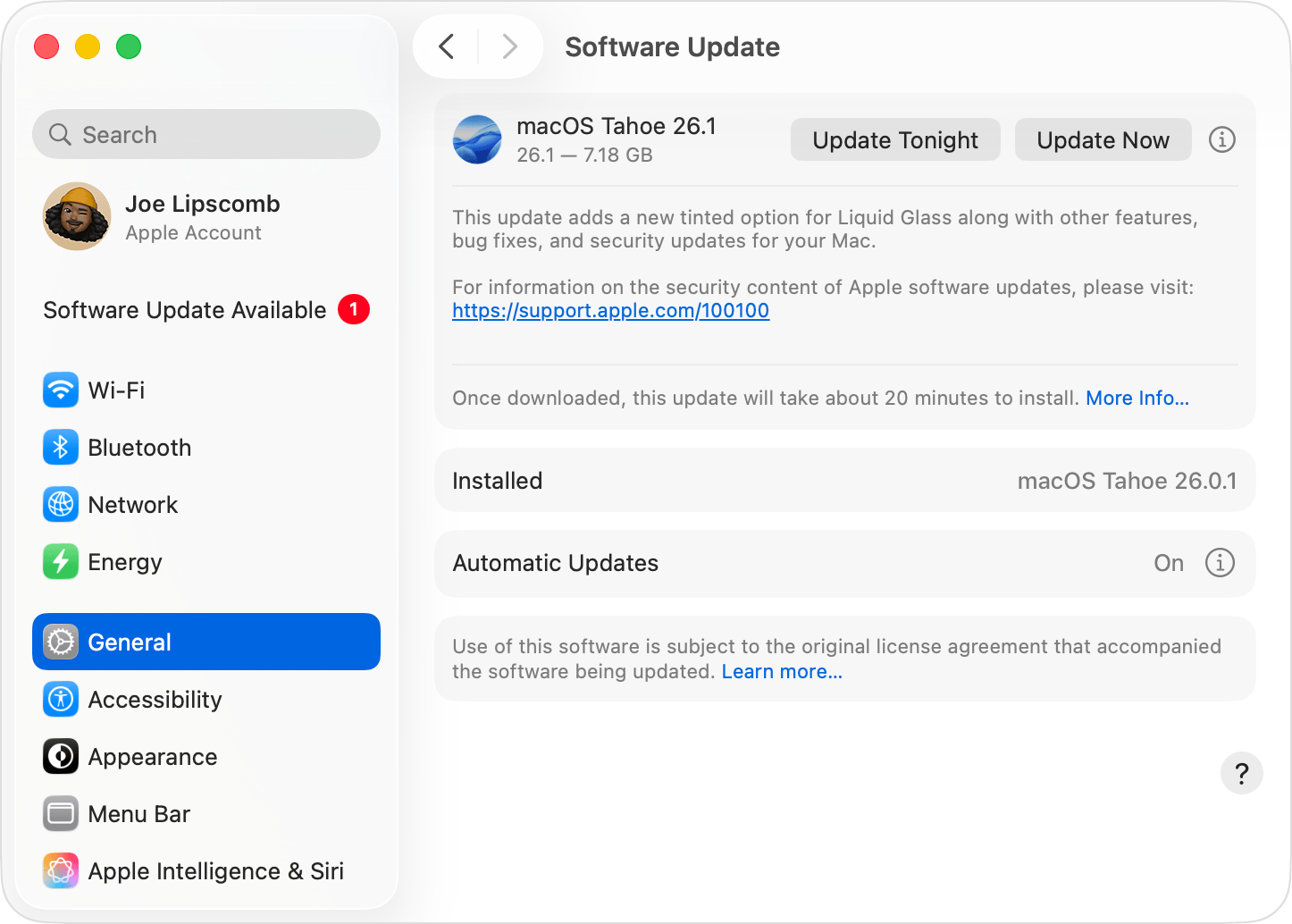
The correct path is:Settings → General → Software Update
Refer to Apple’s official websiteUpdate macOS on Mac
2. Keep Your Exchange App Updated as Well
3. Consider Replacing Older Devices That Cannot Be Updated
4. Do Not Trade on Jailbroken Devices
OS updates are a fundamental line of defense for digital asset security. One less system vulnerability means one less risk to your account. Updating your phone’s system promptly adds another layer of protection to your exchange account and digital assets!
Gate users are advised to immediately check their computers, phones, tablets, and other devices:
Settings → General → Software Update
If an update is available, upgrade to the latest version officially supported as soon as possible.
Disclaimer
The content provided herein is for reference and educational purposes only and does not constitute any financial, investment, trading, or legal advice, nor does it constitute an offer or solicitation to buy or sell any digital assets. Gate makes no express or implied representations or warranties regarding the accuracy, completeness, or timeliness of the information contained herein. Product features, interfaces, rules, and fee structures may be updated or adjusted at any time. Please refer to the latest announcements and the actual information displayed on the Gate platform for the most accurate details.
Digital asset investments involve significant risk, and prices may fluctuate substantially. You may lose the entire amount of your investment. Please make decisions cautiously based on your own financial situation and risk tolerance after fully understanding the associated risks. If necessary, you are advised to consult an independent professional financial or legal advisor.
For more information about potential risks, please refer to Gate's Risk Disclosure and User Agreement.
