


Feature Overview
You can transfer stocks from your Gate stock account to an external broker. Currently supported:
U.S. stocks: Processed through the DTC (Depository Trust Company) clearing system
Hong Kong stocks: Processed through CCASS (Central Clearing and Settlement System)
Item | Description |
|---|---|
Fees | U.S. stocks: 150 USDT / symbol; Hong Kong stocks: 500 HKD / symbol (converted to USDT at the real-time exchange rate) |
Billing Method | Charged based on the number of stock symbols, regardless of the number of shares. Non-refundable |
Supported Share Quantity | Whole shares only |
Estimated Processing Time | Approximately 15 business days or longer. The actual time largely depends on the processing speed of the receiving broker. |
Transfer Method | FOP |
⚠ Once submitted, the transfer-out fee is locked. The fee will not be refunded even if the transfer fails, is rejected, or is canceled. Before submitting, confirm that all information is correct and that you have sufficient USDT balance.
Transfer-Out Process
Step 1: Access the Feature
Path: TradFi → More → Common Features → Transfer Out Stocks
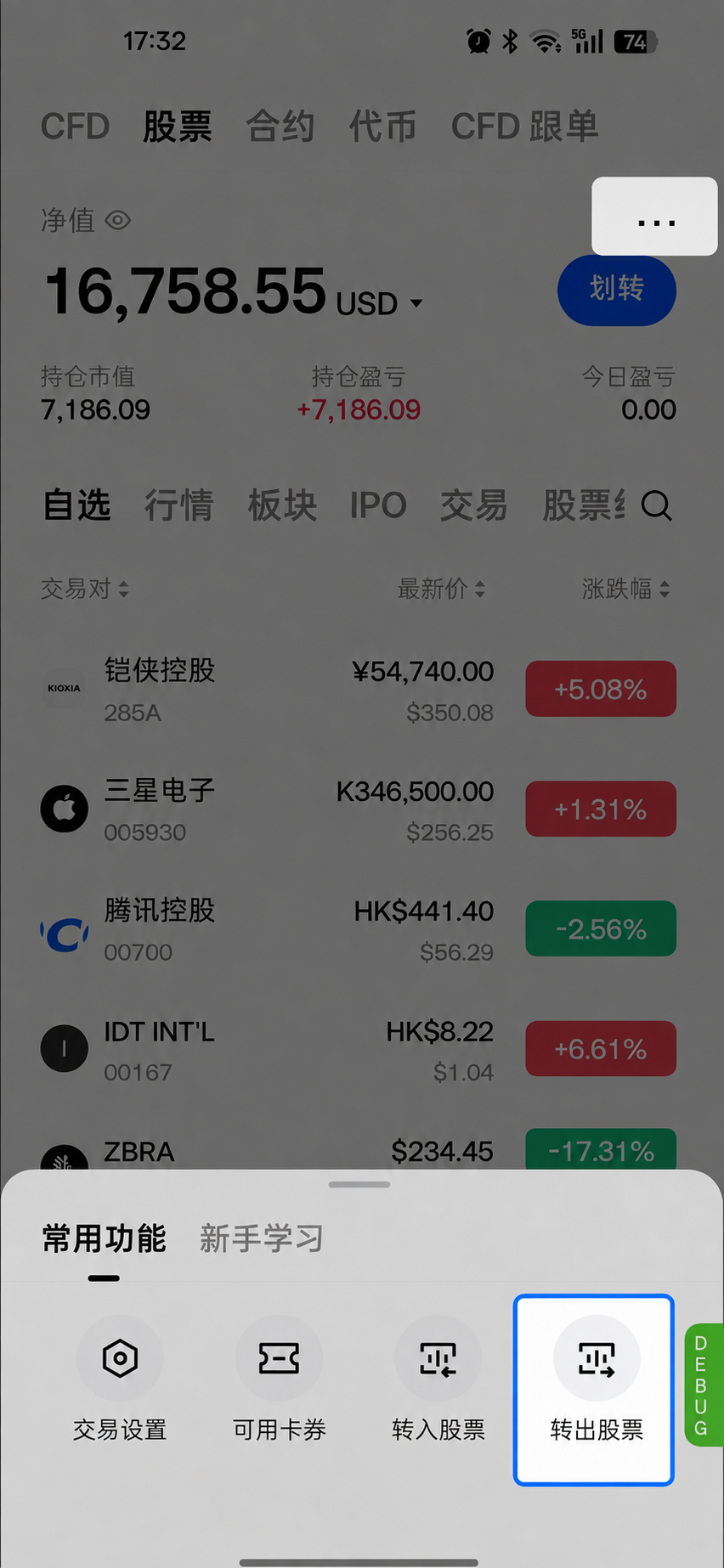
After entering, select the market type: U.S. Stocks or Hong Kong Stocks.
Step 2: Read Important Notices
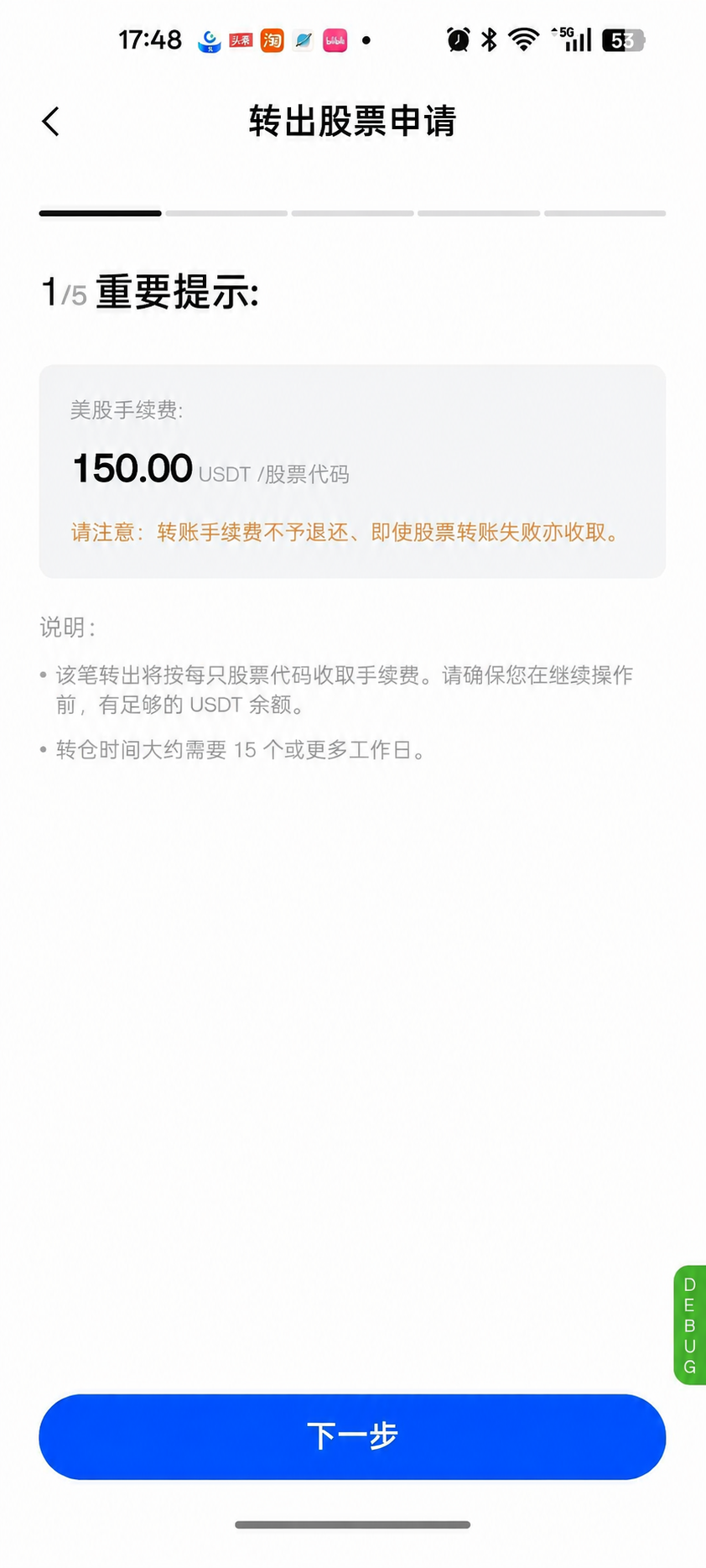
After you tap “Stock Transfer Out,” important notices will appear on the first screen (please read them carefully):
U.S. stock fee: 150 USDT / stock symbol; Hong Kong stock fee: 500 HKD / stock symbol (converted to USDT at the real-time exchange rate)
Please note: The transfer fee is non-refundable and will be charged even if the stock transfer fails.
A fee will be charged for each stock symbol in this transfer-out request. Before proceeding, ensure that you have sufficient USDT balance. The transfer process takes approximately 15 business days or longer.
Step 3: Enter Receiving Broker Information
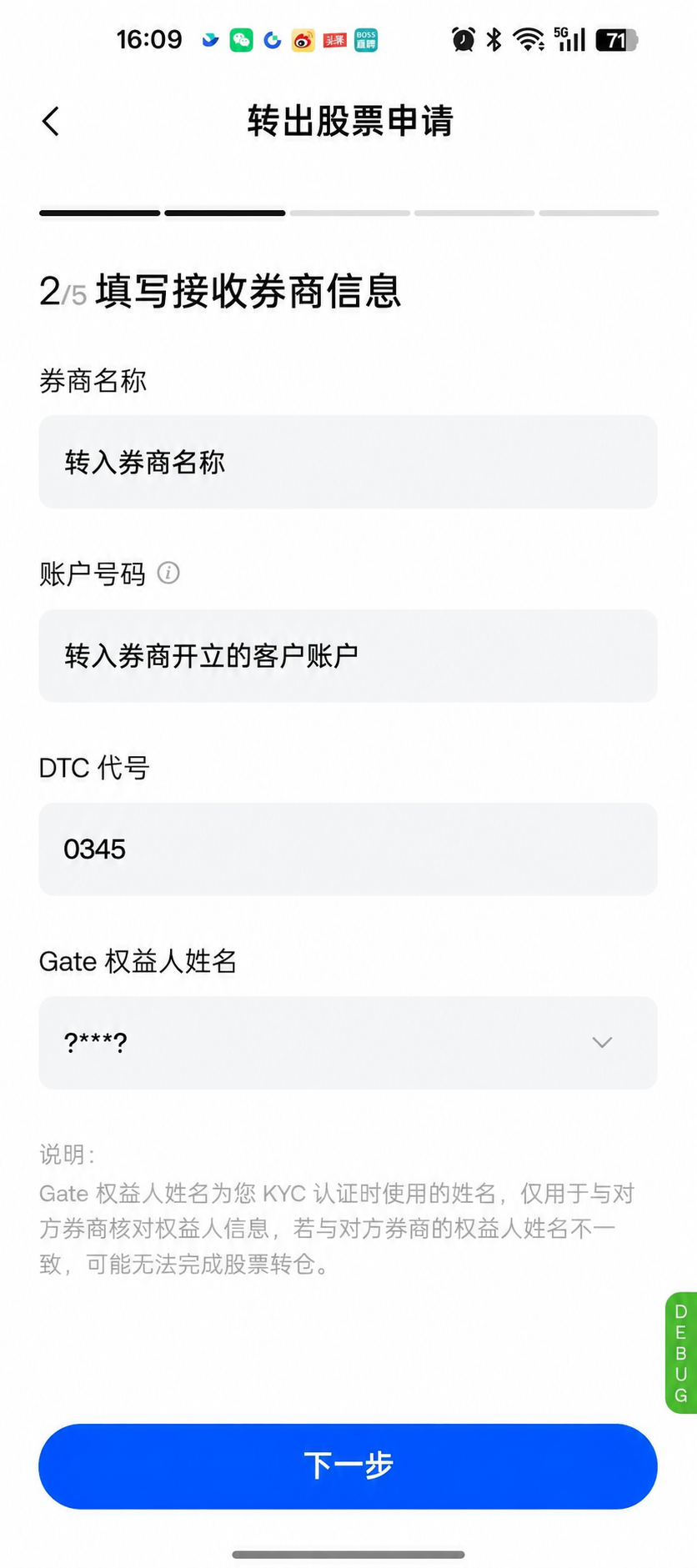
Required information:
Broker Name: Required. Enter the name of the receiving broker.
Account Number: Required. Enter the account number you hold with the receiving broker.
DTC Number / CCASS Number: Required
For U.S. stocks, enter the DTC number
For Hong Kong stocks, enter the CCASS number
Gate Beneficial Owner Name: Required. This name must exactly match the legal name registered with your receiving broker account. Otherwise, the receiving broker may reject the transfer.
You can proceed to the next step only after completing all required fields.
Step 4: Enter Stock Information
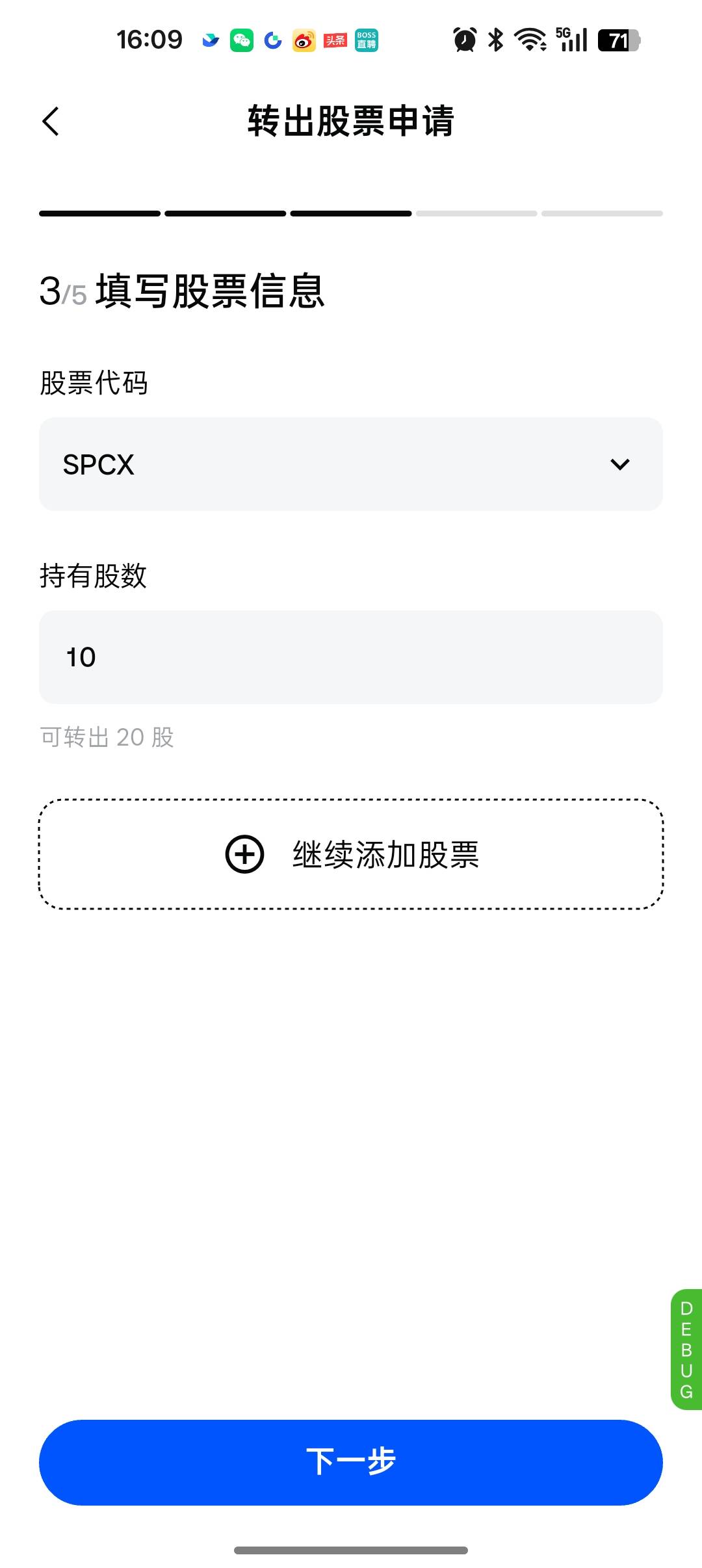
Stock Symbol: Required. You can select only stocks currently held in your account.
Number of Shares: Required. Whole shares only. You cannot submit the request if the quantity entered exceeds the transferable quantity.
Step 5: Confirm Information and Submit
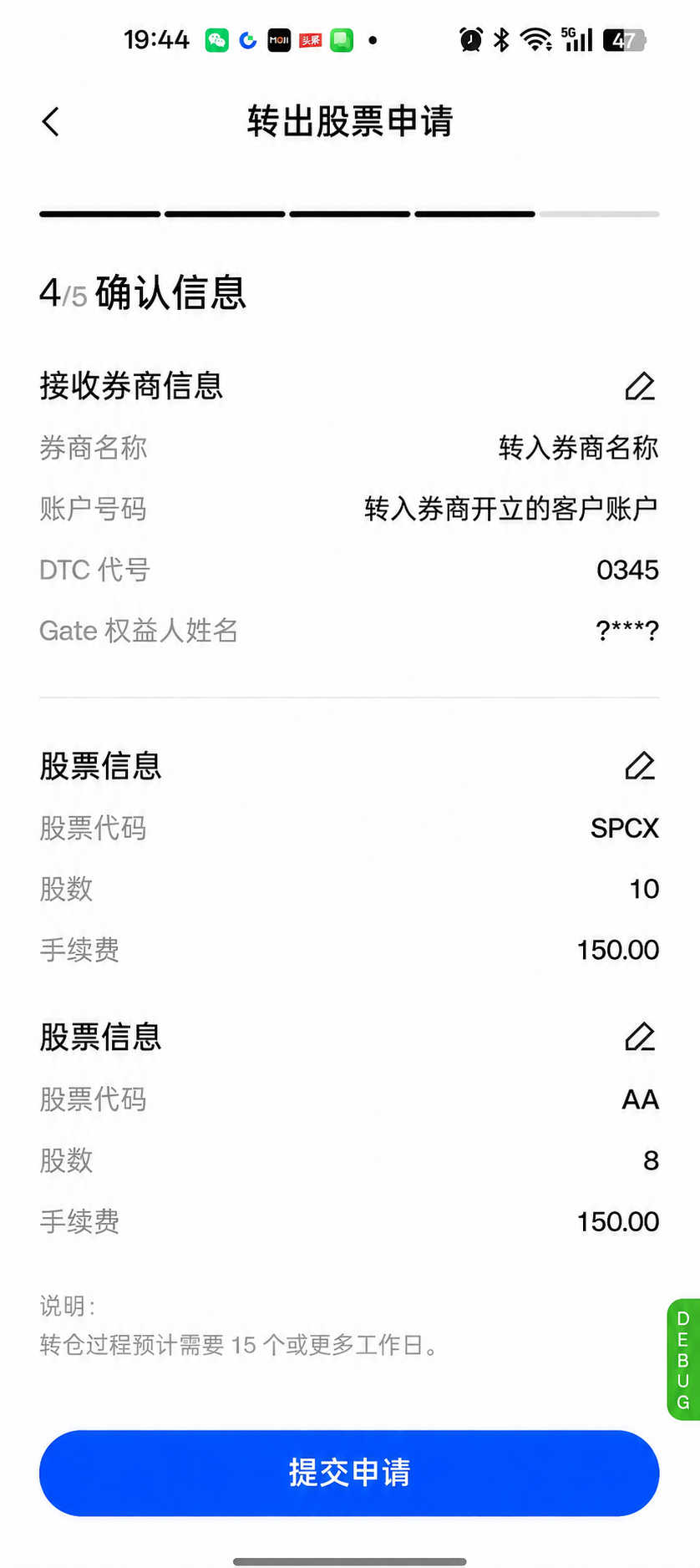
The confirmation page displays:
Receiving broker information, beneficial owner name, and stock information
Fee: XXX USDT (calculated according to the stock transfer fee rules, based on the number of symbols × unit price)
After tapping Submit, confirm again in the pop-up window and complete security verification to formally submit the request. Once submitted, the relevant stocks and fees will be frozen / locked.
Step 6: Successful Submission and Email Notification
After successful submission, your transfer request will be processed once both brokers have verified and confirmed all submitted information.
From the application date, the transfer is expected to take 15 business days or longer to complete. The duration largely depends on the processing speed of the receiving broker. You will receive updates on the final transfer status by email and/or in-app message.
You can view the relevant transfer-out request and its progress in “Application Records.”
Submit an Incoming Transfer Request to the Receiving Broker
Please contact your receiving broker and ask them to submit an incoming transfer request for the securities you wish to transfer out from Gate. Ensure that the account information you provide exactly matches the information in your transfer-out request. Otherwise, the transfer may be delayed or rejected. Please ensure that you provide the following correct receiving information:
Broker Name: RQD Clearing LLC
Account Number: Your Gate UID (you can view it by tapping your profile picture on the Gate App homepage)
DTC Number: 4305
CCASS Number: B01231
Settlement Counterparty Contact: Settlement
Settlement Counterparty Contact Email: settlement@Gate.com (this email address is for inter-institutional communication only)
Transfer-Out Fee Rules
Billing Method
Fees are charged per symbol per transfer-out transaction (per symbol per transaction), regardless of the number of shares transferred or market value.
Market | Product | Direction | Fee Method | Unit Price |
|---|---|---|---|---|
U.S. Stocks | Stocks | Transfer Out | Per Symbol | 150 USDT |
Hong Kong Stocks | Stocks | Transfer Out | Per Symbol | 500 HKD (converted to USDT at the real-time exchange rate) |
Calculation Formula: Transfer-out fee = Unit price × Number of stock symbols
Examples:
For transferring out 3 U.S. stocks (such as AAPL, NVDA, and TSLA), the fee = 3 × 150 = 450 USDT, regardless of how many shares of each stock are transferred.
For transferring out 2 Hong Kong stocks, the fee = 2 × 500 HKD (converted to USDT).
Fee Deduction and Balance Check
The fee is deducted from the USDT balance in your stock account. You must have a sufficient balance when submitting the request.
If your available balance is insufficient, the page will display: Insufficient available balance. Unable to initiate transfer-out.
Non-Refundable
Once submitted, the fee is locked. It will not be refunded even if the transfer fails, is rejected by the receiving broker, or the request is canceled.
Notes
You can select only stocks currently held in your account for transfer-out. You cannot initiate a transfer-out request for stocks you do not hold.
The transfer-out quantity cannot exceed the number of shares currently available for transfer. Whole shares only.
The beneficial owner name must match the legal name on the receiving broker account. Otherwise, the request may be rejected.
Transfers require coordination between both brokers. Success is not guaranteed, and all requests must be verified and approved by both brokers.
Stock transfer requests are supported only on the App. Please upgrade to version 8.36.0 or later before proceeding.
Frequently Asked Questions
1. Which stocks are supported for transfer-out?
Currently, U.S. stocks and Hong Kong stocks are supported. You can select only stocks you currently hold for transfer-out. Whole shares only; fractional shares cannot be transferred out.
2. How are transfer-out fees charged? Are they refundable?
U.S. stocks are charged at 150 USDT / symbol, and Hong Kong stocks at 500 HKD / symbol. Fees are charged based on the number of symbols, regardless of the number of shares. Fees are non-refundable and will be charged even if the transfer fails, is rejected, or is canceled. Please ensure that the information entered is accurate and that you have sufficient USDT balance.
3. Why can’t I select a particular stock for transfer-out?
Transfer-out supports only stocks currently held in your account. You cannot initiate a request for stocks you do not hold.
4. Are there any limits on the transfer-out quantity?
The transfer-out quantity cannot exceed the number of shares currently available for transfer. You cannot submit the request if it exceeds this amount, and only whole shares are supported.
5. What should I enter for the beneficial owner name? What happens if it does not match?
The beneficial owner name must exactly match the legal name registered with the receiving broker account (including middle names / spelling). Any discrepancy may result in the transfer being rejected.
6. How long does completion take?
It is expected to take approximately 15 business days or longer, depending on the processing efficiency of both brokers and clearing institutions. Actual progress will prevail.
7. How can I check the application status?
Path: More → Common Features → Transfer In Stocks → Application Records. Tap Application Records to view details and transfer progress.
8. Why have the stocks not arrived after the request was approved?
First, confirm that you have submitted an incoming transfer request with the receiving broker. If you have already submitted one, your receiving broker must contact us; otherwise, the transfer cannot proceed. If there is still no progress after 15 business days, contact both brokers to confirm the status.
Disclaimer
This information is provided for general informational and operational guidance only and does not constitute legal advice or professional advice. Stock transfers are subject to the rules of both brokers, clearing institution rules, and regulatory requirements in relevant jurisdictions. Gate does not guarantee that all requests will be successful or completed on a specific date. The actual processing results of both brokers shall prevail.
Disclaimer
The content provided herein is for reference and educational purposes only and does not constitute any financial, investment, trading, or legal advice, nor does it constitute an offer or solicitation to buy or sell any digital assets. Gate makes no express or implied representations or warranties regarding the accuracy, completeness, or timeliness of the information contained herein. Product features, interfaces, rules, and fee structures may be updated or adjusted at any time. Please refer to the latest announcements and the actual information displayed on the Gate platform for the most accurate details.
Digital asset investments involve significant risk, and prices may fluctuate substantially. You may lose the entire amount of your investment. Please make decisions cautiously based on your own financial situation and risk tolerance after fully understanding the associated risks. If necessary, you are advised to consult an independent professional financial or legal advisor.
For more information about potential risks, please refer to Gate's Risk Disclosure and User Agreement.
