


What Is Private Copy Trading?
Private Copy Trading is a CFD copy trading mode. Unlike Public Copy Trading, Private Copy Trading is not publicly displayed in the Copy Trading Marketplace. Only users who hold a private invite code from a lead trader can apply to copy trades. The profit-sharing ratio for Private Copy Trading is capped at 50%, higher than the 20% cap for Public Copy Trading. It is suitable for lead traders who want to deeply engage and manage their private communities.
How Do I Create a Private Invitation Link?
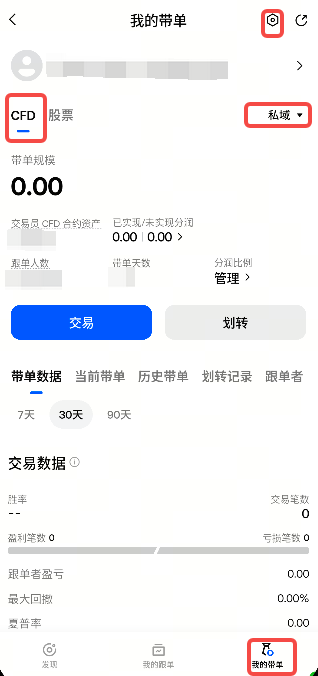
Go to [My Lead Trading] → CFD → Private, then click ⚙ in the upper-right corner to access Lead Trading Settings.
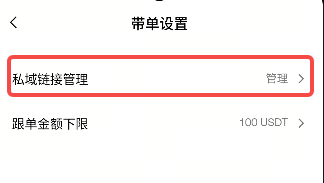
Click “Private Link Management Manage ›” to open the invitation link management page.
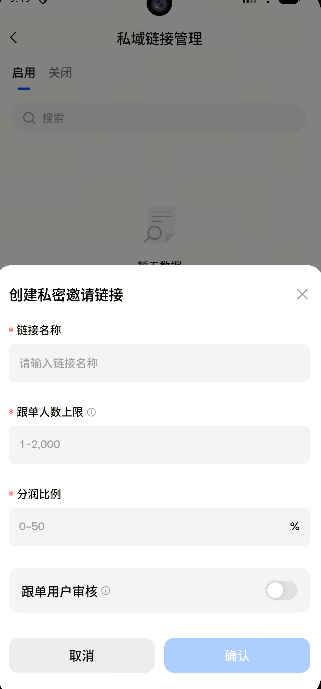
Click the “Generate Link” button at the bottom and fill in the following information:
-
Link name (required; ≤20 characters; only Chinese, English, and numbers are supported)
-
Maximum number of copiers (required; range: 1 to the remaining allocable number)
-
Profit-sharing ratio (required; integers from 0 to 50; cannot be changed after creation)
-
Copier review (optional toggle; off by default)
Click “Confirm Creation.” Once created, the link will appear in the active list.
Where Can I Get a Private Invite Code?
Copiers can obtain a private invite code in the following ways:
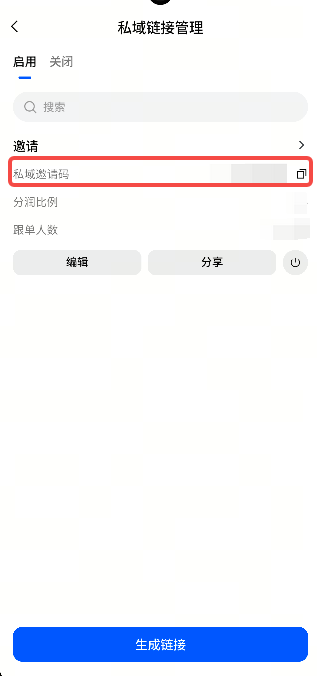
Request it directly from the lead trader. The lead trader can click the copy icon in [Invitation Link Management - Link Card] to obtain the invite code.
The lead trader can use the sharing feature to send a share card containing the invite code to social platforms such as Telegram and X.
After obtaining the invite code, find the corresponding lead trader in the Copy Trading Marketplace. When you click Copy, enter the invite code in the pop-up window to submit your copy trading application.
What Does a Pending Copy Trading Application Review Mean? How Long Does the Review Take?
If the lead trader has enabled the [Copier Review] toggle for the invitation link, your application will enter pending review after you submit the invite code. The system will display the [Application Submitted] page.
During the review period, your copy trading has not yet taken effect. You must wait for the lead trader to manually review it in the backend. The review time is determined by the lead trader, and the platform does not set a fixed time limit.
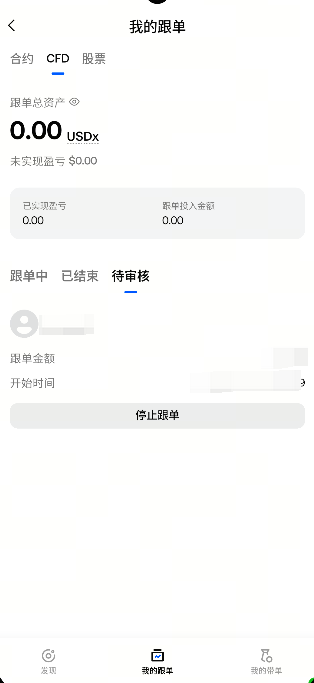
You can check the status of your application in the [My Copy Trading - Pending Review] tab. If the lead trader rejects your application, you will receive a notification, and the application will no longer appear in the list.
What Is the Maximum Number of Copiers for Private Copy Trading?
The maximum number of copiers for Private Copy Trading is determined by two limits:
Platform level: The lead trader’s account has a total limit on the number of private copiers (determined by the trader’s level).
Link level: When creating each invitation link, the lead trader can customize the maximum number of copiers for that link.
The maximum number of copiers for a single link cannot exceed the total private copier limit − the current number of copiers across all links. The specific allocable number is displayed in real time when creating a link.
How Long Do I Need to Wait Before Re-enabling Private Copy Trading After Disabling It?
After disabling Private Copy Trading mode, you must wait 30 calendar days before enabling it again. Please proceed with caution.
After disabling Private Copy Trading:
-
All existing invitation links will become invalid.
-
All copiers will also automatically stop copying trades, and the corresponding profits will be settled.
-
All invitation links will become invalid, and all pending copy trading applications will be automatically rejected.
Disclaimer
The content provided herein is for reference and educational purposes only and does not constitute any financial, investment, trading, or legal advice, nor does it constitute an offer or solicitation to buy or sell any digital assets. Gate makes no express or implied representations or warranties regarding the accuracy, completeness, or timeliness of the information contained herein. Product features, interfaces, rules, and fee structures may be updated or adjusted at any time. Please refer to the latest announcements and the actual information displayed on the Gate platform for the most accurate details.
Digital asset investments involve significant risk, and prices may fluctuate substantially. You may lose the entire amount of your investment. Please make decisions cautiously based on your own financial situation and risk tolerance after fully understanding the associated risks. If necessary, you are advised to consult an independent professional financial or legal advisor.
For more information about potential risks, please refer to Gate's Risk Disclosure and User Agreement.
