


1. What Is a Stock Portfolio Bot?
A stock portfolio bot is an automated trading strategy designed to dynamically adjust your stock holdings, making it suitable for medium- and long-term investment horizons. By setting target allocation ratios, rebalancing intervals, and thresholds, the bot automatically sells assets when their allocation exceeds the target and buys assets when their allocation falls below it as market conditions change. This helps restore your portfolio to its preset allocation ratios, enabling dynamic rebalancing and helping you capture potential returns from market fluctuations.
2. Stock Portfolio Bot Overview
Advantages of a Stock Portfolio:
If you're bullish on multiple stocks or sectors and plan to hold them for the long term, the stock portfolio bot may be a suitable option.
- Risk Diversification: The stock portfolio bot supports multi-asset holdings. By diversifying your investments across different stocks, it can help reduce the impact of a single stock’s price decline on your overall portfolio.
- Sell High, Buy Low: Market gains often rotate among different stocks and sectors. When a stock or sector rises, the bot can sell a portion of the position to lock in profits while reallocating funds to other stocks trading at lower prices, creating opportunities to buy low. Repeating this process can help capture returns from market rotations.
How Does a Stock Portfolio Achieve Arbitrage?
By taking profits from assets that have risen sharply and reallocating them to assets that have lagged, the portfolio can rebalance its holdings. This is similar to using gains from outperforming assets to build positions in other assets, potentially compounding returns over time and generating additional gains.
3. Stock Portfolio Parameters Explained
Parameter Glossary
- Add Stocks: Select the stocks you want to include in your portfolio. Each portfolio must contain at least 2 stocks and can include up to 10 stocks.
- Equal Allocation: Click [Equal Allocation] to distribute your portfolio evenly across the selected stocks.Tip: You can manually adjust the allocation for each stock based on your preferences, but the total allocation must equal 100%.
- Total Investment: The total investment amount must be at least the minimum required amount. The minimum investment amount depends on the number of stocks selected in your portfolio.
- Rebalancing Interval: Over the selected interval, changes in asset prices may cause your portfolio allocations to drift from their target ratios. When the rebalancing interval is reached, the bot will automatically adjust your holdings to restore the initial target allocations.
- Rebalancing Threshold: If the allocation of any stock in your portfolio deviates from its target allocation by more than the set threshold, the bot will automatically rebalance the portfolio to restore the initial target ratios.
- Portfolio Rebalancing Interval & Threshold Example:
Suppose your portfolio contains two stocks, NVDA and TSLA, with an initial allocation of 50% each. If the total portfolio value is 1,000 USDT, each stock is initially worth 500 USDT.
– Rebalancing by time interval: If you set the rebalancing interval to 4 hours, the bot will check your portfolio every 4 hours to see whether the current allocations have deviated from the initial targets. If NVDA rises to 52% (520 USDT) and TSLA falls to 48% (480 USDT), the bot will sell 20 USDT worth of NVDA and use the proceeds to buy 20 USDT worth of TSLA, restoring the portfolio to the original 50/50 allocation. Both positions will then be worth 500 USDT each, before accounting for trading fees and any price movements during execution.
– Rebalancing by threshold: If you set the rebalancing threshold to 3%, the bot will automatically rebalance whenever a stock’s allocation deviates from its 50% target by more than the set threshold—for example, when its allocation reaches 53% or falls to 47%. This allows the bot to automatically sell relatively overallocated assets and buy relatively underallocated ones, implementing a systematic sell-high, buy-low approach.
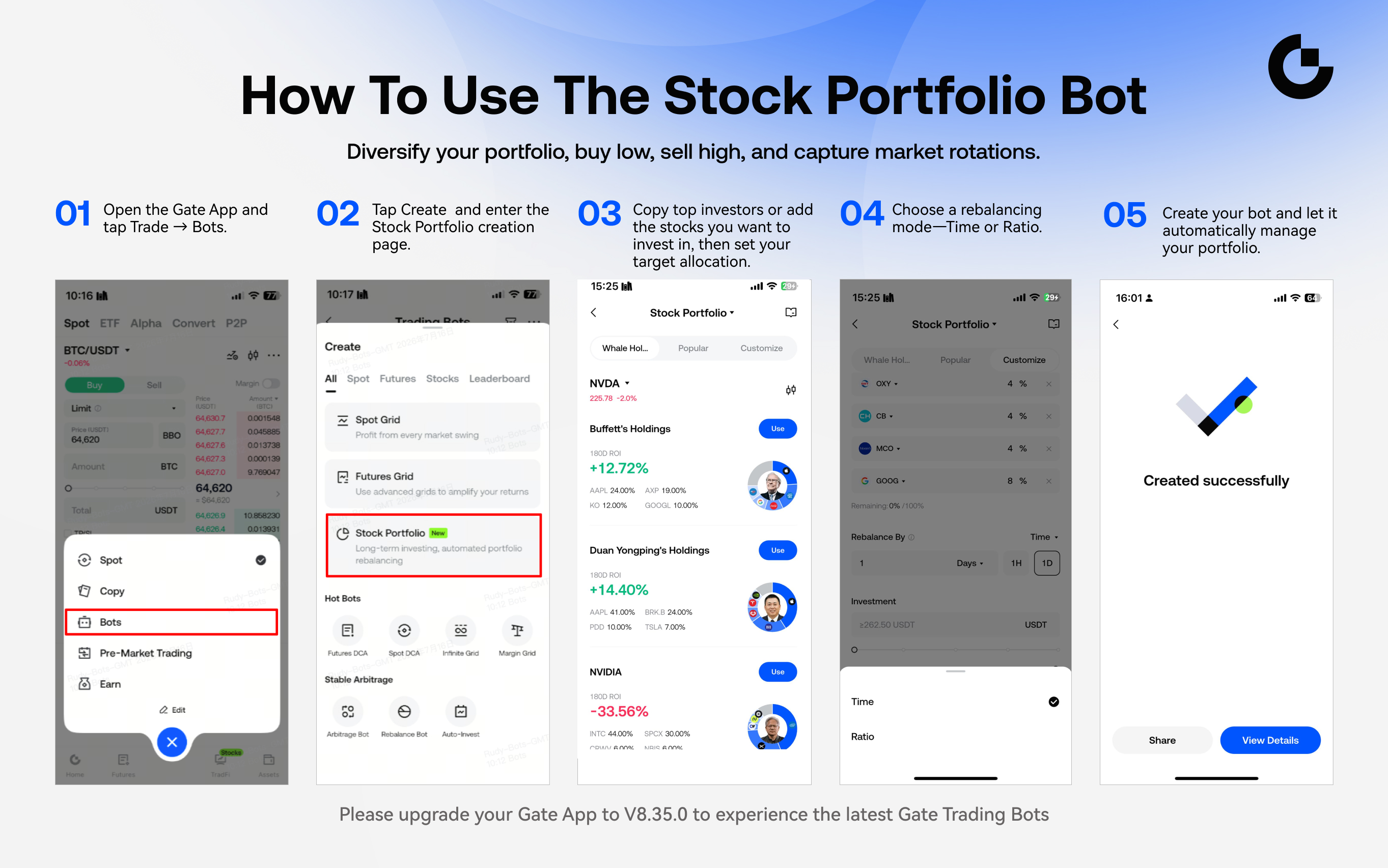
4. How to Create a Stock Portfolio Bot
Step 1: Go to the Trading Bot Homepage
- Open the Gate App and tap [Trade] in the bottom navigation bar.
- Select the [Bots] section.
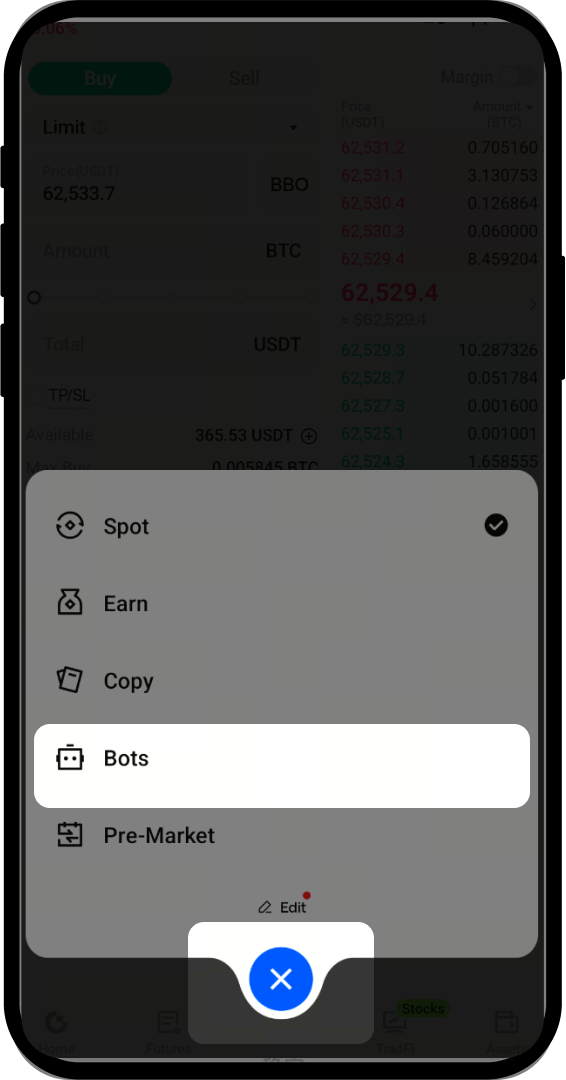
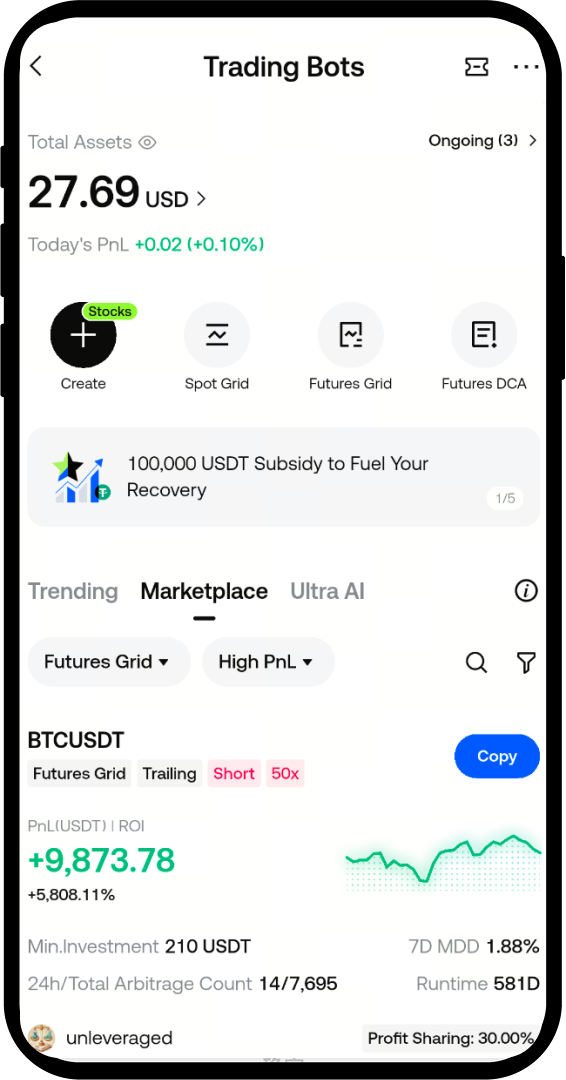
Step 2: Enter the Stock Portfolio Creation Page
- Tap [Create] and select the Stock Portfolio Bot.
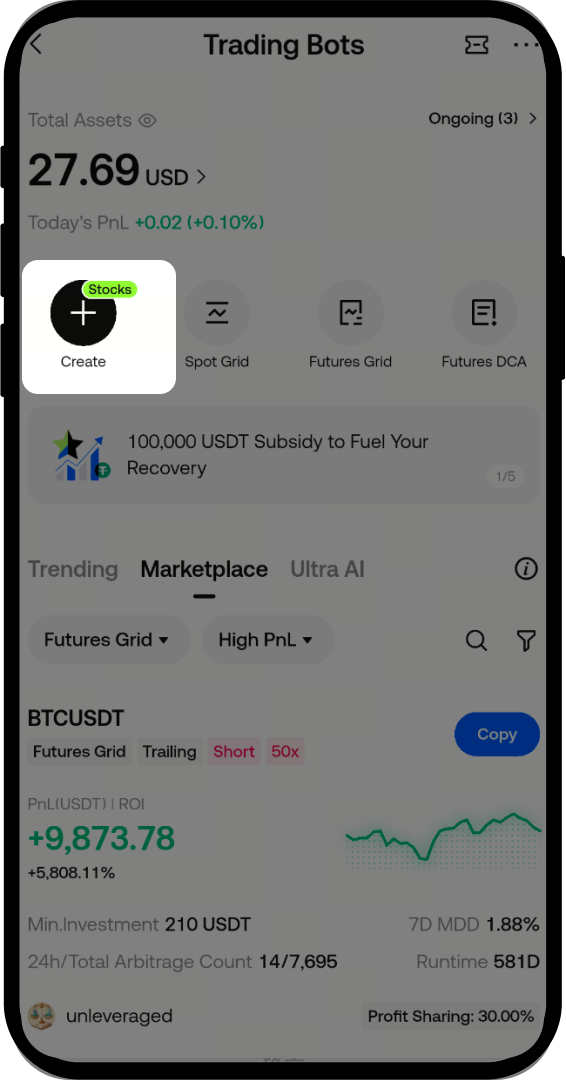
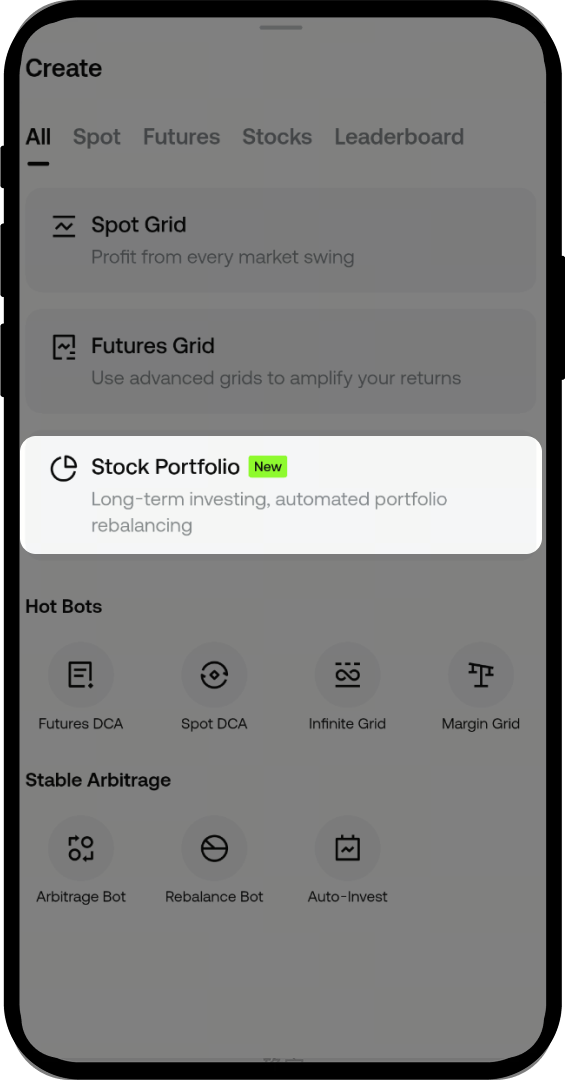
Step 3: Set Parameters and Create
- Add the stocks you want to invest in and set your target allocation ratios.
- Choose your rebalancing method—you can trigger rebalancing by time or by allocation threshold.
- Tap [Create Bot].
5. Important Notes
- Due to differences in trading hours across markets, stock portfolios can only include stocks from the same market. Cross-market portfolios are not supported. For example, if you select U.S. stocks, all stocks in your portfolio must be U.S. stocks.
- If any stock in your active bot is not trading because its market is closed, you cannot add funds, adjust allocations, or terminate the bot. You must wait until all stocks in your portfolio are within their respective trading hours before performing these actions.
Disclaimer
The content provided herein is for reference and educational purposes only and does not constitute any financial, investment, trading, or legal advice, nor does it constitute an offer or solicitation to buy or sell any digital assets. Gate makes no express or implied representations or warranties regarding the accuracy, completeness, or timeliness of the information contained herein. Product features, interfaces, rules, and fee structures may be updated or adjusted at any time. Please refer to the latest announcements and the actual information displayed on the Gate platform for the most accurate details.
Digital asset investments involve significant risk, and prices may fluctuate substantially. You may lose the entire amount of your investment. Please make decisions cautiously based on your own financial situation and risk tolerance after fully understanding the associated risks. If necessary, you are advised to consult an independent professional financial or legal advisor.
For more information about potential risks, please refer to Gate's Risk Disclosure and User Agreement.
