


What is a POV order?
A Percentage of Volume (POV) order is an algorithmic order that adjusts the size of each order based on market trading volume or liquidity in the order book.
You set a participation rate and choose how often the strategy places orders. The size of each order rises or falls with the trading volume or order book liquidity used in that cycle.
POV can help you build or reduce a position in stages when you have some flexibility about when the trade finishes. This guide covers POV orders for Gate perpetual futures.
What are the benefits of POV orders?
- Order sizes adjust to the market. The strategy uses recent trading volume or current order book depth to size each order, so you can spend less time adjusting individual orders.
- Large trades can be spread over time. Splitting a trade across several cycles can reduce the impact of sending one large order into the book.
- You can choose how orders execute. Use market orders, place limit orders at the best price on the opposite side of the book, or post maker orders and wait for a fill.
- You choose when the strategy stops. Set a target filled amount, a maximum duration, or both. If you set both, the strategy stops when it reaches the first limit.
How does a POV order work?
The participation rate is the percentage of the reference amount that the strategy uses to size an order in each cycle.
At the frequency you select, the strategy reads the market data, multiplies the reference amount by the participation rate, and submits the order using the selected mode. Each order it submits is called a child order.
Each mode uses a different reference amount.
- Trading Volume uses the market volume traded during the selected lookback window.
- Opposite-Side Liquidity uses the total amount resting at the selected price levels on the opposite side of the book.
- Same-Side Liquidity uses the total amount resting at the selected price levels on the same side of the book as your order.
Example
Suppose you want to buy up to 12 ETH in stages using ETH perpetual futures. You select Trading Volume mode and use the following settings.
| Parameter | Setting |
|---|---|
| Volume Lookback Window | 5 minutes |
| Participation Rate | 5% |
| Order Frequency | 30 seconds |
| Stop condition | Stop when the total filled reaches 12 ETH |
If 100 ETH traded in the last 5 minutes, the calculated order size is 5 ETH. If the 5-minute volume falls to 80 ETH at the next cycle, the calculated order size falls to 4 ETH.
The estimated amount is displayed to the precision supported by the contract. The amount submitted also depends on the remaining target, the contract’s per-order limits, and the amount available to trade in your account.
Which execution mode should I choose?
| Mode | How each order is sized | Order type | When to use it |
|---|---|---|---|
| Trading Volume | Trading volume over the selected lookback window multiplied by the participation rate | Market order | To build or reduce a position using market orders sized to recent trading activity |
| Opposite-Side Liquidity | Total amount at the top N asks for a buy or top N bids for a sell, multiplied by the participation rate | Limit order at the best opposite-side price. Buys use the best ask and sells use the best bid. | When execution speed matters and you want to trade against the liquidity currently available |
| Same-Side Liquidity | Total amount at the top N bids for a buy or top N asks for a sell, multiplied by the participation rate | Post-only limit order. Buys use the best bid and sells use the best ask. | When your timing is flexible and you want to post maker orders and wait for fills |
The best bid is the highest buy price in the book. The best ask is the lowest sell price. The top N levels are the N prices closest to the market on the selected side.
For a buy, Opposite-Side Liquidity uses the depth on the ask side to size the order and submits it at the best ask. Same-Side Liquidity uses the depth on the bid side and posts the order at the best bid.
Same-Side Liquidity uses Post Only . The order must rest in the book first. If it would match an existing order immediately, it is canceled or rejected.
In either liquidity mode, if the strategy runs repeatedly, it cancels the unfilled portion of the previous child order before the next cycle. It then recalculates the size and price using the latest order book.
If you select the top 5 levels, the strategy adds the amounts resting at all 5 levels and multiplies the total by your participation rate to size the next order.
How do I place a POV order?
Step 1. Select POV
Web
On the perpetual futures trading page, open the order type menu in the order panel and select POV.
App
Open Futures, choose the perpetual contract you want to trade, and select POV from the order type menu.
Step 2. Set the order parameters
1. Mode
Choose Trading Volume, Opposite-Side Liquidity, or Same-Side Liquidity according to how you want the order to execute.
2. Amount per Order
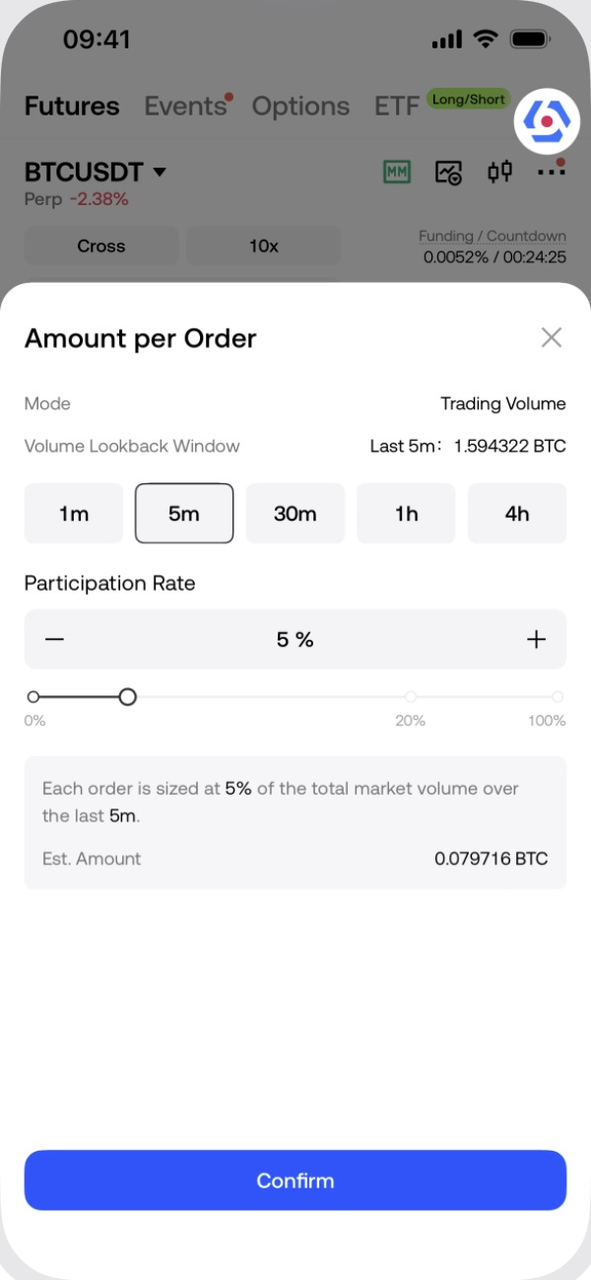
After choosing a mode, open Amount per Order. For Trading Volume, select a lookback window. For either liquidity mode, select the number of price levels. Set the participation rate and check the estimated amount for the cycle.
| Parameter | What it controls | How to set it |
|---|---|---|
| Participation Rate | The percentage of the reference amount used to size each order | For the same reference amount, a higher rate produces a larger order and may have a greater market impact. |
| Volume Lookback Window | The period used to measure market volume in Trading Volume mode | Choose 1, 5, or 30 minutes, or 1 or 4 hours. Shorter windows emphasize recent changes, while longer windows capture more trading activity over time. |
| Liquidity Reference | The number of price levels used in either liquidity mode | Choose the top 1, 3, 5, or 10 levels. Including more levels generally brings more resting liquidity into the calculation and can increase the estimated order size. |
For example, for a buy in Opposite-Side Liquidity mode with the top 3 levels and a 10% participation rate, the order size is 10% of the total amount at the top 3 asks.
In the app screenshot, 1.594322 BTC traded in the last 5 minutes. With the participation rate set to 5%, the estimated amount shown is 0.079716 BTC.
3. Order Frequency
Select One-Time, or repeat the order every 5 seconds, 30 seconds, 1 minute, 5 minutes, 30 minutes, or 1 hour.
One-Time runs a single cycle and requires no stop condition.
4. Terminate Strategy
| Stop condition | When the strategy stops |
|---|---|
| Size | When the total filled reaches your maximum amount |
| Duration | When the maximum runtime is reached |
| Either | Set both a maximum amount and a maximum duration. The strategy stops when it reaches either one. |
You can set a maximum duration of 15 to 1,440 minutes. The order interval must be shorter than the maximum duration.
In the app, select Either under Terminate Strategy to enter both an amount and a duration.
Step 3. Confirm and submit
Choose your trade direction, check the margin mode, leverage, and Reduce-Only setting, then select the corresponding buy or sell button.
In the confirmation window, review the contract, mode, order sizing settings, order frequency, and stop condition. Confirm to submit.
Your POV strategy is created once the order is submitted successfully.
How do I view or stop a POV order?
Check strategy execution
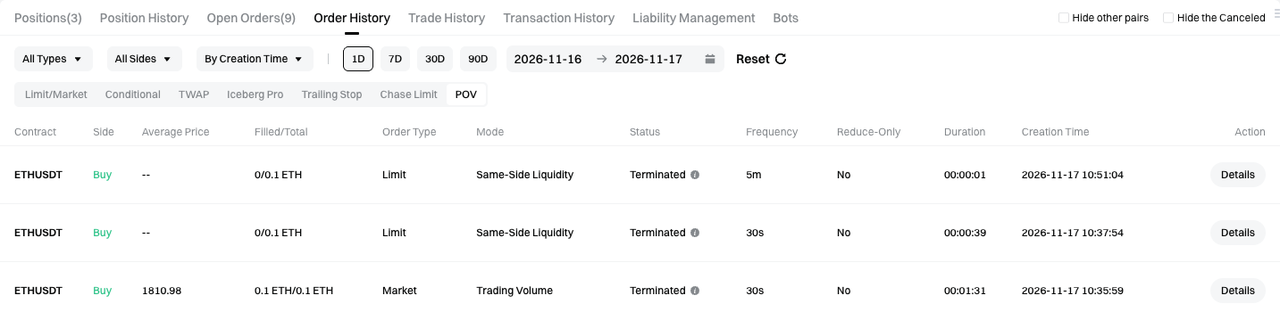
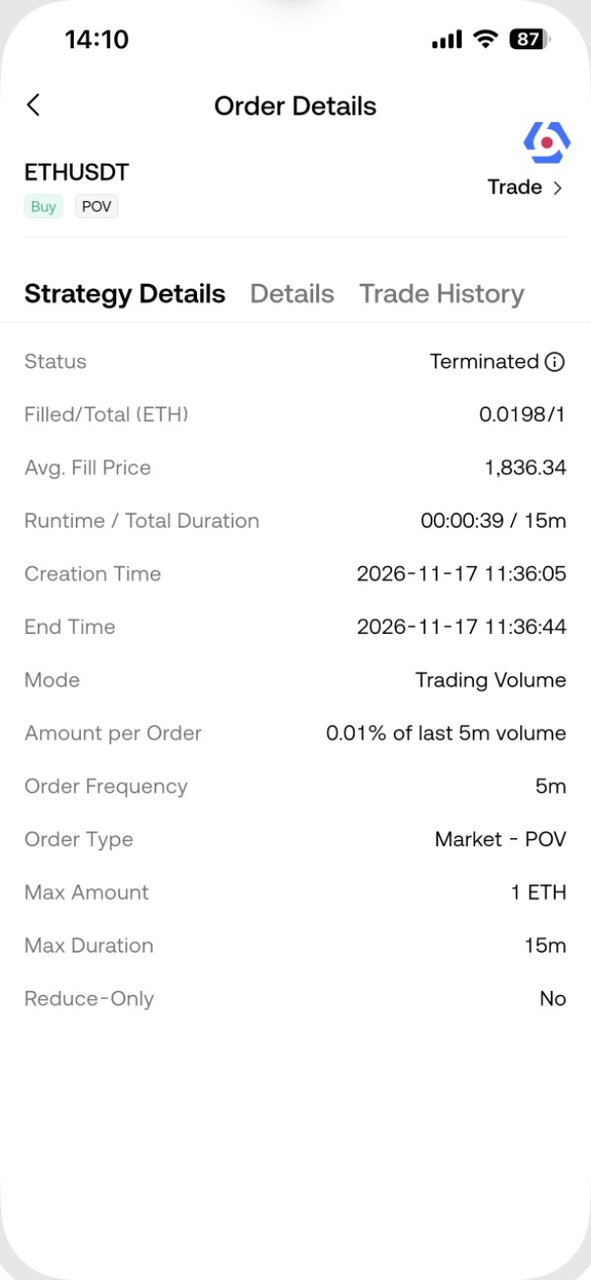
Find active strategies under Open Orders and strategies that have ended under Order History.
Use Filled/Total to see how much of your target has filled. Check the average fill price, runtime, and strategy status for more detail.
On the web, open Order History on the futures trading page and select POV.
Stop an order
To stop a strategy early, find the POV order under Open Orders, select Cancel, and confirm.
The strategy stops placing orders and cancels the unfilled portions of its child orders. Completed trades and any resulting positions remain in your account.
Frequently asked questions
1. Which contracts support POV orders?
POV is available for eligible USDT-margined and BTC-margined perpetual futures. Delivery futures are excluded. Check the trading page for availability on a specific contract.
Each account can run up to 10 POV strategies at a time. Lead traders cannot use POV.
2. How should I choose a participation rate?
For the same reference amount, a higher rate produces larger child orders. This may help you reach your target sooner but can increase market impact and slippage. A lower rate produces smaller orders, so reaching your target may take longer.
Before submitting, adjust the participation rate to see how the estimated order size changes.
3. How do one-time and recurring orders differ?
- One-Time runs a single cycle. You do not need to set an amount or duration limit.
- Recurring orders run at the interval you select and require a stop condition. Choose a maximum amount, a maximum runtime, or both. If you set both, the strategy stops when it reaches either one.
4. Do the lookback window and order frequency have to match?
You can set them separately. The lookback window determines how far back the strategy measures trading volume. The order frequency determines how often it runs a cycle.
For example, with a 5-minute window and a 30-second frequency, the strategy checks the volume traded in the preceding 5 minutes every 30 seconds and uses it to size the next child order.
5. Where can I check a POV order’s status?
Look under Open Orders for active strategies and Order History for strategies that have ended. Select Details to view the child orders and fills.
| Status | Meaning |
|---|---|
| Active | The strategy is running with your chosen settings. |
| Terminated | The strategy completed, was stopped manually, or ended because of an error. |
6. Why was no order placed or filled in a given cycle?
- Cycle skipped. If the calculated amount is below the contract’s minimum order size, the strategy skips that cycle and waits for the next one.
- Order could not be posted. Same-Side Liquidity uses Post Only. If the order would fill immediately, it is canceled or rejected.
- Order placed but not filled. The limit order is resting in the book and is waiting for a matching order.
7. What if my Same-Side Liquidity orders are not filling?
Same-Side Liquidity posts buys at the best bid and sells at the best ask. The order waits for another trader to match it, so it may fill only partially or remain open.
With recurring orders, the strategy cancels the unfilled portion of the previous child order before the next cycle. It then recalculates and posts a new order using the latest order book.
If execution speed matters more to you, consider Trading Volume or Opposite-Side Liquidity when creating a strategy.
8. Why is the final child order smaller than the estimate?
When you set a maximum amount, the strategy limits subsequent orders to the amount remaining in your target.
For example, suppose your maximum is 12 ETH, 9 ETH has filled, and you have no other outstanding orders. Even if the participation rate gives a calculated size of 5 ETH for the next cycle, only 3 ETH remains in your target, so that order is capped at 3 ETH.
9. What happens if a child order fails?
The strategy stops if it can no longer place orders, for example because there is insufficient margin, the position size available to close is too small, or the contract is no longer tradable. Order details show the relevant records and the reason for the failure.
If a child order cannot be posted because of Post Only, or a cycle is skipped because the calculated amount is too small, a recurring strategy recalculates at the next cycle.
10. How long can a strategy run without a maximum duration?
With only an amount target set, the strategy ends when the total filled reaches that amount, you stop it manually, an error prevents it from continuing, or 24 consecutive hours pass without a fill.
11. What happens to open orders and positions when I stop a POV strategy?
The strategy cancels the unfilled portions of its child orders. Fills can still occur while cancellation is in progress, so check your trade history after cancellation is complete.
Positions opened by earlier fills remain open. To close one, go to Positions.
12. What happens if a POV strategy reaches its maximum duration before reaching its target?
When the maximum duration is reached, the strategy stops placing orders. At the same time, it checks for any outstanding child orders and cancels them.
Disclaimer
The content provided herein is for reference and educational purposes only and does not constitute any financial, investment, trading, or legal advice, nor does it constitute an offer or solicitation to buy or sell any digital assets. Gate makes no express or implied representations or warranties regarding the accuracy, completeness, or timeliness of the information contained herein. Product features, interfaces, rules, and fee structures may be updated or adjusted at any time. Please refer to the latest announcements and the actual information displayed on the Gate platform for the most accurate details.
Digital asset investments involve significant risk, and prices may fluctuate substantially. You may lose the entire amount of your investment. Please make decisions cautiously based on your own financial situation and risk tolerance after fully understanding the associated risks. If necessary, you are advised to consult an independent professional financial or legal advisor.
For more information about potential risks, please refer to Gate's Risk Disclosure and User Agreement.
