


1. What Is a Stock Bonus?
A Stock Bonus is a fixed amount provided by the platform to redeem fractional shares of one designated stock. Once you confirm redemption, the system buys the stock for you and adds it to your holdings. The position will be labeled 【Trial Position】. You can sell it during the trial period. If it remains unsold when the period ends, the system will automatically sell and settle it. You keep any profits, while the platform covers any losses.
You receive a trial credit that cannot be withdrawn. It can only be used to redeem the one designated stock specified on the voucher.
Key Features
Feature | Description |
One designated stock | Each voucher corresponds to one designated stock. Simply confirm redemption; you do not need to choose from multiple stocks. |
No-cost redemption | The credit is used to purchase fractional shares. The platform covers the purchase fee, so you do not need to use your own funds. |
You keep profits; the platform covers losses | After you sell or the position is settled at expiration, any profit will be credited to your account. Losses will not be deducted from your other balances. |
Trial Position label | The position and related sell records are labeled 【Trial Position】 and displayed separately from regular positions. |
Measured in trading hours | The trial period is calculated in trading hours. Any unsold shares will be automatically sold and settled at expiration. |
Usage Restrictions
Each voucher can be successfully redeemed only once. Once you confirm redemption, it is immediately marked as used. You cannot change the stock or cancel the redemption.
You can have only one unsettled Trial Position in the same stock at a time. You may hold one position each in different stocks at the same time. After the position for that stock has been settled, you can use a new voucher designated for the same stock.
Trial credits cannot be withdrawn or transferred. Trial shares cannot be purchased additionally, transferred, withdrawn, moved between accounts, or converted into stock tokens.
Trial Positions do not support copy trading, lead trading, or bots.
If the stock market is closed when you confirm, the voucher will still be marked as used, and the fractional shares will be credited after the market opens. The Trial Position will not appear in your holdings before the shares are credited, and the redemption cannot be canceled.
Gate reserves the right of final interpretation for this voucher.
2. How to Use a Stock Bonus (Web)
View Stock Bonus
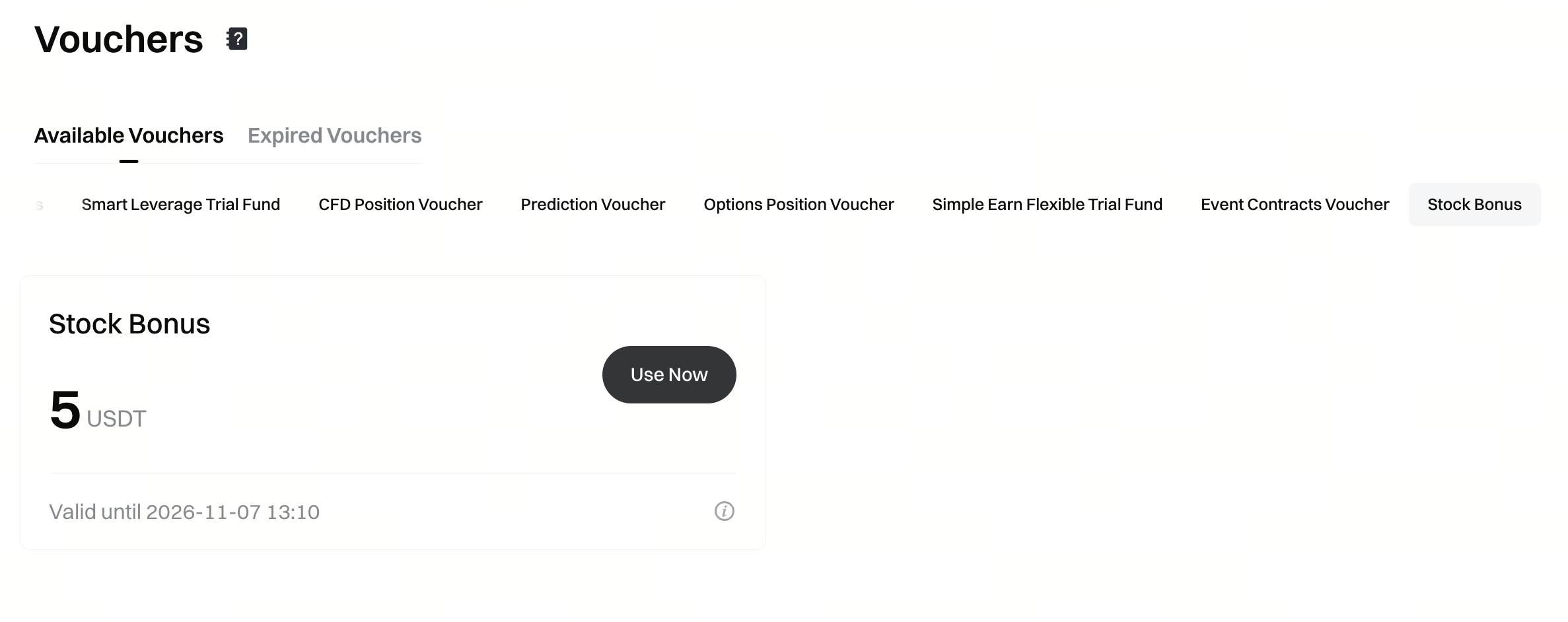
Method 1: View your vouchers under 【Vouchers 】-【Stock Bonus】.
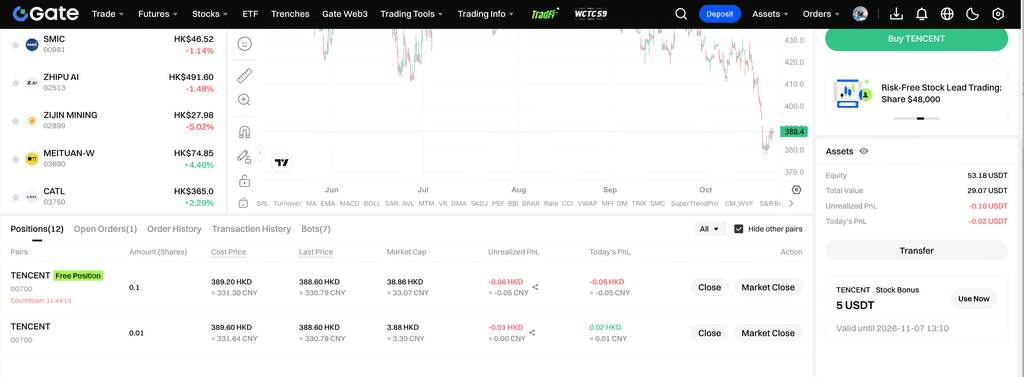
Method 2: Unused Stock Bonus are displayed in the asset section of the trading page.
Redeem the Designated Stock
Step 1: Select an unused Stock Bonus from the above entry points and click 【Use Now】 to open the pop-up titled 【Redeem Stock Bonus】.
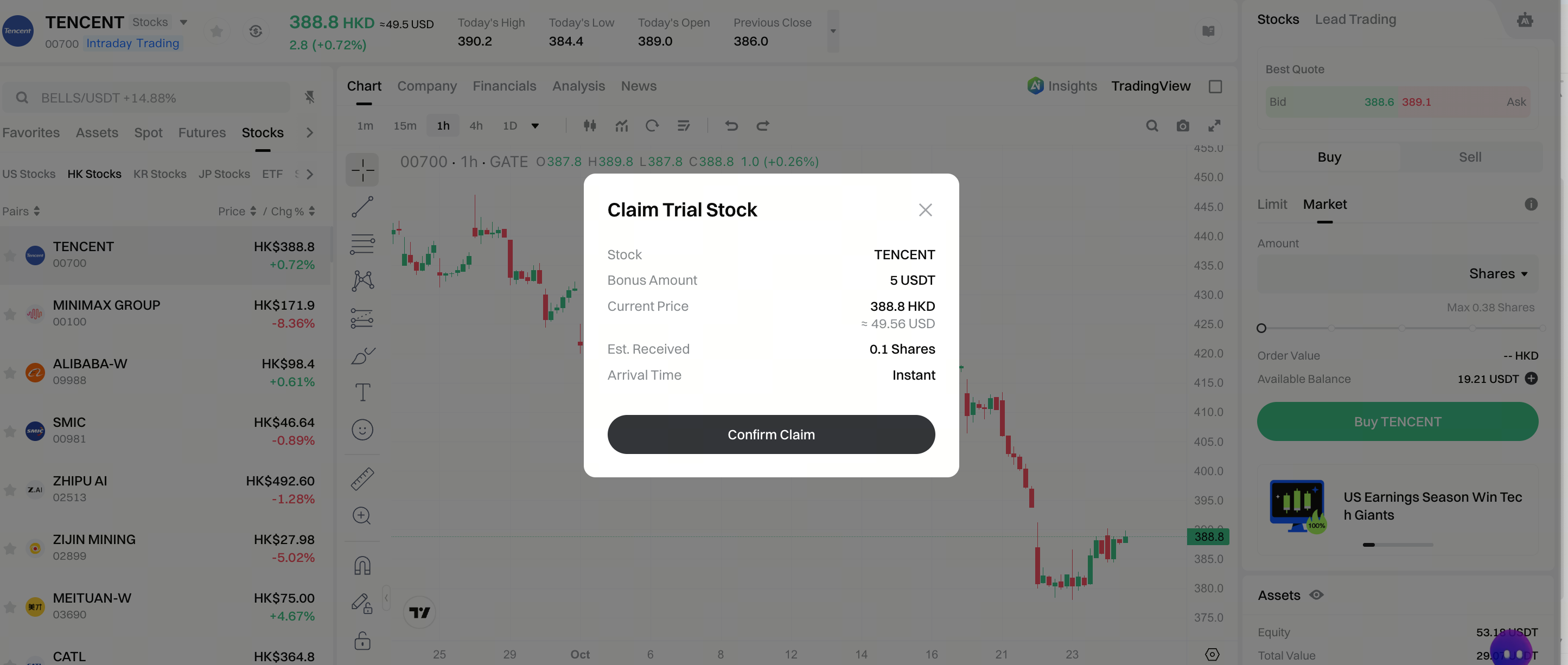
Step 2: Verify the stock, price, and estimated number of shares, then click 【Confirm Redemption】.
Redemption during trading hours: The estimated number of shares is calculated based on the latest current price and will be credited immediately after confirmation.
Redemption when the market is closed: The pop-up displays the estimated number of shares based on the closing price of the most recent trading day. The actual number of shares is based on the execution price after the market opens.
If redemption is unavailable before confirmation, the page will display the specific reason, and the voucher will remain unchanged:
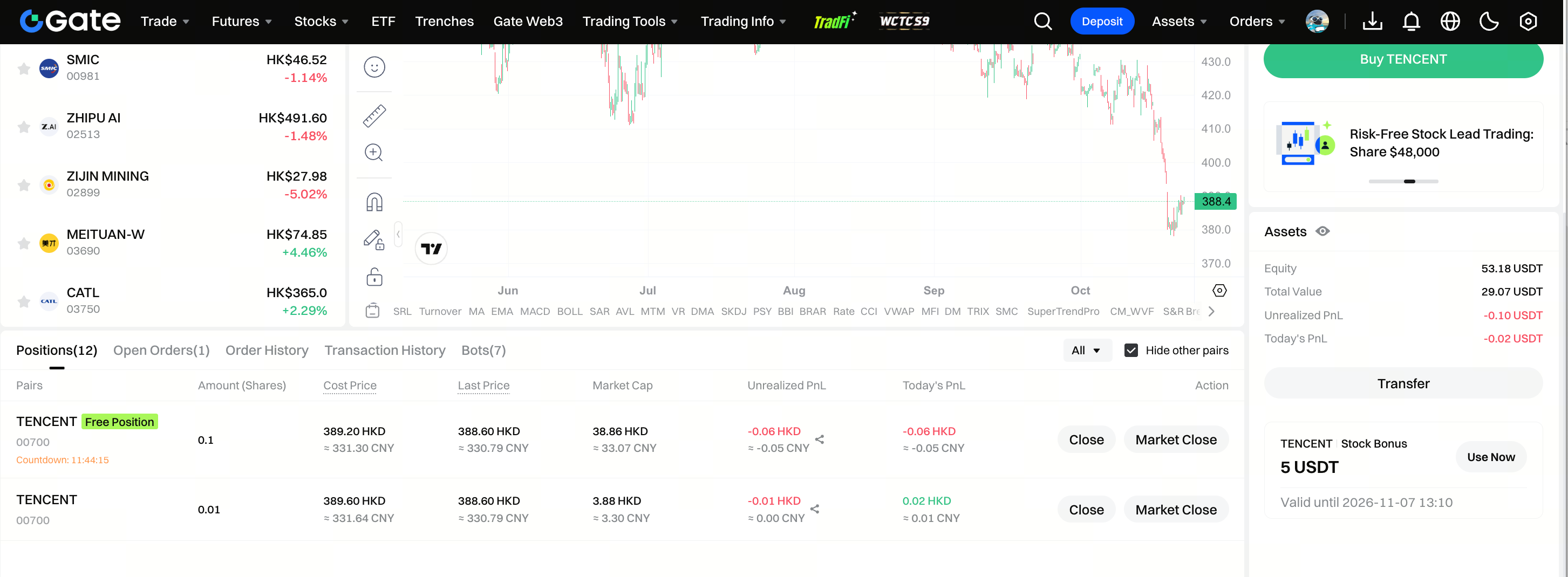
Step 3: After successful redemption, you can view the Trial Position.
If redemption is successful during trading hours, you can view the position directly on the stock page. If redemption is successful when the market is closed, you can view the Trial Position in your stock holdings after the market opens.
View and Sell a Trial Position
Trial Positions are displayed separately from regular positions in the same stock and are labeled 【Trial Position】 with an expiration countdown. You can sell during trading hours within the trial period using market or limit orders. You can also sell only part of the position.
When you sell only part of a position, the sold portion is settled immediately, while the remaining shares continue in the trial period.
The sellable quantity excludes any pending position-reduction orders.
If you have both a regular position and a Trial Position in the same stock, the Trial Position will be reduced first when you sell.
Orders for voluntary sales will appear in your order history and be labeled 【Trial Position Sale】. The purchase when shares are credited will also appear in your order history.
Automatic Sale at Expiration
The trial period is calculated in valid trading hours, with the duration determined when the voucher is issued. The hour in which you confirm redemption is not counted; calculation begins with the next valid trading hour. Weekends and holidays are not counted. Stocks in each region follow their respective trading sessions.
At expiration, any unsold Trial Position will be automatically sold and settled. This order will appear in your order history and be labeled 「Trial Position Expiration Reclamation」.
3. How to Use a Stock Bonus (App)
View Stock Bonus
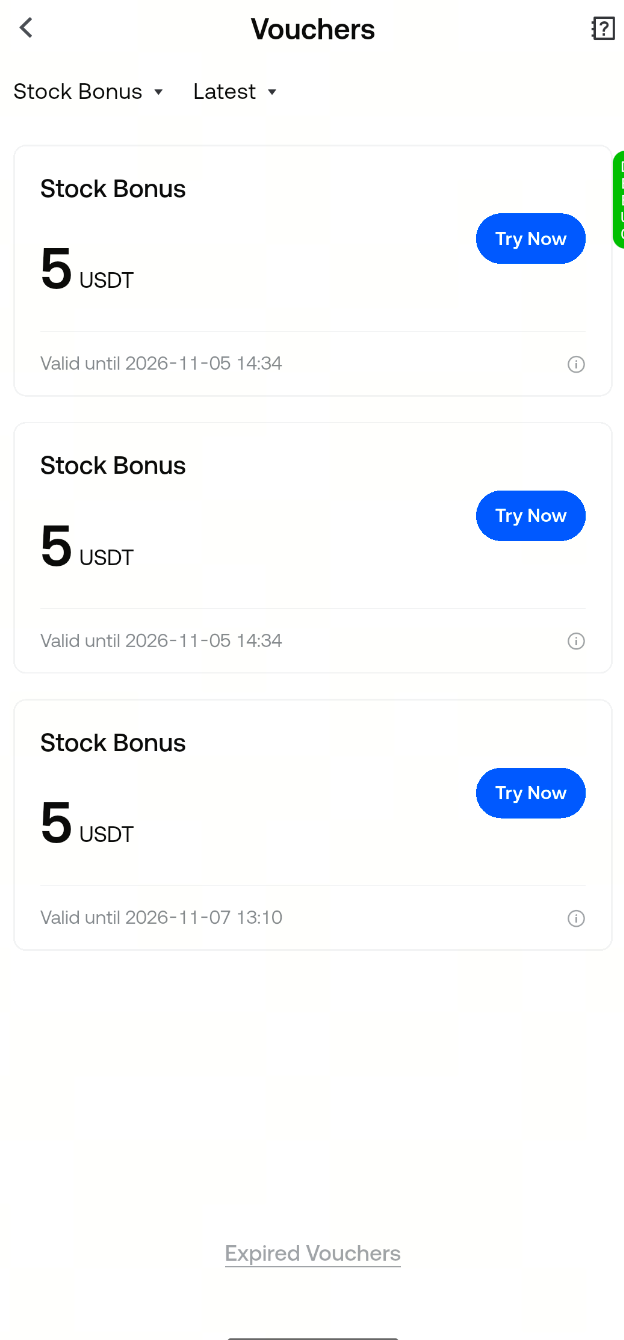
Method 1: View your vouchers under 【Vouchers】-【Stock Bonus】.
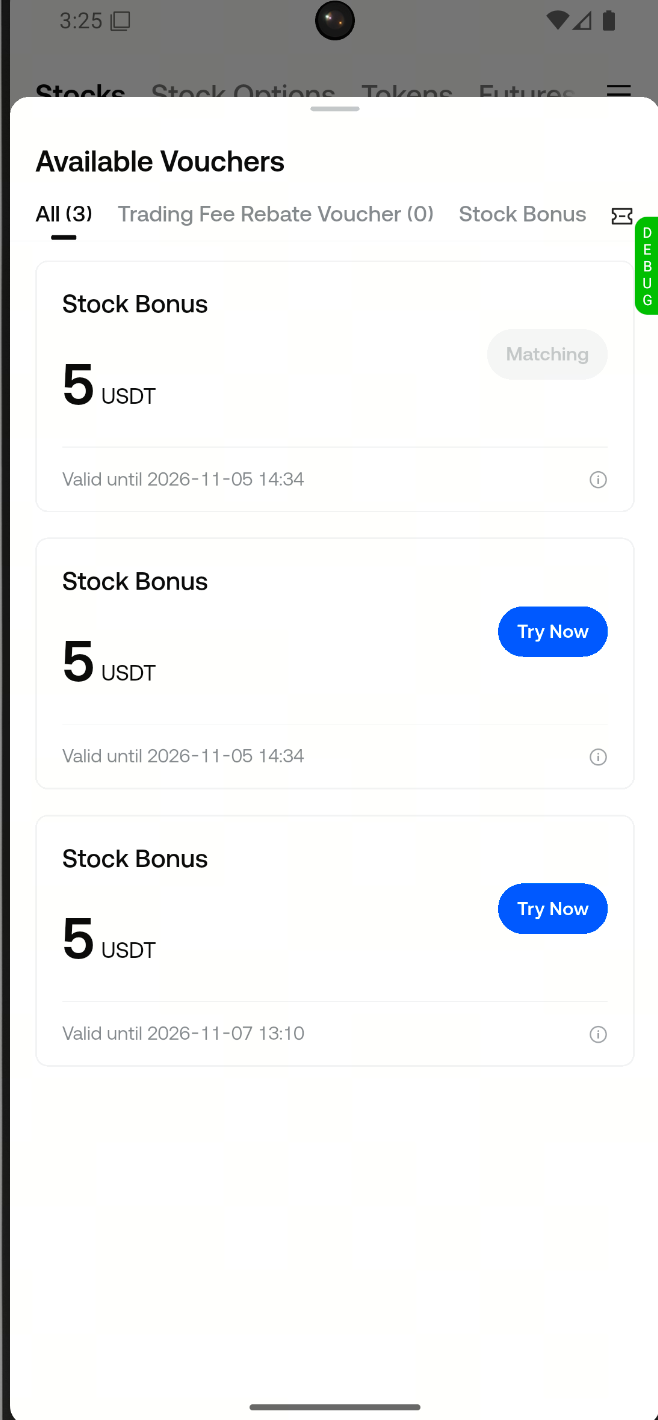
Method 2: You can also view them under 【Available Vouchers】 on the stock market page. Categories include 【All】 and 【Stock Bonus】.
Redeem the Designated Stock
Step 1: Tap 【Use Now】 to open the 【Redeem Stock Bonus】 pop-up, then verify the credit amount, designated stock, current price, estimated number of shares, and crediting time.
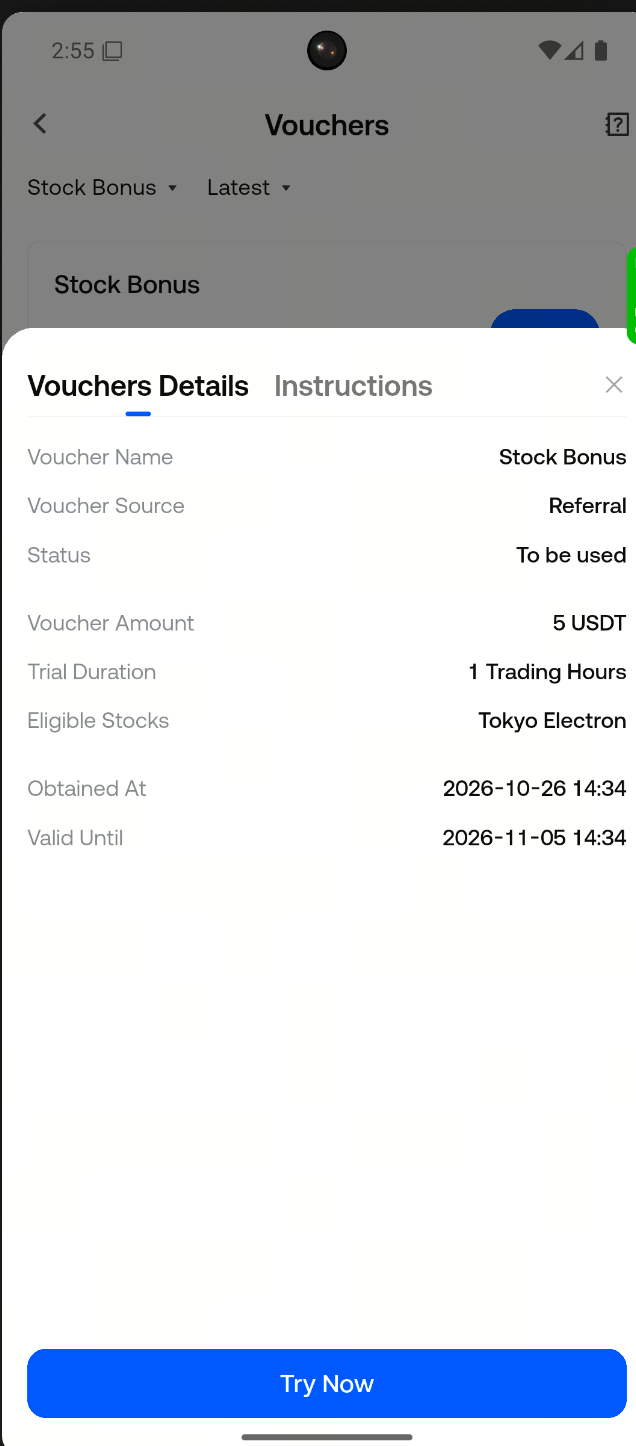
Step 2: Tap 【Confirm Redemption】.
Shares are credited immediately after confirmation during trading hours. If you redeem when the market is closed, they will be credited after the market opens.
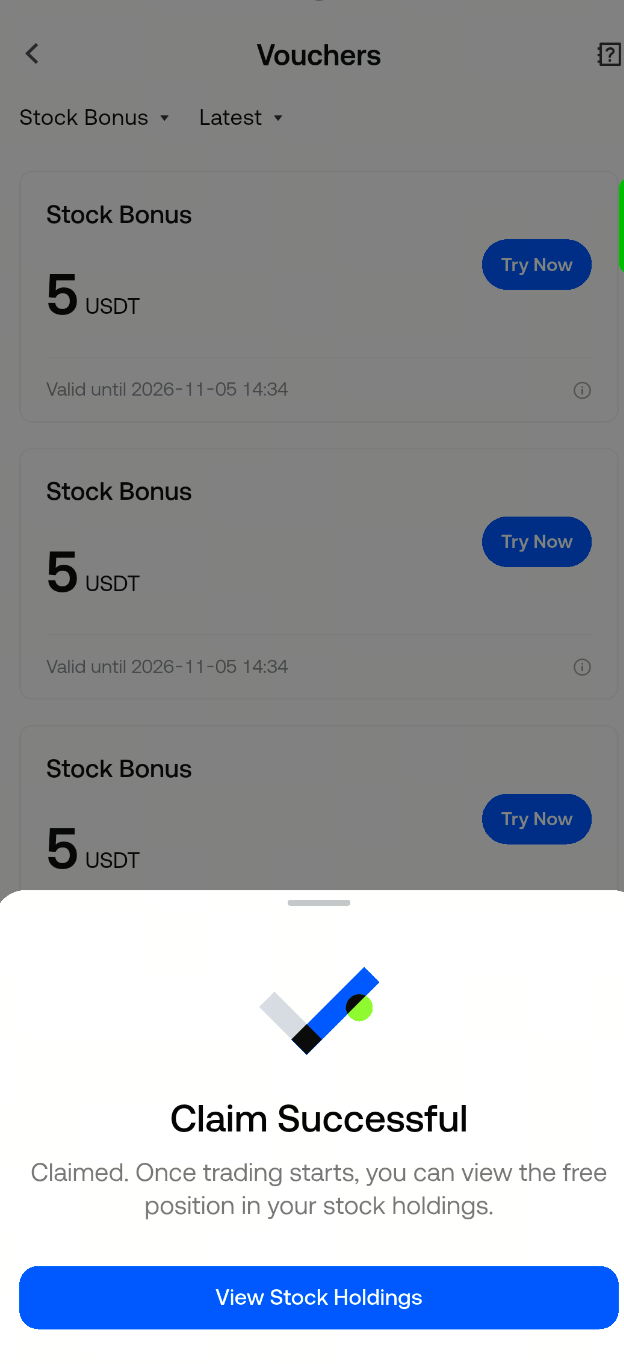
Step 3: On the success page, tap 【View Now】 to access the holdings for that stock.
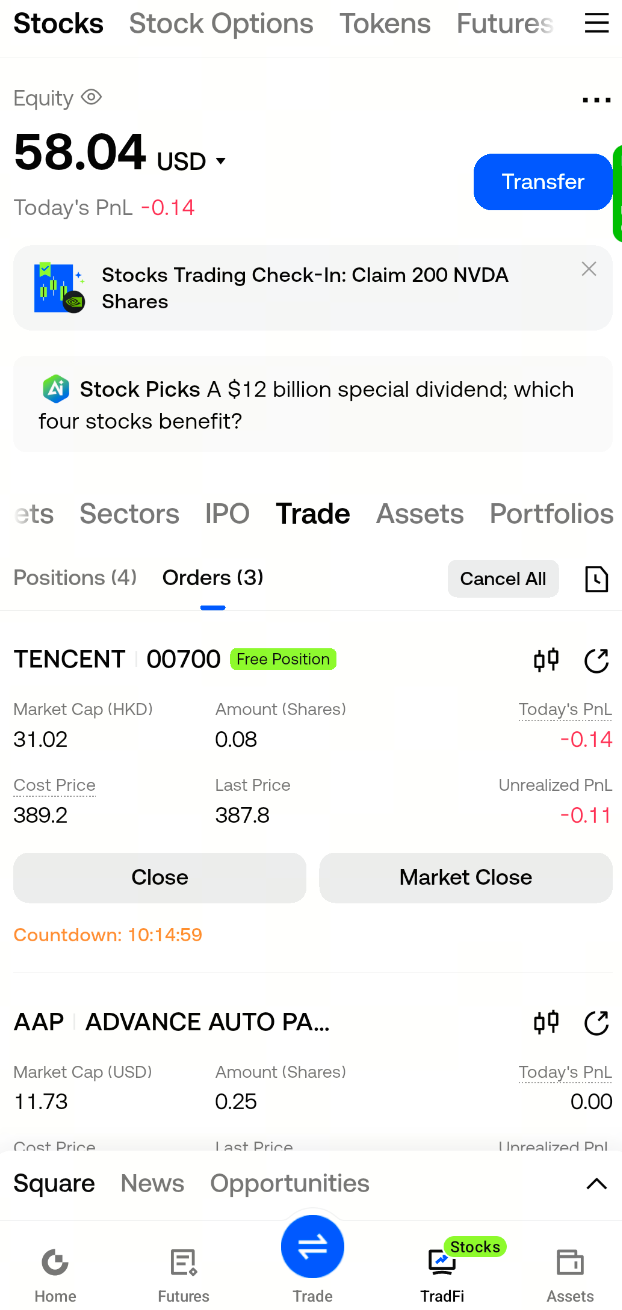
View and Sell a Trial Position
Trial Positions are displayed separately from regular positions and are labeled 【Trial Position】 with an expiration countdown. During trading hours, you can use 【Close Position】 or 【Close All at Market】, or partially sell the position as you would a regular position. When you sell only part of a position, the sold portion is settled immediately, while the remaining portion continues in the trial period.
Any shares that remain unsold at expiration will be automatically sold. The rules are the same as on the Web platform.
4. Trading Rules
Each voucher redeems one designated stock. Once confirmed, fractional shares are purchased and recorded as a Trial Position. You do not need to choose whether the price will rise or fall, or enter a price or quantity.
The estimated number of shares will be displayed before confirmation. During trading hours, it is estimated using the latest price and purchased immediately. When the market is closed, it is estimated using the most recent closing price and purchased at the actual execution price after the market opens. The credited number of shares is based on the actual purchase, displayed to a maximum of two decimal places. Any remaining credit that cannot be converted into shares will not be issued separately.
The platform covers the purchase fee. The sell fee is the same as for regular stock sales and is deducted from the sale proceeds before profit or loss is calculated.
When you sell or the position is settled at expiration: any profit will be credited to your account; if there is no profit, you will receive zero. The platform will not recover losses from your other balances, regular positions, or future earnings.
The platform does not impose a profit cap. No matter how much the stock rises, all profits belong to you.
Trial shares do not participate in any corporate actions.
Once redemption is confirmed, the voucher is marked as used. Unused vouchers will expire after their validity period and will not purchase any shares. Expired vouchers will remain grayed out for 30 days.
If confirmation fails for the same voucher because you already have a Trial Position or the stock is temporarily unavailable for trading, the voucher will remain unused and you can try again later. If the voucher has expired, it can no longer be used.
5. Fund Flow Details
When trial funds are credited or reclaimed, the transaction history will show 【Trial Position Bonus Credit】 and 【Trial Position Bonus Reclamation】. All other stock trading fund flows remain the same as in regular trading.
6. Frequently Asked Questions
Can a Stock Bonus be transferred?
No. Stock Bonus are account-specific benefits and cannot be transferred to other accounts. Trial shares also cannot be transferred, withdrawn, or moved between accounts.
Will losses on a Trial Position cost me my own money?
No. The platform covers the purchase fee. If there is no profit after selling or expiration, you will receive zero, and no funds will be deducted from your other balances.
How can I use my profits?
Profits will be credited to your account and can be used freely afterward.
Can I hold multiple Trial Positions at the same time?
Yes, but they must be in different stocks. You cannot have a second Trial Position in the same stock until the previous one has been settled. Once it is settled, a new voucher can be used to redeem that stock again.
Why am I being told that I already have a Trial Position?
You still have an unsettled Trial Position in this stock. Please sell it first or wait for it to be settled at expiration before using a voucher designated for the same stock. The voucher will remain unused at this time.
Why is the position not in my holdings after I confirmed during market closure?
If you confirm while the market is closed, the voucher will first be marked as used. Fractional shares will not be purchased and credited until the market opens, so they will not appear in your holdings beforehand. The estimated number of shares will be recalculated based on the execution price after the market opens and may differ from what was displayed when you confirmed. This redemption cannot be canceled.
How is the trial period calculated?
The countdown begins from the next valid trading hour after you confirm redemption and is measured in trading hours. The hour in which you confirm, weekends, and holidays are not counted. Stocks in each region follow their respective trading sessions.
What happens at expiration?
Any unsold Trial Position will be automatically sold. If there is a profit, it will be credited to your account;
Why can’t I see it in some versions of the App, or why am I prompted to upgrade after tapping it?
Please upgrade the App to version 8.42.0 to use Stock Bonus normally.
Disclaimer
The content provided herein is for reference and educational purposes only and does not constitute any financial, investment, trading, or legal advice, nor does it constitute an offer or solicitation to buy or sell any digital assets. Gate makes no express or implied representations or warranties regarding the accuracy, completeness, or timeliness of the information contained herein. Product features, interfaces, rules, and fee structures may be updated or adjusted at any time. Please refer to the latest announcements and the actual information displayed on the Gate platform for the most accurate details.
Digital asset investments involve significant risk, and prices may fluctuate substantially. You may lose the entire amount of your investment. Please make decisions cautiously based on your own financial situation and risk tolerance after fully understanding the associated risks. If necessary, you are advised to consult an independent professional financial or legal advisor.
For more information about potential risks, please refer to Gate's Risk Disclosure and User Agreement.
