
1. What Is a Spot Grid Bot?
A spot grid bot is an automated trading strategy designed for volatile markets, ideal for buying low and selling high. It's suitable for short, medium, and long-term trading. You simply set parameters like the price range and the number of grids, and the bot takes care of the rest. Once activated, the bot divides your funds into several portions, buying in increments as the price drops and selling in increments as the price rises. By capitalizing on market fluctuations, it continually buys low and sells high to capture profits from volatility.
2. Spot Grid Strategy Overview
Advantages:
Spot grid bots are beginner-friendly and help minimize emotional decision-making errors in volatile markets. They operate 24/7, automatically executing buy and sell orders, so you can profit from the market without constant monitoring.
- In an oscillating uptrend: Users can profit from both price appreciation and volatility arbitrage.
- In an oscillating downtrend: Volatility arbitrage helps reduce user losses.
Disadvantages:
However, spot grid bots are not all-powerful. They can only go long, which means they may get stuck in a one-sided downtrend, have relatively low capital utilization, and can easily move out of the set range.
Which Trading Pairs Are Suitable for Spot Grid Trading?
If you’re new to trading, it’s recommended to choose mainstream, high-liquidity coins with strong consensus, such as BTC_USDT or ETH_USDT. You can refer to the trading activity of the top 100 digital assets on Gate, as ranked by CMC. If you have a deeper understanding of spot grid trading, you can try other highly volatile pairs to pursue higher profits.
3. Spot Grid Parameters Explained
Spot Grid Terminology:
AI Smart Grid: The AI Smart Grid uses historical data from the past 7 days to backtest and automatically calculates the grid parameters with the highest yield: upper price limit, lower price limit, and number of grids. Users only need to select the investment amount (the chosen amount must be at least the minimum investment).
Fill AI Data: Automatically fetches and fills in AI Smart Grid data.
Clear All Shortcut: If you need to clear multiple data entries, use this shortcut instead of deleting them one by one. After clicking, simply reset the parameters.
Lower Price Limit: The lowest buying price. The bot won’t buy if the market price falls below this level, and no sell orders can be executed at this price.
Upper Price Limit: The highest selling price. The bot won’t sell if the market price rises above this level, and no buy orders can be executed at this price.
Number of Grids: The number of grids to execute, ranging from 2 to 1000.
Grid Spacing:
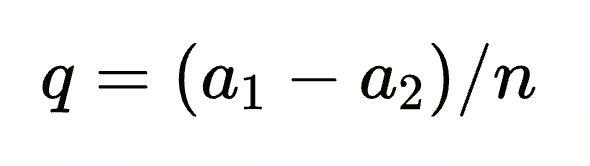
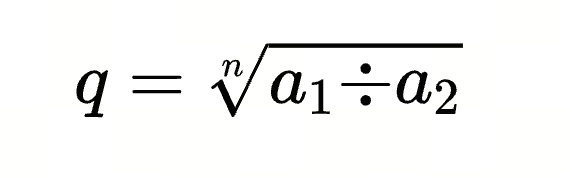
Suppose the grid spacing is q, the upper price limit is a1, the lower price limit is a2, and the number of grids is n. The formula for arithmetic grid spacing q is:
The formula for geometric grid actual floating ratio q is:
Single Grid Yield:
Suppose the grid spacing is q, the upper price limit is a1, the lower price limit is a2, and the number of grids is n.
Geometric Single Grid Yield:

Arithmetic Single Grid Yield:


Single grid base trade quantity: The quantity of the selected coin to buy/sell in each grid.
Quantity Increment: Quantity increment is off by default. When enabled, you can choose to increase the buy/sell quantity for each grid by a fixed amount or percentage.
Example: If the single grid base trade quantity is 1 and quantity increment is 2, the first grid will buy/sell 1 BTC, the second grid will buy/sell 1+2=3 BTC, the third grid will buy/sell 1+2+2=5 BTC, and so on.
Advanced Settings: The above are basic parameter settings required for all users. For a cleaner interface, not all advanced settings are displayed by default; click to reveal them. Advanced settings include optional fields you can fill in as needed.
Advanced Settings Parameter Explanation:
- Strategy Trigger Price: The grid will only start running when the latest market price is less than or equal to the trigger price. The trigger price must be lower than the latest price and within the grid range.
- Stop-Loss Price: If the latest market price is less than or equal to this price, a stop-loss is triggered. Must be lower than the lower price limit.
- Take-Profit Price: If the latest market price is greater than or equal to this price, a take-profit is triggered. Must be higher than the upper price limit.
- Settlement Options (Optional):
- Sell Holdings at Termination: When enabled, all held coins will be sold at market price for USDT when the strategy ends.
- Coin Accumulation Mode: When enabled, grid profits are immediately converted into the selected coin. In spot grid coin accumulation mode, if you are bullish on the coin long-term, the arbitrage profits from each buy and sell are used to buy more coins at the latest market price, effectively accumulating more coins over time.
You can view the profit-to-coin conversion records for grids with coin accumulation mode enabled in the accumulation records.
Note: If the profit from a single grid's buy-sell cycle is less than the system's minimum order amount, the profit will be temporarily stored. Once the profit reaches the minimum order amount, it will be used to buy coins at the latest market price.
Tip: "Sell holdings at termination" and "Coin accumulation mode" can be enabled at the same time.
4. How to Create/Terminate a Spot Grid
4.1 How to Create a Spot Grid
Spot Grid Custom Creation Process
WEB:
Trading Bots - Spot Grid - Select Trading Pair - Manual Grid Configuration - Create

4.2 How to Terminate a Spot Grid
You can terminate a spot grid bot at any time. Please note:
- If the spot grid bot no longer fits the current market, it should be stopped.
- Spot grid bots are not ultra-short-term strategies; most grids need time to operate before reaching expected returns.
- Since the bot buys low and sells high, the grid profit curve may initially decline before rising. Early losses are normal in theory.
