
If you have registered multiple Gate US accounts (or cannot log in to your current account) and have forgotten your account details, please send an email to support@gate.us. Follow the instructions and provide the required documents so we can assist you in recovering your account
Required Information
Please provide the following:
- ID document number: It must be from the document you used for identity verification, provided in text format.
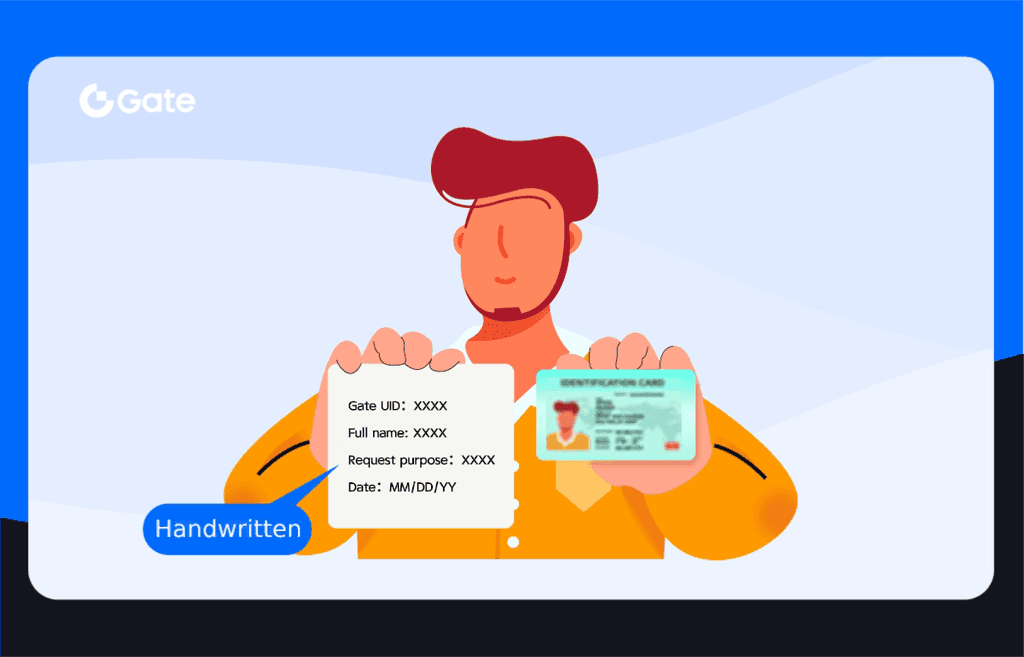
- A photo of you holding your ID document and a handwritten note :
In the photo, make sure you are holding a valid ID (such as your passport or national ID) along with a handwritten note that includes:
- Your Gate US account UID
- Your full name
- A statement requesting to retrieve accounts registered under your name
- The date of application
Reference image example:
Important Notes
- Make sure your face is clearly visible in the photo. The information on your ID and the handwritten note must be unobstructed and legible.
- After sending the email, you will receive an acknowledgment email containing a reference number, indicating that your request has been successfully submitted. We will verify your information as soon as possible and notify you of the result via email.
- Before submitting your request, we recommend attempting to recover your account using your registered phone number or email address. If that is unsuccessful, please follow the process above to submit the required photo and apply for account recovery.
Disclaimer: This is not investment advice. The information is provided for informational purposes only and should not be construed as a recommendation to buy, sell or hold any asset. Cryptocurrency trading involves a risk of loss. Gate US services may be restricted in certain jurisdictions. For more information, please see our legal disclosures: https://us.gate.com/legal/disclosures
