When logging in to Gate, withdrawing assets, or performing other security-related actions that require an email verification code, you may occasionally fail to receive the verification email. In such cases, we recommend adding Gate's official email addresses to your email whitelist to ensure messages are delivered successfully.
Please add the following email addresses to your whitelist:
- no-reply@mail.gate.ae
How to add Gate emails to a Gmail whitelist
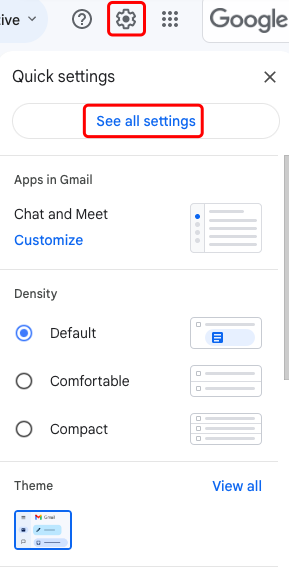
Step 1: Log in to your Gmail account, click the Settings icon in the upper-right corner, and select [See all settings].
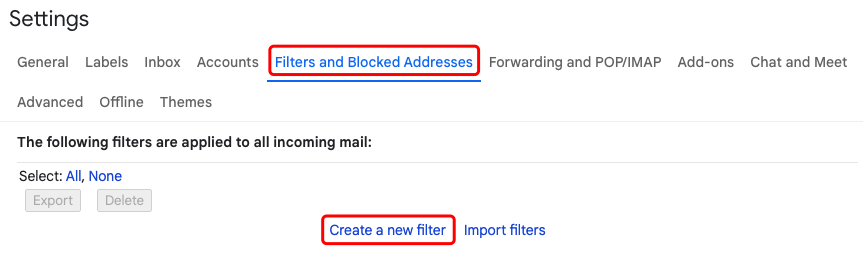
Step 2: Go to the [Filters and Blocked Addresses] tab and click [Create a new filter].
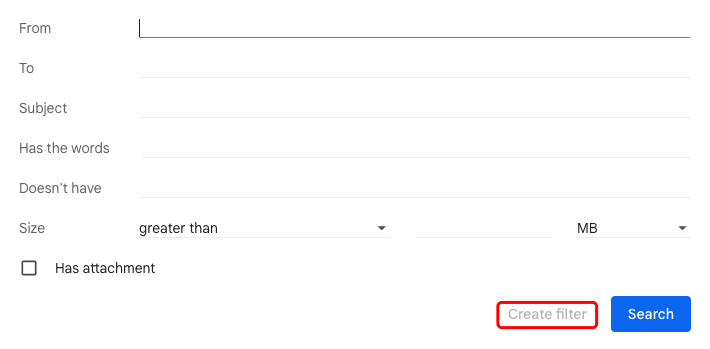
Step 3: Enter the email address you want to whitelist in the [From] field, then click [Create filter].
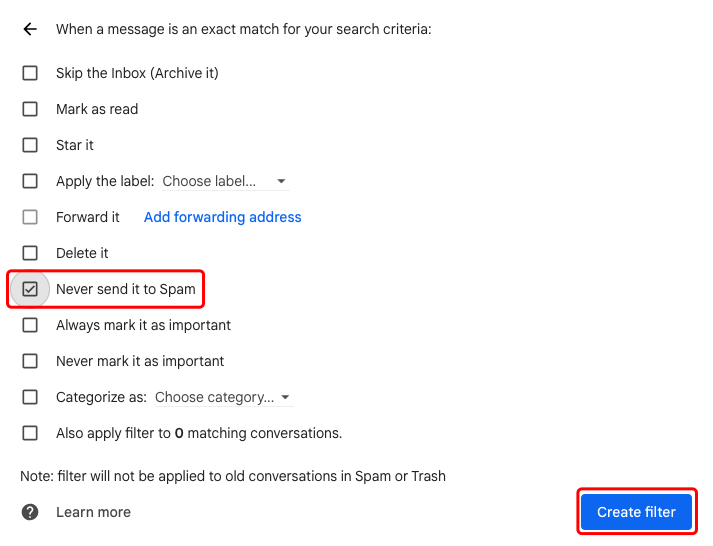
Step 4: Check the [Never send it to Spam] box. Then click [Create filter] to save your whitelist settings.
Disclaimer
This page may refer to products, services, or features that are not offered by Gate Dubai. Such content is for general information purposes only and does not constitute, and shall not be construed as, an offer or solicitation by Gate Dubai. Gate Dubai users should rely only on products and services expressly made available on the Gate Dubai platform.
