What is a Sub Account
A subaccount is a trading account created and managed under a primary Gate Australia account (referred to as Main Account). It allows you to manage assets more efficiently. Each main account can create multiple subaccounts for trading and asset management.
Note: Once created, subaccounts cannot be deleted.
Subaccount creation limits by VIP level
A single main account can create multiple subaccounts. The higher the VIP level, the more subaccounts can be created. The specific rules are as follows:
- VIP 0-4, Up to 10 sub-accounts can be created.
- VIP 5-9, Up to 30 sub-accounts can be created.
- VIP 10-11, Up to 100 sub-accounts can be created.
- VIP 12-16, Up to 200 sub-accounts can be created.
On the Web
How to create a subaccount
Step 1: Enter the Sub-Account Management page and apply for a sub-account.
Step 2: Enter the Sub-Account Management page (compliance review approved)
Step 3: Fill in the required details:
- Subaccount type: Choose [ Standard Subaccount ] (You may set trading permissions here).
- Set your subaccount username (use letters or a combination of letters and numbers). Click [ Check if it’s available ].
- Remarks: Write a remark or leave it blank.
- You can choose whether the subaccount settings follow those of the main account. If not, customize the fields manually.
Once all details are confirmed, click [ Confirm ].
Step 4: Choose your preferred verification method ([Google Authenticator]/[SMS]), then click [ Confirm ] to complete the creation.
How to transfer funds
① Click [ Transfer ] next to the subaccount.
② Select the direction of the transfer (Main Account <> Subaccount).
③ Select the currency to transfer.
④ Enter the amount to transfer.
⑤ Click [ Confirm ].
Subaccount settings
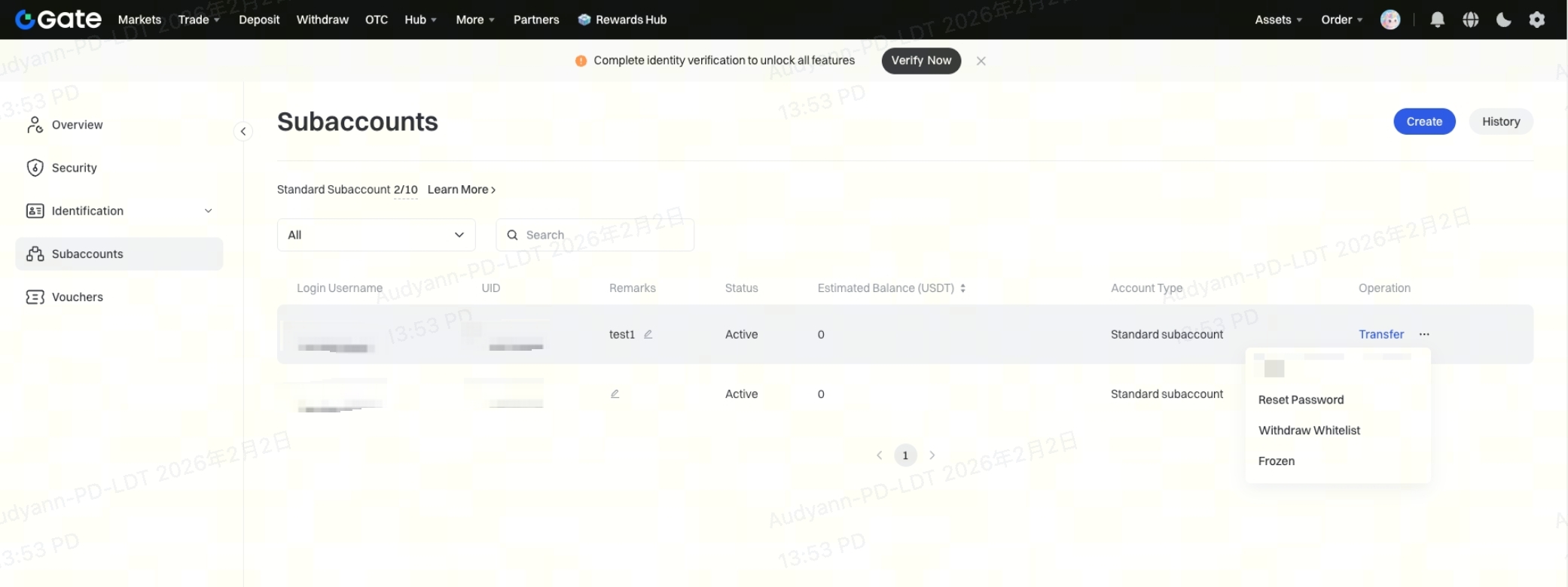
Click the […] icon on the right side of the subaccount to open the operation menu. You can perform the following actions:
- [Reset Password]: Reset the login password for the subaccount.
- [Withdrawal Whitelist]: Add withdrawal addresses for the subaccount.
- [Frozen]: Freeze the subaccount (takes effect after 3 minutes).