

Trade
Basic
Futures
Futures
Hundreds of contracts settled in USDT or BTC
Options
HOT
Trade European-style vanilla options
Unified Account
Maximize your capital efficiency
Demo Trading
Futures Kickoff
Get prepared for your futures trading
Futures Events
Participate in events to win generous rewards
Demo Trading
Use virtual funds to experience risk-free trading
Earn
Launch
CandyDrop
Collect candies to earn airdrops
Launchpool
Quick staking, earn potential new tokens
HODLer Airdrop
Hold GT and get massive airdrops for free
Launchpad
Be early to the next big token project
Alpha Points
NEW
Trade on-chain assets and enjoy airdrop rewards!
Futures Points
NEW
Earn futures points and claim airdrop rewards
Investment
Simple Earn
Earn interests with idle tokens
Auto-Invest
Auto-invest on a regular basis
Dual Investment
Buy low and sell high to take profits from price fluctuations
Soft Staking
Earn rewards with flexible staking
Crypto Loan
0 Fees
Pledge one crypto to borrow another
Lending Center
One-stop lending hub
VIP Wealth Hub
Customized wealth management empowers your assets growth
Private Wealth Management
Customized asset management to grow your digital assets
Quant Fund
Top asset management team helps you profit without hassle
Staking
Stake cryptos to earn in PoS products
Smart Leverage
NEW
No forced liquidation before maturity, worry-free leveraged gains
GUSD Minting
Use USDT/USDC to mint GUSD for treasury-level yields

More







gate Telegram Mini Program Newbie Guide
1. How to find the Gate TG Mini Program
###1. Search Process
Setting Before Trading
###1. Register Registration process: Click OPEN APP-Enter the gate TG app-Click Assets-Enter the asset interface-Click to bind-Register and bind an account-Click Create New Account (existing account can click Existing Account)-Enter the registration interface-Enter email/phone number-Set login password-Select country/region-Inviter ID (can be skipped if no inviter)-Accept user protocol and privacy policy-Click Register-Verification-Verification successful-Enter email verification code-Confirm-Registration successful Screenshot: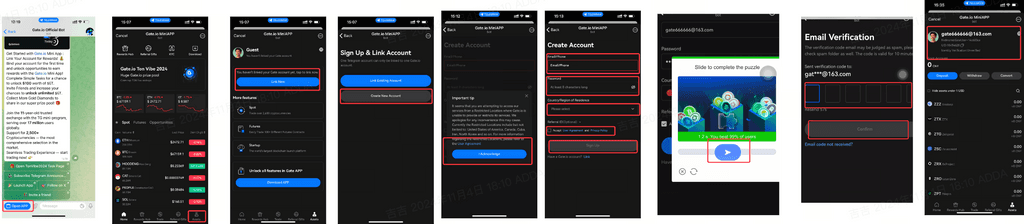 ###2. KYC Identity Verification
Authentication process:
Home page - click KYC - enter personal certification - enter personal information (nationality, country of residence, real name, ID card, document number) - select whether it is a country other than the United States - click next after entering - enter the type of identity document and issuing country/region (issuing country/region, document type) - click continue - enter the prepare upload page (view tips) - click continue - enter the upload interface - select local upload/take a photo upload - wait for review - review completed
Screenshot:
###2. KYC Identity Verification
Authentication process:
Home page - click KYC - enter personal certification - enter personal information (nationality, country of residence, real name, ID card, document number) - select whether it is a country other than the United States - click next after entering - enter the type of identity document and issuing country/region (issuing country/region, document type) - click continue - enter the prepare upload page (view tips) - click continue - enter the upload interface - select local upload/take a photo upload - wait for review - review completed
Screenshot:
 ##3. How to trade?
gate TG app provides you with the flash exchange function, you can quickly exchange Crypto Assets directly in the gate TG app, without complex operations and transfer process
Flash Exchange
Operation process:
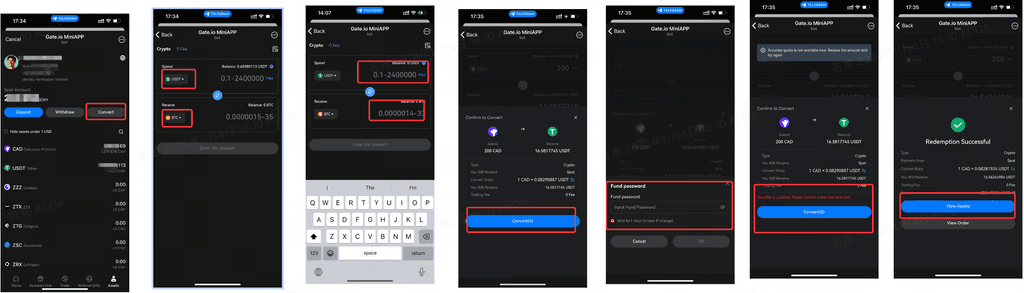
Click Assets - Click Flash Exchange - Enter the Flash Exchange interface - Select the currency (e.g. USDT) to be exchanged from the account and the currency (e.g. BTC) to be obtained - Enter the desired exchange quantity - Preview the exchange result - Confirm - Enter the transaction password - Confirm the order - Transaction successful
Screenshot:
##3. How to trade?
gate TG app provides you with the flash exchange function, you can quickly exchange Crypto Assets directly in the gate TG app, without complex operations and transfer process
Flash Exchange
Operation process:
Click Assets - Click Flash Exchange - Enter the Flash Exchange interface - Select the currency (e.g. USDT) to be exchanged from the account and the currency (e.g. BTC) to be obtained - Enter the desired exchange quantity - Preview the exchange result - Confirm - Enter the transaction password - Confirm the order - Transaction successful
Screenshot:
4. How to Deposit/Withdraw?
1. Deposit Operation process: Click on Assets - Click on deposit - Jump to select coin interface - Search/Select coin - Jump to select network interface - Select the required network - Jump to the coin deposit Address interface - Copy the coin deposit Address/Scan the deposit code - Copy it to the platform where you want to withdraw the coin - Select the same coin type - Select the same network - Confirm - The deposit will be credited
Note: When selecting the deposit network, the withdrawal network of other exchanges or wallets should be consistent with the deposit network of Gate.io, for example, both should be USDT-TRON (TRC20). Otherwise, the coins will be lost.
Screenshot: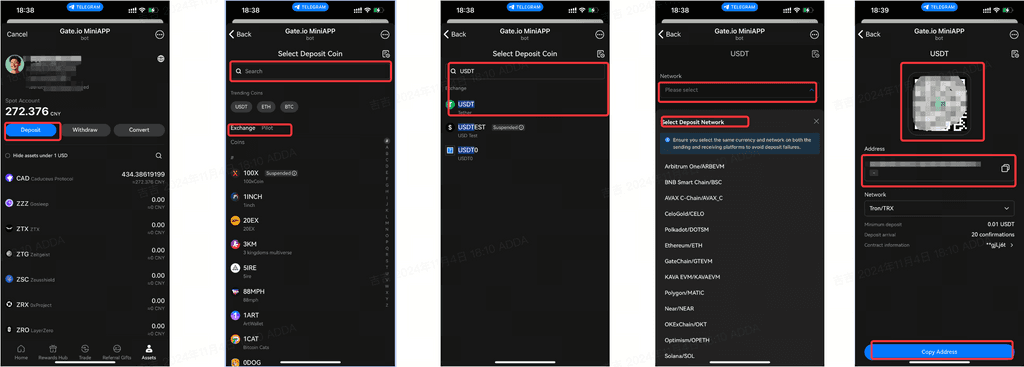
2. Withdrawal Operation process: Click on Assets - Click on Withdrawal - Redirect to the official website Screenshot: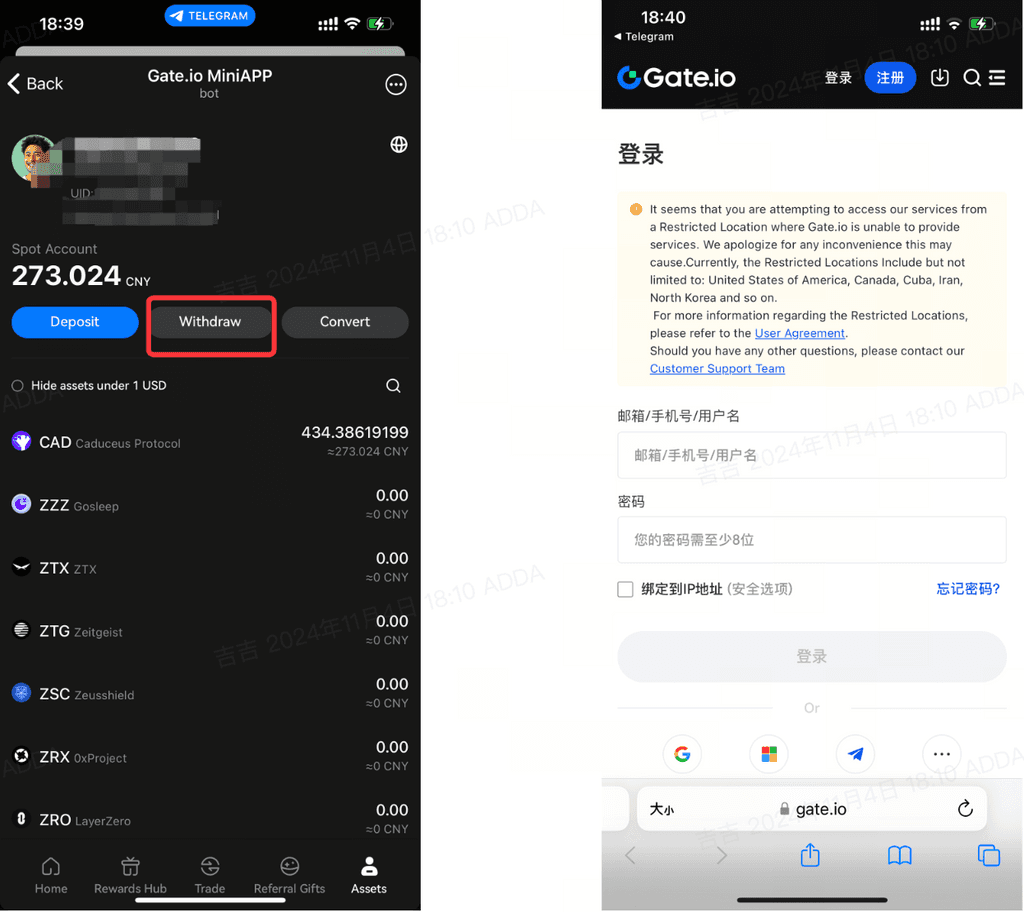 ##Five, how can I view my assets?
View Assets
Operation process:
Click on My Assets - The bottom of the page displays a list of my assets - Search for currency/View the list of currencies
Screenshot:
##Five, how can I view my assets?
View Assets
Operation process:
Click on My Assets - The bottom of the page displays a list of my assets - Search for currency/View the list of currencies
Screenshot:
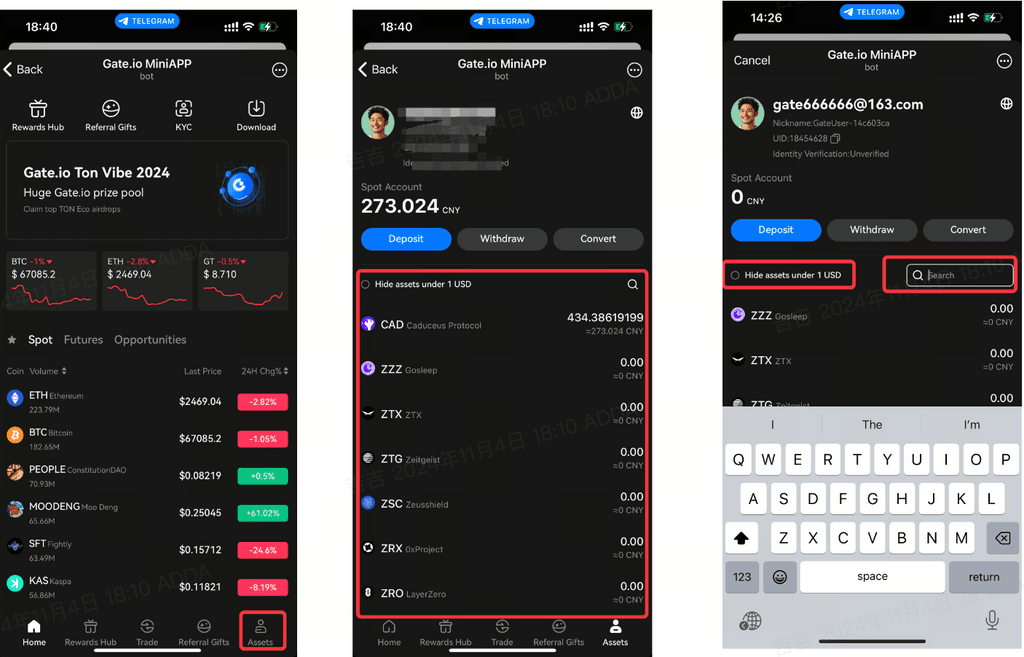
Six, how to view/participate in platform activities?
How to view platform activities Operation process: View the TG Mini Program Entrance: Click gateofficialbot - The robot pushes the current activity - Click the relevant activity - Jump to the relevant activity interface - Participate in the relevant activity Screenshot: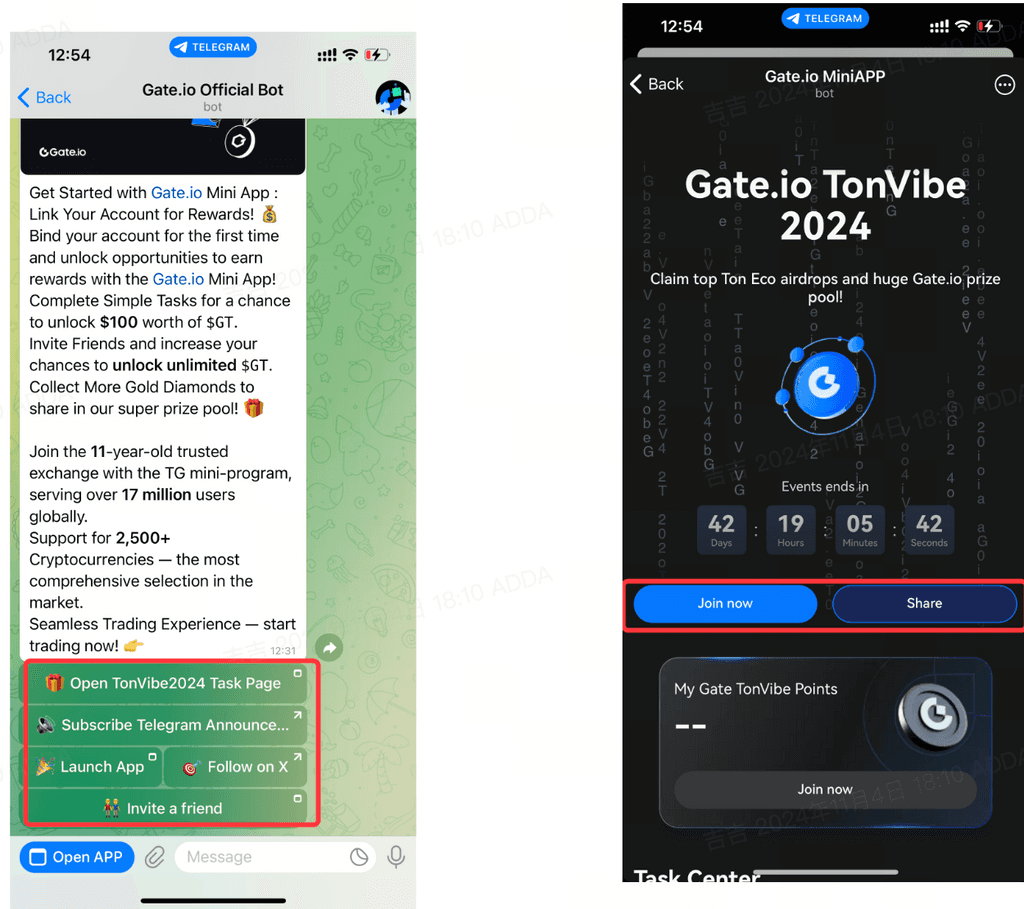
Operation process: View in TG Mini Program: Click OPEN APP - Home - View BANNER recommended activities/Welfare Center - Click to enter the activity page - Click to participate - Participation successful Screenshot: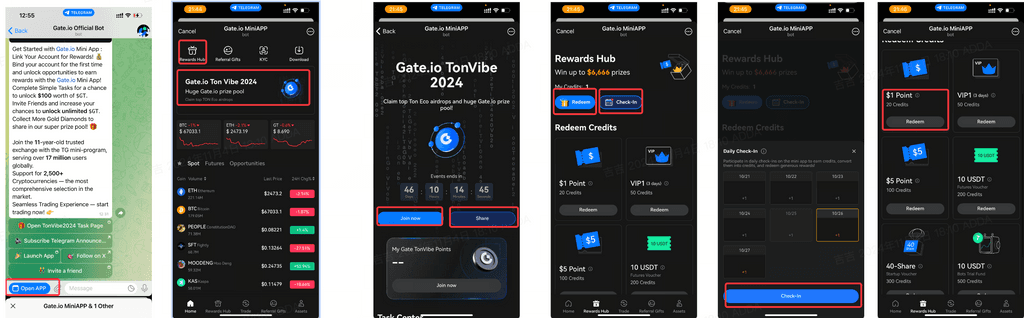 How to Participate in Platform Activities
TonVibe2024 Event
How to Participate in Platform Activities
TonVibe2024 Event
How to invite fren?
Invite Friends Operation process: Search for gate-official-bot in the Telegram search bar, select gate-official-bot, enter the gate TG mini-program entrance homepage, click on Invitational Rewards, enter the invitation page, where you will find the invitation lottery machine and the current activity reward withdrawal progress. Click on Invite Friends to generate an invitation QR code/link, share it with your friends, and when they register through the link, the invitation will be successful. Screenshot: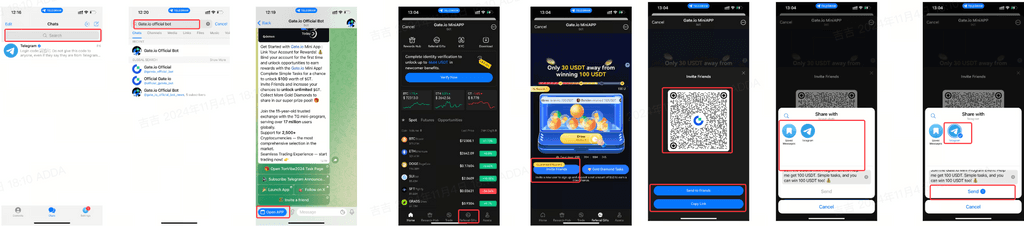
How to check the market?
View Market Operation process: -Homepage-Display the price movement of Digital Money-Click on the navigation bar above (Spot, Contract, Opportunity)-Find the interested currency-Click to jump to the trading interface/Click on Trading in the bottom navigation bar-Check the PA of the selected currency-Click on the trading pair selection-Jump to the search interface-Select/Search for the desired currency-Click-Jump to the trading interface-Check the selected currency Screenshot: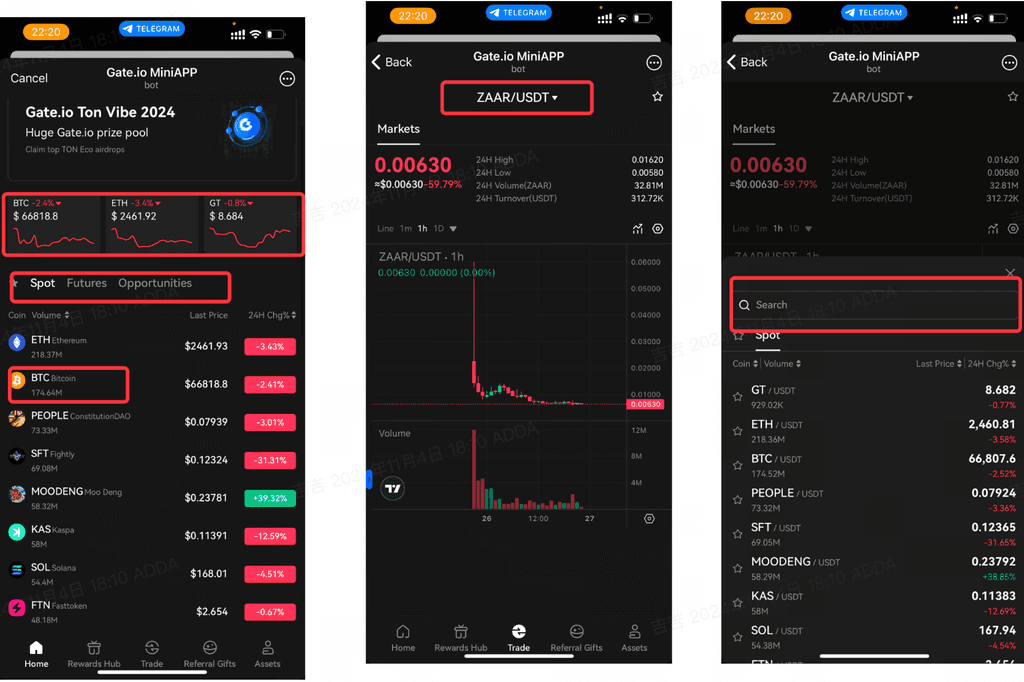 ##9. How to view personal information?
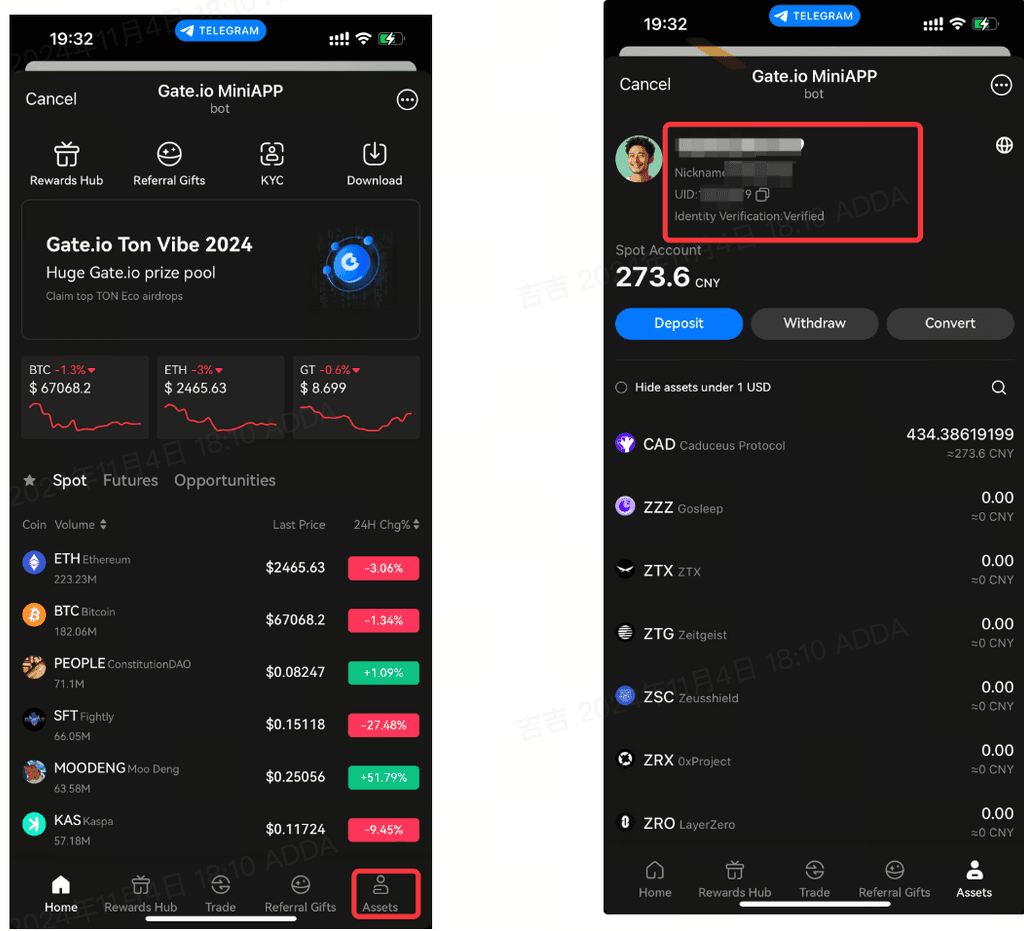
View personal information
Operation process:
Click on My Assets - the page displays personal information (registered account, nickname, UID)
Screenshot:
##9. How to view personal information?
View personal information
Operation process:
Click on My Assets - the page displays personal information (registered account, nickname, UID)
Screenshot:
Ten, how to switch language?
Switch Language Operation process: Click on My Assets - Click on the globe icon 🌏 - Language switch pop-up appears - Select language/search - Save - Switch successful Screenshot: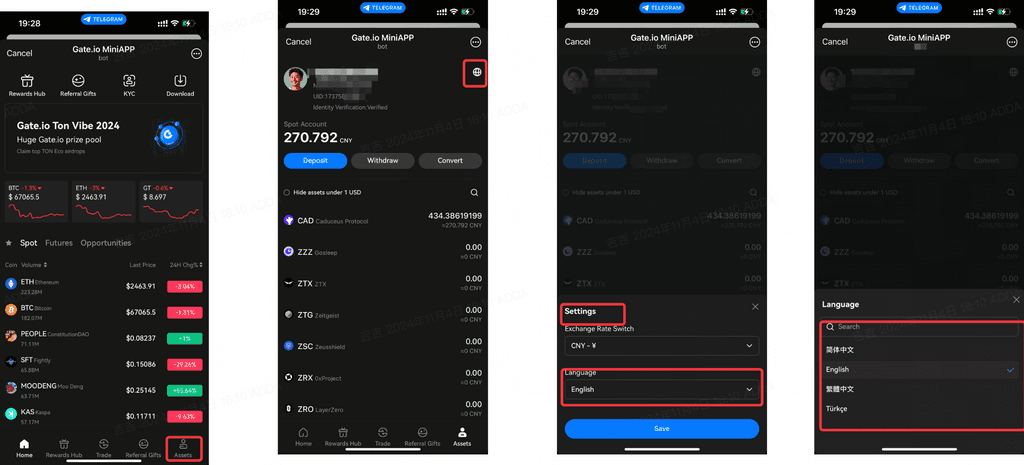
Eleven, how to switch the asset interface display Exchange Rate?
Switch Language Operation process: Click on My Assets - Click on the globe icon 🌏 - The Exchange Rate switching pop-up appears - Select/Search Exchange Rate - Save - The Exchange Rate display is changed successfully. Screenshot: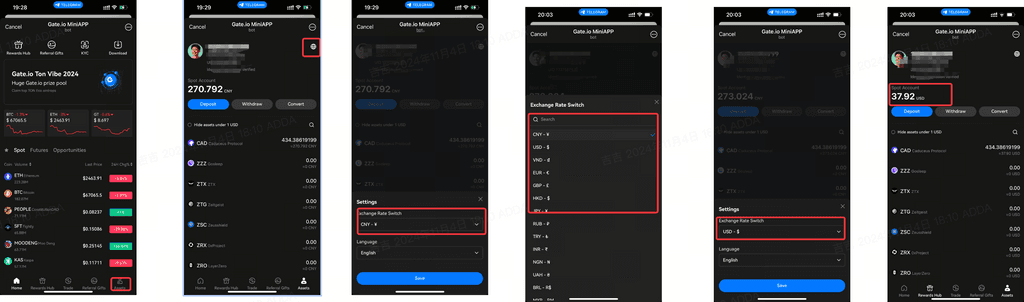
12. How to download the APP?
You can directly download GATAPP and unlock more features and ways to play within the Gate TG mini-program. Download the APP Download process: Home-click to download the APP-appear download guide pop-up-click to download the app-redirect to the browser to download the APP webpage Screenshot: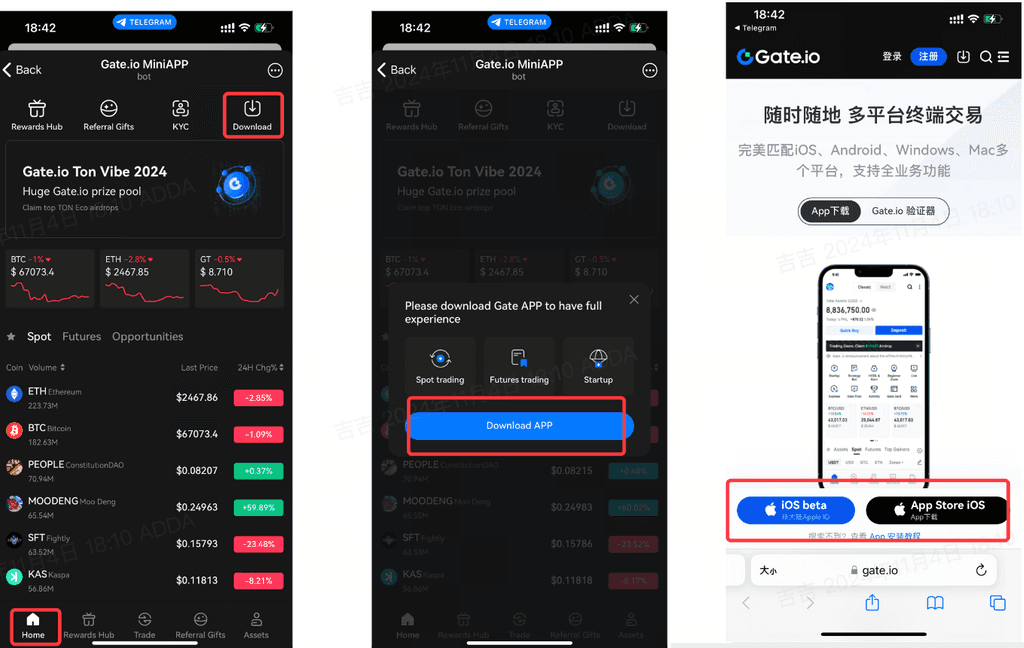 ##Related Mini Program Links
gate mini program entrance: /miniapp
gate Mini Program Telegram Announcement Channel:
Participate in the TonVibe2024 event: /miniapp?startapp=4pXM482psu2QYyOaGuuLhNIBDz2EtJ
##Related Mini Program Links
gate mini program entrance: /miniapp
gate Mini Program Telegram Announcement Channel:
Participate in the TonVibe2024 event: /miniapp?startapp=4pXM482psu2QYyOaGuuLhNIBDz2EtJ
Author: gate Team *This article represents only the author’s point of view and does not constitute any trading advice. *This content is original, and the copyright belongs to Gate.io. Please indicate the author and source if you need to reprint, otherwise legal responsibilities will be pursued.