Gate Australia Trading Fees: How Spot Trading Fees Are Calculated
This guide explains how Gate Australia trading fees work, how to calculate spot trading fees, and where to check your actual fee records. The examples below are for educational purposes and use the fee structure available on Gate Australia.
Key Takeaways
- Gate Australia spot trading fees depend on your VIP level and whether your order is classified as a maker or taker.
- Spot trading fees are calculated as trading amount × applicable fee rate.
- Only the executed portion of an order incurs trading fees.
- Higher VIP levels generally provide lower maker and taker fee rates.
- You can review your trading fees through Transaction History or Spot Trade History in your Gate account.
What Are Gate Australia Trading Fees?
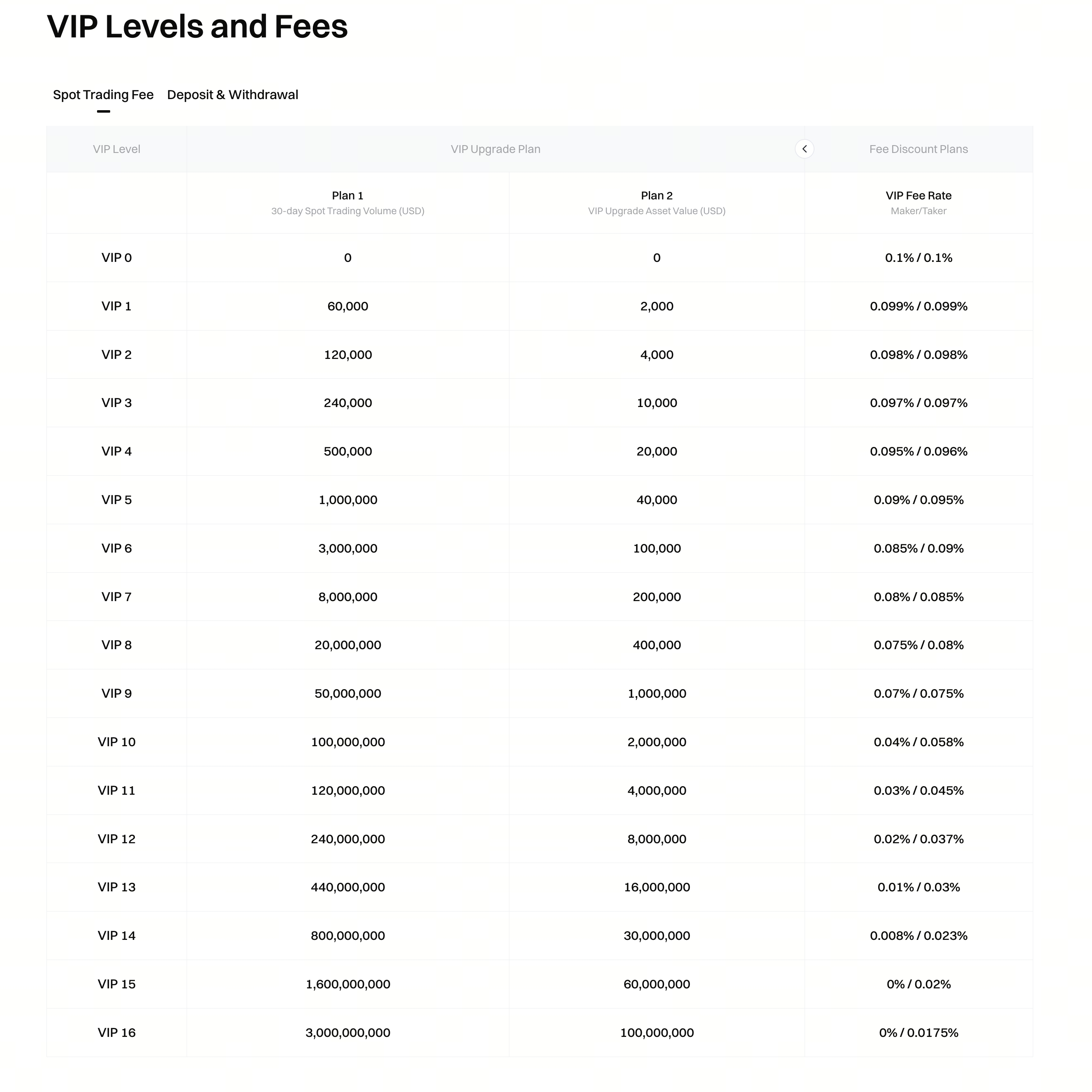
Gate Australia charges a spot trading fee when a spot order is executed. The fee depends on your VIP level and whether the executed order acts as a maker or taker. Gate Australia currently provides multiple VIP levels, with trading fee rates decreasing as users move to higher VIP tiers.
Your applicable rate can depend on factors such as your trading activity and account asset value. Because fee rates and VIP requirements may change, users should check the latest fee information on the official Gate Australia website before trading.
How Are Spot Trading Fees Calculated on Gate Australia?
The basic formula for calculating a spot trading fee is:
Trading Fee = Trading Amount × Fee Rate
To calculate the fee for a specific trade, you need to identify your VIP fee rate, determine whether the order is a maker or taker, and calculate the value of the executed trade.
Step 1: Check Your VIP Fee Rate
Gate Australia uses a VIP fee structure ranging from VIP0 to VIP16. Each level has its own maker and taker fee rates.
Your VIP level can be determined based on factors such as your 30-day spot trading volume or account asset value. Higher VIP levels generally provide lower trading fees.
Before placing a trade, check your current VIP level and the corresponding fee rate to estimate your trading costs.
Step 2: Determine Whether You Are a Maker or Taker
Spot trading fees are divided into two categories: maker fees and taker fees.
A maker order adds liquidity to the order book. For example, when you place an order that does not immediately match an existing order and instead remains on the order book, it may be classified as a maker order.
A taker order removes liquidity by matching with an existing order in the order book. Orders that are executed immediately against available orders are generally classified as taker orders.
The applicable fee rate depends on your VIP level and your role in the trade.
Step 3: Calculate Your Trading Amount
Your trading amount is based on the executed price and quantity.
For a buy or sell order:
Trading Amount = Trading Price × Executed Quantity
For example, if you sell 2 ETH at 2,000 USDT per ETH, the trading amount is 4,000 USDT.
Keep in mind that trading fees are charged only on the portion of an order that is actually executed.
Step 4: Apply Your Fee Rate
Once you know the trading amount and applicable fee rate, multiply the two values to calculate the trading fee.
For example, suppose a VIP0 user sells 2 ETH at 2,000 USDT per ETH and the applicable taker fee is 0.1%.
- Trading amount: 2 × 2,000 = 4,000 USDT
- Taker fee rate: 0.1%
- Trading fee: 4,000 × 0.1% = 4 USDT
The actual fee for your trade may differ depending on your VIP level and applicable maker or taker rate.
Gate Australia Spot Trading Fee Example
Consider a user placing a spot sell order for 2 ETH at a price of 2,000 USDT per ETH.
If the entire order is executed, the total trading amount is 4,000 USDT. At a 0.1% fee rate, the trading fee would be 4 USDT.
If only part of the order is executed, the fee applies only to the executed portion. For example, if only 1 ETH is filled, the trading amount would be 2,000 USDT, and the fee at 0.1% would be 2 USDT.
This makes the calculation straightforward: determine the executed trading amount, identify the applicable fee rate, and multiply the two.
How to Check Your Trading Fees on Gate Australia
After a trade is executed, you can review your trading fee records through your Gate account.
To check transaction details, go to Assets → Transaction History → Unified Account, then select the relevant cryptocurrency to view the associated fee information.
You can also go to Spot → Trade History to review historical spot trades and their trading fees.
Trading fees are automatically deducted when an order is executed. If an order is only partially filled, fees are charged based on the executed portion rather than the entire original order.
Gate Australia Trading Fees FAQ
When are Gate Australia trading fees deducted?
Trading fees are deducted when an order is executed. If an order is only partially filled, the fee applies only to the executed portion.
What is the difference between maker and taker fees?
Maker orders add liquidity to the order book, while taker orders remove existing liquidity by matching with available orders. The applicable rate depends on your VIP level and order type.
How can I reduce my trading fees on Gate Australia?
Users may qualify for lower trading fee rates by reaching a higher VIP level. VIP levels are determined using criteria such as 30-day spot trading volume or account asset value.
Where can I check my Gate Australia trading fees?
You can review your fee records through Assets → Transaction History → Unified Account or Spot → Trade History in your Gate account.
Do Gate Australia trading fees change?
Fee rates and VIP requirements may be updated from time to time. Always refer to the latest Gate Australia fee schedule before trading.
* The information is not intended to be and does not constitute financial advice or any other recommendation of any sort offered or endorsed by Gate Australia.
* This article may not be reproduced, transmitted or copied without referencing Gate Australia. Contravention is an infringement of Copyright Act and may be subject to legal action.


Related Articles

What Is Bitcoin? Understanding How Decentralized Digital Currency Works and Where Its Value Comes From

What Is Ethereum? ETH, Smart Contracts, and the Ethereum Ecosystem Explained
Where to Buy Dogecoin: Top Platforms and Essential Safety Tips

Hyperliquid and HYPE: Powering the Next‑Generation On‑Chain Financial Ecosystem
How to Buy XRP on Gate: A Step-by-Step Guide to Funding, Trading, and Storage